Indledning
This manual provides detailed instructions for the setup, operation, and maintenance of your Lexon Cubissimo Alarm Clock, model LR79R5. Please read this manual thoroughly before using the device to ensure proper functionality and longevity.
Produkt overview
The Lexon Cubissimo is a compact alarm clock featuring an LCD display. Its unique cube design allows for intuitive interaction. The device is constructed from Acrylonitrile Butadiene Styrene (ABS) and aluminum, offering durability and a modern aesthetic.
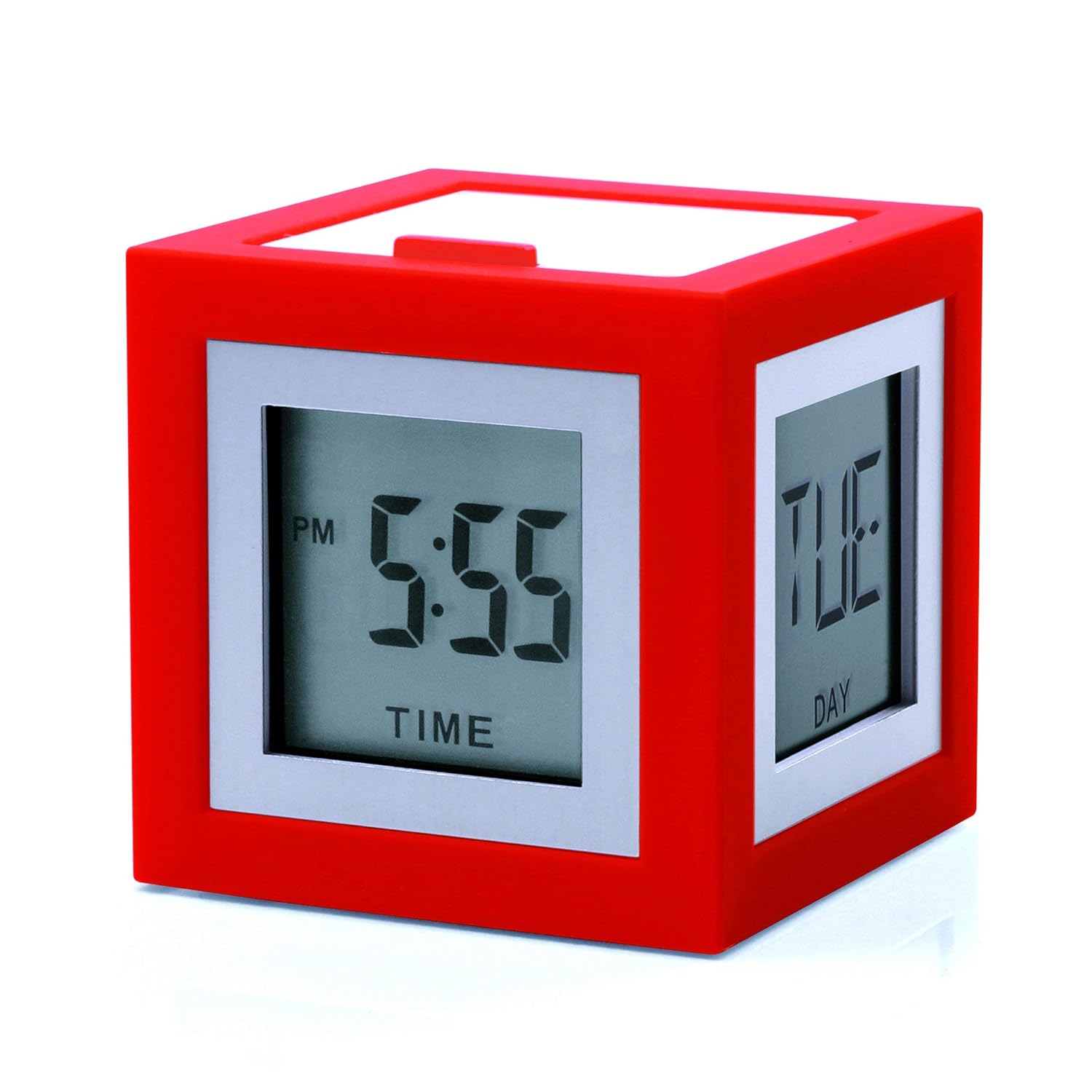
Billede 1: Forside view of the Lexon Cubissimo Alarm Clock in red, displaying time and day on its LCD screens. This image illustrates the compact, cube-shaped design and the dual-screen display capability.

Image 2: A collection of Lexon Cubissimo Alarm Clocks in different colors, showcasing their versatility and compact size. Each clock displays various information such as time, date, or temperature, highlighting the multi-functional display.
Opsætning
1. Batteriinstallation
The Lexon Cubissimo Alarm Clock is battery-powered. Batteries are not included with the product.
- Locate the battery compartment. This is typically found on the top or bottom surface of the cube, often concealed under a removable panel.
- Åbn batterirummets dæksel.
- Insert the required batteries, ensuring correct polarity (+/-). Refer to the markings inside the compartment.
- Luk batterirummets dæksel forsvarligt.
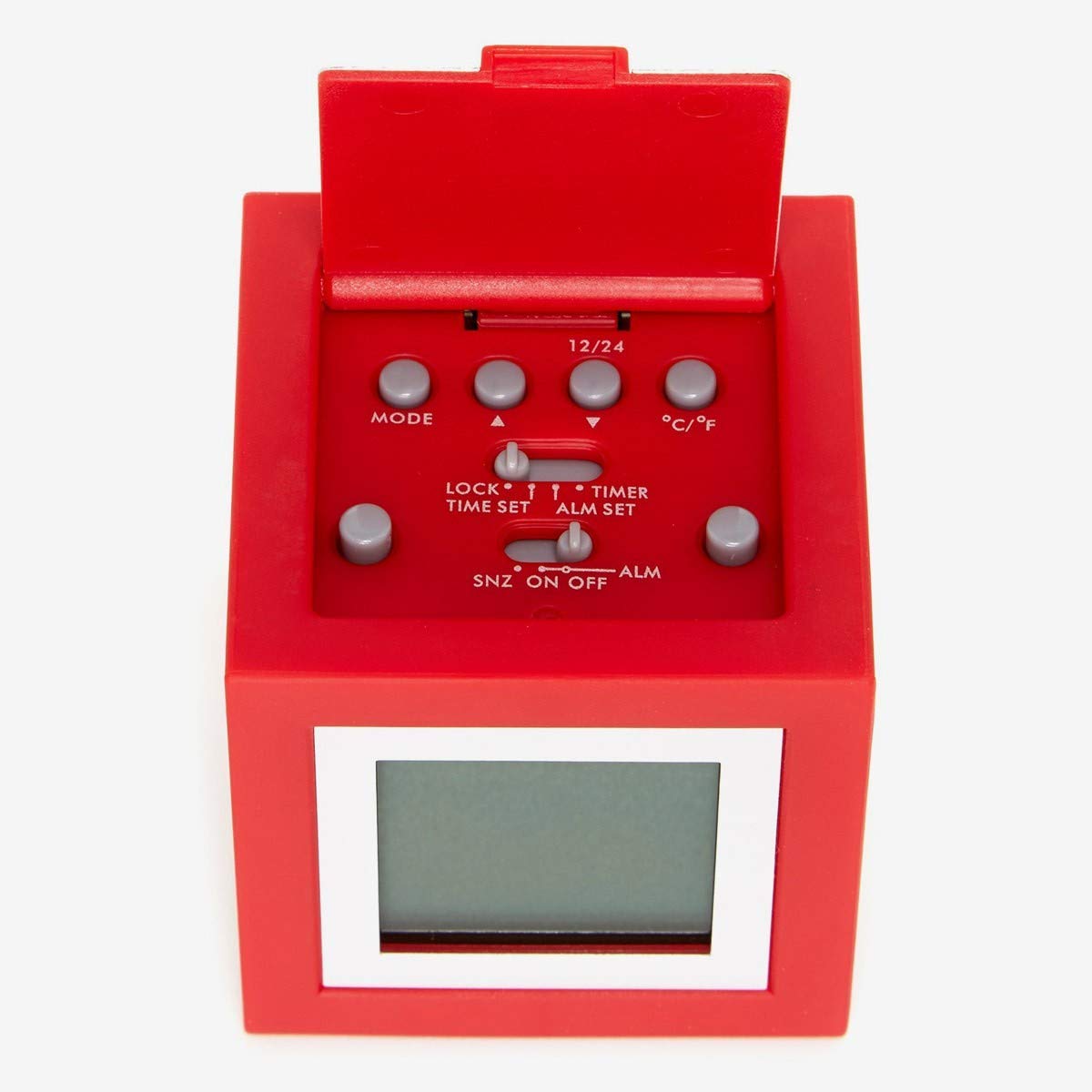
Billede 3: Top view of the Lexon Cubissimo Alarm Clock with the battery compartment open, showing the control panel. This panel includes buttons for MODE, 12/24 hour format, Celsius/Fahrenheit selection, and switches for LOCK, TIME SET, ALM SET, SNZ (Snooze), ON, OFF, and ALM (Alarm).
2. Første opstart
Once batteries are installed, the clock should power on automatically. The LCD display will activate.
Betjeningsvejledning
The Lexon Cubissimo features multiple control buttons and switches located under the top panel (refer to Image 3).
Indstilling af tid
- Open the top panel to access the controls.
- Slide the main switch to the TIDSINDSTILLING position.
- Brug MODE button to cycle through hours, minutes, and possibly date settings.
- Brug Op (▲) og Ned (▼) knapper for at justere værdierne.
- Once the time is set, slide the main switch back to the LÅSE position to save settings and prevent accidental changes.
Indstilling af alarm
- Åbn toppanelet.
- Slide the main switch to the ALM SET position.
- Brug MODE button to cycle through alarm hours and minutes.
- Brug Op (▲) og Ned (▼) knapper til at justere alarmtidspunktet.
- Slide the main switch back to the LÅSE position.
- For at aktivere alarmen skal du skubbe ALM skifte til ON. To deactivate, slide to SLUKKET.
Brug af Snooze-funktionen
Når alarmen lyder, skal du trykke på SNZ button (Snooze) to temporarily silence the alarm. The alarm will sound again after a short interval (typically 5-10 minutes).
Changing Display Format (12/24 Hour, °C/°F)
- Brug 12/24 button to toggle between 12-hour and 24-hour time formats.
- Brug ° C / ° F button to switch between Celsius and Fahrenheit temperature display (if applicable to your model).
Opretholdelse
Rensning
To clean the Lexon Cubissimo Alarm Clock, use a soft, dry, or slightly damp klud. Undgå at bruge slibende rengøringsmidler, opløsningsmidler eller kemiske spray, da disse kan beskadige overfladen og de elektroniske komponenter.
Udskiftning af batteri
Replace batteries when the display dims or the clock functions become erratic. Always use the recommended battery type and dispose of old batteries responsibly.
Fejlfinding
- Uret tænder ikke, eller displayet er tomt:
- Kontroller, om batterierne er isat korrekt med den rigtige polaritet.
- Udskift gamle batterier med nye.
- Sørg for, at batterirummets dæksel er forsvarligt lukket.
- Alarmen lyder ikke:
- Verify that the ALM switch is set to ON.
- Ensure the alarm time is set correctly.
- Kontroller batteriniveauet.
- Forkert tidsvisning:
- Re-enter the time using the TIDSINDSTILLING fungere.
- Ensure the main switch is in the LÅSE position after setting the time.
Specifikationer
| Feature | Detalje |
|---|---|
| Mærke | Lexon |
| Modelnummer | LR79R5 |
| Farve | Rød |
| Display Type | LCD |
| Speciel funktion | Alarm |
| Strømkilde | Batteridrevet |
| Værelsestype | Soveværelse, stue, kontor |
| Form | Rectangular (Cube) |
| Materiale | Acrylonitrile Butadiene Styrene (ABS), aluminum |
| Varens vægt | 0.15 kilogram (154 g) |
| Dimensioner (LxBxH) | 5.1 x 5.1 x 5.1 cm (50 x 50 x 50 millimeter) |
| Driftstilstand | Mekanisk |
Garanti og support
Specific warranty information for the Lexon Cubissimo Alarm Clock model LR79R5 is not provided in this manual. For warranty details, product support, or service inquiries, please refer to the official Lexon webwebsted eller kontakt din forhandler.
Du kan også besøge Lexon Brand Page on Amazon for yderligere information.


