Indledning
This manual provides detailed instructions for the installation, operation, and maintenance of your Commax Audio Door Phone and Door Unit Kit (Model: DP-2S/DR-2K). This kit is designed to provide convenient audio communication between an indoor station (DP-2S) and an outdoor door unit (DR-2K), including a door lock release function.
The system features a user-friendly handset design and requires a simple 2-wire installation for both the door station and an optional electric door strike.
Produktkomponenter
The Commax Audio Door Phone and Door Unit Kit includes the following main components:
- DP-2S Indoor Audio Door Phone: The main indoor unit with a handset for communication.
- DR-2K Outdoor Door Unit: The outdoor unit installed at the entrance for visitors to call.
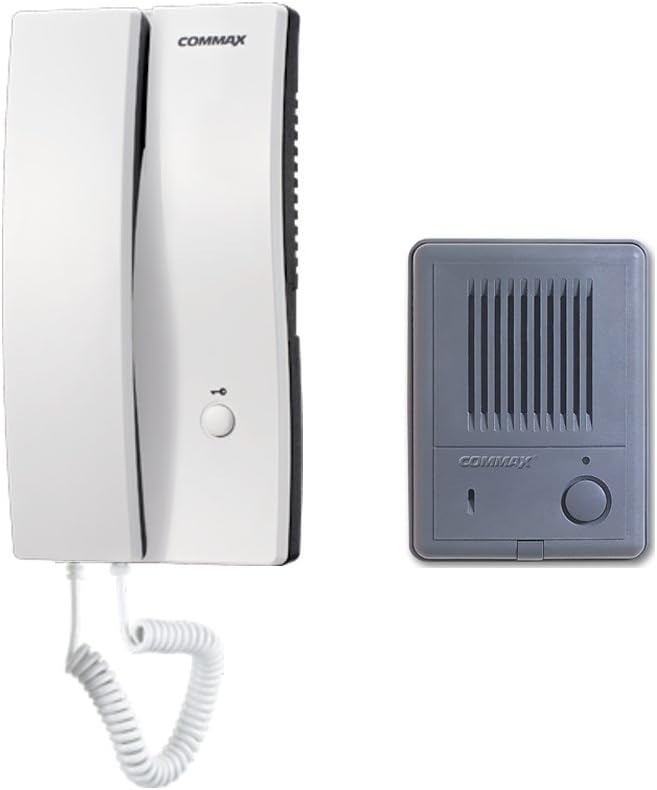
Image: The Commax DP-2S indoor audio door phone (left) and the DR-2K outdoor door unit (right).
Specifikationer
DP-2S Indoor Audio Door Phone
| Strømkilde | AC 110V 50/60Hz |
| Monteringstype | Overflademonteret type |
| Ledningsføring (opkald) | 2 ledninger |
| Ledningsføring (døråbner) | 2 ledninger (1.6Ø kobbertråd anbefales) |
| Maks. Afstand | 100m (with 0.65Ø wire), 50m (with 0.8Ø wire) |
| Dimensioner (B×H×D) | 108mm × 210mm × 33(61)mm |

Image: Close-up of the wiring diagram and specifications label on the back of the DP-2S unit.
DR-2K Outdoor Door Unit
| Strømkilde | 9V (powered by DP-2S) |
| Monteringstype | Overflademonteret type |
| Driftstemperatur | -10℃ ~ +40℃ |
| Ledningsføring | 2 ledninger |
| Dimensioner (B×H×D) | 96 mm × 128 mm × 26 mm |

Billede: Bagside view of the Commax DR-2K outdoor door unit, showing connection terminals.
Opsætning og installation
Proper installation is crucial for the optimal performance of your door phone system. Ensure all power is disconnected before beginning installation.
Ledningsdiagram
The system uses a simple 2-wire connection between the indoor unit (DP-2S) and the outdoor unit (DR-2K). An additional 2-wire connection is required for an optional electric door strike.

Image: Simplified wiring diagram showing connections between the Room unit (DP-2S), Door unit (DR-2K), Power Adapter, and optional Electric Door Key.
- Connect the two wires from the DR-2K outdoor unit to the corresponding terminals on the DP-2S indoor unit.
- Connect the power adapter to the DP-2S indoor unit.
- For door release functionality, connect the two wires from your electric door strike (not included) to the designated terminals on the DP-2S unit.
Montering
Both the DP-2S and DR-2K units are designed for surface-mounted installation. Choose a suitable location for each unit, ensuring the outdoor unit is protected from direct water exposure as it is not waterproof.

Billede: Bagside view of the Commax DP-2S indoor unit, showing mounting holes, wiring terminals, and attached power cord.
- Securely mount the DP-2S indoor unit to an interior wall using appropriate screws.
- Mount the DR-2K outdoor unit at the desired entrance location, ensuring it is within reach for visitors and protected from harsh weather.
Betjeningsvejledning
Modtagelse af et opkald
- When a visitor presses the call button on the DR-2K outdoor unit, the DP-2S indoor unit will ring.
- Pick up the handset on the DP-2S unit to answer the call and begin communication.
To-vejs kommunikation
- Speak into the handset of the DP-2S unit to communicate with the visitor at the DR-2K unit.
- The visitor will speak into the DR-2K unit.
Døråbnerfunktion
- During a conversation, press the door release button on the DP-2S unit to activate the connected electric door strike.
- This will temporarily unlock the door, allowing the visitor to enter.
Opretholdelse
To ensure the longevity and proper functioning of your Commax door phone system, follow these simple maintenance guidelines:
- Clean the units regularly with a soft, dry cloth. Do not use abrasive cleaners or solvents.
- Ensure the outdoor unit (DR-2K) is kept free from dust, dirt, and debris that could obstruct the speaker or microphone.
- Avoid exposing the units to extreme temperatures or direct moisture. The DR-2K is not waterproof and should be installed in a protected location.
Fejlfinding
If you encounter issues with your Commax door phone system, refer to the following common problems and solutions:
| Problem | Mulig årsag | Løsning |
|---|---|---|
| No sound from either unit or distorted audio. | Loose or incorrect wiring connections. Damaged speaker/microphone. | Check all 2-wire connections between DP-2S and DR-2K. Ensure wires are securely fastened. |
| Door release function not working. | Incorrect wiring to electric door strike. Faulty door strike. No power to door strike. | Verify the 2-wire connection to the electric door strike. Test the door strike independently if possible. Ensure the door strike receives power. |
| Indoor unit (DP-2S) does not power on. | Power adapter not connected or faulty. No power from outlet. | Ensure the power adapter is securely plugged into the DP-2S unit and a working electrical outlet. Check the power outlet with another device. |
Garanti og support
For specific warranty information regarding your Commax Audio Door Phone and Door Unit Kit, please refer to the documentation provided at the time of purchase or contact Commax customer support directly. Keep your proof of purchase for warranty claims.
For technical assistance or further inquiries, please visit the official Commax webwebstedet eller kontakt deres autoriserede servicecentre.


