1. Introduktion
The ORDRO EP7 is a lightweight, head-wearable 4K video camera designed for hands-free recording. It features a 1/3 inch 13.0MP CMOS sensor, capable of capturing 4K UHD video at 60fps/30fps and up to 20.0MP still images. Its compact design and autofocus capabilities make it suitable for various applications, including vlogging, educational content creation, and documenting professional tasks.
This manual provides detailed instructions for setting up, operating, and maintaining your ORDRO EP7 camera to ensure optimal performance and longevity.

Image 1.1: The ORDRO EP7 FPV Camcorder, highlighting its compact and wearable design for hands-free video recording.
Nøglefunktioner:
- 4K UHD videooptagelse: Capture high-resolution video at 3840x2160 (60fps/30fps).
- Bærbart design: Head-mounted for hands-free operation, weighing only 80g (0.18 lb).
- Autofokus: Maintains clear focus from 0.1m to infinity.
- Wi-Fi-forbindelse: Connects to smartphones via the "OD Cam" app for real-time viewing og kontrol.
- Webcam Funktionalitet: Can be used as a webcam when connected to a computer via Micro USB.
- Kardanstabilisering: Features two-axis gimbal anti-shake for smoother footage.
- IP65 vandtæt: Dustproof and water-resistant design for various environments.

Image 1.2: Visual representation of the ORDRO EP7's core functions, including 4K quality, two-axis gimbal anti-shake, autofocus, HDR function, and waterproof design.
2. Pakkens indhold
Kontroller venligst, at alle nedenstående varer er inkluderet i din pakke. Hvis der mangler eller er beskadigede varer, bedes du kontakte kundesupport.
- ORDRO EP7 Head-Wearable 4K Video Camera
- Bærbar bæretaske
- 64GB MicroSDXC Memory Card (U3)
- Pandebånd
- Micro USB opladningskabel
- W1 Remote Control and Wrist Band
- 2 x Headband Brackets
- Lille skruenøgle
- Blødt gummi ærme
- Skruehoved
- Krog
- English User's Manual
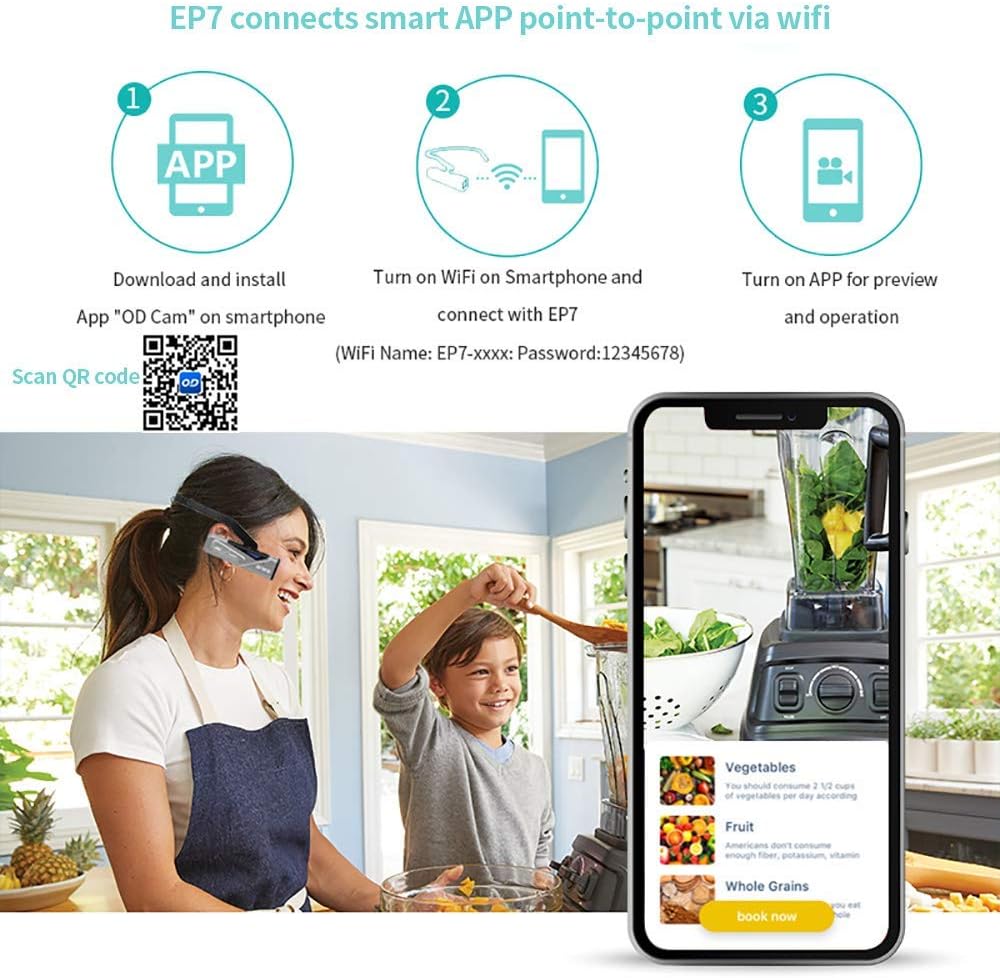
Image 2.1: A visual representation of all items included in the ORDRO EP7 package, such as the camera, carrying case, memory card, headband, remote control, and various accessories.
3. Produktet er slutview
Familiarize yourself with the components and controls of your ORDRO EP7 camera.

Image 3.1: Labeled diagram of the ORDRO EP7 camera, showing the video button, photo button, power/WiFi button, status light, retractable head hood, detachable design, and HD port.
- Videoknap: Starter og stopper videooptagelse.
- Fotoknap: Optager stillbilleder.
- Power / WiFi Button: Powers the device on/off and activates WiFi.
- Statuslys: Indicates camera status (e.g., recording, charging, WiFi active).
- Retractable Head Hood: Adjustable for comfortable wear.
- Aftageligt design: Allows for flexible mounting options.
- HD Port: Micro HDMI output for connecting to external displays.
- Micro USB -port: Til opladning og dataoverførsel.
- MicroSD -kortplads: Til isætning af hukommelseskortet.
4. Opsætning
4.1 Opladning af kameraet
Before first use, fully charge the camera's built-in 4.35V 1000mAh lithium battery. Use the provided Micro USB cable to connect the camera to a power source. The charging process typically takes over 2 hours until fully charged. The camera supports video recording while charging, allowing for extended use with a power bank.
4.2 Isætning af hukommelseskortet
Locate the MicroSD card slot on the camera. Gently insert the provided 64GB MicroSDXC card into the slot until it clicks into place. Ensure the card is inserted in the correct orientation. The camera supports MicroSD cards for storing recordings.
4.3 Wearing the Camera
Attach the camera to the headband using the provided headband brackets. Adjust the retractable head hood for a secure and comfortable fit on your head. The camera is designed to be lightweight and unobtrusive for hands-free operation.

Image 4.1: An individual wearing the ORDRO EP7 camera, demonstrating its head-mounted, hands-free design.
5. Betjeningsvejledning
5.1 Tænd/sluk
To power on the camera, press and hold the Power / WiFi knap until the status light illuminates. To power off, press and hold the same button until the status light turns off.
5.2 Optagelse af video
Når kameraet er tændt, skal du trykke på Video knap once to start recording. The status light will change to indicate recording is in progress. Press the Video knap again to stop recording. Videos are saved to the inserted MicroSD card.
5.3 Optagelse af billeder
To capture a still image, press the Foto knap once. The camera will take a picture and save it to the MicroSD card.
5.4 Wi-Fi-forbindelse og app-brug
The ORDRO EP7 can connect to your smartphone via Wi-Fi for real-time viewing, parameter settings, and file management using the "OD Cam" app.
- Download appen: Download and install the "OD Cam" app on your smartphone. You can scan the QR code provided in Image 5.1 or visit http://app.appurl.me/79815371137.
- Aktivér kameraets Wi-Fi: Turn on the camera and press the Power / WiFi knap to activate its Wi-Fi function.
- Connect Phone to Camera Wi-Fi: On your smartphone, go to Wi-Fi settings and connect to the network named "EP7-xxxxxx". The default password is 12345678.
- Open "OD Cam" App: Launch the "OD Cam" app. You can now preview kameraets view, adjust settings, and manage files.
Note: When your phone is connected to the EP7's Wi-Fi, other internet-based Wi-Fi connections will be temporarily unavailable. If internet access is required, please enable cellular data on your phone.

Image 5.1: Step-by-step guide for connecting the ORDRO EP7 to a smartphone via the "OD Cam" app, including QR code for app download.
5.5 Using the W1 Smart Remote Control
The W1 Smart Remote Control allows for convenient operation of the camera from a distance of up to 10 feet (3 meters) via RF 2.4G wireless connection. Ensure the camera is powered on for the remote to function.

Image 5.2: The ORDRO EP7 camera and its W1 Smart Remote Control, illustrating its wireless functionality for taking pictures and videos.
5.6 Webcam Funktionalitet
To use the ORDRO EP7 as a webcam for live streaming or video calls, connect it to your computer using the Micro USB cable. The computer should recognize the camera as a webcam device, allowing you to select it in your video conferencing or streaming software.
6. Vedligeholdelse
- Rensning: Brug en blød, tør klud til at rengøre kamerahuset. Brug en specialklud og -opløsning til objektivet. Undgå skrappe kemikalier.
- Opbevaring: Store the camera in a cool, dry place, away from direct sunlight and extreme temperatures. Use the provided carrying case for protection during transport.
- Batteripleje: To prolong battery life, avoid fully discharging the battery frequently. If storing for an extended period, charge the battery to approximately 50%.
- Firmwareopdateringer: Periodically check the official ORDRO website or the "OD Cam" app for any available firmware updates to ensure optimal performance and new features.
7. Fejlfinding
If you encounter issues with your ORDRO EP7 camera, please refer to the following common problems and solutions:
| Problem | Mulig årsag/løsning |
|---|---|
| Kameraet tænder ikke. |
|
| Cannot connect to Wi-Fi / "OD Cam" app. |
|
| Dårlig videokvalitet eller slørede billeder. |
|
| Kort batterilevetid. |
|
| Voice commands or button presses are unresponsive. |
|
8. Specifikationer
| Feature | Detalje |
|---|---|
| Mærke | ORDRO |
| Modelnummer | EP7 |
| Sensor | 1/3 inch 13.0MP High-sensitivity CMOS |
| Video opløsning |
|
| Stillbillede opløsning | Op til 20.0 MP |
| Autofocus Range | 0.1m ~ infinity |
| Forbindelse | Wi-Fi, Micro USB, Micro HDMI |
| Batteri | Built-in 4.35V 1000mAh Lithium Polymer |
| Battery Life (4K UHD) | Cirka 1 time |
| Opbevaring | Micro SD (up to 64GB included) |
| Vægt | 80g (0.18 lb) |
| Dimensioner | 3.7 x 1.1 x 0.9 tommer (kameraenhed) |
| Vandtæt vurdering | IP65 støvtæt og vandtæt |
| Maksimal blænde | 2.2 f |

Image 8.1: Diagram representing the CMOS sensor technology used in the camera.
9. Garanti og support
ORDRO provides a 1 års garanti for the EP7 camera from the date of purchase. This warranty covers manufacturing defects and ensures excellent customer service.
For technical support, warranty claims, or any inquiries regarding your ORDRO EP7 camera, please contact our customer service team. Refer to the contact information provided in the product packaging or on the official ORDRO webwebsted.
Gem venligst din købsbevis for at validere garantien.


