Indledning
This manual provides comprehensive instructions for the setup, operation, maintenance, and troubleshooting of your Proscan CRK83X PSVR82 TV Remote Control. This remote is designed to work seamlessly with various Proscan TV and VCR models, offering a direct replacement or compatible control solution.
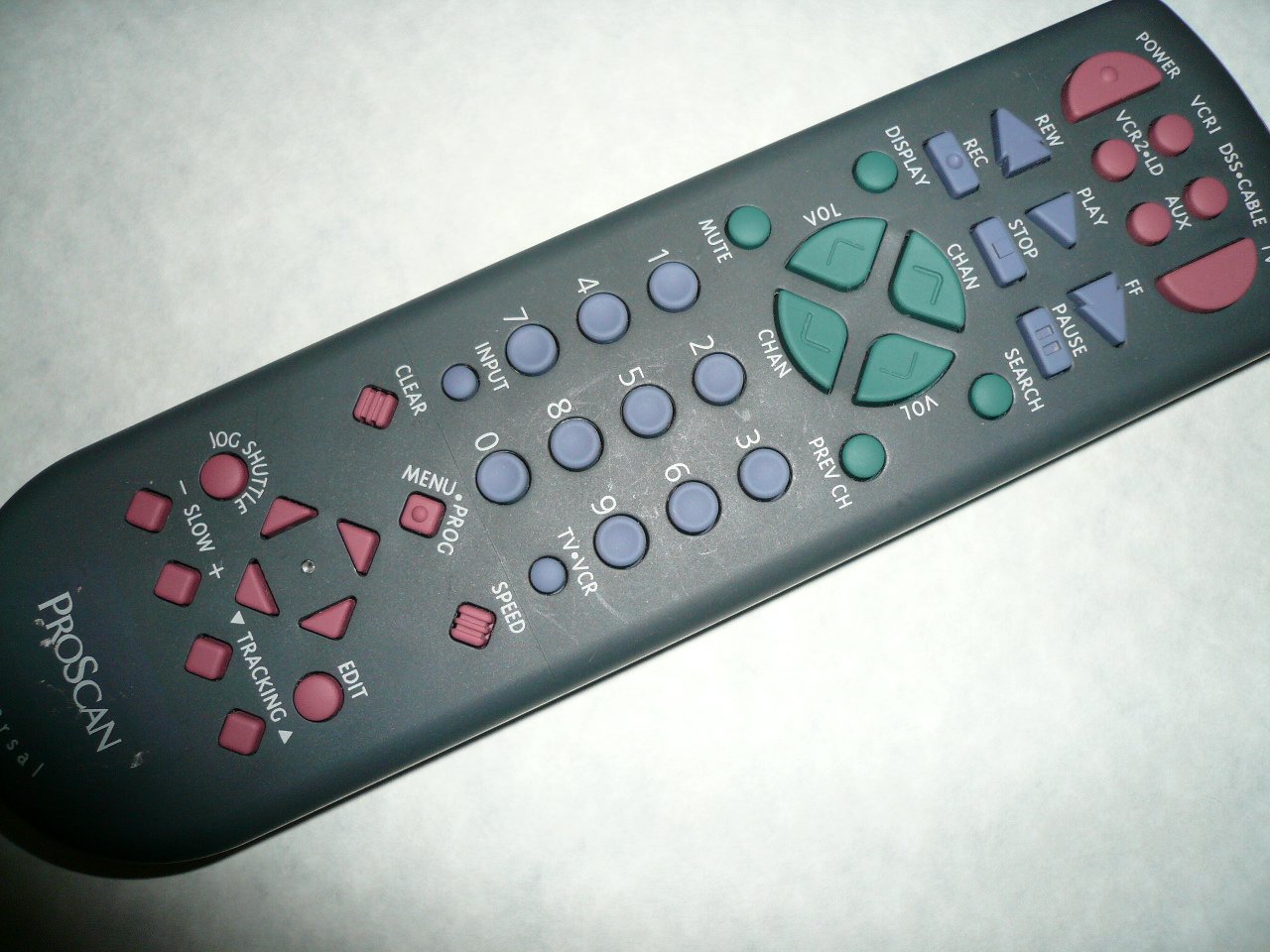
An image showing the Proscan CRK83X PSVR82 TV Remote Control, highlighting its ergonomic design and button layout. The remote is dark gray with purple and teal buttons, clearly labeled for various functions.
Opsætning
1. Batteriinstallation
- Find batterirummets dæksel på bagsiden af fjernbetjeningen.
- Skub dækslet nedad, eller tryk på låsen for at åbne det.
- Insert two (2) AAA batteries (not included), ensuring the positive (+) and negative (-) terminals align correctly with the markings inside the compartment.
- Sæt batteridækslet på igen ved at skubbe det på plads, indtil det klikker sikkert.
2. Førstegangsbrug
The Proscan CRK83X PSVR82 remote control is typically pre-programmed for compatible Proscan TV and VCR models. No complex programming steps are usually required for initial use with supported devices. Simply point the remote at your device and press the desired function button.
This remote is compatible with a wide range of models, including but not limited to: P5VR74, PAVR57, PCVR72, PRVR71, PSDR72, PSDR73, PSNKVSR72, PSNPSVR57, PSNPSVR65, PSNPSVR70, PSNPSVR71, PSNPSVR72, PSNPSVR73, PSNPSVR74, PSNPSVRR73, PSNR65, PSNVR74, PSRV65, PSRV71, PSRV72, PSRV74, PSRVR65, PSRVR71, PSUR70, PSUR72, PSV174, PSV65, PSV71, PSV72, PSVDR73, PSVER72, PSVH57, PSVP71, PSVR22, PSVR27, PSVR57, PSVR61, PSVR62, PSVR65, PSVR72L, PSVR72VCR, PSVR75, PSVR79, PSVR83, PSVT73, PSVV73, PSZR65, PSZR71, PSZR73, PVSR73, R65, RCU800, RSVR73, SPVR65, SSVR62, VR653HF, VR730, VR730HF.
Betjeningsvejledning
Familiarize yourself with the buttons and their functions for optimal control of your television and VCR.
| Knap navn | Fungere |
|---|---|
| MAGT | Turns the connected device (TV/VCR) on or off. |
| VCR1, DSS/CABLE, VCR2/LD, AUX | Selects the input source for the television or VCR. |
| STUM | Slår lyden fra eller til. |
| VOL +/- | Justerer lydstyrken op eller ned. |
| CHAN +/- | Skifter kanalen op eller ned. |
| PREV CH | Skifter til den tidligere viewed kanal. |
| VISE | Viser oplysninger på skærmen, såsom kanalnummer eller tid. |
| REC | Initiates recording on the VCR. |
| REW | Rewinds the tape during VCR playback. |
| SPIL | Starts playback of a tape or disc. |
| FF | Fast forwards the tape during VCR playback. |
| STOP | Stopper afspilning eller optagelse. |
| PAUSE | Pauserer afspilning eller optagelse. |
| SØGE | Activates search function, typically for VCR content. |
| Tastatur (0-9) | Indtaster kanalnumre eller menuvalg direkte. |
| INPUT | Blader gennem tilgængelige inputkilder. |
| KLAR | Clears entered numbers or menu selections. |
| MENU / PROG | Accesses the on-screen menu or programming functions. |
| TV-VCR | Toggles control between TV and VCR modes. |
| JOG SHUTTLE | Provides frame-by-frame or variable speed control for VCR playback. |
| LANGSOMT +/- | Adjusts slow-motion speed during VCR playback. |
| HASTIGHED | Adjusts playback speed, typically for VCR. |
| TRACKING ▲/▼ | Adjusts the VCR tracking for optimal picture quality. |
| REDIGERE | Activates editing functions, typically for VCR. |
Opretholdelse
Rengøring af fjernbetjeningen
- Tør fjernbetjeningen af med en blød, tør klud.
- Til genstridigt snavs, let dampRengør kluden med vand eller et mildt, ikke-slibende rengøringsmiddel. Spray ikke rengøringsmiddel direkte på fjernbetjeningen.
- Undgå at bruge skrappe kemikalier, opløsningsmidler eller slibende rengøringssvampe, da disse kan beskadige fjernbetjeningens overflade eller interne komponenter.
Udskiftning af batteri
Replace batteries when the remote's response becomes sluggish or it stops functioning. Refer to the "Battery Installation" section under Setup for detailed instructions.
Bortskaf altid brugte batterier forsvarligt i henhold til lokale regler.
Fejlfinding
| Problem | Mulig årsag/løsning |
|---|---|
| Fjernbetjeningen virker ikke. |
|
| Fjernbetjeningen virker periodisk. |
|
| Visse knapper reagerer ikke. |
|
Specifikationer
- Mærke: PROSKAN
- Model: CRK83X PSVR82
- Fabrikant: Proscan
- Kompatible enheder: Television (and various Proscan VCR models as listed in Setup section)
- Forbindelse teknologi: Infrarød
- Controller type: Knap kontrol
- Speciel funktion: Ergonomisk design
- ASIN: B00P82T2LS
- Dato først tilgængelig: 4. november 2014
Garanti og support
Specific warranty information for the Proscan CRK83X PSVR82 TV Remote Control is not provided in this manual. Please refer to the product packaging or contact your retailer for details regarding warranty coverage.
For further assistance or technical support, please contact the manufacturer or your point of purchase. No specific support contact details are available in this document.


