Indledning
This manual provides essential information for the safe and effective operation, maintenance, and troubleshooting of your Hotone Thunder Bass Mini Bass Guitar Amplifier Head. Please read this manual thoroughly before using the product.
The Hotone Thunder Bass amplifier head is designed to deliver a powerful bass tone in a compact and portable form factor. It features a simplified control layout for ease of use, including a 3-band EQ for tone shaping, and various input/output options for versatile connectivity.
Opsætning
1. Udpakning og inspektion
Fjern forsigtigt ampFjern enheden fra emballagen. Undersøg enheden for tegn på skader, der kan være opstået under forsendelsen. Gem emballagen til senere transport eller opbevaring.
2. Tilslutning af strøm
Connect the included 18V DC power supply adapter to the 18V DC input jack on the rear panel of the amplifier. Ensure the adapter is securely connected before plugging it into a power outlet. Use only the specified 18V DC center-negative power supply.
3. Tilslutning af dit instrument
Sæt din basguitar i INPUT (1/4" mono jack) on the front panel of the amplifier ved hjælp af et standard instrumentkabel.

Figure 1: Front Panel Controls and Input. (1) INPUT: 1/4" mono jack for bass guitar.
4. Connecting to a Speaker Cabinet
Tilslut amplifier to a speaker cabinet using the HØJTTALERUDGANG (1/4" mono jack) on the rear panel. The amplifier is designed to automatically fit cabinets with impedances ranging from 4-16 ohms.
5. Connecting Headphones or Line Out
For silent practice or direct recording, connect headphones or a line-level device to the PHONES/LINE OUTPUT (1/8" stereo jack) on the rear panel.
6. Using the FX Loop
To integrate external effects pedals, use the FX LOOP SEND og FX LOOP RETURN (1/4" mono jacks) on the rear panel. The FX Loop is positioned between the pre-amp og magt amp sektioner.
7. Connecting an External Music Player (AUX IN)
Connect an external music player (e.g., smartphone, MP3 player) to the AUX IN (1/8" stereo jack) on the rear panel to play along with backing tracks.

Figure 2: Rear Panel Connections. (1) 18V DC Input, (2) PHONES/LINE OUTPUT, (3) AUX IN, (4) FX LOOP RETURN, (5) SPEAKER OUTPUT, (6) FX LOOP SEND.
Betjeningsvejledning
1. Tænd/sluk
Find ON/OFF toggle switch on the front panel. Flip the switch to the "ON" position to power on the amplifier. The indicator light will illuminate. Flip to "OFF" to power down.
2. Volume and Gain Controls
- GEVINST: Controls the input gain level. Higher settings increase the signal strength and can introduce overdrive.
- BIND: Styrer den overordnede udgangsvolumen for amplivligere.
Start with the VOLUME control at a low setting and gradually increase it to a comfortable listening level. Adjust the GAIN to achieve your desired amount of clean tone or overdrive.
3. 3-Band EQ Controls
The Thunder Bass features a responsive 3-band equalizer to shape your tone:
- BAS: Styrer lavfrekvensresponsen.
- I midten: Styrer mellemfrekvensresponsen.
- DISKANT: Styrer højfrekvensresponsen.
Experiment with these controls to find the perfect tone for your bass and playing style. Adjusting the MIDDLE control can significantly impact the presence and clarity of your sound.
4. Produktdemonstrationsvideo
Watch this video for a demonstration of the Hotone Thunder Bass amplifier's sound characteristics across various musical styles, including funk, world, rock, and blues. It showcases the amplifier's ability to produce strong, classic tones, smooth overdrive, and bright, powerful slap sounds.
Video 1: Hotone Thunder Bass Mini Bass Guitar Amplifier Head Demonstration.
Opretholdelse
- Rensning: Brug en blød, tør klud til at rengøre ydersiden af ampBrug ikke slibende rengøringsmidler, voks eller opløsningsmidler.
- Opbevaring: Når den ikke er i brug i længere perioder, skal den opbevares ampOpbevar apparatet på et køligt, tørt sted, væk fra direkte sollys og ekstreme temperaturer.
- Ventilation: Sørg for amplifier has adequate ventilation during operation. Do not block the ventilation slots.
- Kabelstyring: Avoid kinking or excessive bending of cables. Store cables neatly to prevent damage.
Fejlfinding
| Problem | Mulig årsag | Løsning |
|---|---|---|
| Ingen lydudgang |
|
|
| Forvrænget lyd |
|
|
| Brummen eller støj |
|
|
Specifikationer
- Model: NLA-4 (Thunder Bass)
- Output Wattage: 5 watt
- Strømkilde: 18V DC (adapter inkluderet)
- Speaker Output Impedance: 4-16 ohms (auto-fitting)
- Kontrolelementer: Volume, Gain, Bass, Middle, Treble
- Indgange: 1/4" Instrument Input, 1/8" AUX IN
- Udgange: 1/4" Speaker Output, 1/8" Phones/Line Output
- Effektløkke: Yes (Send/Return)
- Materiale: Metal chassis
- Varens vægt: Cirka 0.45 kg
- Produktmål (L x B x H): 4.72 x 2.76 x 2.36 tommer (120 x 70 x 60 mm)
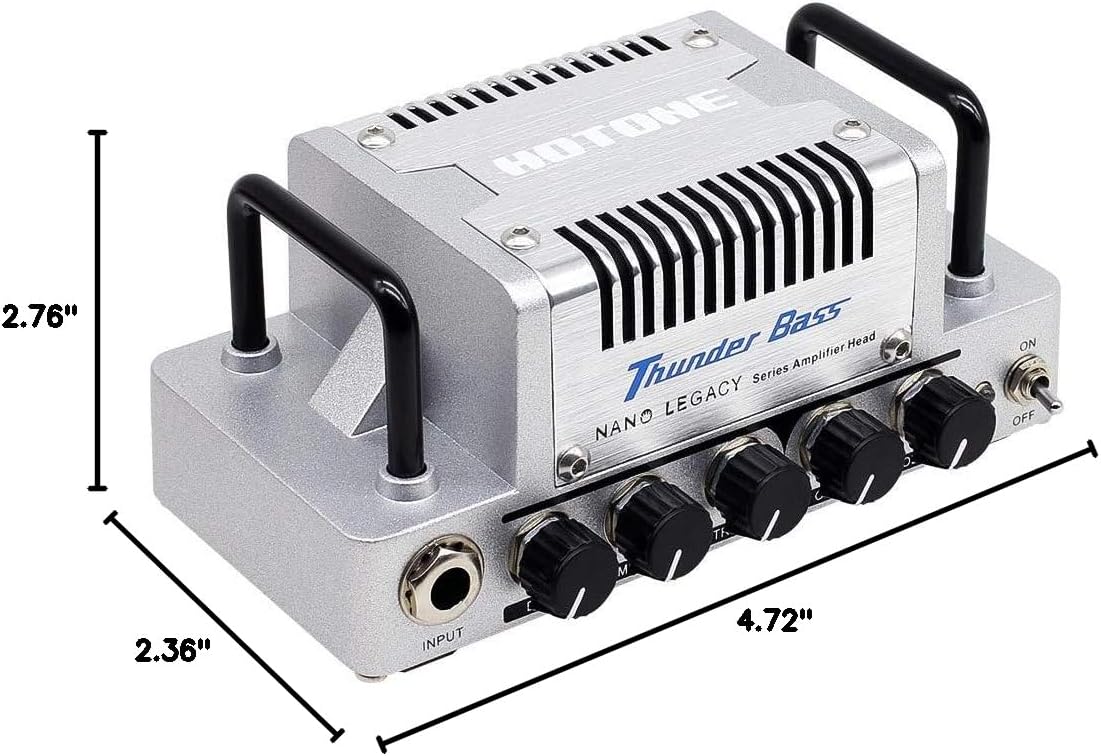
Figur 3: Produktmål.
Garanti og support
The Hotone Thunder Bass Mini Bass Guitar Amplifier Head is covered by a manufacturer's warranty. For detailed warranty information, technical support, or service inquiries, please refer to the warranty card included with your product or visit the official Hotone webwebstedet. Behold din købskvittering som købsbevis.


