1. Introduktion
This manual provides detailed instructions for the proper use, setup, and maintenance of your Genius HS-920BT Bluetooth Headset. Please read this manual thoroughly before using the device to ensure optimal performance and longevity.
The Genius HS-920BT is a versatile Bluetooth headset designed for wireless audio streaming and hands-free communication with compatible devices such as smartphones, tablets, and PCs.
2. Pakkens indhold
Bekræft at alle varer er til stede i din pakke:
- Genius HS-920BT Bluetooth Headset
- USB opladningskabel
- Multi-language User Manual (this document)
3. Produktet er slutview
The HS-920BT headset features an adjustable headband and comfortable earcups, integrating controls for audio playback and call management.
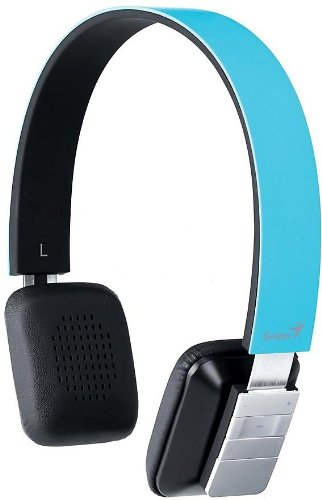
Figure 1: Genius HS-920BT Bluetooth Headset (Blue)
This image displays the Genius HS-920BT Bluetooth Headset in blue, viewed from an angle, highlighting its adjustable headband and earcup design.
Nøglefunktioner:
- Wireless Bluetooth connectivity for audio and calls (A2DP support)
- Integrated rechargeable Lithium-Ion battery
- Indbygget mikrofon til håndfri kommunikation
- On-ear controls for volume adjustment, track skipping (AVRCP support)
- Justerbart pandebånd for behagelig pasform
- 40 mm driver units for clear sound
4. Opsætning
4.1 Opladning af headsettet
Before initial use, fully charge the headset. Use the provided USB charging cable.
- Tilslut den lille ende af USB-opladerkablet til opladningsporten på headsettet.
- Tilslut den større ende af USB-kablet til en strømforsynet USB-port (f.eks. en computer eller USB-vægadapter).
- The LED indicator on the headset will illuminate during charging and change color or turn off when fully charged. Refer to the headset's LED behavior for specific indications.
En fuld opladning tager typisk cirka 2-3 timer.
4.2 Parring med en Bluetooth-enhed
To use the HS-920BT wirelessly, you must pair it with your Bluetooth-enabled device.
- Tænd: Press and hold the Power button on the headset until the LED indicator flashes, usually alternating blue and red, indicating pairing mode.
- Aktiver Bluetooth: On your smartphone, tablet, or PC, enable Bluetooth functionality.
- Søg efter Enheder: In your device's Bluetooth settings, search for available devices. The headset should appear as "HS-920BT".
- Select and Pair: Select "HS-920BT" from the list. If prompted for a passcode, enter "0000" (four zeros).
- Bekræftelse: Once paired, the headset's LED indicator will typically flash blue slowly, and your device will confirm the connection.
The headset will automatically attempt to reconnect to the last paired device when powered on, if that device's Bluetooth is active and within range.
5. Betjeningsvejledning
The HS-920BT features intuitive controls located on the earcup.

Figure 2: Earcup Controls of HS-920BT
This image shows a close-up of the right earcup of the Genius HS-920BT Bluetooth Headset, detailing the control buttons for power, volume, and track navigation.
5.1 Tænd/sluk
- Tænd: Tryk på tænd/sluk-knappen og hold den nede i cirka 3 sekunder, indtil LED-indikatoren blinker blåt.
- Sluk: Tryk på tænd/sluk-knappen og hold den nede i cirka 3 sekunder, indtil LED-indikatoren slukker.
5.2 Musikafspilning
- Afspil/pause: Tryk én gang på knappen Afspil/Pause.
- Næste nummer: Press the "Next Track" button (usually marked with a forward arrow).
- Forrige nummer: Press the "Previous Track" button (usually marked with a backward arrow).
5.3 Opkaldshåndtering
- Besvar/afslut opkald: Press the Multi-function button (often the same as Play/Pause) once during an incoming call to answer, or once during a call to end it.
- Afvis opkald: Press and hold the Multi-function button for approximately 2 seconds during an incoming call.
- Genopkald sidste nummer: Double-press the Multi-function button when not on a call.
5.4 Lydstyrkekontrol
- Forøg lydstyrke: Tryk på knappen Lydstyrke op (+).
- Skru ned for lydstyrken: Tryk på lydstyrke ned-knappen (-).
6. Vedligeholdelse
Proper care ensures the longevity of your headset.
- Rensning: Brug en blød, tør klud til at rengøre headsettet. Brug ikke slibende rengøringsmidler eller opløsningsmidler.
- Opbevaring: Opbevar headsettet et køligt, tørt sted væk fra direkte sollys og ekstreme temperaturer.
- Batteripleje: To preserve battery life, avoid fully discharging the battery frequently. Charge the headset regularly, even if not in use for extended periods.
- Vandeksponering: Headsettet er ikke vandtæt. Undgå udsættelse for vand eller overdreven fugt.
7. Fejlfinding
If you encounter issues with your HS-920BT headset, refer to the following common solutions:
| Problem | Mulig løsning |
|---|---|
| Headsettet tænder ikke. | Ensure the battery is charged. Connect the headset to a power source using the USB cable. |
| Kan ikke parre headsettet med en enhed. |
|
| Ingen lyd eller lav lydstyrke. |
|
| Opkaldskvaliteten er dårlig. |
|
8. Specifikationer
| Modelnavn: | HS-920BT |
| Trådløs teknologi: | Bluetooth |
| Driver enheder: | 40 mm |
| Batteri: | Indbygget genopladeligt litium-ion-batteri |
| Kontroltype: | Volume Control, Track Navigation, Call Management |
| Mikrofon: | Indbygget |
| Understøttet Profiles: | A2DP, AVRCP |
| Hardware platform: | PC, Smartphone, Tablet |
| Varens vægt: | 110 gram |
| Dimensioner (LxBxH): | 13.6 x 17.3 x 2.9 cm |
9. Garanti og support
For warranty information and technical support, please refer to the warranty card included with your product or visit the official Genius webwebstedet. Behold din købskvittering som købsbevis.
For further assistance, you may contact Genius customer service through their official channels.


