1. Introduktion
This manual provides complete instructions for the installation and operation of your AT&T CRL81212 DECT 6.0 Cordless Phone System. This system features DECT 6.0 digital technology for enhanced sound quality and security, an extra-large LCD display, and large, backlit buttons for ease of use. It includes caller ID, call waiting, and a 50-name/number phonebook directory.
2. Pakkens indhold
Sørg for, at din pakke indeholder følgende varer:
- One (1) AT&T CRL81212 base unit with power adapter
- Two (2) AT&T CRL81212 cordless handsets
- Two (2) handset chargers with power adapters
- Two (2) battery packs for handsets
- En (1) telefonledning
- Denne brugervejledning
3. Opsætning
3.1 Batteriinstallation
Before using your phone, you must install and charge the battery pack in each handset.
- Åbn batterirummets dæksel på bagsiden af håndsættet.
- Tilslut batteripakkens stik sikkert til stikket inde i batterirummet.
- Place the battery pack with the label UP.
- Luk batterirummets dæksel.
3.2 Tilslutning af baseenhed
Connect the base unit to a telephone line and power outlet.
- Sæt den ene ende af telefonledningen i TEL LINE-stikket på bagsiden af baseenheden.
- Sæt den anden ende af telefonledningen i et telefonstik i væggen.
- Plug the small end of the base unit power adapter into the POWER jack on the back of the base unit.
- Plug the large end of the base unit power adapter into an electrical outlet not controlled by a wall switch.
3.3 Opladning af håndsæt
Place each handset in its respective charger or the base unit cradle to charge. The CHARGE indicator on the handset will illuminate. Allow at least 16 hours for the initial charge.
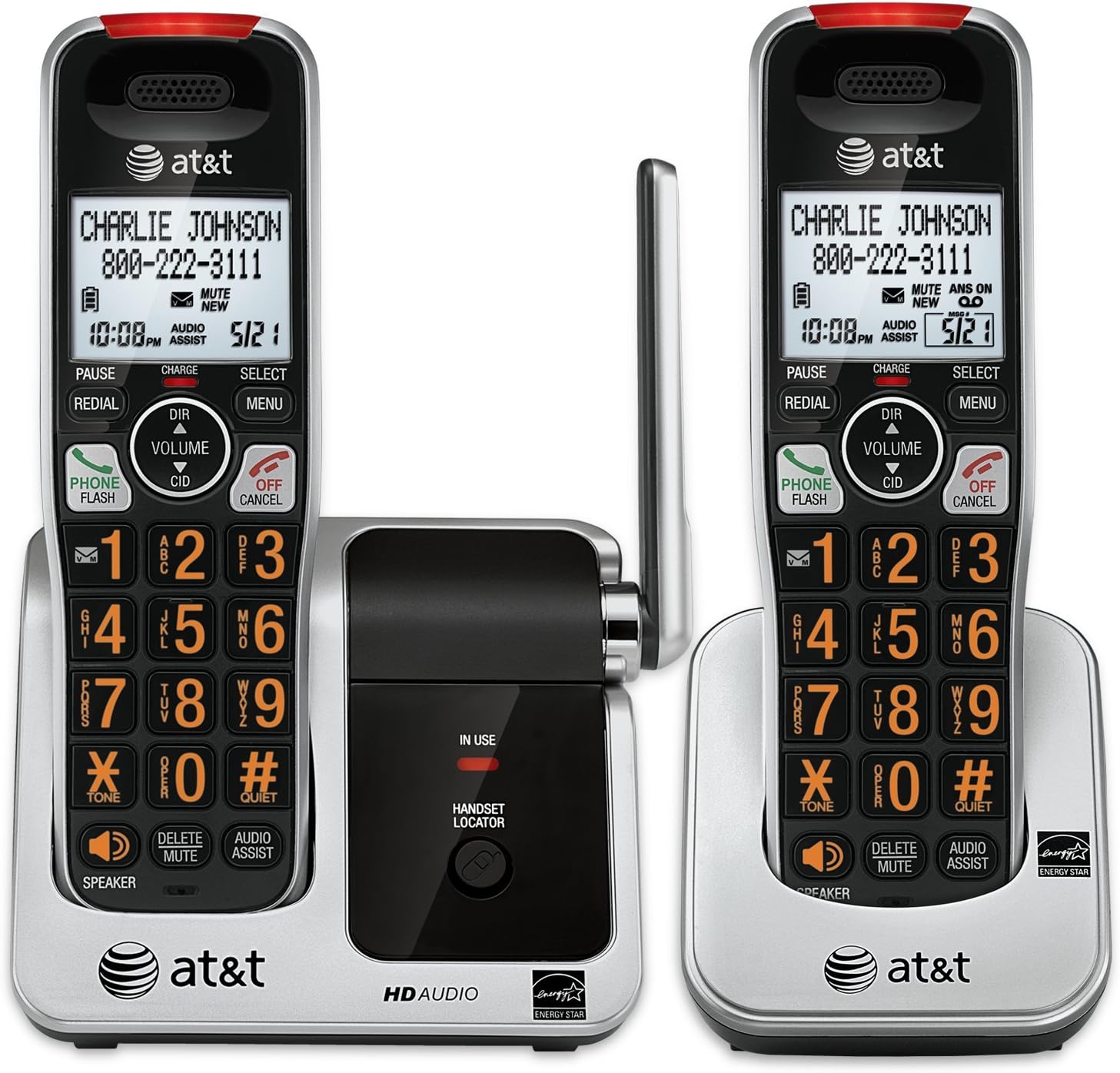
Image: The AT&T CRL81212 DECT 6.0 Cordless Phone System, showing two handsets in their charging cradles. The handsets feature large, backlit buttons and an extra-large LCD display. The base unit includes a handset locator button and an 'in use' indicator.
4. Betjening af din telefon
4.1 Foretage og modtage opkald
- Sådan foretager du et opkald: Trykke TELEFON / FLASH or HØJTTALER, og ring derefter op til nummeret.
- For at besvare et opkald: Trykke TELEFON / FLASH or HØJTTALER når telefonen ringer.
- Sådan afslutter du et opkald: Trykke FRA/ANNULLER eller placer håndsættet i opladeren.
4.2 Vis nummer
The handset displays the caller's name and number (if available) after the first ring. To review caller ID history, press CID.
4.3 Telefonbog
Store up to 50 names and numbers in the phonebook directory.
- Sådan tilføjer du en post: Trykke MENU, select 'Phonebook', then 'Add New Entry'. Follow the on-screen prompts.
- To Search/Dial: Trykke DIR, then use the arrow keys to scroll or enter the first letter of the name. Press TELEFON / FLASH at ringe op.
4.4 Voicemail and Message Retrieval
When you have new voicemail messages, the voicemail icon will appear on the handset display. To retrieve messages, press and hold 1 on the keypad (if configured for speed dial to voicemail) or dial your voicemail service number.
4.5 Intercom and Conference Calls
- Samtaleanlæg: To call another handset, press MENU, select 'Intercom', then the desired handset number.
- 3-vejs telefonmøde: Under et eksternt opkald skal du trykke på BLITZ to get a dial tone, dial the second party's number, and once connected, press BLITZ igen for at slutte sig til alle partier.
4.6 Andre funktioner
- Højttalertelefon: Trykke HØJTTALER during a call to activate/deactivate.
- Stum: Trykke SLET/MUTE under et opkald for at slå lyden fra for din mikrofon. Tryk igen for at slå lyden til.
- Genopkald: Trykke GENTAGELSE til view the last 10 dialed numbers. Press TELEFON / FLASH to dial a selected number.
- Audio Assist: Trykke AUDIO ASSIST to temporarily boost the audio volume during a call.
- Handset Locator: Trykke HÅNDSÆT LOCATOR on the base unit to page all registered handsets.
5. Funktioner overview
- DECT 6.0 digital teknologi: Provides superior sound quality, security, and range.
- Extra-Large LCD Display: Offers clear visibility of caller ID, menu options, and phonebook entries.
- Extra-Large Backlit Buttons: Enhances usability, especially in low-light conditions, and for users with visual impairments.
- Visuel ringetoneindikator: A light on the handset flashes when there is an incoming call, providing an additional alert.
- Udvidbart system: Supports up to 12 handsets (sold separately) on a single base unit.
- 50-Name/Number Phonebook: Conveniently store frequently called contacts.
- 17-Minute Digital Answering System: (If applicable to your specific model variant, check product packaging for confirmation) Records incoming messages.
6. Vedligeholdelse
- Rensning: Clean the phone and charger with a soft, damp klud. Brug ikke rengøringsspray eller skrappe kemikalier.
- Batteripleje: Replace the battery pack when the handset indicates low battery or when operating time decreases significantly. Use only the specified replacement battery type.
- Miljøforhold: Undgå at placere telefonen i direkte sollys, i nærheden af varmekilder eller i områder med meget fugt eller støv.
7. Fejlfinding
7.1 Ingen opkaldstone
- Ensure the telephone line cord is securely plugged into both the base unit and the wall jack.
- Verify the base unit power adapter is properly connected to a working electrical outlet.
- Kontroller, om håndsættets batteri er opladet.
7.2 Handset Not Charging
- Ensure the handset is correctly seated in the charger.
- Verify the charger's power adapter is plugged into a working electrical outlet.
- Rengør opladningskontakterne på både håndsættet og opladeren med en tør klud.
7.3 Dårlig lydkvalitet
- Flyt håndsættet tættere på baseenheden.
- Avoid placing the base unit near other electronic devices that may cause interference.
- Tjek for eventuelle løse forbindelser.
8. Specifikationer
| Mærke | AT&T |
| Model | CRL81212 |
| Trådløs teknologi | DECT 6.0 |
| Display Type | LCD |
| Strømkilde | Corded Electric, Battery Operated |
| Batterier påkrævet | 2 AA (inkluderet) |
| Optagelseskapacitet | 17 Minutes (for models with answering machine) |
| Dimensioner (basisenhed) | Cirka 20 x 15 x 11 cm |
| Vægt (håndsæt) | Cirka 85.05 g (3 ounces) |
9. Garanti og support
For warranty information and technical support, please refer to the warranty card included in your product packaging or visit the official AT&T webwebstedet. Behold din købskvittering som købsbevis.
For further assistance, you may contact AT&T customer service.


