1. Introduktion
The Mastech MS2115A is a professional-grade digital clamp meter designed for accurate measurement of DC/AC current, DC/AC voltage, resistance, capacitance, frequency, and duty cycle. It features True RMS for AC measurements, a built-in Non-Contact Voltage (NCV) detector, diode check, continuity test, and a reading hold function. This manual provides essential information for safe and effective operation of your MS2115A clamp måler.
2. Sikkerhedsoplysninger
Læs og forstå alle sikkerhedsoplysninger, før du bruger denne enhed. Manglende overholdelse af disse instruktioner kan resultere i elektrisk stød, brand eller beskadigelse af måleren.
- Always ensure the meter is in the correct function mode before making measurements.
- Anvend ikke voltage or current that exceeds the maximum rated limits of the meter.
- Udvis ekstrem forsigtighed ved arbejde med spændingsførende kredsløb. Høj lydstyrketagkan være dødelige.
- Undersøg testledningerne for skader før hver brug. Må ikke anvendes, hvis isoleringen er kompromitteret.
- Brug ikke måleren, hvis den ser beskadiget ud, eller hvis huset er åbent.
- Udskift batterierne med det samme, når indikatoren for lavt batteri vises, for at sikre nøjagtige aflæsninger.
- Overhold lokale og nationale sikkerhedsforskrifter.
3. Produktfunktioner
The Mastech MS2115A clamp meter offers a range of advanced features for electrical testing:
- LCD with 5999 counts for precise readings.
- Jaw size up to ϕ40mm (1.6 inches) for large conductors.
- DC/AC current measurement up to 1000A.
- Tests AC/DC voltage, current, resistance, capacitance, frequency, and duty cycle.
- Indbygget Non-Contact Voltage (NCV) detector for live wire detection without physical contact.
- True RMS for accurate AC voltage and AC current measurements of non-sinusoidal waveforms.
- Work light for illumination in dimly lit areas.
- Auto power off function to conserve battery life.
- Diode check and continuity test with audible buzzer.
- Reading hold function to freeze the displayed measurement.
4. Produktet er slutview
Familiarize yourself with the components of your Mastech MS2115A clamp måler.

Figur 4.1: Forside View of Mastech MS2115A Clamp Måler. This image displays the front of the Mastech MS2115A Digital Clamp Meter, highlighting its large LCD screen, rotary dial for function selection, clamp jaw, and input terminals. Key buttons such as RANGE, HZ%, MAX/MIN, REL, and HOLD are visible, along with the Mastech branding.
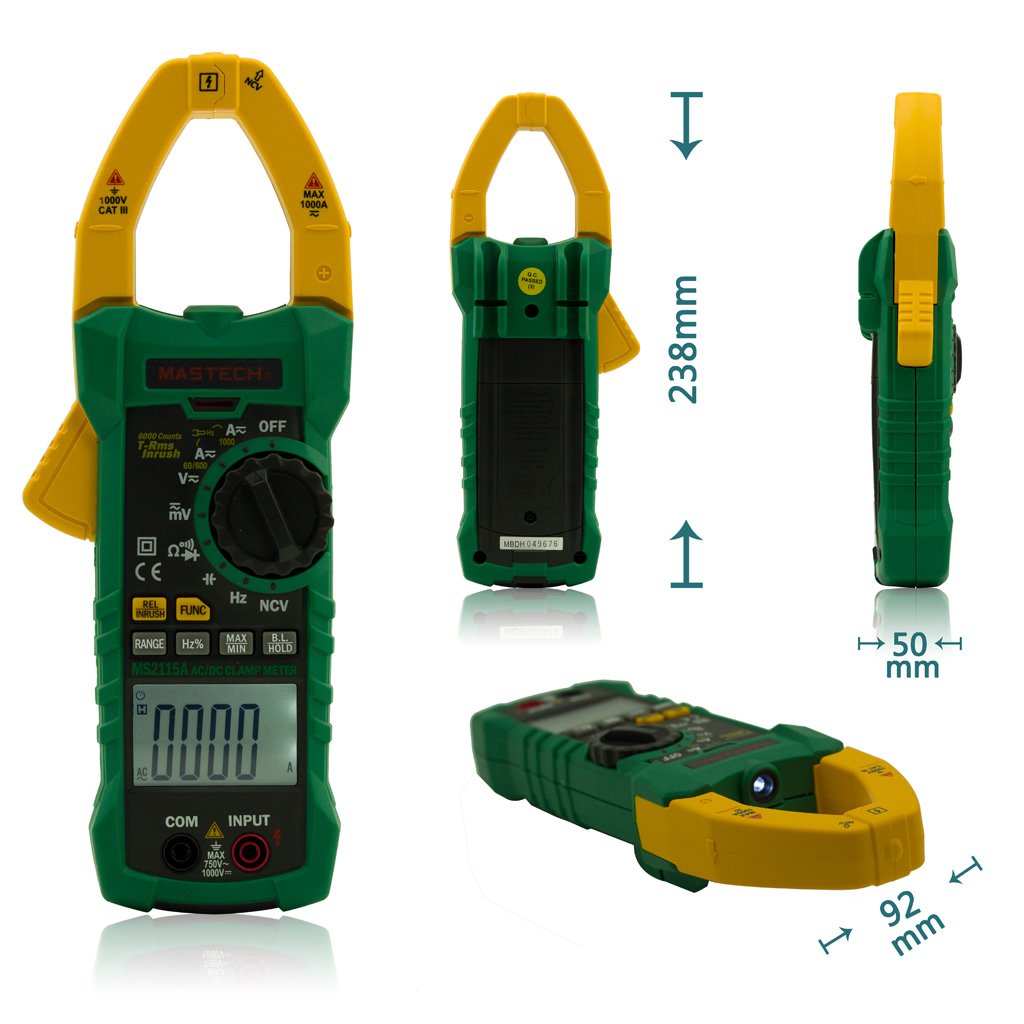
Figure 4.2: Mastech MS2115A Clamp Meter Dimensions. This image provides multiple views of the Mastech MS2115A, including front, back, side, and bottom angles, with measurements indicating its approximate height (238mm), width (92mm), and thickness (50mm). This helps users understand the physical size and form factor of the device.

Figure 4.3: Mastech MS2115A Clamp Meter Package Contents. This image shows the complete contents included with the Mastech MS2115A clamp meter. It features the clamp meter itself, a pair of red and black test leads, a carrying case, and a user manual. Please note that the 9V battery is typically not included and must be purchased separately.
5. Opsætning
5.1 Batteriinstallation
The Mastech MS2115A requires a 9V battery for operation. Please note that the battery is typically not included in the package and must be purchased separately.
- Sørg for, at måleren er slukket.
- Find batteridækslet på bagsiden af måleren.
- Brug en skruetrækker til at løsne skruen/skruerne, der fastgør batteridækslet.
- Fjern batteridækslet.
- Connect a new 9V battery to the battery clips, observing correct polarity.
- Placer batteriet i rummet.
- Sæt batteridækslet på igen, og fastgør det med skruen/skruerne.
6. Betjeningsvejledning
6.1 Tænd/sluk
To power on the meter, rotate the function dial from the OFF position to any desired measurement function. To power off, rotate the dial back to the OFF position. The meter features an auto power-off function to conserve battery life after a period of inactivity.
6.2 Funktionsvalg
Use the central rotary dial to select the desired measurement function (e.g., V∼, V−, A∼, A−, Ω, Diode/Continuity, CAP, Hz%). Some positions may have multiple functions; press the FUNK knappen for at bladre gennem dem.
6.3 Måling af AC/DC-strøm (Clamp Kæbe)
- Rotate the dial to the A∼ (AC Current) or A− (DC Current) position.
- Tryk på kæbeaftrækkeren for at åbne clamp kæbe.
- Omslut kun én leder med clamp kæbe. Sørg for, at kæben er helt lukket.
- Read the current value on the LCD. For DC current, observe the polarity indicator.
6.4 Måling af AC/DC Voltage
- Indsæt den røde testledning i INPUT terminal and the black test lead into the KOM terminal.
- Rotate the dial to the V∼ (AC Voltage) or V− (DC Voltage) stilling.
- Tilslut testledningerne parallelt til det kredsløb eller den komponent, der testes.
- Læs bindtage value on the LCD. For DC voltage, observe the polarity indicator.
6.5 Measuring Resistance (Ω)
- Indsæt den røde testledning i INPUT terminal and the black test lead into the KOM terminal.
- Rotate the dial to the Ω (Resistance) position.
- Sørg for, at kredsløbet eller komponenten er spændingsfri, før du tilslutter testledningerne.
- Tilslut testledningerne på tværs af komponenten for at måle dens modstand.
- Aflæs modstandsværdien på LCD-skærmen.
6.6 Measuring Capacitance (CAP)
- Indsæt den røde testledning i INPUT terminal and the black test lead into the KOM terminal.
- Rotate the dial to the CAP (Capacitance) position.
- Sørg for, at kondensatoren er helt afladet, før du tilslutter testledningerne.
- Tilslut testledningerne over kondensatoren.
- Læs kapacitansværdien på LCD-skærmen.
6.7 Diode Check and Continuity Test
- Indsæt den røde testledning i INPUT terminal and the black test lead into the KOM terminal.
- Rotate the dial to the Diode/Continuity position. Press FUNK to switch between diode and continuity modes if necessary.
- For Diode Check: Connect the red lead to the anode and the black lead to the cathode of the diode. The forward voltage-faldet vises. Byt ledningerne for at kontrollere for et åbent kredsløb.
- For Continuity Test: Connect the test leads across the circuit or component. An audible beep indicates continuity (low resistance).
6.8 Non-Contact Voltage (NCV) Detektion
- Rotate the dial to the NCV position.
- Move the top front part of the meter (near the clamp jaw) close to the conductor or outlet you wish to test.
- Måleren vil indikere tilstedeværelsen af AC-volumentage through an audible beep and/or visual indicator on the LCD.
6.9 Special Functions (RANGE, HZ%, MAX/MIN, REL, HOLD)
- RÆKKEVIDDE: Press to switch between auto-ranging and manual ranging. In manual mode, press repeatedly to cycle through ranges.
- HZ%: Press to measure frequency (Hz) or duty cycle (%) in relevant voltage/current modes.
- MAX / MIN: Press to record the maximum and minimum readings during a measurement session.
- REL (relativ måling): Tryk på for at gemme den aktuelle aflæsning som referenceværdi. Efterfølgende målinger vises som forskellen fra denne reference.
- HOLDE: Tryk for at fryse den aktuelle aflæsning på displayet. Tryk igen for at slippe.
7. Vedligeholdelse
7.1 Rengøring
For at rengøre måleren skal du tørre huset af med enamp cloth and a mild detergent. Do not use abrasives or solvents. Ensure the meter is powered off and disconnected from any circuits before cleaning.
7.2 Udskiftning af batteri
When the low battery indicator appears on the LCD, replace the 9V battery as described in Section 5.1. Prompt battery replacement ensures continued accuracy and proper operation.
8. Fejlfinding
If you encounter issues with your MS2115A, refer to the following common problems and solutions:
- Ingen visning: Check if the meter is powered on. Ensure the battery is correctly installed and has sufficient charge. Replace the battery if necessary.
- Forkerte aflæsninger: Verify that the function dial is set to the correct measurement mode. Ensure test leads are properly connected and not damaged. For current measurements, ensure only one conductor is within the clamp jaw. Check battery level.
- Ingen biplyd ved kontinuitet: Ensure the meter is in continuity mode. Check if the circuit has very high resistance or is open.
- NCV registreres ikke: Ensure the meter is in NCV mode. The NCV function detects AC voltage; it will not detect DC voltage. Ensure the sensor area is close enough to the live conductor.
If problems persist, contact Mastech customer support for further assistance.
9. Specifikationer
The following table outlines the general specifications for the Mastech MS2115A Digital Clamp Måler:
| Specifikation | Værdi |
|---|---|
| Mærke | matech |
| Modelnummer | MS2115A |
| Måletype | Ammeter (Clamp Måler) |
| Stil | Digital |
| Strømkilde | Batteridrevet (9V) |
| Vise | LCD, 5999 tæller |
| Kæbe størrelse | Up to ϕ40mm (1.6 inches) |
| AC / DC strøm | Op til 1000A |
| Ægte RMS | Til AC Voltage and AC Current |
| Pakkedimensioner | 10.63 x 5.83 x 2.36 tommer |
| Varens vægt | 1.41 pund |
10. Garanti og support
The Mastech MS2115A Digital DC/AC Clamp Meter is manufactured by Mastech. For warranty information, technical support, or service inquiries, please refer to the official Mastech webwebstedet eller kontakt deres kundeserviceafdeling. Gem din købskvittering som købsbevis i tilfælde af garantikrav.


