Indledning
The PROSCAN ELITE PKCR2713AMZ is a versatile under-counter audio system designed to provide entertainment and convenience in your kitchen or workspace. Featuring a CD player, FM radio, and Bluetooth connectivity, this unit allows you to enjoy your favorite music from various sources. Its space-saving design and intuitive controls make it a practical addition to any home.
Hvad er der i æsken
Kontroller, at alle elementer er til stede, før installationen påbegyndes:
- PROSCAN ELITE PKCR2713AMZ Under Counter CD Player
- Mounting Kit (includes template and hardware)
- Fjernbetjening med fuld funktion
- AC strømadapter
Opsætning og installation
Follow these steps to properly install your under-counter CD player:
- Vælg en placering: Select a flat, sturdy surface under a kitchen cabinet. Ensure there is adequate space for the unit and access to a power outlet.
- Forberedelse til montering: Use the provided mounting template to mark the drilling locations under your cabinet. Note: Some users have reported the template may not be perfectly accurate; verify measurements before drilling.
- Bor pilothuller: Carefully drill pilot holes at the marked locations.
- Fastgør monteringsplade: Secure the mounting plate to the underside of the cabinet using the provided screws.
- Monter enheden: Slide the PROSCAN ELITE unit onto the mounting plate until it clicks securely into place.
- Tilslut strøm: Plug the AC power adapter into the unit and then into a wall outlet.
- Install Backup Batteries: For clock and preset memory retention during power outages, install 2 x AA batteries (not included) into the battery compartment.
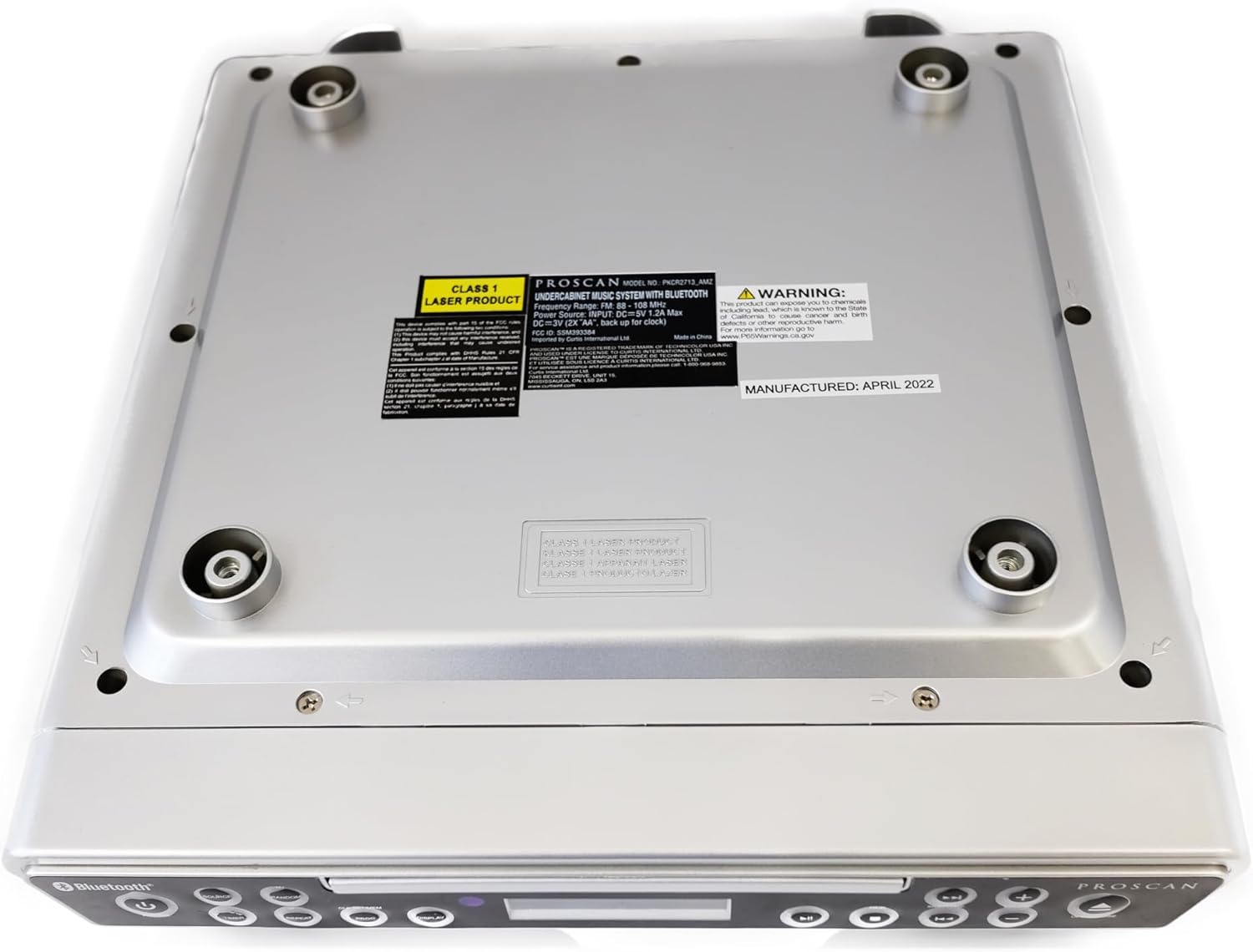
Billede: Bund view of the unit, illustrating the mounting points and product information label.
Betjeningsvejledning
Kontrol på frontpanelet

Image: Front panel of the unit, showing the display, CD tray, and various control buttons.
- POWER -knap: Tryk for at tænde eller slukke for enheden.
- SOURCE knap: Cycle through available modes: CD, FM Radio, Bluetooth.
- LYDSTYRKE +/- knapper: Juster lydudgangsniveauet.
- ÅBN/LUK-knap: Eject or retract the CD tray.
- SKIP/TUNE Buttons:
- In CD mode: Skip to the next/previous track.
- In FM mode: Tune to the next/previous radio station.
- PLAY/PAUSE knap: Play or pause CD playback.
- PAIR knap: Start Bluetooth-parringstilstand.
- DISPLAY-knap: Adjust display brightness or cycle through display information.
- CLK SET/MEM Button: Set the clock or save/recall radio presets.
- TIMER knap: Set sleep timer or alarm functions.
- REPEAT knap: Repeat current track or entire CD.
- PROG knap: Program CD playback order.
- RANDOM Button: Play CD tracks in random order.
Betjening af cd-afspiller
- Tryk på ÅBN/LUK knappen for at åbne CD-skuffen.
- Placer en cd i bakken med etiketsiden opad.
- Tryk på ÅBN/LUK button again to close the tray. The unit will automatically begin playing the CD.
- Brug AFSPIL/PAUSE, SKIP/TUNE, GENTAGE, PROG, og TILFÆLDIG knapper til at styre afspilning.
Betjening af FM-radio
- Tryk på KILDE knappen, indtil "FM" vises på displayet.
- Brug SKIP/TUNE buttons to manually tune to a desired frequency or press and hold to auto-scan for the next available station.
- Sådan gemmer du en forudindstilling: Stil ind på den ønskede station, og tryk derefter på og hold CLK SET/MEM knappen indtil det forudindstillede nummer blinker. Brug SKIP/TUNE knapperne for at vælge et forudindstillet nummer, og tryk derefter på CLK SET/MEM igen for at bekræfte.
- Sådan genkalder du en forudindstilling: Tryk kort på CLK SET/MEM knappen og brug SKIP/TUNE knapperne for at vælge den ønskede forudindstilling.
Bluetooth-betjening
- Tryk på KILDE button until "BT" or "Bluetooth" appears on the display. The unit will enter pairing mode, indicated by a flashing Bluetooth icon.
- Aktiver Bluetooth på din Bluetooth-aktiverede enhed (smartphone, tablet osv.) og søg efter tilgængelige enheder.
- Select "PROSCAN ELITE" or similar from the list of devices.
- Once paired, the Bluetooth icon on the unit's display will stop flashing, and you can stream audio from your device to the unit.
- To disconnect, either turn off Bluetooth on your device or press and hold the PAR knappen på enheden.

Billede: Side view of the unit, highlighting the 'LINE IN' auxiliary input port.
Opretholdelse
- Rensning: Tør enheden af med en blød, tør klud. Brug ikke slibende rengøringsmidler eller opløsningsmidler.
- CD-pleje: Handle CDs by the edges. Keep them clean and free of scratches to ensure optimal playback.
- Udskiftning af batteri: Replace backup batteries (AA) annually or when the clock/presets are not retained during power outages.
Fejlfinding
| Problem | Mulig årsag | Løsning |
|---|---|---|
| Enheden tænder ikke. | No power, AC adapter not connected. | Sørg for, at AC-adapteren er korrekt tilsluttet enheden og en fungerende stikkontakt. |
| Ingen lyd fra højttalere. | Volume too low, incorrect source selected, muted. | Increase volume. Press SOURCE to select correct mode (CD, FM, BT). Check if unit is muted. |
| CD'en hopper eller afspilles ikke. | Dirty or scratched CD, CD inserted incorrectly. | Clean the CD with a soft cloth. Ensure CD is inserted label-side up. Try a different CD. |
| Dårlig FM-radiomodtagelse. | Weak signal, internal antenna position. | Reposition the unit for better reception. Note: This unit does not have an AM feature. |
| Problemer med Bluetooth-parring. | Device too far, Bluetooth not enabled on device, unit not in pairing mode. | Ensure device is within range. Enable Bluetooth on your device. Press PAIR button on unit. |
Specifikationer
- Produktdimensioner: 14 x 4 x 12.5 tommer (L x B x H)
- Varens vægt: 0.035 ounce
- Mærke: PROSKAN
- Modelnummer: PKCR2713_AMZ
- Forbindelse teknologi: Bluetooth
- Farve: Sølv
- Højttalertype: Stereoanlæg
- Strømudgang: 2 x 1.2 W
- Strømkilde: AC Adapter with Battery Backup (2 x AA, not included)
- Funktioner: Under-cabinet mounting, CD player, FM radio, Bluetooth 3.0, LED display, remote control.
Garanti og support
For warranty information and technical support, please refer to the documentation included with your purchase or visit the official PROSCAN webwebsted. Gem din købsbevis til garantikrav.
Online ressourcer:
- Official PROSCAN Store: PROSCAN ELITE Store
- Brugermanual (PDF): Download PDF Manual


