Indledning
This manual provides essential information for the proper setup, operation, and maintenance of your Supersonic SC1010JBBT 10.1-inch Quad Core Bluetooth Tablet. Please read this manual thoroughly before using your device to ensure optimal performance and longevity. Keep this manual for future reference.
Opsætning
1. Udpakning og indledende inspektion
Carefully remove all components from the packaging. Verify that the tablet and any included accessories are present and undamaged. If any items are missing or damaged, contact customer support.
2. Opladning af enheden
Before first use, fully charge the tablet's battery. Connect the provided power adapter to the tablet's charging port and then to a power outlet. The charging indicator will typically illuminate during charging and change color or turn off when fully charged. A full charge may take several hours.
3. Tænd/sluk
- For at tænde: Press and hold the Power button located on the side or top edge of the tablet until the screen illuminates.
- For at slukke: Press and hold the Power button until a power-off menu appears on the screen. Select 'Power Off' and confirm.
- For at genstarte: Vælg 'Genstart' i sluk-menuen.
4. Initial Setup Wizard
Upon first power-on, the tablet will guide you through an initial setup process. This includes selecting your language, connecting to a Wi-Fi network, and setting up your Google account.
5. Tilslutning til Wi-Fi
- Gå til Indstillinger > Wi-Fi.
- Slå Wi-Fi til/fra On.
- Vælg dit ønskede netværk fra listen over tilgængelige netværk.
- Indtast netværksadgangskoden, hvis du bliver bedt om det, og tryk derefter på Forbinde.
6. Opsætning af Google-konto
A Google account is required to download apps from the Google Play Store and access Google services. During initial setup, you will be prompted to sign in with an existing Google account or create a new one.
Betjeningsvejledning
1. Grundlæggende navigation
The tablet uses a capacitive touchscreen for interaction. Common gestures include:
- Tryk på: For at vælge et element eller åbne et program.
- Tryk og hold: For at få adgang til kontekstmenuer eller flytte ikoner.
- Stryg: Til at rulle gennem lister eller skifte mellem startskærme.
- Knib-for-at-zoome: For at zoome ind eller ud på billeder og web sider.
2. Startskærm overview
The home screen is your central hub for accessing applications, widgets, and settings. It typically features multiple panels you can swipe between.
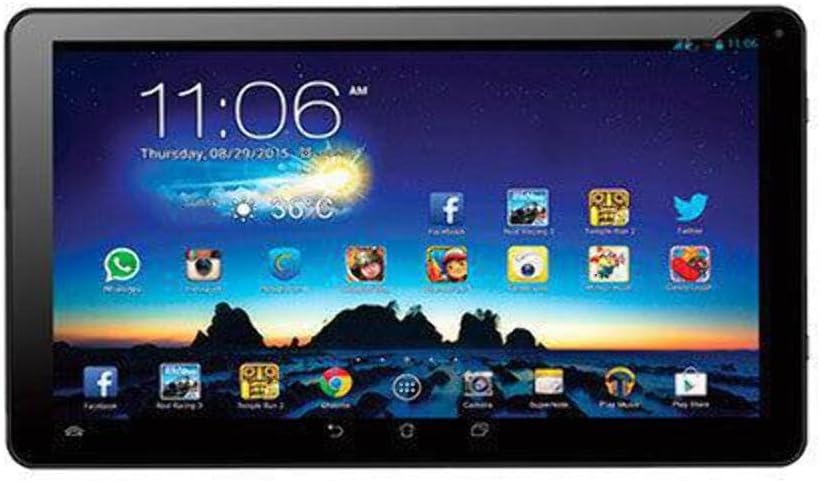
This image shows the Supersonic SC1010JBBT tablet's display, featuring the Android home screen. The screen displays the current time, date, weather, and a grid of application icons including social media, games, and utility apps. The tablet has a black bezel.
3. Installing and Uninstalling Applications
- Installere: Åbn Google Play Butik app, search for your desired application, and tap Installere.
- Afinstaller: Gå til Indstillinger > Apps, vælg appen, og tryk på Afinstaller. Alternatively, tap and hold an app icon on the home screen and drag it to the 'Uninstall' option if available.
4. Tilslutning af Bluetooth-enheder
- Ensure the Bluetooth device you wish to pair is in pairing mode.
- Gå til din tablet på Indstillinger > Bluetooth.
- Slå Bluetooth til/fra On.
- The tablet will scan for available devices. Select your device from the list.
- Følg eventuelle anvisninger på skærmen for at fuldføre parringsprocessen.
5. Brug af kameraet
Åbn Kamera app. Tap the screen to focus, then tap the shutter button to take a photo or start/stop video recording. You can switch between front and rear cameras using the icon on the screen.
6. Web Gennemse
Brug den forudinstallerede web browser (e.g., Chrome) to access the internet. Tap the address bar to enter URLs or search queries.
Opretholdelse
1. Rengøring af enheden
Brug en blød, fnugfri klud til at rengøre skærmen og tablettens kabinet. Brug ikke slibende rengøringsmidler, alkohol eller opløsningsmidler, da disse kan beskadige overfladerne. Undgå at få fugt i åbningerne.
2. Batteripleje
- Undgå ekstreme temperaturer, da disse kan forringe batteriets levetid.
- Lad ikke tabletten oplade i længere tid, efter den er fuldt opladet.
- If storing the tablet for a long time, ensure it has at least a 50% charge.
3. Softwareopdateringer
Tjek regelmæssigt for systemopdateringer for at sikre, at din tablet har de nyeste funktioner og sikkerhedsrettelser. Gå til Indstillinger > Om tablet > Systemopdateringer.
4. Lagerstyring
To free up storage space, uninstall unused apps, delete unnecessary files, and regularly clear app caches. You can check storage usage in Indstillinger > Opbevaring.
Fejlfinding
Dette afsnit omhandler almindelige problemer, du kan støde på med din tablet.
- Enheden tænder ikke: Ensure the battery is charged. Connect the charger and wait a few minutes before attempting to power on again. If it still doesn't turn on, try holding the power button for 10-15 seconds.
- Problemer med Wi-Fi-forbindelse: Verify that Wi-Fi is enabled on the tablet and that you have entered the correct password. Restart your Wi-Fi router and the tablet. Try connecting to a different Wi-Fi network to isolate the issue.
- Apps der går ned eller fryser: Close and reopen the app. Clear the app's cache (Settings > Apps > [App Name] > Storage > Clear Cache). If the problem persists, uninstall and reinstall the app.
- Langsom ydeevne: Close unused apps running in the background. Clear app caches and free up storage space. Restart the tablet regularly.
- Skærmen reagerer ikke: If the screen is completely unresponsive, perform a forced restart by holding the Power button for an extended period (e.g., 10-15 seconds) until the device powers off and restarts.
- Fabriksnulstilling (sidste udvej): Hvis problemerne fortsætter, kan en fabriksnulstilling løse mange softwarerelaterede problemer. Advarsel: Dette vil slette alle data på din tablet. Sikkerhedskopier vigtige data, før du fortsætter. Gå til Indstillinger > Sikkerhedskopiering og nulstilling > Fabriksindstilling.
Specifikationer
Key technical specifications for the Supersonic SC1010JBBT tablet:
| Feature | Detalje |
|---|---|
| Modelnummer | SC-1010JBBT |
| Skærmstørrelse | 10.1 tommer |
| Max skærmopløsning | 1024 x 600 |
| Processor | 1.3 GHz Quad Core (AMD Processor Brand) |
| VÆDDER | 1 GB DDR3 SDRAM |
| Hard Drive / Flash Memory | 8 GB |
| Operativsystem | Android 4.2 Jelly Bean (Note: Product description mentions Android 4.4, but specifications list 4.2) |
| Trådløs type | 802.11b, 802.11g, 802.11n |
| Bluetooth | Yes (implied by product title) |
| Gennemsnitlig batterilevetid | 5 timer |
| Varens vægt | 1.75 pund |
| Produktdimensioner | 11.6 x 7.2 x 3.2 tommer |
| Bag Webcam opløsning | 1 MP |
Garanti og support
For information regarding product warranty, please refer to the warranty card included with your purchase or visit the official Supersonic website. For technical support, troubleshooting assistance beyond this manual, or to inquire about repairs, please contact Supersonic customer service through their official channels. Contact details are typically available on the manufacturer's webwebsted eller i produktemballagen.


