1. Introduktion
This manual provides detailed instructions for the safe and effective use of your Canon VIXIA HF-R52 HD Digital Camcorder. Please read this manual thoroughly before operating the camcorder and retain it for future reference.
Nøglefunktioner:
- 3.28 Megapixel Full HD CMOS Image Sensor: Captures true 1920 x 1080 resolution video with natural color, even in low light.
- 57x Advanced Zoom & SuperRange Optical Image Stabilizer: Provides stable video across a wide zoom range.
- DIGIC DV 4 billedprocessor: Ensures exceptional imaging performance and enables simultaneous dual recording.
- 32GB Internal Flash Drive & SD Card Slot: Tilbud ample storage for up to 12 hours of HD video, expandable with SD memory cards.
- Indbygget Wi-Fi: Facilitates easy sharing, live streaming, and remote control via compatible mobile devices.
- 3.0-inch Capacitive Touch Panel LCD: Intuitive interface for easy operation and control.
- Babytilstand: Dedicated features for capturing and organizing a child's growth and development.
2. Opsætning
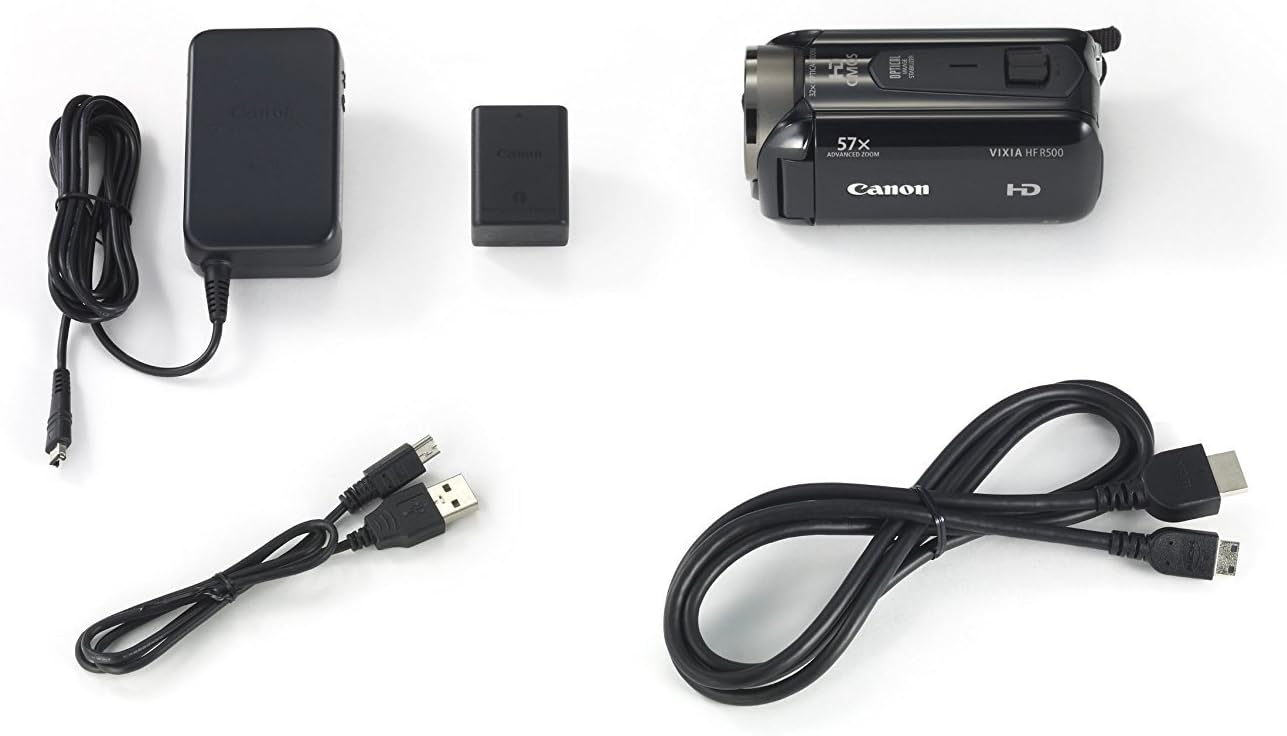
2.1. Pakkens indhold
Bekræft at alle varer er til stede i pakken:
- Canon VIXIA HF-R52 HD Digital Camcorder
- Batteripakke
- Kompakt strømadapter
- USB kabel
- HDMI kabel
- Instruktionsmanual (dette dokument)
2.2. Batteriinstallation og opladning
- Åbn batterirummets dæksel.
- Insert the battery pack, ensuring it clicks into place.
- Luk batterirummets dæksel.
- Connect the compact power adapter to the camcorder and a power outlet to charge the battery. The charging indicator will illuminate.
2.3. Indsættelse af hukommelseskort
- Åbn dækslet til SD-kortåbningen.
- Insert an SD memory card with the label facing the front of the camcorder until it clicks.
- Luk SD-kortåbningens dæksel.
2.4. Attaching the Hand Strap and Lens Cap
Securely attach the hand strap for comfortable and safe handling. Ensure the lens cap is attached to protect the lens when not in use.

3. Betjening af videokameraet
3.1. Tænd/sluk
To power on the camcorder, open the LCD panel. To power off, close the LCD panel or press and hold the power button located inside the LCD panel area.
3.2. LCD Touch Panel Usage
The 3.0-inch capacitive touch panel LCD allows for intuitive control. Tap to select menu options, adjust settings, or focus on subjects. The display is clear and responsive.

3.3. Optagelse af video og fotografering
To start recording video, press the REC button. Press it again to stop. To take a still photo, press the PHOTO button.
3.4. Zoomfunktionalitet
Use the zoom lever to zoom in (T) or out (W). The camcorder features a 57x Advanced Zoom for capturing distant subjects and a SuperRange Optical Image Stabilizer to minimize camera shake, even when shooting handheld or while walking.
3.5. Special Recording Modes
- Babytilstand: Activates optimal settings for recording children and automatically saves videos to a dedicated Baby Album. Includes features like Pre-Record and Touch Decoration.
- Valg af lydscene: Offers five modes (Standard, Music, Forest and Birds, Speech, Noise Suppression) to optimize audio recording based on the environment.
- Smart AUTO: Automatically selects optimal settings from 38 shooting situations.
- Biograf-look-filtre: Apply one of seven cinematic styles (e.g., Cinema Standard, Dramatic B&W, Sepia) to your video.
- Video-øjebliksbillede: Records short video clips and allows for background music integration.
- 24p Cinema & 30p Progressive Modes: Provides film-like feel or optimized footage for online sharing.
3.6. Wireless Functions
- Indbygget Wi-Fi: Connects to home networks or mobile devices via the Canon Movie Uploader app for sharing and live streaming.
- Livestreaming: Stream video to iOS or Android devices, even remotely over the internet, using the CameraAccess plus app.
- Fjernovervågning: Compatible with the optional Camera Pan Table CT-V1 for remote monitoring of a 200-degree area.
4. Vedligeholdelse
4.1. Rensning
- Brug en blød, tør klud til at rengøre videokameraets kabinet.
- For the lens and LCD screen, use a lens cleaning cloth and specialized cleaning fluid if necessary. Avoid harsh chemicals.
4.2. Batteripleje
- Oplad batteriet helt før hver brug.
- Opbevar batterierne på et køligt, tørt sted, når de ikke er i brug.
- Undgå at udsætte batterier for ekstreme temperaturer.
4.3. Opbevaring
When storing the camcorder for extended periods, remove the battery and memory card. Store the camcorder in a dry, dust-free environment, preferably in its carrying case.
5. Fejlfinding
Hvis du støder på problemer med dit videokamera, kan du bruge følgende almindelige løsninger:
- Videokameraet tænder ikke: Sørg for, at batteriet er fuldt opladet og korrekt isat.
- Dårlig videokvalitet i svagt lys: Utilize the 3.28 Megapixel Full HD CMOS Image Sensor and DIGIC DV 4 Image Processor which are designed for improved low-light performance. Consider adding external lighting if available.
- Unresponsive touch screen: Ensure the screen is clean and dry. Apply gentle pressure as capacitive screens respond to touch, not force.
- Lydproblemer: Check microphone connections and settings in the Audio Scene Select menu.
- Connectivity problems (Wi-Fi/USB): Ensure the camcorder is within range of the Wi-Fi network or that the USB cable is securely connected to a compatible device. Refer to the Canon Movie Uploader or CameraAccess plus app instructions for specific device compatibility.
- Kort batterilevetid: Ensure the battery is fully charged. High capacity battery packs are designed for extended use, but continuous recording or heavy Wi-Fi usage will consume power faster.
If problems persist, consult the Canon support webwebsted eller kontakt kundeservice.
6. Specifikationer
| Feature | Specifikation |
|---|---|
| Mærke | Canon |
| Modelnummer | 9173B004 |
| Produktdimensioner | 4.6 x 2.1 x 2.2 tommer |
| Varens vægt | 8.3 ounce |
| Fotosensorteknologi | CMOS |
| Videooptagelsesopløsning | 1080p |
| Maksimal brændvidde | 89.6 millimeter |
| Flash-hukommelsestype | SD |
| Videooptagelsesformat | AVCHD; MPEG-4 |
| Understøttet lydformat | AAC |
| Skærmstørrelse | 3 tommer |
| Forbindelsesteknologi | USB, Wi-Fi |
| Farve | Sort |
7. Garanti og support
7.1. Juridisk ansvarsfraskrivelse
This product is covered under warranty by Canon. For specific warranty terms and conditions, please refer to the warranty card included with your product or visit the official Canon support webwebsted.
7.2. Kundesupport
For yderligere assistance, teknisk support eller serviceforespørgsler, besøg venligst Canon Store or the official Canon support webwebsted.


