1. Introduktion
This manual provides comprehensive instructions for the setup, operation, and maintenance of your A4tech Natural A Ergonomic Keyboard, model KRS-85. Designed with patented A-Shape keys and round-edged keycaps, this keyboard aims to promote a natural typing position, thereby helping to prevent Repetitive Strain Injury (RSI).
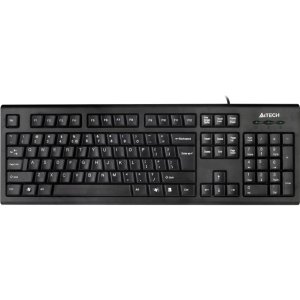
Figure 1: A4tech Natural A Ergonomic Keyboard (KRS-85). This image displays the full layout of the black wired keyboard, highlighting its ergonomic design with A-Shape keys and round keycaps.
2. Opsætning
2.1 Systemkrav
- IBM or Compatible Systems
- Windows 2000 / XP (X64) / 2003 (X64) / Vista
2.2 Tilslutning af tastaturet
- Find en ledig USB-port på din computer.
- Insert the USB connector of the A4tech KRS-85 keyboard firmly into the USB port.
- Dit operativsystem burde automatisk registrere og installere de nødvendige drivere. Denne proces kan tage et par øjeblikke.
- Når installationen er færdig, er tastaturet klar til brug.
3. Betjeningsvejledning
The A4tech Natural A Keyboard is designed for comfortable and efficient typing. Its unique features are intended to enhance your typing experience and reduce strain.
3.1 Nøglefunktioner
- Patented A-Shape Keys: The layout of the keys is designed to align with the natural position of your hands and wrists, promoting a more relaxed posture.
- Round Edged Keycaps: These keycaps provide a smooth and comfortable typing surface.
- Standard layout: The keyboard features a full-size layout including a numeric keypad, function keys (F1-F12), and navigation keys.
3.2 Grundlæggende brug
Use the keyboard as you would any standard computer keyboard for typing, navigating, and executing commands. The ergonomic design is intended to provide comfort during extended use.
4. Vedligeholdelse
Korrekt vedligeholdelse sikrer dit tastaturs levetid og optimale ydeevne.
4.1 Rengøring
- Frakobl tastaturet fra computeren, før du rengør det.
- Brug en blød, fnugfri klud lidt damprengøres med vand eller en mild rengøringsopløsning til at tørre tastaturets overflade af.
- Undgå at bruge skrappe kemikalier, slibende rengøringsmidler eller for meget fugt.
- Brug trykluft til rengøring mellem tasterne for at fjerne støv og snavs.
5. Fejlfinding
If you encounter issues with your A4tech Natural A Keyboard, please refer to the following common solutions.
5.1 Tastaturet reagerer ikke
- Ensure the USB cable is securely connected to a working USB port on your computer. Try a different USB port.
- Genstart din computer.
- Check your computer's Device Manager (Windows) to see if the keyboard is recognized and if there are any driver issues.
5.2 Specific Key Combinations Not Working (e.g., Ctrl-Alt-Del)
- Some users have reported that certain key combinations, such as Ctrl-Alt-Del, may not function as expected on this keyboard with Windows operating systems. This is a known compatibility limitation for some configurations.
- If this issue persists, consider using alternative methods for these functions within your operating system, or consult A4tech support for potential workarounds or driver updates if available.
6. Specifikationer
| Feature | Detalje |
|---|---|
| Produktnavn | Natural_A Rounded Edge Keyboard |
| Modelnummer | KRS-85 |
| Forbindelsesteknologi | Kabel (USB) |
| Tastaturbeskrivelse | Ergonomisk |
| Antal nøgler | 85 |
| Produktdimensioner | 19.69 x 7.87 x 1.97 tommer |
| Varens vægt | 2.2 pund |
| Fabrikant | ERGOGUYS (A4tech Co., Ltd) |
| Dato først tilgængelig | 31. oktober 2013 |
7. Garantioplysninger
The A4tech Natural A Ergonomic Keyboard (KRS-85) comes with a 1 års begrænset garanti fra producenten. Denne garanti dækker materiale- og fabrikationsfejl under normal brug.
Please retain your proof of purchase for warranty claims. For detailed terms and conditions, refer to the warranty documentation provided with your product or contact the manufacturer directly.
8. Support
For further assistance, technical support, or warranty inquiries, please contact the manufacturer or your point of purchase. Ensure you have your product model number (KRS-85) and proof of purchase ready when contacting support.


