Indledning
Thank you for choosing the Quantum QZA4600.4 4-Channel QZA AmpDenne manual indeholder vigtige oplysninger om korrekt installation, betjening og vedligeholdelse af din ampLæs venligst denne manual grundigt, inden du forsøger at installere eller betjene den, for at sikre optimal ydeevne og sikkerhed.
The Quantum QZA4600.4 is designed to deliver high-quality audio performance for your vehicle's sound system. Proper installation and understanding of its features will maximize your listening experience.
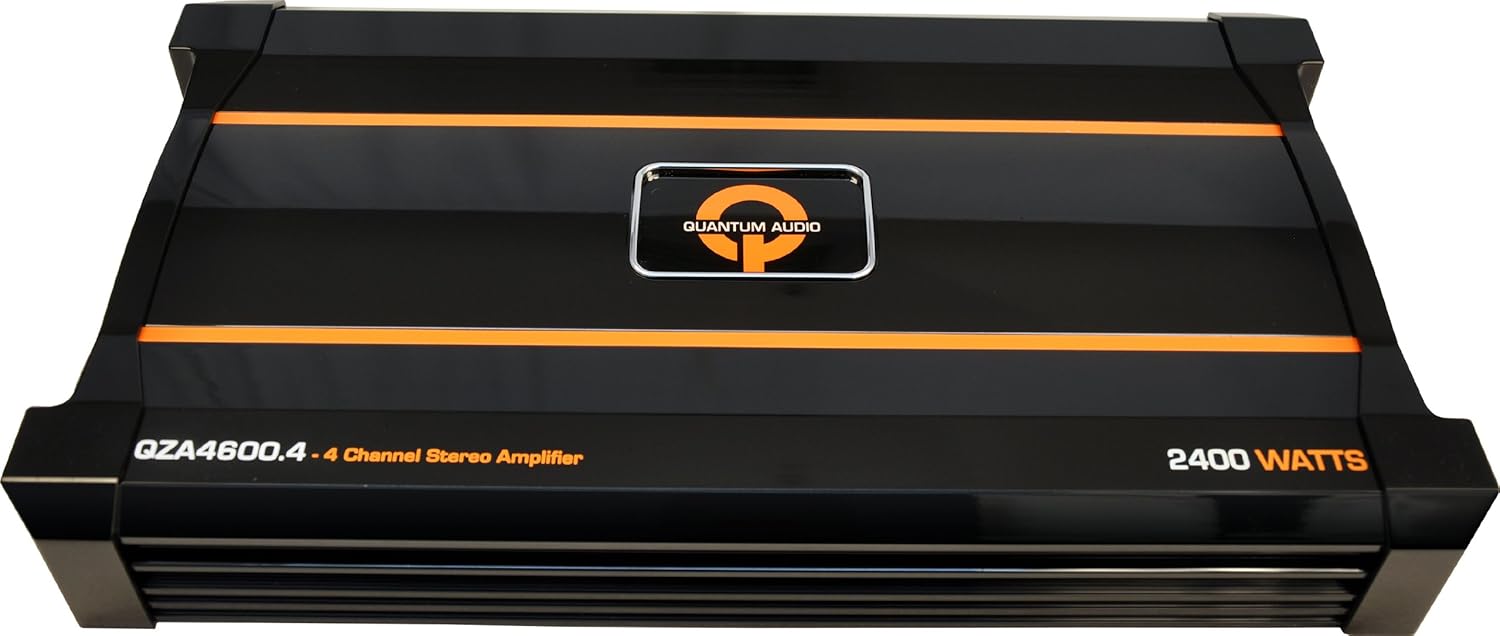
Figur 1: Forside view of the Quantum QZA4600.4 4-Channel QZA Ampløfter, showcasing det er sort casing with orange accents and the Quantum Audio logo.
Sikkerhedsoplysninger
To prevent injury or damage to the amplifier, please observe the following safety precautions:
- Professionel installation anbefales: Installation af bilstereokomponenter kræver erfaring med elektrisk ledningsføring og bilprocedurer. Hvis du er i tvivl, skal du kontakte en kvalificeret fagmand.
- Afbryd batteriet: Frakobl altid bilens negative batteripol, inden du påbegynder elektrisk arbejde, for at undgå kortslutninger.
- Korrekt ledningsføring: Ensure all wiring is correctly connected and insulated to prevent short circuits and electrical hazards. Use appropriate gauge wires for power and ground connections.
- Montering: Monter amplifier securely in a dry, well-ventilated location away from direct sunlight, heat sources, and moisture. Ensure adequate airflow around the ampvarmebeholder til afkøling.
- Sikringsbeskyttelse: Always use an external fuse on the main power cable, located within 18 inches (45 cm) of the battery. The fuse rating should match the amplifers krav.
- Undgå overbelastning: Do not connect speaker loads below the amplifier's minimum impedance rating. Refer to the specifications section.
Nøglefunktioner
The Quantum QZA4600.4 amplifier incorporates several design elements for enhanced performance and reliability:
- QSINK Heat Management System: Designed for efficient heat dissipation, ensuring stable operation and longevity.
- 2 OHM Stereo Stable on 2 and 4 Channel Models: Provides flexibility in speaker configuration and power delivery.
- MOSFET strømforsyning: Utilizes a Metal-Oxide-Semiconductor Field-Effect Transistor power supply for efficient and stable power conversion.
- Variable Input Level Control: Allows precise matching of the amplifier's input sensitivity to the output of your head unit.
- Thermal/Overload/Short Circuit Protection: Integrated protection circuits safeguard the amplifier from potential damage due to excessive heat, current overload, or short circuits.
Installation og opsætning
Proper installation is critical for the performance and safety of your amplifier. It is highly recommended that installation be performed by a qualified car audio professional.
Monteringssted
Vælg et monteringssted, der er:
- Tør og fri for fugt.
- Well-ventilated to allow for proper cooling.
- Secure, preventing movement during vehicle operation.
- Tilgængelig for ledningsføring og justeringer.
- Away from fuel lines, brake lines, and electrical harnesses.
Ledningsforbindelser
All wiring should be routed carefully to avoid pinching, chafing, or interference with vehicle components. Use high-quality connectors and ensure all connections are secure.
- Effekt (B+): Connect a heavy-gauge power cable directly from the positive terminal of the vehicle's battery to the amplifier's B+ terminal. Install an inline fuse holder within 18 inches (45 cm) of the battery.
- Jord (GND): Tilslut et kraftigt jordkabel fra ampForbind GND-terminalen på laderen til en ren, umalet metaloverflade på køretøjets chassis. Sørg for en solid forbindelse med lav modstand.
- Fjernbetjening (REM): Tilslut en fjernbetjeningsledning fra din hovedenheds fjernbetjeningsudgang til amplifier's REM terminal. This wire signals the amplifier to turn on and off with the head unit.
- RCA-indgang: Tilslut RCA-kabler fra din hovedenheds for-amp udgange til ampliferens RCA-indgangsstik.
- Højttaler output: Connect speaker wires from the amplifier's speaker output terminals to your speakers. Observe correct polarity (+ to + and - to -). Refer to the amplifier's specifications for minimum impedance ratings.
Note: Specific wiring diagrams for various configurations (e.g., 2-channel, 4-channel, bridged) are typically provided in the full product manual or can be found through professional car audio resources. Always ensure your speaker impedance matches the amplifiers muligheder.
Betjeningsvejledning
Når amplifier is correctly installed and wired, follow these steps for initial operation:
- Indledende opstart: After all connections are made and checked, reconnect the vehicle's negative battery terminal. Turn on your head unit. The amplifier should power on, indicated by an illuminated power LED.
- Set Gain Control: Start med amplifier's gain control set to minimum. Play a familiar piece of music at a moderate volume level on your head unit (around 75% of maximum). Slowly increase the amplifier's gain control until you hear distortion, then back it off slightly until the sound is clear.
- Adjust Crossover (if applicable): Hvis din amplifier has built-in crossover filters (e.g., Low Pass Filter, High Pass Filter), adjust them according to your speaker type and desired sound. For full-range speakers, a high-pass filter might be used to protect them from low bass. For subwoofers, a low-pass filter is essential.
- Bass Boost (if applicable): Use the bass boost feature sparingly. Excessive bass boost can lead to distortion and potential damage to speakers or the amplivligere.
Note: Fine-tuning the amplifier's settings often requires careful listening and adjustment to achieve the best sound quality for your specific vehicle and speaker setup.
Opretholdelse
The Quantum QZA4600.4 ampLifier er designet til pålidelig drift med minimal vedligeholdelse. Regelmæssige kontroller kan dog bidrage til at sikre dens levetid:
- Rensning: Behold amplifier clean and free of dust and debris. Use a soft, dry cloth to wipe down the exterior. Do not use liquid cleaners or solvents.
- Ventilation: Sørg for, at amplifier's cooling fins are not obstructed. Good airflow is essential for heat dissipation.
- Tilslutningstjek: Periodically inspect all power, ground, remote, and speaker connections to ensure they are secure and free from corrosion. Loose connections can cause performance issues or damage.
- Sikringsinspektion: Hvis amplifier fails to power on, check the inline fuse on the power cable. Replace it only with a fuse of the same type and rating.
Fejlfinding
Hvis du oplever problemer med din amplifier, refer to the following common problems and solutions before seeking professional service:
| Problem | Mulig årsag | Løsning |
|---|---|---|
| Amplifier does not power on (no LED). |
|
|
| Ingen lydudgang. |
|
|
| Forvrænget lyd. |
|
|
| Amplifier overheats (protection mode). |
|
|
If the problem persists after attempting these solutions, contact Quantum customer support or a qualified service technician.
Specifikationer
The following specifications are for the Quantum QZA4600.4 4-Channel QZA Amplivligere:
| Modelnummer | QZA4600.4 |
| Produktdimensioner | 50.8 x 30.48 x 10.16 cm |
| Varens vægt | 5.67 kg |
| Kanaler | 4-kanal |
| Stable Impedance | 2 Ohm Stereo (on 2 and 4 channel models) |
| Strømforsyningstype | MOSFET |
| Beskyttelsesfunktioner | Thermal, Overload, Short Circuit |
Note: All specifications are subject to change without notice. For the most current information, please refer to the official Quantum product page.
Garanti og support
Quantum products are designed and manufactured to the highest quality standards. For information regarding warranty coverage, terms, and conditions, please refer to the warranty card included with your product or visit the official Quantum Audio webwebsted.
For technical support, troubleshooting assistance beyond what is provided in this manual, or service inquiries, please contact Quantum customer support through their official website or authorized service centers. Please have your model number (QZA4600.4) and purchase information ready when contacting support.
Online ressourcer:
- Official Quantum Audio Webwebsted: www.quantumaudio.net (Bemærk: Dette er en pladsholder URL as no official support link was provided in the product data. Please verify the correct URL.)


