1. Introduktion
Thank you for choosing the Chieftec Libra Series LG-01B Mid-Tower ATX PC Case. This manual provides essential information for the proper installation, operation, and maintenance of your new computer chassis. Please read this manual thoroughly before beginning installation to ensure optimal performance and safety.
2. Sikkerhedsoplysninger
Overhold altid følgende sikkerhedsforanstaltninger:
- Ensure the power supply is disconnected from the mains before opening the case or installing components.
- Handle components with care to avoid damage from electrostatic discharge (ESD). Consider using an anti-static wrist strap.
- Hold små dele og værktøj væk fra børn.
- Do not operate the case in environments with excessive dust, moisture, or extreme temperatures.
- Refer to the manuals of your individual components (motherboard, power supply, etc.) for specific installation instructions.
3. Pakkens indhold
Bekræft at alle varer er til stede i pakken:
- Chieftec Libra Series LG-01B PC Case
- Accessory kit (screws, motherboard standoffs, thumb screws)
Note: Power supply unit (PSU) is not included and must be purchased separately.
4. Nøglefunktioner
- Modern and ergonomic design
- Support for mATX and ATX motherboards
- Front panel connectivity: 1x USB 3.0, 2x USB 2.0, Mic-in, Audio-out (HD Audio)
- Tool-less installation for 5.25" optical drives and 3.5" hard drives
- Drive Bays: 2x 5.25" external, 1x 3.5" external, 2x 3.5" internal, 1x 2.5" internal
- Fan preparations: 1x 80/90/120mm (front), 2x 80mm (rear), 2x 120mm (left side panel)
- Maksimal CPU-kølerhøjde: 140 mm
- Maximum VGA card length: 380mm
5. Opsætning og installation
5.1. Åbning af sagen
To access the interior, remove the side panel. Typically, this involves unscrewing two thumb screws at the rear of the case and sliding the panel backward.
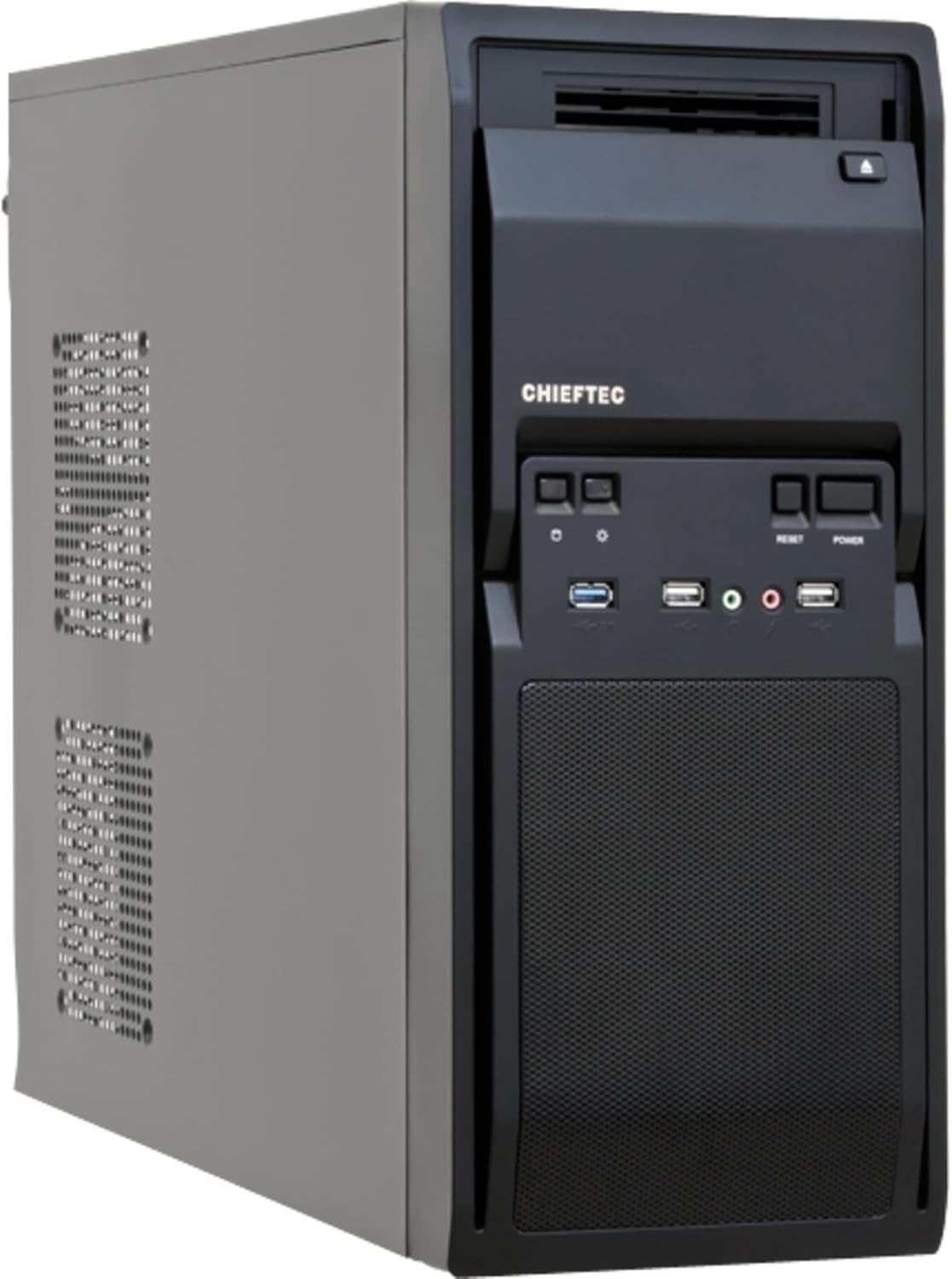
Figur 1: Foran-venstre view of the Chieftec LG-01B PC case, showing the main chassis and front panel design. The side panel is secured by screws at the rear.
5.2. Installation af bundkort
- Install the necessary motherboard standoffs into the motherboard tray according to your motherboard's form factor (ATX or mATX).
- Place the I/O shield into the opening at the rear of the case.
- Juster forsigtigt dit bundkort med afstandsstykkerne og I/O-skjoldet, og fastgør det derefter med skruer.

Figur 2: Interiør view of the Chieftec LG-01B PC case, showing the motherboard tray, drive bays with tool-less clips, and cable management cutouts. The rear I/O shield opening is visible.
5.3. Installation af strømforsyningsenhed (PSU)
Install your ATX power supply into the designated bay at the top rear of the case and secure it with screws from the exterior.

Figur 3: Bagside view of the Chieftec LG-01B PC case, highlighting the power supply mounting area at the top, expansion slots, and fan mounting points.
5.4. Drive Installation (ODD/HDD/SSD)
- 5.25" optiske drev: Remove the front panel bay cover, slide the optical drive into the bay, and secure it using the tool-less clips.
- 3.5" harddiske: Slide the 3.5" HDD into an internal bay and secure it with the tool-less clips.
- 2.5" SSD'er: Install 2.5" SSDs into the dedicated internal 2.5" bay, typically requiring screws.

Figur 4: Forside view of the Chieftec LG-01B PC case with the front panel cover for the I/O ports opened, revealing the 5.25" and 3.5" external drive bays. The USB and audio ports are also visible.
5.5. Tilslutninger på frontpanelet
Connect the front panel cables (USB 3.0, USB 2.0, HD Audio, Power, Reset, HDD LED, Power LED) to the corresponding headers on your motherboard. Refer to your motherboard manual for header locations.
5.6. Expansion Cards (GPU, etc.)
Remove the necessary expansion slot covers at the rear of the case. Insert your expansion card into the PCIe slot on the motherboard and secure it with a screw.
5.7. Kabelforvaltning
Utilize the cable routing cutouts and tie-down points behind the motherboard tray to manage cables for improved airflow and aesthetics.
6. Betjeningsvejledning
Once all components are installed and connected, close the side panel. Connect your monitor, keyboard, mouse, and power cable to the system. Press the power button on the front panel to start your computer.
6.1. Porte på frontpanelet
- USB 3.0-port: Til højhastigheds dataoverførsel med kompatible enheder.
- USB 2.0-porte: Til tilslutning af standard USB-enheder.
- Mic-in Jack: Til tilslutning af mikrofon.
- Audio-out Jack: Til tilslutning af hovedtelefoner eller højttalere.
- Power knap: For at tænde/slukke systemet.
- Nulstil knap: For at genstarte systemet.
7. Vedligeholdelse
Regelmæssig vedligeholdelse er med til at sikre dine pc-komponenters levetid og optimale ydeevne.
- Støvrensning: Periodically clean dust from inside the case, especially from fan filters and heatsinks, using compressed air or a soft brush. Ensure the system is powered off and unplugged before cleaning.
- Kabelstyring: Ensure cables are neatly routed to prevent obstruction of airflow.
- Ventilation: Ensure the case has adequate clearance around its ventilation openings for proper airflow.
8. Fejlfinding
Hvis du støder på problemer, kan du overveje følgende almindelige fejlfindingstrin:
- Systemet tænder ikke:
- Check if the power cable is securely connected to the PSU and the wall outlet.
- Sørg for, at strømforsyningskontakten er i 'ON'-positionen.
- Kontroller, at kablet til tænd/sluk-knappen på frontpanelet er korrekt tilsluttet bundkortets header.
- Ingen displayudgang:
- Ensure the monitor cable is securely connected to the graphics card or motherboard (if using integrated graphics).
- Sæt grafikkortet og RAM-modulerne i igen.
- USB-porte virker ikke:
- Check if the front panel USB cables are correctly connected to the motherboard headers.
- Ensure necessary drivers are installed for your motherboard.
Ved mere komplekse problemer, se i komponentmanualerne eller søg professionel hjælp.
9. Specifikationer
| Model | LG-01B |
| Formfaktor | Mid Tower |
| Bundkort kompatibilitet | ATX, mATX |
| Dimensioner (LxBxH) | 484mm x 180mm x 404mm (with feet +3mm) / 19.06 x 7.09 x 15.91 inches |
| Vægt | 4.5 kg / 9.9 lbs (without PSU) |
| Eksterne drevbåse | 2x 5.25", 1x 3.5" |
| Interne drevbåse | 2x 3.5", 1x 2.5" |
| Frontpanelporte | 1x USB 3.0, 2x USB 2.0, Mic-in, Audio-out (HD Audio) |
| Fan Preparations | Front: 1x 80/90/120mm; Rear: 2x 80mm; Left Side: 2x 120mm |
| Max CPU kølerhøjde | 140 mm |
| Max VGA-kortlængde | 380 mm |
| Materiale tykkelse | 0.6 mm |
10. Garanti og support
The Chieftec Libra Series LG-01B PC case comes with a 24-month warranty from the date of purchase. This warranty covers manufacturing defects. It does not cover damage caused by improper installation, misuse, accidents, modifications, or unauthorized repairs.
For technical support or warranty claims, please contact your retailer or visit the official Chieftec webwebsted for kontaktoplysninger.


