1. Produktet er slutview
The Dell Ultrasharp 1909Wf is a 19-inch widescreen LCD monitor designed for various computing needs. It features a highly adjustable stand, offering swivel, tilt, and height adjustments, including the ability to rotate to a vertical orientation. The monitor also provides multiple connectivity options and integrated USB ports and an SD card reader for enhanced convenience.

Figur 1: Forside view of the Dell Ultrasharp 1909Wf monitor, showcasing its widescreen display and Dell branding.
2. Opsætningsvejledning
2.1 Udpakning og montering
- Tag forsigtigt skærmen og dens komponenter ud af emballagen.
- Place the monitor base on a stable surface.
- Attach the monitor panel to the stand, ensuring it is securely fastened.
2.2 Tilslutning af skærmen
The Dell 1909Wf monitor offers various ports for connecting to your computer and other devices.
- Strømtilslutning: Connect the standard power cable to the monitor's power input and then to a power outlet.
- Videoindgang: Use either a VGA or DVI-D cable to connect the monitor to your computer's video output port.
- USB-porte: The monitor includes USB ports for connecting peripherals.
- SD-kortlæser: An integrated SD card reader is available for convenient data transfer.
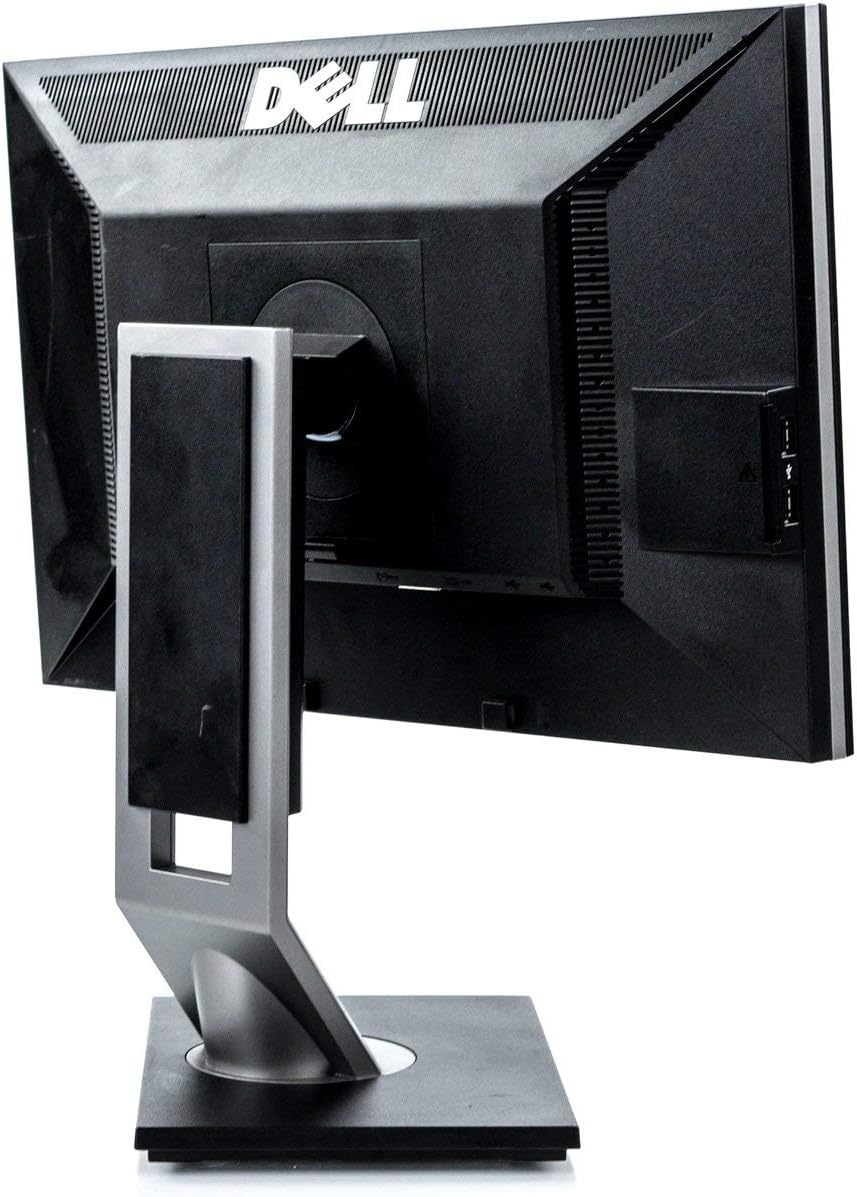
Figur 2: Bagside view of the monitor, highlighting the various input and output ports for connectivity.

Figur 3: Side view of the monitor, showing the conveniently located USB ports and SD card reader.
3. Betjening af monitoren
3.1 Tænd/sluk
Press the power button located on the front bezel of the monitor to turn it on or off. The power indicator light will illuminate when the monitor is active.
3.2 Justering af displayet
The Dell 1909Wf monitor features a versatile stand for optimal viewkomfort:
- Højdejustering: Skub eller træk forsigtigt skærmpanelet op eller ned for at justere dets højde.
- Justering af hældning: Tilt the monitor screen forwards or backwards to find your preferred viewvinkel.
- Drejejustering: Drej skærmen til venstre eller højre på dens base.
- Pivot (Vertical Orientation): The monitor can be rotated 90 degrees to a vertical (portrait) orientation. This is useful for viewing long documents or web sider.

Figur 4: Forside view of the monitor with the screen off, showing the Dell logo and control buttons.
3.3 On-Screen Display (OSD) menu
Use the buttons on the front bezel to navigate the On-Screen Display (OSD) menu. This menu allows you to adjust various display settings such as brightness, contrast, color temperature, and input source selection.
4. Vedligeholdelse
4.1 Rengøring af monitoren
- Sluk altid skærmen og tag stikket ud, inden du rengør den.
- Brug let en blød, fnugfri klud dampened with water or a non-abrasive screen cleaner to wipe the screen and exterior surfaces.
- Avoid using harsh chemicals, solvents, or abrasive materials, as these can damage the monitor's finish.
4.2 Generel pleje
- Hold skærmen væk fra direkte sollys, varmekilder og overdreven fugtighed.
- Sørg for korrekt ventilation omkring skærmen for at forhindre overophedning.
- Undgå at placere tunge genstande på skærmen eller dens kabler.
5. Fejlfinding
This section addresses common issues you might encounter with your Dell Ultrasharp 1909Wf monitor.
5.1 Intet billede på skærmen
- Check if the monitor is powered on and the power indicator light is active.
- Verify that the video cable (VGA or DVI-D) is securely connected to both the monitor and the computer.
- Sørg for, at den korrekte inputkilde er valgt via OSD-menuen.
- Test the monitor with another computer or a different video cable if possible.
5.2 Problemer med billedkvalitet
- Adjust brightness and contrast settings through the OSD menu.
- Ensure the display resolution on your computer is set to the monitor's native resolution (e.g., 2048 x 1536 or FHD 1080p, depending on specific configuration).
- Kontroller for fysisk skade på skærmen eller videokablet.
5.3 Stand Adjustment Issues
- Ensure no cables are obstructing the movement of the stand.
- Apply gentle, even pressure when adjusting height, tilt, or swivel.
6. Specifikationer
| Feature | Detalje |
|---|---|
| Mærke | Dell |
| Modelnummer | 1909Wf |
| Skærmstørrelse | 19 tommer |
| Aspektforhold | 16:9 |
| Opløsning | 2048 x 1536, FHD 1080p |
| Billedlysstyrke | 300 cd/m² |
| Kontrastforhold | 1000:1 |
| Svartid | 5 ms |
| Farveskala | 83 % |
| Beskrivelse af skærmoverfladen | Blank |
| Forbindelse | VGA, DVI-D, USB Ports, SD Card Reader |
| Strømforbrug | Average 25 watts (2 Cold Cathode Fluorescent Lamps) |
| Varens vægt | 12.25 pund |
| Pakkedimensioner | 18.23 x 18.07 x 7.01 tommer |
| Fabrikant | Dell-computere |
7. Garanti og support
For warranty information and technical support, please refer to the documentation provided with your purchase or visit the official Dell support webwebstedet. Du kan også finde yderligere ressourcer og kontaktoplysninger på Dell Store on Amazon.


