1. Introduktion
This manual provides detailed instructions for the safe and efficient operation of your Majestic AH239K Portable 2.1 Multimedia Audio System. Please read this manual thoroughly before using the device and retain it for future reference.
The Majestic AH239K is a versatile portable audio system featuring an internal rechargeable battery, two side speakers, and a front subwoofer. It includes AUX, USB, and SD card inputs for various audio sources, two microphone inputs, and comes with one microphone and a remote control. Enjoy FM PLL radio with 50 preset stations and an LED display for clear function visualization.
2. Sikkerhedsoplysninger
- Strømkilde: Use only the specified power adapter for charging. Ensure the voltage er kompatibel.
- Vand og fugt: Do not expose the device to rain, moisture, or immerse it in water.
- Ventilation: Sørg for tilstrækkelig ventilation. Bloker ikke ventilationsåbninger.
- Varme: Hold enheden væk fra varmekilder såsom radiatorer, varmeapparater, komfurer eller andre apparater, der producerer varme.
- Rensning: Unplug the device before cleaning. Use a dry, soft cloth. Do not use liquid cleaners or aerosol cleaners.
- Service: Forsøg ikke selv at servicere dette produkt. Overlad al service til kvalificeret servicepersonale.
- Batterisikkerhed: The device contains a rechargeable battery. Do not expose to excessive heat or direct sunlight. Dispose of batteries according to local regulations.
3. Pakkens indhold
Kontroller venligst, at alle varer er til stede:
- Majestic AH239K Micro Hi-Fi System
- 1 x mikrofon
- 1 x fjernbetjening
- Brugervejledning (dette dokument)
- Strømadapter (kan variere afhængigt af region)
4. Produktet er slutview
Familiarize yourself with the components and controls of your Majestic AH239K system.

Figur 4.1: Front view of the Majestic AH239K Micro Hi-Fi System, showing the main speaker, LED display, control knobs, and microphone inputs. The included microphone is positioned next to the unit.

Figur 4.2: Side view of the Majestic AH239K, highlighting one of the two side speakers.

Figur 4.3: Bag view of the Majestic AH239K, displaying the battery compartment cover and additional ports.
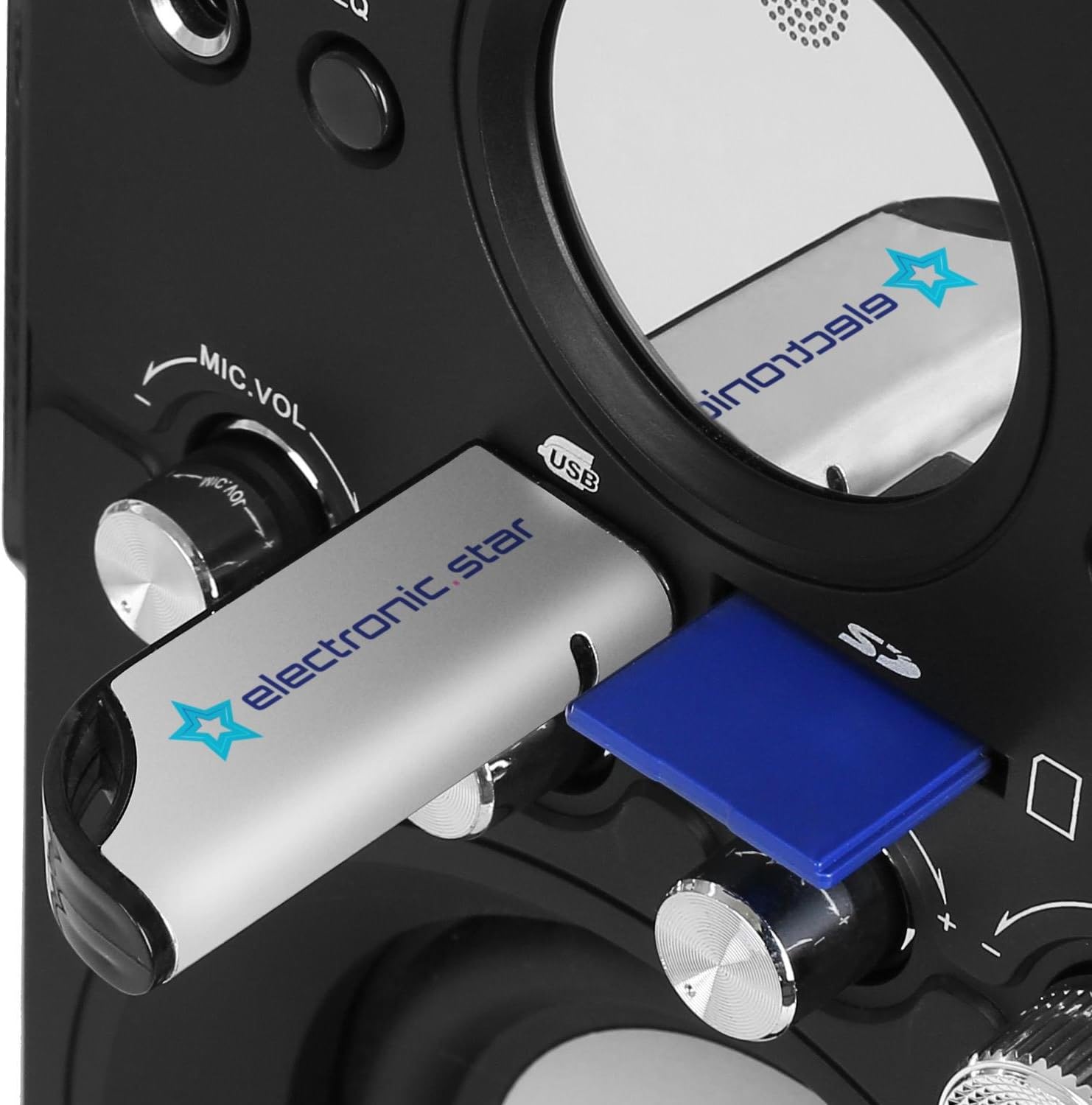
Figur 4.4: Nærbillede view of the USB port and SD card slot, located on the front panel for easy access.

Figur 4.5: The included remote control, featuring power, mode, EQ, playback, volume, mute, and number buttons.
Kontrol på frontpanelet:
- MIC1 / MIC2: Mikrofonindgangsstik.
- KØRSELSVEJLEDNING: Button to switch between input sources (FM, AUX, USB, SD).
- EQ: Equalizer preset button.
- Play/Pause (►/‖): Afspil eller sæt lydafspilning på pause.
- Forrige (◀◀): Skip to the previous track/station.
- Næste (►►): Skip to the next track/station.
- MIC.VOL: Microphone volume control knob.
- BAS: Bass level adjustment knob.
- DISKANT: Treble level adjustment knob.
- BIND: Master volumen kontrol knap.
- USB-port: Til tilslutning af USB-flashdrev.
- SD-kortplads: Til isætning af SD-hukommelseskort.
- LED display: Viser aktuel tilstand, spornummer, frekvens osv.
5. Opsætning
5.1. Opladning af batteriet
- Connect the power adapter to the DC IN port on the rear of the unit.
- Sæt strømadapteren i en passende stikkontakt.
- The LED display will indicate charging status. Allow sufficient time for a full charge before first use (typically 3-4 hours).
5.2. Tænd/sluk
- To power on the unit, rotate the VOLUME knob clockwise until it clicks and the LED display illuminates.
- To power off, rotate the VOLUME knob counter-clockwise until it clicks and the LED display turns off.
5.3. Tilslutning af mikrofonen
- Insert the microphone cable into either the MIC1 or MIC2 jack on the front panel.
- Ensure the microphone is switched to the 'ON' position if it has a power switch.
6. Betjeningsvejledning
6.1. Valg af inputtilstand
Tryk på MODE button repeatedly to cycle through available input sources: FM Radio, AUX, USB, and SD. The current mode will be displayed on the LED screen.
6.2. USB/SD-kortafspilning
- Sæt et USB-flashdrev i USB-porten eller et SD-kort i SD-kortstikket.
- Systemet skifter automatisk til USB- eller SD-tilstand og begynder at afspille kompatibel lyd. files (e.g., MP3). If not, press the MODE knappen for at vælge den korrekte kilde.
- Brug Afspil/pause, Tidligere, og Næste knapper til at styre afspilning.
6.3. Betjening af FM-radio
- Skift til FM-tilstand ved hjælp af MODE knap.
- To auto-scan and save stations: Press and hold the Afspil/pause button. The system will scan for available FM stations and save them as presets.
- To manually tune or select presets: Use the Tidligere og Næste buttons to navigate through saved stations or fine-tune the frequency.
6.4. AUX -indgang
- Connect an external audio device (e.g., smartphone, tablet, CD player) to the AUX IN port using a 3.5mm audio cable (not included).
- Skift til AUX-tilstand ved hjælp af MODE knap.
- Styr afspilning fra din tilsluttede eksterne enhed.
6.5. Microphone Use
- Once the microphone is connected (as per Section 5.3), adjust the microphone volume using the MIC.VOL knop.
- Juster mastervolumen ved hjælp af BIND knop.
6.6. Brug af fjernbetjeningen
Fjernbetjeningen giver nem adgang til forskellige funktioner:
- Power knap: Tænder eller slukker for enheden.
- KØRSELSVEJLEDNING: Skifter inputkilder.
- EQ: Skifter gennem equalizer-forudindstillinger.
- Afspilningskontroller: Play/Pause, Previous, Next.
- VOL+ / VOL-: Justerer masterlydstyrken.
- Stum: Slår lyden fra eller til.
- Nummerknapper (0-9): For direct track selection in USB/SD mode or direct station selection in FM mode.
7. Vedligeholdelse
7.1. Rensning
- Always unplug the device from the power source before cleaning.
- Brug en blød, tør klud til at tørre de udvendige overflader af.
- Brug ikke slibende rengøringsmidler, voks eller opløsningsmidler, da de kan beskadige finishen.
7.2. Batteripleje
- For at forlænge batteriets levetid bør du undgå at aflade batteriet helt ofte.
- If the unit will not be used for an extended period, charge it periodically (e.g., every 3 months) to maintain battery health.
8. Fejlfinding
| Problem | Mulig årsag | Løsning |
|---|---|---|
| Ingen strøm | Battery is discharged; Power adapter not connected; Unit is off. | Charge the battery; Connect the power adapter; Turn the VOLUME knob clockwise to power on. |
| Ingen lyd | Volume is too low; Mute function is active; Incorrect input mode selected; External device not playing. | Increase VOLUME; Press Mute on remote; Select correct MODE; Ensure external device is playing. |
| Mikrofon virker ikke | Microphone not connected properly; MIC.VOL is too low; Microphone is off. | Ensure microphone is fully plugged in; Increase MIC.VOL; Switch microphone to 'ON'. |
| Problemer med USB/SD-afspilning | Ukorrekt file format; USB/SD card not inserted correctly; Corrupted files. | Sikre files are MP3 format; Re-insert USB/SD card; Try a different USB/SD card or files. |
| Fjernbetjening virker ikke | Battery is dead or inserted incorrectly; Obstruction between remote and unit; Remote too far. | Replace remote battery; Remove obstructions; Operate remote within range. |
9. Specifikationer
- Modelnummer: 100239_BK
- Mærke: Majestætisk
- Produktmål (L x B x H): 14.5 x 16.2 x 26.5 cm
- Produktvægt: 2.5 kg
- Forbindelse teknologi: AUX, USB
- Connector Type: Hjælpeudstyr, USB
- Kompatible enheder: USB, SD, CD players, MP3 players
- Antal kanaler: 2.1 (Two side speakers, one front subwoofer)
- Farve: Sort
- UPC: 8000191808050
10. Garanti og support
This product is covered by a standard manufacturer's warranty. For specific warranty terms and conditions, please refer to the warranty card included with your purchase or contact your retailer.
For technical support or service inquiries, please contact the Majestic customer service department through your point of purchase or visit the official Majestic webwebsted for kontaktoplysninger.


