Indledning
The JJC SR-RC4 Wired Remote Commander is designed to provide convenient remote control for Zoom H4N and H4N Pro audio recorders. This device allows users to manage various recording functions from a distance, effectively minimizing handling noise and improving recording quality. It serves as a direct replacement for the Zoom RC4.
Nøglefunktioner omfatter:
- Remote control for recording start/stop.
- Playback control: play, stop, fast forward, and reverse.
- Adjustment of recording levels.
- Input source switching.
- Wired connection to minimize interference and ensure reliable operation.
- Plug-and-play functionality, requiring no batteries.
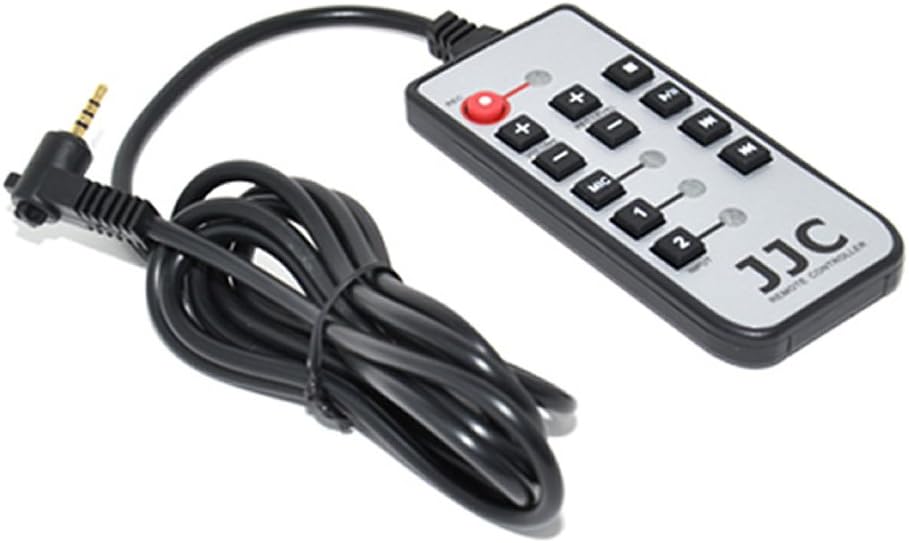
Image: The JJC SR-RC4 Wired Remote Commander, showing its compact design and control buttons.
Opsætning
The JJC SR-RC4 is designed for simple, plug-and-play operation. No complex installation or battery insertion is required.
- Find fjernporten: Identify the remote control input port on your Zoom H4N or H4N Pro audio recorder. This is typically a 3.5mm jack labeled 'REMOTE'.
- Tilslut fjernbetjeningen: Insert the 3.5mm plug of the JJC SR-RC4 cable firmly into the remote port of your Zoom H4N/H4N Pro.
- Bekræft forbindelsen: Once connected, the remote commander is ready for use. The recorder should recognize the remote automatically.

Image: The JJC SR-RC4 Remote Commander connected to a Zoom H4N recorder, illustrating the cable connection.
Betjeningsvejledning
The SR-RC4 provides intuitive control over your Zoom H4N/H4N Pro recorder. Refer to the buttons on the remote for their specific functions:
- REC (Red Button): Press once to start recording. Press again to stop recording.
- Afspil/pause knap: Press to start playback of a recorded file. Press again to pause playback.
- Stop-knap: Tryk for at stoppe afspilning eller optagelse.
- Fast Forward (>>): During playback, press to fast forward through the audio.
- Rewind (<<): During playback, press to rewind through the audio.
- Lydstyrke op (+): Increases the playback volume or recording input level.
- Skrue ned for lyden (-): Decreases the playback volume or recording input level.
- MIC 1 / MIC 2 Buttons: These buttons allow you to switch between different input sources or adjust settings related to microphone inputs 1 and 2, depending on the H4N's current mode and configuration. Consult your Zoom H4N manual for specific input control details.
Using the remote helps to minimize physical interaction with the recorder, thereby reducing unwanted handling noise during critical recording sessions.

Image: The JJC SR-RC4 Remote Commander positioned for use alongside a Zoom H4N recorder.
Opretholdelse
Proper care and maintenance will ensure the longevity and reliable performance of your JJC SR-RC4 Remote Commander.
- Rensning: Use a soft, dry cloth to clean the surface of the remote. For stubborn dirt, a slightly damp en klud med mild sæbe kan bruges, efterfulgt af øjeblikkelig tørring. Undgå barske kemikalier eller slibende materialer.
- Opbevaring: Opbevar fjernbetjeningen et køligt, tørt sted væk fra direkte sollys, ekstreme temperaturer og høj luftfugtighed.
- Kabelpleje: Avoid sharply bending or twisting the cable. When storing, coil the cable loosely to prevent damage to the internal wires. Do not pull the cable to disconnect the remote; always grasp the plug.
- Miljøbeskyttelse: Protect the remote from dust, dirt, and moisture. Do not expose it to rain or immerse it in liquids.
Fejlfinding
If you encounter issues with your JJC SR-RC4 Remote Commander, try the following troubleshooting steps:
- Fjernbetjeningen reagerer ikke:
- Ensure the 3.5mm plug is fully and securely inserted into the remote port of your Zoom H4N/H4N Pro.
- Kontroller kablet for synlige skader eller knæk.
- Verify that your Zoom H4N/H4N Pro is powered on and functioning correctly.
- Specifikke knapper virker ikke:
- Confirm that the recorder is in a mode where the button's function is applicable (e.g., playback buttons won't work if no file is selected for playback).
- Tryk forsigtigt på knappen flere gange for at sikre, at den ikke sidder fast.
- Intermitterende forbindelse:
- Remove and re-insert the plug to ensure a clean connection.
- Avoid excessive movement of the cable during operation.
If these steps do not resolve the issue, please contact JJC customer support for further assistance.
Specifikationer
| Model | SR-RC4 |
| Produktdimensioner | 5.7 x 3.5 x 1.9 tommer (cirka) |
| Varens vægt | 2.24 ounce |
| Forbindelsesteknologi | Kablet |
| Kompatible enheder | Zoom H4N, Zoom H4N Pro |
| Kabellængde | Cirka 59 tommer (1.5 meter) |
Garanti og support
For warranty information or technical support regarding your JJC SR-RC4 Wired Remote Commander, please refer to the documentation included with your purchase or visit the official JJC website. You may also contact JJC customer service directly for assistance with product inquiries, troubleshooting, or replacement parts.
For de mest opdaterede kontaktoplysninger, besøg venligst JJC Butik på Amazon eller producentens officielle webwebsted.


