1.Overview
The Tycon Power Systems POE/Solar charge controllers are designed with dual inputs to charge batteries from both a Power over Ethernet (PoE) source and a secondary source such as solar panels. This dual input capability ensures redundancy and maintains 100% uptime for critical applications. The solar input is prioritized, minimizing grid power usage when sunlight is available. These controllers feature built-in PoE inserters, and the 12V battery model includes an integral DC to DC converter that delivers 48V at the PoE output port. They are equipped with comprehensive electronic protections against short circuits, reverse current, overvoltage, overcharge, and over-discharge. The integrated over-discharge protection and low self-consumption significantly extend battery life. Five LED indicators provide quick visual status updates for PoE source, solar panel input, battery charging status, load output activation, and reverse battery polarity warnings. Connections for solar and battery are via 4-wire terminals (up to 10AWG), while PoE input and output utilize 2 RJ45 shielded connectors. The controllers are protected by a standard replaceable fuse.
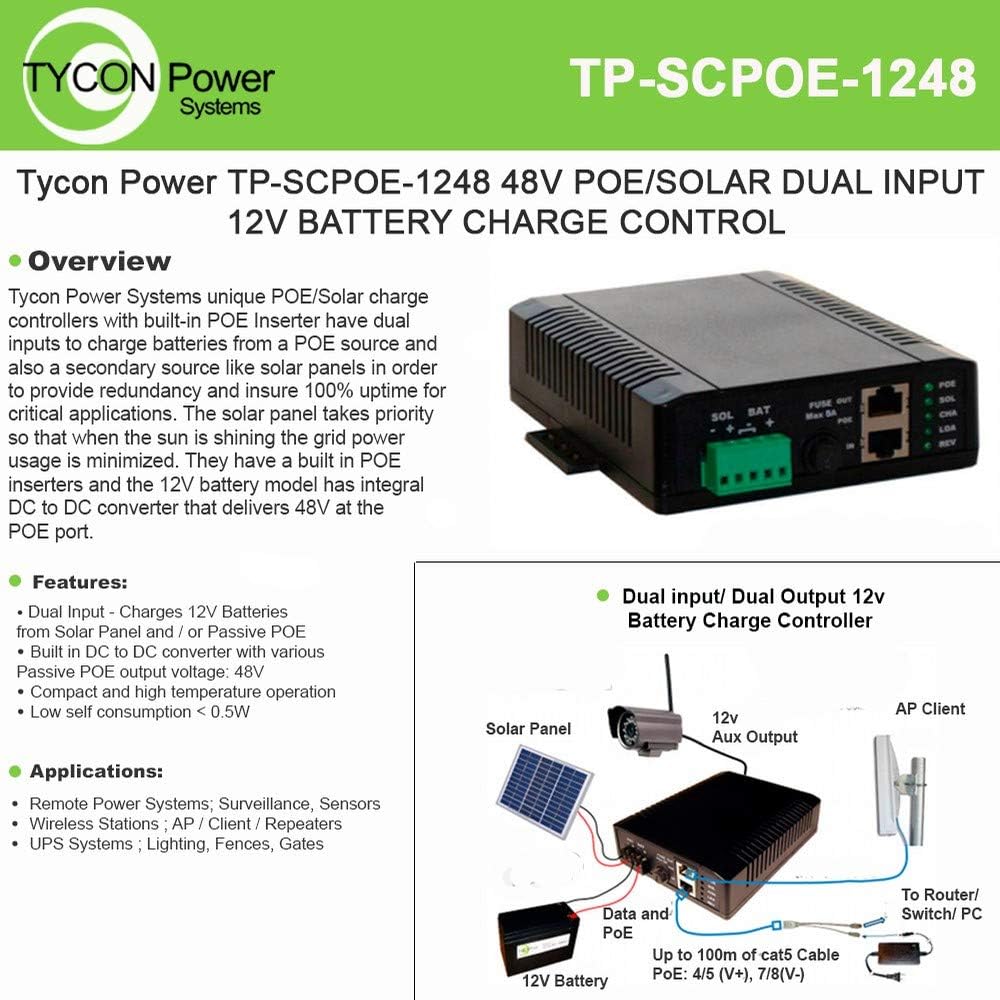
Figure 1: Tycon Power TP-SCPOE-1248 Solar Controller with its various ports and a typical connection diagram showing solar panel, 12V battery, PoE data input, 12V auxiliary output, and PoE output to an AP client or router/switch/PC.
2. Funktioner
- Dual Input Charging: Charges 12V batteries from both solar panels (up to 8A) and/or passive PoE sources (18-57V, up to 2.5A).
- Integrated DC to DC Converter: Provides 48V 0.375A passive PoE output.
- Hjælpeudgang: Features a secondary wire terminal 12V 1.5A output.
- Electronic Protections: Full protection against short circuit, reverse current, overvoltage, overcharge, and over-discharge.
- Low Self-Consumption: Ensures battery is not over-discharged, extending battery life. Self-consumption is less than 0.5W.
- LED-indikatorer: Five LEDs for quick status checks: PoE input, Solar input, Battery charging, Load output, and Reverse polarity warning.
- Kompakt design: Suitable for high-temperature operation.
- Montering: Includes DIN Rail Mounting Kit.
3. Ansøgninger
The TP-SCPOE-1248 is versatile and suitable for a variety of remote power and surveillance applications:
- Remote Power Systems
- Surveillance and Sensor Systems
- Wireless Stations (AP / Client / Repeaters)
- Uninterruptible Power Supply (UPS) Systems
- Lighting, Fences, and Gates
4. Opsætning og installation
Follow these steps for proper installation of your TP-SCPOE-1248 controller:
- Montering: Securely mount the controller using the included DIN Rail Mounting Kit in a suitable location, protected from direct weather exposure if outdoors.
- Batteriforbindelse: Connect a 12V battery to the "BAT" terminals. Ensure correct polarity (+ to + and - to -). A reverse polarity warning LED will illuminate if connected incorrectly. Use wire size up to 10AWG.
- Solpaneltilslutning: Connect your solar panel (12V, up to 8A) to the "SOL" terminals. Observe correct polarity. The solar panel takes priority for charging when sunlight is available.
- PoE Input Connection: Connect the passive PoE input source (18-57V, up to 2.5A) to the "PoE IN" RJ45 port. The PoE pinout is 4,5V+ and 7,8V-.
- PoE Output Connection: Connect your PoE-powered device (e.g., AP client, IP camera) to the "PoE OUT" RJ45 port. This port provides 48V 0.375A passive PoE.
- Auxiliary Output Connection (Optional): If needed, connect a 12V device to the secondary wire terminal 12V 1.5A output.
- Installation af sikringer: Ensure the standard replaceable fuse is correctly installed in its holder.
- Kabelstyring: Route all cables neatly and securely to prevent accidental disconnections or damage.
Vigtig: Always ensure power sources are disconnected before making or changing any connections to prevent damage to the unit or connected devices.
5. Betjeningsvejledning
The TP-SCPOE-1248 operates automatically once connected. Monitor the LED indicators for status information:
- PoE LED: Illuminates when power is being supplied by the PoE input source.
- SOL LED: Illuminates when power is being supplied by the solar panel.
- CHA LED: Angiver, at batteriet oplades i øjeblikket.
- LOA LED: Indicates that the load output (PoE OUT and 12V Aux) is active.
- REV LED: A warning indicator that illuminates if the battery is connected with reverse polarity. Immediately disconnect and correct the battery connection if this LED is on.
The controller prioritizes solar power when available to minimize grid power usage. It automatically manages battery charging and discharge to protect the battery and connected loads.
6. Vedligeholdelse
The TP-SCPOE-1248 is designed for low maintenance. However, periodic checks are recommended:
- Sikringskontrol: The controller is protected by a standard replaceable fuse. If the unit stops functioning, check and replace the fuse if blown. Always replace with a fuse of the same type and rating.
- Forbindelser: Periodically inspect all wire and RJ45 connections to ensure they are secure and free from corrosion or damage.
- Rensning: Keep the unit free from dust and debris. Use a soft, dry cloth for cleaning. Do not use liquid cleaners.
- Batteriets sundhed: Regularly check the health of your connected 12V battery as per the battery manufacturer's recommendations.
7. Fejlfinding
| Problem | Mulig årsag | Løsning |
|---|---|---|
| Ingen lysdioder lyser. | No power input (solar or PoE) or blown fuse. | Check solar panel connection and output. Check PoE input connection and power. Inspect and replace fuse if necessary. |
| REV LED is lit. | Battery connected with reverse polarity. | Immediately disconnect the battery and reconnect with correct polarity (+ to +, - to -). |
| Battery not charging (CHA LED off). | Insufficient solar input, no PoE input, or battery is already full. | Ensure solar panel is receiving adequate sunlight. Verify PoE input is active. Check battery voltage; if full, charging will stop. |
| PoE output device not powered. | LOA LED off, low battery voltage, or device issue. | Check if LOA LED is on. Ensure battery is sufficiently charged. Verify the PoE output device is compatible and functioning correctly. Check PoE output cable. |
8. Specifikationer
| Attribut | Værdi |
|---|---|
| Modelnummer | TP-SCPOE-1248 |
| Fabrikant | Tycon systemer |
| Solar Input Current (Max) | 8A |
| PoE Input VoltagRækkevidde | 18-57V |
| PoE Input Current (Max) | 2.5A |
| PoE Output Voltage | 48V |
| PoE udgangsstrøm | 0.375A (30W) |
| Hjælpeudgang | 12V 1.5A |
| Batteri Voltage | 12V |
| Type opladningsport | RJ45 shielded connectors (PoE), 4-wire terminals (Solar/Battery) |
| Varens vægt | 14.9 ounce |
| Pakkedimensioner | 10.51 x 6.46 x 1.85 tommer |
| Farve | Sort |
| Display Type | LED |
9. Garanti og support
For warranty information and technical support, please contact Tycon Systems directly. Refer to their official webwebstedet eller produktemballagen for de seneste kontaktoplysninger og garantivilkår.
Fabrikant: Tycon systemer
For yderligere hjælp, besøg produktside på Amazon.com.


