Indledning
This manual provides comprehensive instructions for the setup, operation, and maintenance of your AT&T CL2940 Corded Phone. The CL2940 is designed for ease of use, featuring a large tilt display, extra-large buttons, a speakerphone, Caller ID/Call Waiting, and Audio Assist functionality. Please read this manual thoroughly to ensure proper use and to take full advantage of all available features.
Pakkens indhold
Sørg for, at alle varer er til stede i din pakke:
- AT&T CL2940 Corded Speakerphone with Large Display
- Håndsæt
- Oprullet håndsætledning
- Telefonledning
- Brugervejledning (dette dokument)
- Note: 4 AA batteries (not included) are required for Caller ID functionality.
Produkt overview
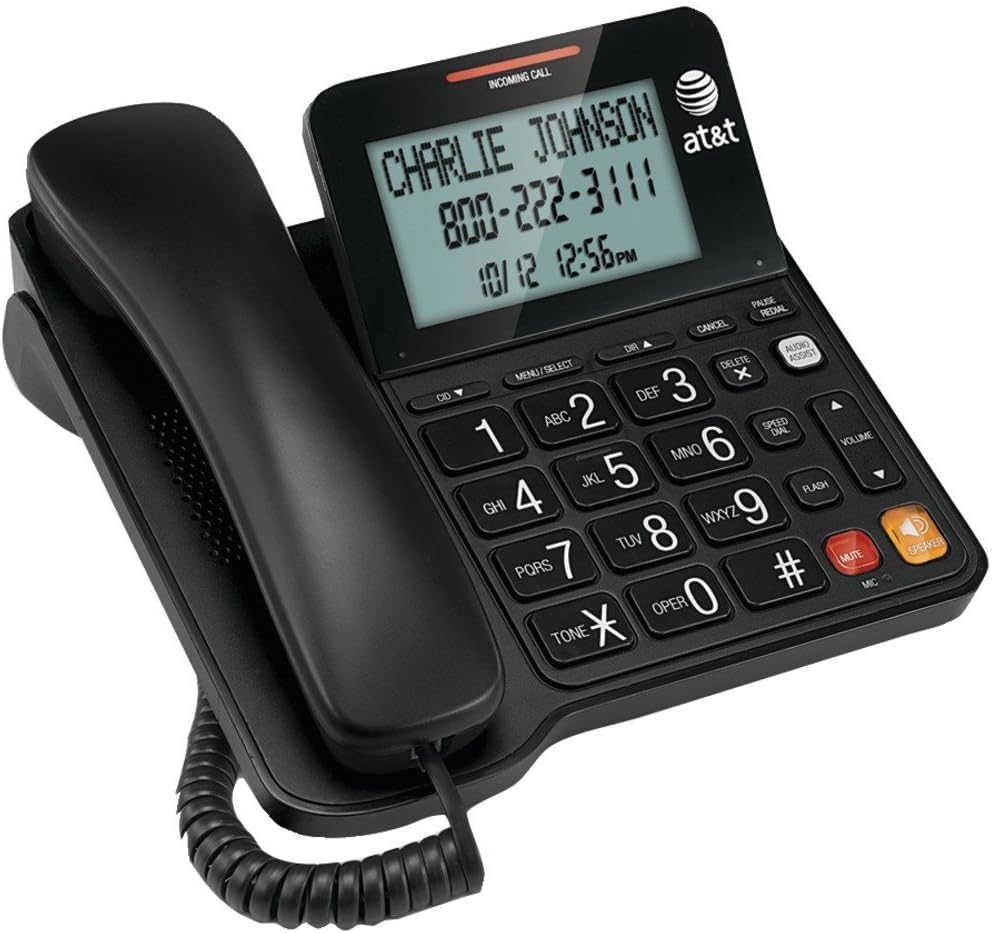
Figure 1: AT&T CL2940 Corded Phone
This image shows the AT&T CL2940 corded phone in black. The phone features a large, easy-to-read tilt display that currently shows an incoming call from 'CHARLIE JOHNSON' with the number '800-222-3111' and the date/time '10/12 12:56PM'. The large, clearly labeled buttons are visible on the keypad, including number keys, navigation buttons, and dedicated buttons for Speaker, Mute, Volume, and Audio Assist. The coiled handset cord connects the handset to the main unit.
Key Features and Components:
- Extra-Large Tilt Display: Provides clear visibility of Caller ID information, time, and menu options.
- Extra-Large Buttons: Designet til nem opkald og navigation.
- Højttalertelefon: Muliggør håndfri samtaler.
- Audio Assist: Enhances audio clarity during calls.
- Vis nummer/Opkald venter: Displays incoming caller information and manages multiple calls.
- Telefonbogsmappe: Gemmer op til 25 navne og numre.
- Hurtigopkald: 10-number speed dial for frequently called contacts.
- Extra-Loud Ringer: Adjustable ringer volume for clear alerts.
- Vægmonteret: Can be placed on a desk or mounted on a wall.
Opsætning
1. Tilslutning af telefonen
- Connect one end of the coiled handset cord to the handset and the other end to the jack labeled HÅNDTELEFON on the side of the phone base.
- Connect one end of the telephone line cord to the jack labeled LINE on the back of the phone base.
- Tilslut den anden ende af telefonledningen til et telefonstik i væggen.
2. Installing Batteries (for Caller ID/Display)
The phone operates without AC power for basic calling functions. However, to enable the Caller ID display and other display-dependent features, 4 AA batteries (not included) are required.
- Locate the battery compartment on the underside of the phone base.
- Åbn batterirummets dæksel.
- Isæt 4 AA-batterier, og overhold den korrekte polaritet (+ og -) som angivet inde i batterirummet.
- Sæt batterirummets dæksel på igen.
3. Vægmontering (valgfrit)
The CL2940 can be mounted on a wall to save desk space. Ensure you have a standard wall plate with two pins spaced appropriately.
- Remove the desk stand if attached.
- Align the two keyhole slots on the back of the phone with the wall plate pins.
- Slide the phone downwards to secure it in place.
Betjeningsvejledning
Foretag et opkald
- Løft håndsættet, eller tryk på HØJTTALER knap.
- Indtast det ønskede telefonnummer ved hjælp af tastaturet.
- For at afslutte opkaldet skal du placere håndsættet tilbage i holderen eller trykke på HØJTTALER knappen igen.
Modtagelse af et opkald
- Når telefonen ringer, skal du løfte røret eller trykke på HØJTTALER knappen for at svare.
- For at afslutte opkaldet skal du placere håndsættet tilbage i holderen eller trykke på HØJTTALER knap.
Brug af højttalertelefonen
- For at aktivere højttalertelefonen under et opkald skal du trykke på HØJTTALER knap.
- To switch back to the handset, pick up the handset.
- To end a speakerphone call, press the HØJTTALER knappen igen.
Vis nummer og opkald venter
- When an incoming call is received, the caller's name and number will appear on the display (requires battery installation and subscription to Caller ID service).
- Brug CID ▼ og DIR ▲ buttons to scroll through the Caller ID log.
- If you subscribe to Call Waiting, a tone will indicate a second incoming call. Press BLITZ for at skifte mellem opkald.
Phonebook and Speed Dial
The phone allows you to store frequently called numbers for quick access.
- Programming Phonebook Entries: Refer to the detailed instructions in the full user manual for programming names and numbers into the 25-entry phonebook.
- Brug af hurtigopkald: Tryk på HURTIGOPKALD button, then the corresponding number (0-9) for the stored entry.
Audio Assist
Tryk på AUDIO ASSIST button during a call to temporarily boost the audio volume and clarity, making conversations easier to hear.
Lydstyrkekontrol og mute
- Bind: Brug VOLUME ▲/▼ buttons to adjust the listening volume during a call (for both handset and speakerphone).
- Stum: Tryk på STUM button to temporarily silence your microphone during a call. The other party will not hear you, but you can still hear them. Press STUM igen for at genoptage talen.
Opretholdelse
Rengøring af telefonen
To keep your phone in good condition, periodically wipe it with a soft, slightly damp cloth. Avoid using harsh chemicals or abrasive cleaners, as these can damage the phone's finish or electronic components.
Udskiftning af batteri
If the Caller ID display becomes dim or unresponsive, it may be time to replace the 4 AA batteries. Follow the battery installation steps outlined in the "Setup" section.
Fejlfinding
If you experience issues with your AT&T CL2940 phone, try the following common troubleshooting steps:
- Ingen klartone:
- Sørg for, at telefonledningen er korrekt tilsluttet til både telefonen og vægstikket.
- Test the wall jack with another working phone to confirm the line is active.
- Opkalds-id vises ikke:
- Verify that 4 AA batteries are correctly installed in the battery compartment.
- Check if your telephone service provider offers Caller ID service and that it is activated on your line.
- Udskift gamle batterier med nye.
- Dårlig lydkvalitet:
- Juster lydstyrken ved hjælp af BIND knapper.
- Sørg for, at håndsættets ledning er korrekt tilsluttet.
- If using the speakerphone, ensure you are within a reasonable distance from the microphone.
- Try activating the AUDIO ASSIST funktion.
- Knapper reagerer ikke:
- Ensure the phone is connected to a live telephone line.
- If the issue persists, try disconnecting the phone from the wall jack for a few minutes, then reconnecting it.
For more detailed troubleshooting or persistent issues, please refer to the full product support documentation or contact AT&T customer service.
Specifikationer
| Mærke | AT&T |
| Modelnummer | CL2940 |
| Telefontype | ledning |
| Farve | Sort |
| Produktdimensioner | 7.9 x 8.8 x 3.7 tommer |
| Varens vægt | 1 pund |
| Strømkilde | Telephone Line Powered (Batteries for Caller ID/Display) |
| Batterier påkrævet | 4 AA batteries (for Caller ID/Display, not included) |
| Fabrikant | Vtech |
| Funktioner | Caller ID/Call Waiting, Speakerphone, Audio Assist, Extra-Large Tilt Display, Extra-Large Buttons, Extra-Loud Ringer, 10-Number Speed Dial, 25-Name/Number Phonebook |
Garanti og support
Your AT&T CL2940 Corded Phone is manufactured by Vtech. For warranty information and customer support, please refer to the documentation included with your purchase or visit the official AT&T or Vtech support websites. Keep your purchase receipt as proof of purchase.
For assistance, you may contact AT&T customer service directly.


