Indledning
The Korg TMR-50 is a versatile device designed to assist musicians in improving their pitch and rhythm. It integrates a tuner, metronome, and recorder into a single compact unit. These three functions can be used independently or simultaneously, offering comprehensive support for practice and performance. The TMR-50 also features high-quality linear PCM recording, allowing up to 100 tracks to be stored, and a USB port for easy data transfer to a computer. With its built-in microphone, speaker, and various rhythm variations, the TMR-50 is an essential tool for any musician.
Sikkerhedsforanstaltninger
- Do not expose the unit to extreme temperatures, direct sunlight, high humidity, or dusty environments.
- Undgå at tabe enheden eller udsætte den for kraftige stød.
- Forsøg ikke at skille enheden ad eller ændre den. Overlad al service til kvalificeret personale.
- Brug kun den angivne batteritype (AAA), og sørg for korrekt polaritet under installationen.
- Fjern batterierne, hvis enheden ikke skal bruges i længere tid, for at forhindre lækage.
- Keep the unit away from sources of strong electromagnetic interference.
Pakkens indhold
Sørg venligst for, at alle følgende varer er til stede i din pakke:
- Korg TMR-50 Tuner Metronome Recorder unit
- 2 x AAA batteries (for initial use)
- Brugervejledning (dette dokument)
Delnavne og funktioner
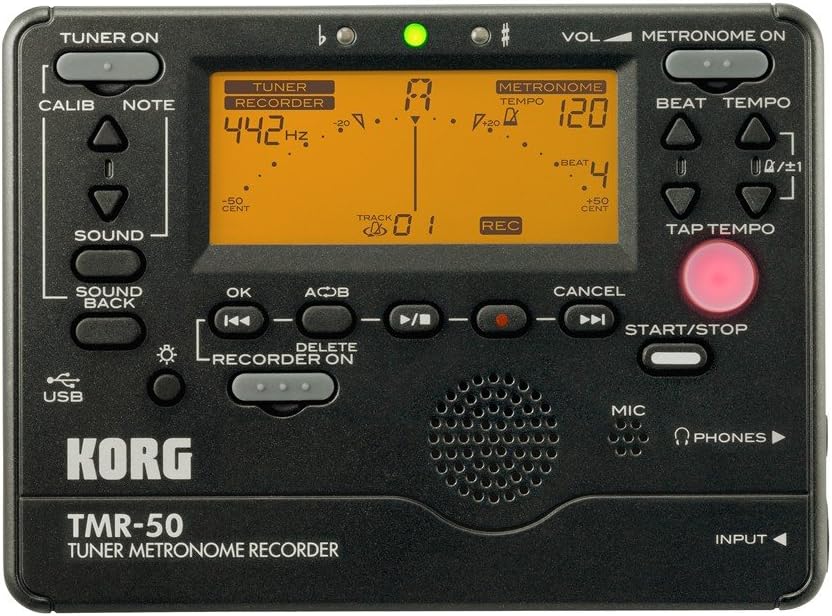
Figur 1: Frontpanel overview of the Korg TMR-50, showing all controls and the display.
Tuner kontrol
- TUNER ON Button: Activates or deactivates the tuner function.
- CALIB-knap: Adjusts the calibration frequency (standard is 440Hz, often adjustable to 442Hz as shown).
- NOTE Buttons (Up/Down Arrows): Selects the target note for tuning.
- LYD-knap: Activates the Sound Out function, which outputs a reference tone from the internal speaker.
- SOUND BACK Button: Engages the Sound Back function, allowing the unit to detect the input pitch and output the closest correct pitch for comparison.
Metronom kontrol
- METRONOME ON Button: Activates or deactivates the metronome function.
- VOL (Volume) Slider: Adjusts the output volume of the metronome and other audio.
- BEAT Buttons (Up/Down Arrows): Adjusts the number of beats per measure.
- TEMPO Buttons (Up/Down Arrows): Adjusts the metronome tempo in beats per minute (BPM).
- TAP TEMPO knap: Allows you to set the tempo by tapping the button in time with the desired beat.
Recorder Controls
- RECORDER ON Button: Activates the recorder function.
- REC Button (Red Dot): Initiates recording when the recorder is active.
- OK knap: Bekræfter valg eller handlinger.
- Rewind/Fast Forward Buttons (Double Arrows): Navigates through recorded tracks or within a track.
- Play/Pause Button (Triangle/Two Vertical Bars): Starts or pauses playback of a recorded track.
- Stopknap (Firkantet): Stopper afspilning eller optagelse.
- A<->B Button: Sets a loop playback region within a recorded track.
- SLET-knap: Deletes selected recorded tracks.
- START/STOP knap: A general control for starting and stopping various functions, including recording and metronome.
Display og indikatorer
- LCD-skærm: Shows tuning information (note, cent deviation, calibration), metronome tempo and beat, and recorder track number and status.
- Flat (b) / Sharp (#) Indicators: Lights up to indicate if the detected pitch is flat or sharp.
- Grønt indikatorlys: Illuminates when the detected pitch is in tune.
Input/Output and Other Features
- MIC (Mikrofon): Built-in microphone for recording and tuning.
- PHONES (Headphone Jack): Output for connecting headphones.
- INPUT Jack: Input for connecting an external microphone or instrument pickup.
- USB-port: For connecting to a computer to transfer recorded data.
- Højttaler: Built-in speaker for metronome clicks, reference tones, and playback.
Opsætning
Installation af batteri
- Åbn batteridækslet på bagsiden af enheden.
- Isæt to (2) AAA-batterier, og sørg for korrekt polaritet (+/-) som angivet i batterirummet.
- Luk batterirummets dæksel forsvarligt.
Tænd/sluk
- For at tænde skal du trykke på og holde nede TUNER ON or METRONOME ON knap i cirka et sekund.
- For at slukke, skal du trykke på og holde nede TUNER ON or METRONOME ON button again for approximately one second. The unit will also automatically power off after a period of inactivity to conserve battery life.
Operating the Tuner
- Tryk på TUNER ON button to activate the tuner. The display will show tuning information.
- Adjust the calibration frequency using the CALIB button if needed. The default is typically 440Hz, but can be set to 442Hz or other values.
- Play a single note on your instrument. The TMR-50 will detect the pitch via its built-in microphone or an external input.
- Observe the display:
- The note name will be displayed.
- The meter indicates pitch deviation. Adjust your instrument until the meter is centered and the green indicator light illuminates.
- The 'b' (flat) or '#' (sharp) indicators will light up if the pitch is significantly off.
- Brug SUND button to output a reference pitch for ear training.
- Engager SOUND BACK function to hear the closest correct pitch while you play, aiding in intonation practice.
Operating the Metronome
- Tryk på METRONOME ON knappen for at aktivere metronomen.
- Juster tempoet ved hjælp af TEMPO Up/Down arrow buttons. The tempo range is typically from 30 to 252 BPM.
- Set the desired beat pattern using the SLÅ Up/Down arrow buttons. This controls the number of beats per measure and rhythm variations.
- Alternativt kan du bruge TAP TEMPO button to set the tempo by tapping it at your desired speed.
- Tryk på START/STOP button to begin or end the metronome click.
- Adjust the metronome volume using the BIND skyderen.
Betjening af optageren
- Tryk på RECORDER ON button to enable the recording function.
- Tryk på for at starte optagelsen REC button (red dot). The display will show "REC" and the track number.
- Play your instrument or sing into the built-in microphone.
- Tryk på for at stoppe optagelsen STOP knap.
- To play back a recorded track:
- Use the Rewind/Fast Forward buttons to select the desired track.
- Tryk på Afspil/pause knappen for at starte afspilning.
- Tryk på STOP knappen for at afslutte afspilningen.
- To use the Loop Play function:
- Tryk på under afspilning A<->B button at the desired start point (A).
- Tryk på A<->B button again at the desired end point (B). The section between A and B will loop continuously.
- Trykke A<->B a third time to cancel the loop.
- To delete a track:
- Select the track you wish to delete using the Rewind/Fast Forward buttons.
- Tryk på SLET knap.
- Confirm the deletion if prompted (usually by pressing OK).
Tilslutning til en computer
The TMR-50 features a USB port for transferring recorded audio files to your computer. Connect the unit to your computer using a standard USB cable (not included). The device should appear as a removable storage device, allowing you to copy files. Refer to your computer's operating system instructions for managing external storage devices.
Opretholdelse
- Rengør enheden med en blød, tør klud. Brug ikke slibende rengøringsmidler eller opløsningsmidler.
- Hvis enheden ikke skal bruges i en længere periode, skal batterierne fjernes for at forhindre lækage og korrosion.
- Opbevar enheden et køligt, tørt sted væk fra direkte sollys.
Fejlfinding
| Problem | Mulig årsag/løsning |
|---|---|
| Enheden tænder ikke. |
|
| Tuner is inaccurate or unresponsive. |
|
| Metronome sound is too low or absent. |
|
| Recorded audio is too quiet or distorted. |
|
| Kan ikke overføre filevia USB. |
|
Specifikationer
| Feature | Detalje |
|---|---|
| Modelnummer | TMR-50 |
| Dimensioner (B x D x H) | 5.2 x 5.2 x 1.3 tommer (ca.) |
| Vægt | 6.7 ounces (excluding batteries) |
| Strømforsyning | 2 x AAA batterier |
| Tuner rækkevidde | A0 (27.50 Hz) – C8 (4186.01 Hz) |
| Kalibreringsområde | A4 = 410 – 480 Hz |
| Metronom Tempo Range | 30 – 252 BPM |
| Metronome Beat Settings | 0 – 9 beats, duplets, triplets, quadruplets, etc. (15 variations) |
| Optagelsesformat | Linear PCM (WAV) |
| Optagelseskapacitet | Up to 100 tracks (approx. 20 minutes total) |
| Input/Output | INPUT jack (mono), PHONES jack (stereo), USB port (Type B) |
Garanti og support
For warranty information and technical support, please refer to the warranty card included with your product or visit the official Korg website. Keep your proof of purchase for warranty claims. Do not attempt to repair the unit yourself, as this may void your warranty.
Official Korg Webwebsted: www.korg.com


