Indledning
This manual provides detailed instructions for the safe and effective use of your CATEYE Omni 3 Bike Safety Light. The Omni 3 is designed to enhance your visibility and safety during cycling, featuring omni-directional technology for 360-degree visibility. Its low-profile design and triple-LED performance make it an essential accessory for any cyclist.

Image: The CATEYE Omni 3 Bike Safety Light, a compact red light with its flexible mounting bracket attached.
Produktegenskaber
- Omni Directional Visibility: Equipped with a translucent design and 3 wide-angle, high-power LEDs, providing 360-degree visibility for enhanced safety on the road.
- Flere lystilstande: Offers three distinct light modes: constant, flashing, and rapid, allowing you to choose the best visibility setting for your riding conditions.
- Forlænget batterilevetid: Designed for long-lasting performance, providing up to 150 hours of battery life, ensuring reliable illumination for extended rides.
- Easy and Secure Mounting: Features the FlexTight Bracket for quick and tool-free mounting, adjustment, and removal of the light from your bicycle.

Image: A diagram illustrating the Omni 3's 360-degree light dispersion, highlighting its wide visibility angles.
Pakkens indhold
Når du åbner pakken, skal du kontrollere, at alle følgende varer er inkluderet:
- CATEYE Omni 3 Light (Rear)
- 2 x AAA batterier
- SP-11 FlexTight™ Mount
- Clip (for alternative mounting)
- Afstandsstykke af gummi

Image: All components included in the CATEYE Omni 3 package: the light unit, FlexTight mount, clip, and two AAA batteries.
Opsætning og installation
1. Batteriinstallation
- Locate the battery compartment cover on the back of the light unit.
- Using a coin or a flat tool, gently pry open the cover from the designated notch.
- Isæt de to AAA-batterier, og sørg for at polerne (+/-) vender korrekt som angivet i batterirummet.
- Carefully close the battery cover, ensuring it snaps securely into place to maintain the light's waterproof integrity. Ensure the rubber gasket is properly seated.
2. Montering af lyset
The Omni 3 offers versatile mounting options:
Using the FlexTight™ Bracket (Recommended for Seatpost)
- Attach the FlexTight™ bracket to your bicycle's seatpost. The bracket is designed to fit various diameters (12-32mm). Use the included rubber spacer if needed for a snug fit.
- Tighten the thumb screw on the bracket until it is firmly secured to the seatpost. Do not overtighten.
- Slide the Omni 3 light onto the bracket until it clicks into place. Ensure it is securely latched.
- Adjust the angle of the light as needed for optimal rear visibility. The light can swivel up and down.
Using the Clip (for Bags, Clothing, etc.)
- Attach the clip accessory to the back of the Omni 3 light.
- Securely clip the light onto a bag, backpack, clothing, or other suitable location that provides clear rear visibility.

Image: The CATEYE Omni 3 light securely mounted on a bicycle's seatpost, demonstrating its position for rear visibility.
Operation
The Omni 3 features a single button for all operations.
- Tænd/sluk: Press and hold the power button for approximately 1 second to turn the light ON or OFF.
- Skift tilstande: While the light is ON, press the power button briefly to cycle through the three available modes:
- Konstant
- Blinker
- Hurtig
- Mode Hukommelse: The light will remember the last used mode when turned off and will resume in that mode when turned back on.
For optimal visibility, especially in low-light conditions or at night, ensure the light is positioned clearly and unobstructed.
Opretholdelse
Udskiftning af batteri
When the light dims or stops functioning, it's time to replace the batteries. Follow the battery installation steps outlined in the "Setup and Installation" section. Always use fresh AAA alkaline batteries for best performance and battery life.
Rensning
Wipe the light and lens with a soft, damp cloth. Do not use abrasive cleaners or solvents, as these can damage the plastic housing or lens. Ensure the battery compartment is dry before closing it.
Opbevaring
If storing the light for an extended period, remove the batteries to prevent leakage and potential damage to the unit.
Fejlfinding
| Problem | Mulig årsag | Løsning |
|---|---|---|
| Lyset tændes ikke. | Døde eller forkert installerede batterier. | Udskift batterierne med nye AAA-batterier, og sørg for at polariteten vender korrekt. |
| Light dims or flickers. | Lav batteristrøm. | Udskift batterierne. |
| Lyset falder af monteringen. | Light not securely clicked into bracket; bracket not tight enough. | Ensure light clicks firmly into place. Tighten FlexTight™ bracket thumb screw. |
| Vand inde i lyset. | Battery cover not properly sealed. | Open battery cover, dry interior, ensure rubber gasket is correctly seated, and close securely. |
Specifikationer
- Modelnavn: OMNI 3
- Varenummer: CA475TL135
- Lyskilde: 3 lysdioder
- Strømkilde: 2 x AAA batterier
- Run Time (Approximate):
- Constant: Up to 150 hours
- Flashing: Up to 200 hours
- Rapid: Up to 200 hours
- Vandtæthed: IP67 (Vandtæt)
- Monteringstype: FlexTight™ Bracket (SP-11), Clip
- Applicable Diameter: 12-32 mm (for FlexTight™ Mount)
- Materiale: Plast
- Varens vægt: Cirka 0.2 pund (90 gram)
- Dimensioner (LxBxH): Cirka 5.9 x 1.45 x 3.97 tommer
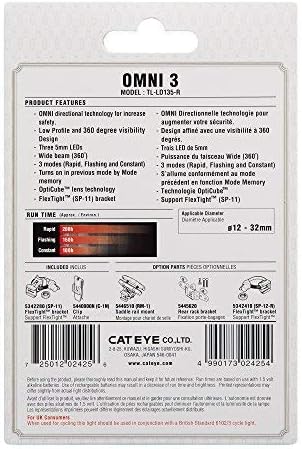
Image: The rear of the Omni 3 retail packaging, displaying detailed product features, run times, and applicable mounting diameters.
Garanti og support
The CATEYE Omni 3 Bike Safety Light comes with a 2 års producentgaranti. Denne garanti dækker fejl i materialer og udførelse ved normal brug.
For warranty claims, technical support, or further inquiries, please contact CATEYE customer service through their official webwebstedet eller forhandleren, hvor produktet blev købt. Gem venligst din købsbevis for at validere garantien.
For more information, visit the official CATEYE webwebsted: www.cateye.com


