1. Introduktion
The Venstar Platinum Slimline Thermostat (Model CECOMINOD058081) is designed to provide reliable and flexible temperature control for your HVAC system. This programmable thermostat offers a range of features to enhance comfort and energy efficiency in your home or office.
Key features include 1-day programming with up to 4 time periods, auto changeover, compatibility with 2-stage varme og 1-stage cool systems (gas/electric, heat pump, electric & hydronic heat), and a large, easy-to-read backlit display. It also includes service indicators for filter and UV light maintenance.

Figur 1: Front view of the Venstar Platinum Slimline Thermostat, showing the display screen and control buttons.
2. Sikkerhedsoplysninger
Please read all instructions carefully before installing or operating this thermostat. Failure to follow these instructions could result in property damage, personal injury, or death.
- Strømafbrydelse: Always disconnect power to the heating and cooling system before installing or servicing the thermostat.
- Professionel installation: Installationen skal udføres af en kvalificeret HVAC-tekniker.
- Voltage Krav: This thermostat requires a 24V "common" wire (C-wire) for operation. It is not suitable for 2-wire, heat-only applications.
- Elektriske farer: Do not touch uninsulated wires or terminals.
3. Opsætning og installation
3.1 Tjekliste før installation
- Ensure power to the HVAC system is OFF at the circuit breaker.
- Gather necessary tools: screwdriver, wire strippers, drill (if needed for mounting).
- Confirm your system has a 24V common wire (C-wire) available at the thermostat location.
3.2 Montering af termostaten
The Venstar Platinum Slimline Thermostat is designed for wall mounting.
- Carefully separate the thermostat faceplate from the backplate.
- Position the backplate on the wall where the old thermostat was located, ensuring wires can pass through the opening.
- Mark the mounting holes and drill pilot holes if necessary.
- Fastgør bagpladen til væggen ved hjælp af de medfølgende skruer.
3.3 Ledningsinstruktioner
Proper wiring is crucial for the thermostat's functionality. This model requires a 24V common wire (C-wire). Refer to the wiring diagram on the backplate and the image below.
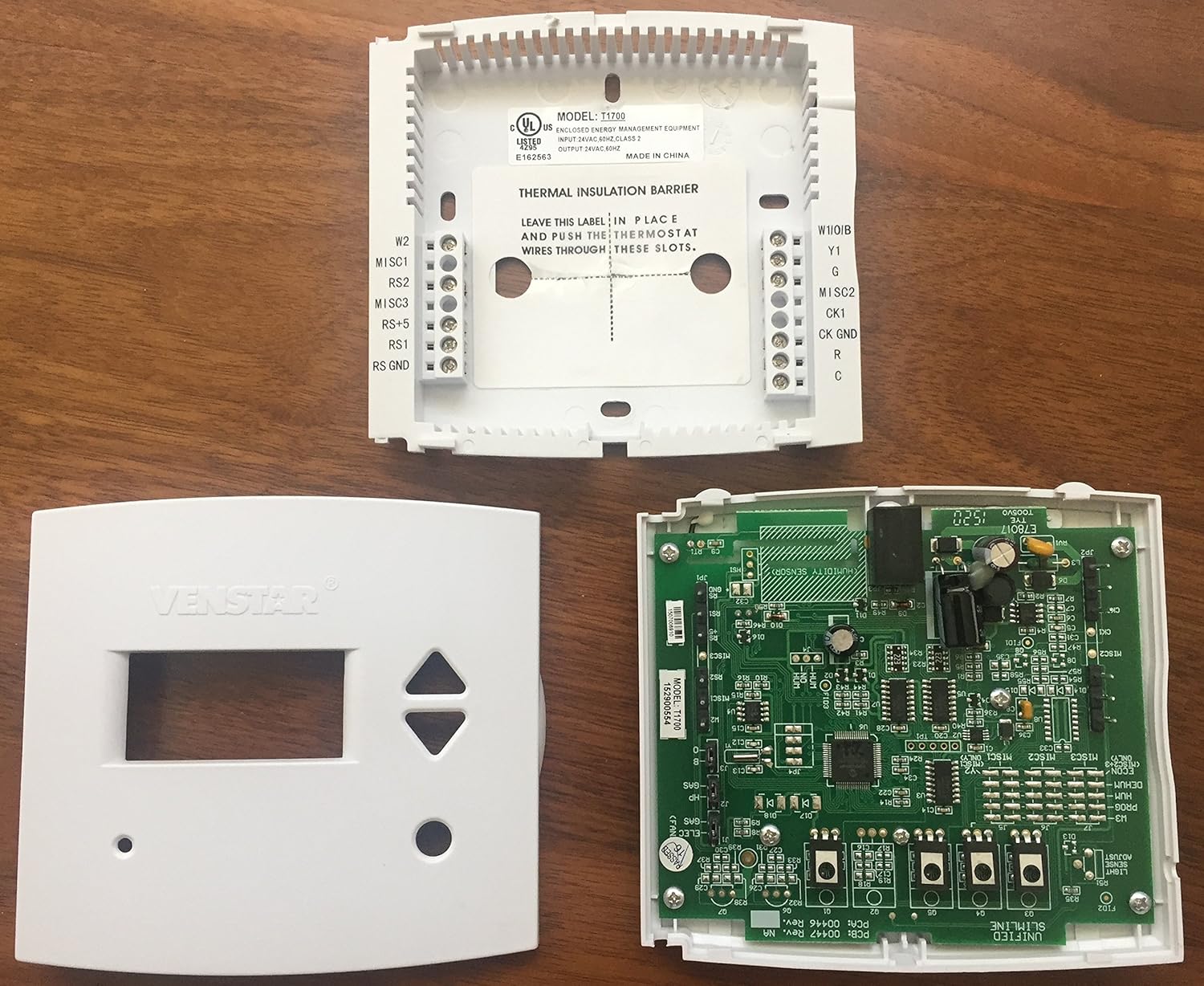
Figur 2: Indre view of the Venstar Platinum Slimline Thermostat, showing the backplate with wiring terminals and the circuit board.
- Match the wires from your HVAC system to the corresponding terminals on the thermostat backplate. Common terminals include R (24V power), C (24V common), G (fan), Y (cooling), W (heating).
- Sørg for, at alle forbindelser er sikre.
- Once wiring is complete, carefully attach the thermostat faceplate to the backplate.
3.4 Første opstart
After installation, restore power to your HVAC system at the circuit breaker. The thermostat display should illuminate. Follow any on-screen prompts for initial setup, such as setting the current time and day.
4. Betjeningsvejledning
4.1 Grundlæggende betjening
- Indstilling af temperatur: Brug UP og NED piletasterne til at justere den ønskede temperatur.
- Valg af tilstand: Brug MODE button (if present, or cycle through options) to select between Heat, Cool, Auto, or Off. The thermostat supports auto changeover.
- Ventilatorkontrol: Brug FAN button to select between Auto (fan runs only when heating/cooling) or On (fan runs continuously).
4.2 Programmeringsplan
The thermostat features 1-day programming with up to 4 time periods. This allows you to set different temperatures for different times of the day (e.g., Wake, Day, Evening, Sleep).
- Access the programming menu (refer to the on-screen prompts or specific button combinations, typically a "Program" or "Set" button).
- Set the start time and desired temperature for each of the 4 periods.
- Gem programindstillingerne.
The thermostat can also be configured for non-programmable operation if a fixed temperature is preferred.
4.3 Vis information
The large backlit display shows the current room temperature, set temperature, operating mode, and fan status. LED indicators glow green for cooling and red for heating.
- Fahrenheit eller Celsius: The display can be configured to show temperatures in Fahrenheit (°F) or Celsius (°C). Consult the advanced settings menu for this option.
4.4 Tastaturlås
The thermostat features a keypad lock function to prevent unauthorized changes to settings. Refer to the advanced settings or specific button sequence in the full manual for activation and deactivation.
5. Vedligeholdelse
5.1 Rengøring af termostaten
For at rengøre termostaten skal du forsigtigt tørre ydersiden af med en blød klud.amp klud. Brug ikke slibende rengøringsmidler eller opløsningsmidler. Sørg for, at der ikke trænger fugt ind i de indvendige komponenter.
5.2 Service Indicators
The thermostat includes indicators for service reminders:
- Service Filter: An indicator will appear when it's time to check or replace your HVAC system's air filter.
- UV lys: If your system includes a UV light, an indicator will signal when it requires service or replacement.
Follow your HVAC system manufacturer's guidelines for filter and UV light maintenance. Reset the indicators after performing the service.
6. Fejlfinding
| Problem | Mulig årsag | Løsning |
|---|---|---|
| Termostatdisplayet er tomt. | No power to the thermostat; C-wire not connected or faulty. | Check circuit breaker for HVAC system. Ensure 24V C-wire is properly connected to the thermostat. Consult a qualified technician. |
| Systemet reagerer ikke på termostatindstillinger. | Forkert ledningsføring; forkert systemtilstand; sikkerhedsspærre. | Verify wiring connections. Ensure thermostat is in the correct mode (Heat/Cool/Auto). Wait a few minutes for system safety lockout to reset. |
| Temperature varies significantly from setpoint. | System cycling issues; thermostat placement; system deadband setting. | Ensure thermostat is not in direct sunlight or near heat sources/drafts. Some systems have a "deadband" (temperature differential) before activating. Consult advanced settings or a technician if variance is excessive. |
| Service Filter/UV Light indicator remains on after service. | Indikatoren er ikke nulstillet. | Refer to the thermostat's advanced settings or specific button sequence to reset the service indicator. |
For issues not listed here or if troubleshooting steps do not resolve the problem, please contact a qualified HVAC professional or Venstar customer support.
7. Specifikationer
| Feature | Detalje |
|---|---|
| Mærke | Venstar |
| Modelnummer | CECOMINOD058081 (T1700) |
| Produktdimensioner | 6.25 x 4.63 x 2 tommer |
| Varens vægt | 10.5 ounce |
| Voltage | 24 volt |
| Controller type | Tryk knap |
| Speciel funktion | Programmerbar |
| Forbindelsesteknologi | Kablet |
| Display Type | Baggrundsbelyst |
| Monteringstype | Vægmontering |
| Strømkilde | Elektrisk med ledning |
| Kompatibilitet | 2-stage varme, 1-stage cool (gas/electric, heat pump, electric & hydronic heat) |
8. Garanti og support
For information om produktgarantien henvises til den dokumentation, der fulgte med dit køb, eller besøg den officielle Venstar-side. webwebsted.
For technical support, troubleshooting assistance, or to inquire about replacement parts, please contact Venstar customer service directly.
Venstar Officiel Webwebsted: www.venstar.com


