1. Introduktion
This manual provides detailed instructions for the installation, operation, and maintenance of your Gewiss GW10701 Programmable Thermostat. This device is designed to control heating and air conditioning systems, allowing you to manage room temperature efficiently and comfortably. Please read this manual thoroughly before installation and use to ensure proper functionality and safety.
2. Sikkerhedsoplysninger
Overhold altid følgende sikkerhedsforanstaltninger for at forhindre personskade eller beskadigelse af enheden:
- Installation bør kun udføres af kvalificeret personale i overensstemmelse med lokale el-forskrifter og -regler.
- Disconnect power to the heating/cooling system at the main circuit breaker before installing or servicing the thermostat.
- Udsæt ikke termostaten for vand eller for høj luftfugtighed.
- Brug kun den angivne batteritype, og sørg for korrekt polaritet under installationen.
- Keep batteries out of reach of children. Do not dispose of batteries in fire.
- Do not attempt to open or repair the thermostat yourself. Contact qualified service personnel.
3. Produktet er slutview
The Gewiss GW10701 is a wall-mounted programmable thermostat featuring an LCD display and intuitive controls for temperature management.
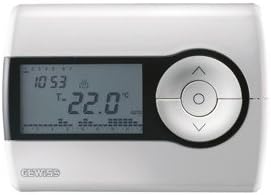
Figur 1: Front view of the Gewiss GW10701 Thermostat. It features a clear LCD screen displaying time and temperature, alongside a circular control panel with directional buttons and a central confirmation button for easy navigation and setting adjustments.
3.1. komponenter
- LCD-skærm: Shows current time, temperature, operating mode, and programming settings.
- Kontrolknapper: Typically include UP/DOWN arrows for temperature adjustment, MODE button for selecting operating modes (e.g., Heat, Cool, Auto, Off), and a SET/PROG button for accessing programming menus. (Note: Specific button functions may vary slightly; refer to on-screen prompts.)
- Batterirum: Located on the rear or side, houses the power supply batteries.
- Monteringsplade: For secure wall installation.
4. Installation
4.1. Valg af placering
Select a central location on an interior wall, approximately 1.5 meters (5 feet) above the floor. Avoid locations near heat sources (lamps, direct sunlight, fireplaces), drafts (windows, doors), or areas with poor air circulation.
4.2. Montering af termostaten
- Afbryd strømmen: Sluk for strømmen til dit varme-/kølesystem ved hovedafbryderen.
- Separate Base Plate: Carefully detach the front cover of the thermostat from its base plate.
- Markér og bor: Hold the base plate against the wall at your chosen location. Mark the drilling points. Drill holes and insert wall anchors if necessary.
- Sikker bundplade: Fasten the base plate to the wall using the provided screws.
- Ledningsføring (hvis relevant): Connect the system wires to the appropriate terminals on the base plate. Refer to the wiring diagram provided with your heating/cooling system or consult a qualified electrician. Note: While the thermostat is battery-powered, it controls a 230V system. Ensure correct wiring.
- Installer batterier: Insert the required batteries into the battery compartment, observing correct polarity (+/-).
- Fastgør termostat: Carefully reattach the thermostat front cover to the base plate, ensuring it clicks securely into place.
- Gendan strøm: Turn on the power to your heating/cooling system at the main circuit breaker.
5. Betjening
5.1. Indledende opsætning
Upon first power-up or after battery replacement, you may need to set the current time and date. Follow the on-screen prompts or refer to the programming section.
5.2. Indstilling af temperaturen
Brug UP og NED arrow buttons to adjust the desired temperature. The display will show the set temperature temporarily, then revert to the current room temperature.
5.3. Driftstilstande
Tryk på MODE button (or similar) to cycle through available operating modes:
- VARME: Termostaten aktiverer varmesystemet, når rumtemperaturen falder til under den indstillede temperatur.
- FEDT NOK: The thermostat will activate the air conditioning system when the room temperature rises above the set temperature.
- BIL: Termostaten skifter automatisk mellem opvarmning og køling for at opretholde det indstillede temperaturområde.
- OFF: The heating and cooling systems are turned off.
6. Programmering
The Gewiss GW10701 allows you to create custom heating/cooling schedules for different times of the day and days of the week. This feature helps optimize energy consumption and comfort.
6.1. Indstilling af tid og dato
- Tryk på SÆT or PROG knappen for at åbne indstillingsmenuen.
- Navigate using the arrow buttons to find "Time" or "Date" settings.
- Use the arrow buttons to adjust the values (hour, minute, day, month, year).
- Bekræft hver indstilling med SÆT or central button.
6.2. Creating a Program Schedule
The thermostat typically offers daily or weekly programming options. You can set different temperatures for various periods (e.g., Wake, Day, Evening, Sleep).
- Tryk på PROG knappen for at gå ind i programmeringstilstand.
- Select the day or group of days you wish to program (e.g., Mon-Fri, Sat-Sun, or individual days).
- For each period (e.g., "Wake"), set the desired start time and temperature using the arrow buttons.
- Advance to the next period and repeat the process.
- Save your program and exit programming mode.
Consult the on-screen menu and specific button labels on your device for precise programming steps, as interfaces can vary.
7. Vedligeholdelse
7.1. Udskiftning af batteri
The thermostat is powered by batteries. When the battery indicator appears on the display, replace the batteries promptly to ensure continuous operation. Typically, 2x AA or AAA alkaline batteries are required.
- Fjern forsigtigt termostatens frontdæksel.
- Fjern de gamle batterier og bortskaf dem på en ansvarlig måde.
- Indsæt nye batterier, og sørg for korrekt polaritet.
- Sæt frontdækslet på igen.
7.2. Rensning
Clean the thermostat's exterior with a soft, dry cloth. Do not use abrasive cleaners, solvents, or spray cleaners directly onto the device, as this can damage the display or internal components.
8. Fejlfinding
| Problem | Mulig årsag | Løsning |
|---|---|---|
| Skærmen er tom eller svag. | Lave eller døde batterier. | Udskift batterierne med nye. |
| Varme-/kølesystemet reagerer ikke. |
|
|
| Temperaturmålingerne virker unøjagtige. | Termostatens placering påvirkes af træk eller varmekilder. | Ensure thermostat is not exposed to direct sunlight, drafts, or heat-emitting appliances. |
9. Specifikationer
- Fabrikant: Gewiss
- Modelnummer: GW10701 (Chorus)
- Dimensioner (L x B x H): 13 x 2.3 x 9.2 cm
- Vægt: 9.07 g
- Farve: Hvid
- Materiale: Plast
- Strømforsyning: Batteridrevet
- Switching Voltage: 230 Volt (for controlled system)
- Skærmtype: LCD eller LED
- Monteringstype: Vægmonteret
- Kontrolfunktioner: Programmable, Button control
- Anvendelse: Heating systems, Air conditioning systems
10. Garanti og support
For warranty information, technical support, or service inquiries regarding your Gewiss GW10701 Thermostat, please refer to the warranty card included with your product or visit the official Gewiss website. You may also contact your local Gewiss distributor or retailer for assistance.
Gewiss Official Webwebsted: www.gewiss.com


