1. Produktet er slutview
The Notifier NBG-12LX is a robust, addressable dual-action manual pull station designed for use in fire alarm systems. It provides a clear and immediate means for occupants to manually initiate a fire alarm signal, alerting others and triggering emergency response procedures. Its durable construction and straightforward operation make it an essential component for fire safety in various building types.

Figur 1: Forside view of the Notifier NBG-12LX Manual Pull Station.
This image displays the front of the Notifier NBG-12LX, highlighting its red casing, the prominent "FIRE" label, and the "PUSH IN PULL DOWN" instructions for activation. A keyhole for resetting the device is visible at the bottom right.
2. Opsætning og installation
Installation of the NBG-12LX should only be performed by qualified personnel in accordance with all local and national electrical and fire codes. This device is designed for wall mounting and requires connection to a compatible fire alarm control panel.
2.1 Montering
- Select a suitable mounting location that is easily accessible and visible, typically near exits or stairwells, as per local fire safety regulations.
- Sørg for, at monteringsfladen er flad og sikker.
- Use appropriate screws (such as those provided, if applicable) to secure the pull station to the wall or electrical box.

Figure 2: Notifier NBG-12LX components including manual, key, and screws.
This image shows the Notifier NBG-12LX pull station alongside its instruction manual, a key for resetting the device, and a small bag containing mounting screws, illustrating the items typically included for installation.
2.2 Ledningsføring
The NBG-12LX is an addressable device and must be wired to an addressable fire alarm control panel. Refer to the specific wiring diagrams provided with your fire alarm control panel and the NBG-12LX installation manual for detailed instructions.
- Connect the appropriate field wiring to the terminal block on the back of the pull station.
- Ensure all connections are secure and comply with wiring standards.
- Verify proper addressing of the device on the fire alarm control panel.

Figur 3: Bagside view of the Notifier NBG-12LX with wiring terminals.
This image displays the back of the Notifier NBG-12LX, revealing the internal wiring terminals and a strip gauge, which are crucial for proper electrical connection to the fire alarm system.
3. Betjeningsvejledning
The Notifier NBG-12LX is a dual-action pull station, meaning it requires two distinct actions to activate the alarm, reducing the likelihood of accidental activation.
3.1 Aktivering af alarmen
In the event of a fire or other emergency requiring immediate evacuation:
- Tryk ind: Firmly push the center bar of the pull station inwards.
- Træk ned: Once pushed in, pull the bar downwards until it latches in the activated position.
This action will send an alarm signal to the fire alarm control panel, initiating the building's emergency procedures, including sounding alarms and notifying emergency services.
4. Vedligeholdelse
Regular maintenance ensures the reliable operation of your Notifier NBG-12LX pull station. All maintenance should be performed by trained and authorized personnel.
4.1 Rutinemæssige kontroller
- Visuel inspektion: Periodically inspect the pull station for any signs of physical damage, tampering, or obstruction. Ensure all labels are legible.
- Funktionstest: Conduct functional tests as required by local fire codes and manufacturer recommendations (e.g., annually). This typically involves activating the pull station and verifying that the alarm signal is received by the control panel.
4.2 Resetting the Pull Station
After activation, the NBG-12LX must be reset using the provided key.
- Insert the key into the keyhole located on the bottom right of the pull station.
- Turn the key to reset the pull station to its normal, non-alarm state.
- Fjern nøglen.
Ensure the fire alarm control panel is also reset after the pull station has been restored.
5. Fejlfinding
If you encounter issues with your Notifier NBG-12LX, consult the following common troubleshooting steps. For complex issues, contact a qualified fire alarm technician.
| Problem | Mulig årsag | Løsning |
|---|---|---|
| Pull station does not activate alarm. | Incorrect wiring, device not addressed, control panel issue, physical damage. | Verify wiring connections. Check device addressing on control panel. Inspect for damage. Consult control panel manual. |
| Pull station cannot be reset. | Key not fully inserted, internal mechanism jammed, control panel not reset. | Ensure key is fully inserted and turned. Gently attempt to reset. Reset the fire alarm control panel first. |
| Falske alarmer. | Accidental activation, faulty device, wiring issue. | Educate users on proper activation. Inspect device for damage. Check wiring for shorts or loose connections. |
6. Specifikationer
| Feature | Detalje |
|---|---|
| Mærke | Underretning |
| Modelnummer | NBG-12LX |
| Type | Adresserbar manuel trækstation |
| Operation | Dual Action (Push In, Pull Down) |
| Reset Mechanism | Keyed Operation |
| Farve | Rød |
| Montering | Vægmontering |
| Materiale | Plast |
| Varens vægt | 6.4 ounce (ca. 0.4 lbs) |
| Produktdimensioner | 5.5 x 4 x 2 tommer |
| Strømkilde | Corded Electric (via FACP) |
| Batterier påkrævet? | Ingen |
| UPC | 020103106041, 643485653622 |
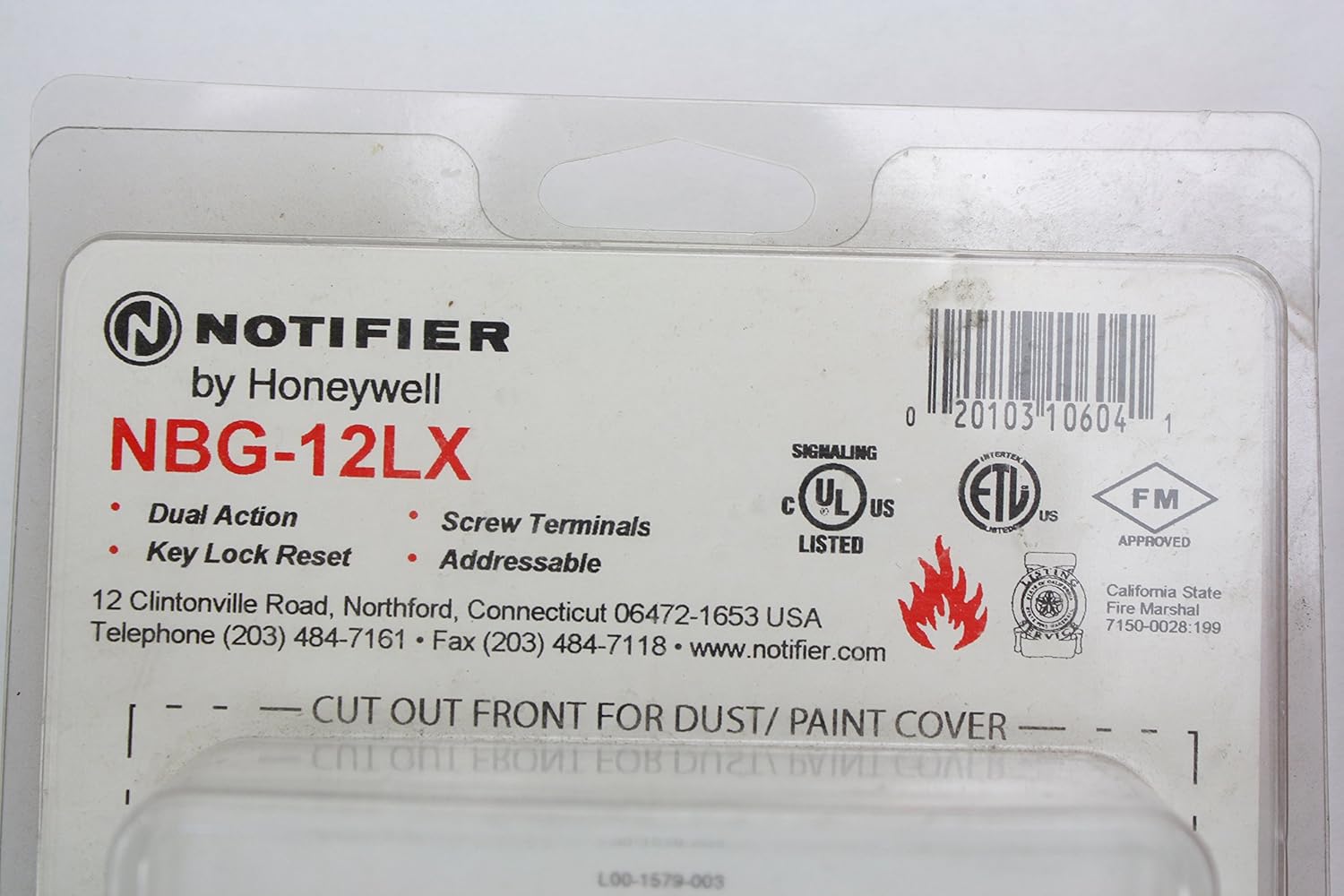
Figure 4: Notifier NBG-12LX packaging with specifications and certifications.
This image displays the product packaging, which lists key features such as "Dual Action," "Key Lock Reset," "Addressable," and "Screw Terminals," along with UL and FM certifications and manufacturer contact information.
7. Garanti og support
For specific warranty information, please refer to the documentation included with your purchase or contact Notifier directly. Notifier products are designed for reliability and performance.
For technical support, service, or further inquiries, please contact Notifier customer service or a certified fire alarm system professional.
- Fabrikant: Notifier af Honeywell
- Webwebsted: www.notifier.com
- Telefon: (203) 484-7161
- Fax: (203) 484-7118


