1. Introduktion
This manual provides instructions for the Perixx PX-1000 Backlit Gaming Keyboard. It covers setup, operation, maintenance, and troubleshooting to ensure optimal performance and user experience. The PX-1000 is designed for various environments, including office, home, and gaming, featuring adjustable backlighting and a Windows key lock function.
2. Produktet er slutview
2.1 Nøglefunktioner
- Baggrundsbelyste taster: Three-level adjustable backlighting for visibility in low-light conditions.
- Farvemuligheder: Switch between blue, red, and purple backlight colors.
- Windows Lock Function: Disable the Windows key to prevent accidental interruptions during gaming.
- USB-forbindelse: Standard USB connection for broad compatibility.
2.2 Tastaturlayout
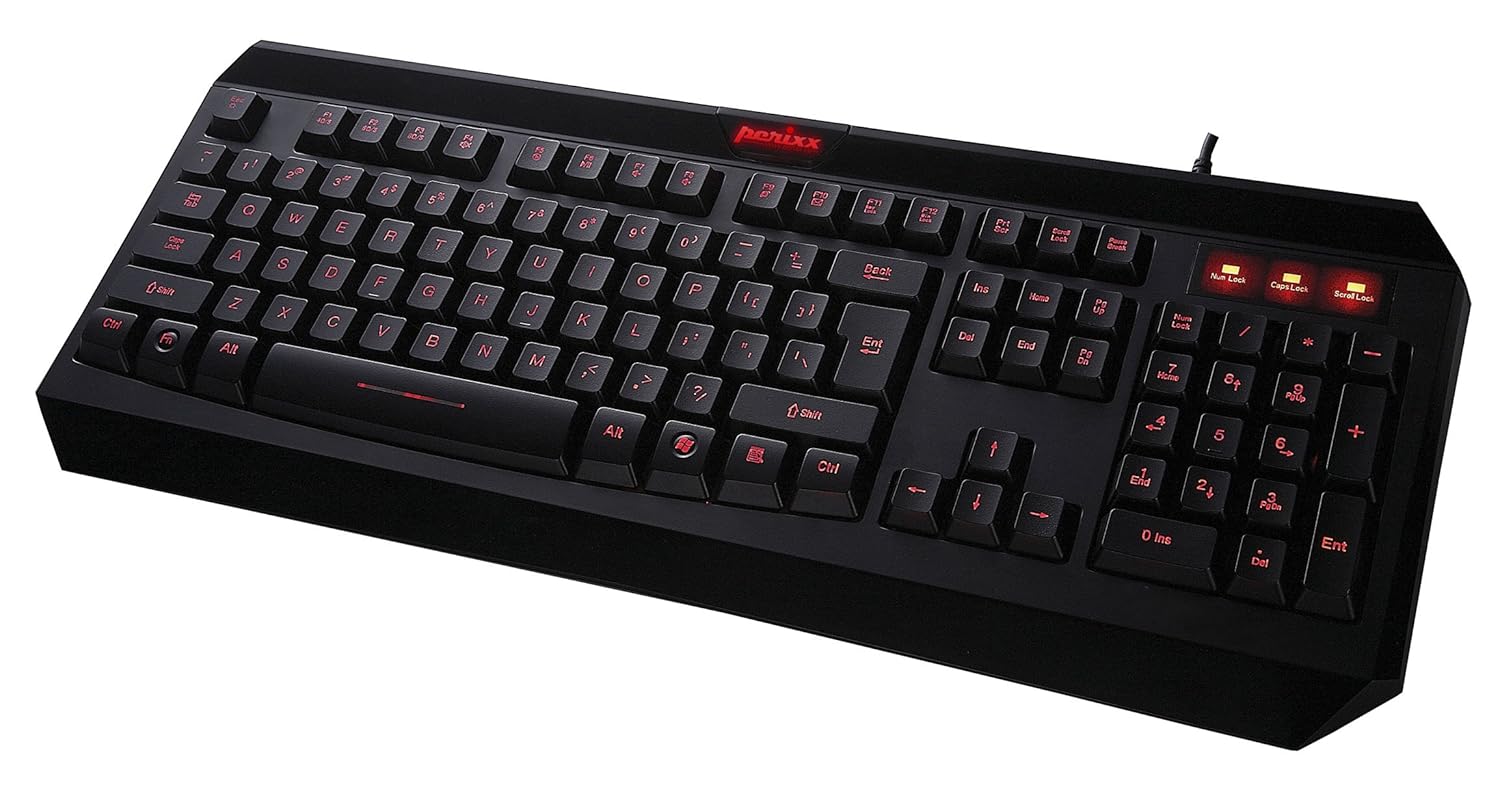
Figur 2.1: Top-down view of the Perixx PX-1000 keyboard with red backlighting activated. This image displays the full QWERTY layout, numeric keypad, and function keys.

Figure 2.2: Technical diagram illustrating the key layout and dimensions of the Perixx PX-1000 keyboard.
3. Opsætning
- Udpakning: Carefully remove the keyboard from its packaging. Ensure all components, including the USB cable, are present.
- Forbindelse: Sæt USB-stikket på tastaturet i en ledig USB-port på din computer.
- Driver installation: The Perixx PX-1000 is a plug-and-play device. Your operating system (Windows) should automatically detect and install the necessary drivers. No additional software installation is typically required.
- Placering: Position the keyboard comfortably on your desk.
4. Betjeningsvejledning
4.1 Backlight Control
The PX-1000 features adjustable backlighting with multiple color options.
- Changing Backlight Color: Tryk på Fn tasten + Scroll Lock key simultaneously to cycle through the available backlight colors: Blue, Red, and Purple.
- Justering af baggrundsbelysningens lysstyrke: Tryk på Fn tasten + Side op key to increase brightness, and Fn tasten + Side ned key to decrease brightness. There are three brightness levels.
- Turning Backlight On/Off: To turn off the backlight, cycle through the brightness levels until it is off, or press Fn tasten + Scroll Lock until the backlight is off.
4.2 Windows Key Lock Function
To prevent accidental activation of the Windows Start menu during intensive tasks or gaming, the Windows key can be disabled.
- Activating/Deactivating Windows Key Lock: Tryk på Fn tasten + Windows nøgle simultaneously. An indicator light (usually near the Num Lock/Caps Lock indicators) will illuminate when the Windows key is locked. Repeat the combination to unlock.
5. Vedligeholdelse
Korrekt vedligeholdelse sikrer dit tastaturs levetid og ydeevne.
- Rensning: Use a soft, dry cloth to wipe the surface of the keyboard. For deeper cleaning, use a can of compressed air to remove dust and debris from between the keys. Avoid using harsh chemicals or abrasive materials.
- Spild: Hvis du spilder væske, skal du straks frakoble tastaturet fra computeren. Vend det på hovedet for at dræne eventuel væske, og lad det tørre helt, før du tilslutter det igen. Forsøg ikke at bruge tastaturet, mens det er vådt.
- Opbevaring: Når tastaturet ikke er i brug i længere perioder, skal det opbevares et rent, tørt sted væk fra ekstreme temperaturer.
6. Fejlfinding
| Problem | Mulig årsag | Løsning |
|---|---|---|
| Tastaturet svarer ikke. | Løs USB-forbindelse, defekt USB-port, driverproblem. |
|
| Backlight not working or stuck on one color. | Backlight function not activated, incorrect settings. |
|
| Windows key not functioning. | Windows-tastlåsen er aktiv. | Trykke Fn + Windows nøgle to toggle the lock function. Check the indicator light. |
| Tasterne er klæbrige eller reagerer ikke. | Debris under keys, liquid damage. |
|
7. Specifikationer

Figure 7.1: Detailed dimensions of the Perixx PX-1000 keyboard.
| Feature | Detalje |
|---|---|
| Mærke | Perixx |
| Modelnummer | PX-1000 (Item model number: 10992) |
| Farve | Black, Red (Backlight colors: Blue, Red, Purple) |
| Forbindelsesteknologi | USB |
| Kompatible enheder | PC |
| Operativsystem | Windows |
| Produktmål (LxBxH) | 46 x 19.2 x 3 cm (18.11 x 7.56 x 1.18 tommer) |
| Varens vægt | 812 g (1.79 lbs) |
| Inkluderede komponenter | USB kabel |
| Speciel funktion | Baggrundsbelyst |
8. Garanti og support
For warranty information and technical support, please refer to the documentation included with your product or visit the official Perixx website. Perixx provides customer support for product-related inquiries and assistance with troubleshooting.
Online ressourcer: For yderligere support og produktinformation kan du besøge Perixx-butik på Amazon.


