1. Introduktion
This manual provides comprehensive instructions for the installation, setup, operation, and maintenance of your Irritrol Rain Dial RD900-INT-R 9-Station Indoor Irrigation Controller. This controller is designed for residential indoor use, offering efficient and flexible irrigation management for your landscape. Please read this manual thoroughly before installation and operation to ensure proper function and longevity of your device.

Image 1.1: Irritrol Rain Dial RD900-INT-R controller, power adapter, and user manual.
The image displays the Irritrol Rain Dial RD900-INT-R irrigation controller, which is gray with a blue control panel. The control panel features an LCD screen, a large rotary dial for mode selection, and various buttons for programming. A power adapter and a printed instruction manual are also visible next to the controller.
2. Sikkerhedsoplysninger
- Read all instructions carefully before operating the controller.
- Sørg for, at strømforsyningen er afbrudt, før du udfører nogen form for ledningsføring eller vedligeholdelse.
- This controller is designed for indoor use only. Do not expose it to outdoor elements unless specifically housed in a weather-resistant enclosure.
- Forsøg ikke at reparere eller modificere styreenheden. Overlad al service til kvalificeret personale.
- Keep the controller away from water sources and excessive humidity.
3. Pakkens indhold
Bekræft at alle varer er til stede i pakken:
- Irritrol Rain Dial RD900-INT-R Irrigation Controller
- Power Adapter (24Vac, 60Hz, 1.25A)
- Brugermanual
- Monteringsudstyr (skruer, ankre)

Image 3.1: Contents of the Irritrol Rain Dial package.
This image shows the Irritrol Rain Dial controller in its closed gray casing, alongside its black power adapter and the printed instruction manual. The controller's front cover features the "RAIN DIAL" logo.
4. Installation
4.1 Montering af controlleren
- Choose a suitable indoor location that is protected from direct sunlight, extreme temperatures, and moisture.
- Use the provided mounting hardware to securely attach the controller to a wall. Ensure it is mounted vertically.
- Allow sufficient space around the controller for ventilation and access to wiring terminals.

Billede 4.1: Bagside view of the controller for mounting.
The image shows the back of the gray Irritrol Rain Dial controller, highlighting the molded plastic structure and a keyhole-shaped mounting point at the top center, along with two circular mounting points at the bottom.
4.2 Tilslutning af styreenheden
ADVARSEL: Ensure power is disconnected before wiring.
- Open the controller's front cover to access the wiring terminal board.
- Connect the common wire from your irrigation valves to the terminal marked KOM.
- Connect each zone valve wire to its corresponding numbered terminal (1-9).
- If using a rain sensor, connect its wires to the designated sensor terminals.
- Tilslut den medfølgende strømadapter til 24 VAC INPUT terminaler.
- Once all wiring is complete, plug the power adapter into a standard electrical outlet.

Image 4.2: Internal wiring connections.
The image displays the open Irritrol Rain Dial controller, revealing the internal components. A black plastic housing covers the main electronics, and a circuit board with screw terminals is visible. The terminals are labeled for zones 1 through 9, "COM" (common), and "24 VAC INPUT". A ribbon cable connects the main unit to the terminal board.
5. Indledende opsætning og programmering
The Rain Dial controller features a user-friendly interface with a rotary dial and push buttons for programming.
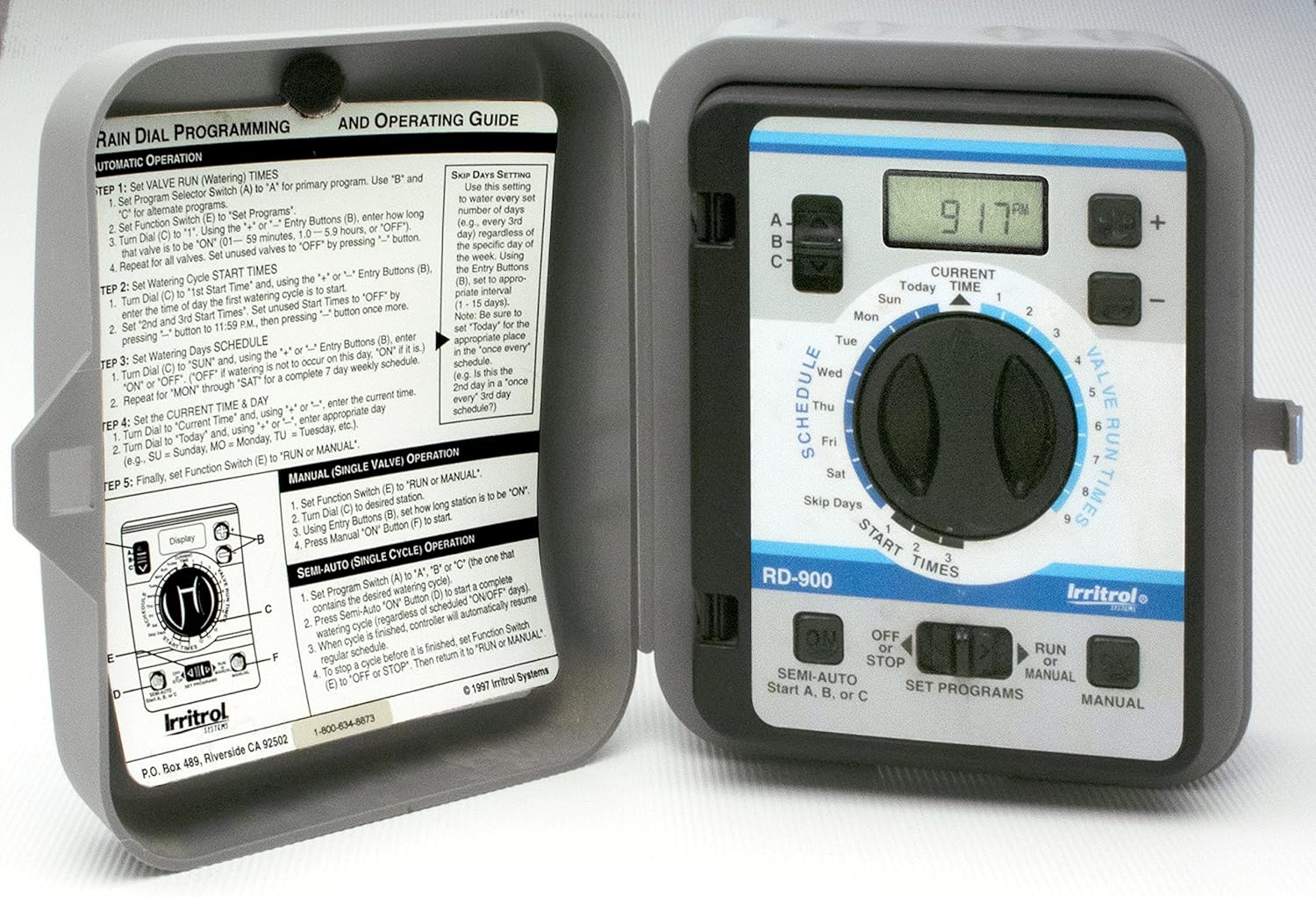
Image 5.1: Control panel and programming guide.
This close-up image shows the blue control panel of the Irritrol Rain Dial controller. The LCD screen displays "9:17 PM". The rotary dial is set to "CURRENT TIME". Various buttons for adjusting time, schedule, and programs are visible. A printed programming guide is attached to the inside of the controller's door, detailing steps for automatic and manual operation.
5.1 Indstilling af aktuel tid og dag
- Drej drejeknappen til NUVÆRENDE TID.
- Brug + og - knapperne til at justere det aktuelle klokkeslæt.
- Brug DAG knappen for at indstille den aktuelle ugedag.
5.2 Programmering af vandingsplaner
The controller supports three independent programs (A, B, C) for flexible watering.
- Drej drejeknappen til SET PROGRAMS.
- Select the desired program (A, B, or C) using the A / B / C skifte.
- Drej drejeknappen til STARTTIDER to set up to three start times per program. Use + og - knapper for at justere.
- Drej drejeknappen til STATIONENS KØRETID to set the watering duration for each station (valve). Use + og - knapper for at justere.
- Drej drejeknappen til SKEMA to select watering days (e.g., specific days of the week, odd/even days, or interval watering).
- Når programmeringen er færdig, drej drejeknappen til LØBE til automatisk drift.
Tip: Use the "Watering Schedule" chart inside the controller door to record your program settings for easy reference.
6. Betjening af controlleren
6.1 Automatisk drift
With the rotary dial set to LØBE, the controller will execute the programmed watering schedules automatically.
6.2 Manuel betjening
To manually operate a station or program:
- Manual Station: Drej drejeknappen til MANUEL. Brug + og - buttons to select the station and set its run time. Press LØBE at starte.
- Semi-Automatic Program: Drej drejeknappen til SEMI-AUTO. Select program A, B, or C. Press LØBE for at starte det valgte program.
6.3 Specialfunktioner
- Climate Logic Ready: The controller is compatible with the optional CLIMATE LOGIC Wireless Weather Sensing System. When connected, it automatically adjusts watering based on weather conditions, optimizing water usage.
- Rain Sensor Ready: A rain sensor can be connected to automatically suspend watering during rainfall. The controller includes a sensor bypass switch.
- Water Well Recovery: This feature allows for a delay between stations, which is beneficial for systems drawing water from a well, preventing pump overload.
7. Vedligeholdelse
- Keep the controller's exterior clean with a soft, damp klæde. Brug ikke slibende rengøringsmidler.
- Kontroller jævnligt ledningsforbindelserne for at sikre, at de er sikre.
- In areas prone to power outages, consider a surge protector for the power adapter.
- If the controller is stored for an extended period, remove the power adapter.
8. Fejlfinding
| Problem | Mulig årsag | Løsning |
|---|---|---|
| Controllerens display er tomt. | Ingen strøm, defekt strømadapter. | Check power outlet, ensure adapter is securely connected. Test adapter if possible. |
| Stationer vander ikke. | Controller in OFF mode, rain sensor active, wiring issue, faulty valve. | Ensure dial is on RUN. Check rain sensor bypass. Verify wiring connections. Test valves manually. |
| Incorrect watering times/days. | Forkert programmering. | Review and re-program start times, run times, and watering days as per Section 5.2. |
9. Specifikationer
- Model: RD900-INT-R
- Stationer: 9
- Input: 24Vac, 60Hz, 1.25A (30VA)
- Produktion: 24Vac, 60Hz, 1.0A Max Total, 0.5A Max Per Station
- Dimensioner: 7.75 x 3.75 x 7 tommer
- Varens vægt: 4 pund
- Skærmtype: LCD eller LED
- Materiale: Plast
- Fabrikant: Irritrol
- UPC: 090258051817

Image 9.1: Product specification label.
The image shows a product label for the Irritrol Rain Dial controller, model RD900-INT. It lists electrical specifications including input (24Vac, 60Hz, 1.25A) and output (24Vac, 60Hz, 1.0A Max Total, 0.5A Max Per Station). It also indicates "FOR INDOOR USE ONLY" and includes UL listing marks.
10. Garanti og support
For warranty information and technical support, please refer to the documentation included with your product or visit the official Irritrol webwebstedet. Behold din købskvittering som købsbevis.


