Indledning
Tak for købetasinKarlsson Mini Flip Clock. Dette automatiske flip-ur kombinerer klassisk design med moderne funktionalitet og giver en letlæselig visning af tid, dag, dato og år. Denne manual indeholder vigtige oplysninger om opsætning, betjening og vedligeholdelse af dit ur for at sikre optimal ydeevne og levetid.
Produkt overview
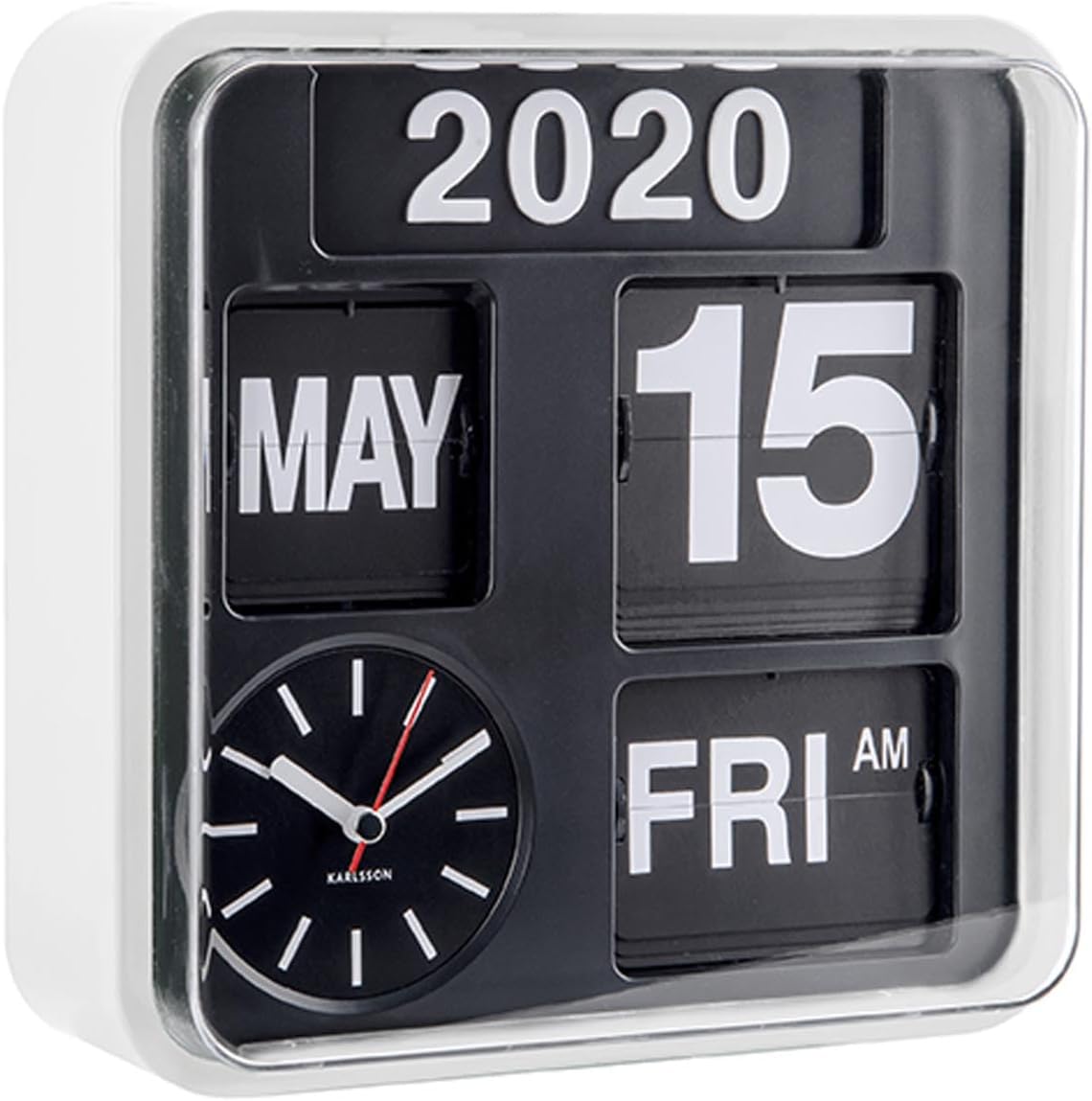
Figur 1: Forside view af Karlsson Mini Flip Clock, der viser displaypanelerne for tid, dag, dato og år sammen med den analoge urskive.
Karlsson Mini Flip Clock har en unik automatisk vippemekanisme til visning af kalenderoplysninger. Det inkluderer et traditionelt analogt ur til tidsmåling og separate paneler til år, måned, dato og ugedag. Uret er designet til både vægmontering og bordplacering.
- Automatisk vippemekanisme: Viser dag, dato og år.
- Analog tidsvisning: Har en rød sekundviser for præcis tidtagning.
- Holdbar Casing: Konstrueret med en hvid plastik casing.
- Alsidig placering: Velegnet til vægmontering eller som bordur.
Pakkens indhold
Sørg for, at alle elementer er til stede, før du fortsætter med opsætningen:
- Karlsson Mini Flip Clock (Model: KA5364WH)
- Sæt med tal til manuel årsjustering
- Brugervejledning (dette dokument)
Bemærk: Der kræves 5 AA-batterier til drift og er ikke inkluderet i pakken.
Opsætning
1. Batteriinstallation
- Find batterirummet på bagsiden af uret.
- Åbn batterirummets dæksel.
- Isæt 5 nye AA-batterier, og sørg for at polerne (+/-) vender korrekt som angivet inde i batterirummet.
- Luk batterirummets dæksel forsvarligt.
2. Indstilling af starttidspunkt og dato
Efter batteriinstallation begynder uret at virke. Du skal indstille det korrekte klokkeslæt og kalenderoplysningerne manuelt.
- Indstilling af tid:
Find tidsjusteringsknappen på siden eller bagsiden af uret. Drej knappen for at indstille den korrekte time og minut. Det analoge ur vil gå frem, og vippemekanismen for AM/PM vil ændre sig i overensstemmelse hermed.
- Indstilling af dato og dag:
Dato og dag skifter automatisk. For at indstille dem i første omgang skal du muligvis manuelt stille tiden frem, indtil den korrekte dato og dag vises. Der er typisk en separat mekanisme eller knap til at stille dagen/datoen frem, hvis det er nødvendigt, eller den synkroniseres, når tiden indstilles. Se de specifikke markeringer på dit ur for præcise kontroller.
- Indstilling af året:
Årsvisningen er manuel. Brug de angivne årstal til at indstille det aktuelle år. Disse tal indsættes typisk i rifterne på årspanelet. Denne justering er normalt kun nødvendig én gang om året.
3. Monteringsmuligheder

Figur 2: Karlsson Mini Flip Clock vist som en vægmonteret enhed.
- Vægbeslag: Brug en passende skrue eller krog (medfølger ikke) på den ønskede vægplacering. Juster monteringshullet på bagsiden af uret med skruen/krogen, og fastgør det godt. Sørg for, at væggen kan bære urets vægt.
- Bordplade: Placer uret på en hvilken som helst flad, stabil overflade.
Betjeningsvejledning
Tidtagningen
Det analoge ur viser kontinuerligt det aktuelle klokkeslæt. Den røde sekundviser giver en visuel indikation af kontinuerlig bevægelse.
Kalender funktion
Kalenderpanelerne vender automatisk for at vise den korrekte dag, dato og måned. AM/PM-indikatoren opdateres også automatisk med tiden.
- Daglig vending: Dag og dato byttes om ved midnat (kl. 00:12).
- Månedlig vending: Måneden vender den 1. i hver ny måned.
- Årsjustering: Året skal ændres manuelt i begyndelsen af hvert nyt år ved hjælp af de angivne årstal.
Opretholdelse
- Rensning: Tør urets c afasing og displaypaneler med en blød, tør klud. Brug ikke slibende rengøringsmidler eller opløsningsmidler, da de kan beskadige overfladen.
- Udskiftning af batteri: Udskift alle 5 AA-batterier, når urets bevægelse bliver langsom eller stopper. Det anbefales at udskifte alle batterier på samme tid med nye alkaliske batterier af høj kvalitet.
- Miljø: Undgå at udsætte uret for ekstreme temperaturer, direkte sollys i længere perioder eller høj luftfugtighed, da disse forhold kan påvirke dets ydeevne og levetid.
Fejlfinding
| Problem | Mulig årsag | Løsning |
|---|---|---|
| Uret går ikke eller går langsomt. | Lave eller døde batterier. Forkert batteriinstallation. | Udskift alle 5 AA-batterier med nye. Sørg for, at batterierne er isat med den rigtige polaritet. |
| Dato/dag-visningen er forkert. | Ikke indstillet korrekt under den første opsætning. | Skru tiden manuelt frem, indtil den korrekte dato og dag vises. Sørg for, at tiden er indstillet korrekt for at muliggøre korrekt automatisk spejling. |
| Årsvisningen er forkert. | Året er ikke manuelt opdateret. | Ændr manuelt årstallene på displaypanelet til det aktuelle år. |
| Vippemekanismen sidder fast eller vipper ikke jævnt. | Støvophobning. Lav batteristrøm. | Rengør forsigtigt området omkring vippemekanismen med en blød børste eller trykluft. Udskift batterierne, hvis de er flade. |
Specifikationer
| Feature | Detalje |
|---|---|
| Mærke | Karlsson |
| Modelnummer | KA5364WH |
| Farve | Hvid |
| Display Type | Digital (Flip) og analog |
| Speciel funktion | Kalendervisning (dag, dato, måned, år, AM/PM) |
| Dimensioner (B x H x D) | 24.5 x 24.5 x 10 cm (9.65" B x 9.65" H) |
| Strømkilde | Batteridrevet (kræver 5 x AA-batterier) |
| Materiale | Plast |
| Monteringstype | Vægmontering / Bordplade |
| Varens vægt | 1.18 kg (2.6 lbs) |
| Se Bevægelse | Automatisk |
Garanti og support
Karlsson-produkter er designet til kvalitet og holdbarhed. For garantioplysninger og support henvises til den dokumentation, der fulgte med dit køb, eller besøg den officielle Karlsson-side. webwebsted. Gem din købsbevis i tilfælde af garantikrav.
For yderligere assistance kan du kontakte Karlssons kundesupport via deres officielle kanaler. Hav venligst dit modelnummer (KA5364WH) klar, når du kontakter support.
Bemærk: Garantibetingelserne kan variere afhængigt af region og forhandler.


