
1. Introduktion og overview
Cloud b Tranquil Turtle er en innovativ natlampe og lydmaskine designet til at skabe et fredeligt og beroligende miljø for børn. Den projicerer bevægelige havbølger op i loftet og afspiller beroligende lyde, hvilket hjælper med afslapning og søvn.

Billede: Den lyserøde Cloud b Tranquil Turtle, en plysskildpadde med en klar skal, der projicerer lys, vist ved siden af produktemballagen.
Denne manual indeholder detaljerede instruktioner til opsætning, betjening, vedligeholdelse og fejlfinding af din Tranquil Turtle for at sikre optimal ydeevne og en rolig oplevelse for dit barn.
2. Nøglefunktioner
- Ocean Wave Projection: Projicerer en dynamisk undervandslyseffekt med blidt bølgende bølger på loft og vægge, hvilket skaber en rolig akvatisk atmosfære.
- To beroligende lyde: Giver mulighed for at vælge mellem en rolig havmelodi og beroligende bølgelyde, designet til at fremme afslapning.
- Justerbare indstillinger: Har justerbar lysstyrke og bevægelsesindstillinger for lysprojektionen, hvilket muliggør tilpasning til forskellige miljøer og præferencer.
- Automatisk slukning: Udstyret med en 23-minutters timer, der automatisk slukker lys og lyd for at spare batterilevetid og sikre et roligt miljø til dyb søvn.
- Blødt og taktilt design: Lavet af superblødt plysmateriale, hvilket gør den til en behagelig ledsager for børn.
- LED'er med lang levetid: Bruger LED-lys, der ikke bliver varme, hvilket sikrer sikkerheden.

Billede: Diagram, der illustrerer Tranquil Turtles funktioner: patenteret teknologi, automatisk slukning efter 23 minutter, undervandsprojektioner og to lydmuligheder (bølger og undervandsmelodi).
3. Opsætning
3.1 Batteriinstallation
Den rolige skildpadde kræver 3 AA-batterier (medfølger). Sådan installeres eller udskiftes batterier:
- Find batterirummet på undersiden af skildpadden. Det er typisk fastgjort med en stofflap med velcro eller en lille skrue.
- Hvis den er fastgjort med en skrue, skal du bruge en lille stjerneskruetrækker til at åbne rummet.
- Isæt 3 nye AA-batterier, og sørg for at polerne vender korrekt (+/-).
- Luk batterirummet forsvarligt.
Bemærk: For optimal ydeevne og for at undgå hyppig batteriudskiftning bør du overveje at bruge alkaliske eller genopladelige batterier af høj kvalitet.
4. Betjeningsvejledning
4.1 Tænd/sluk
- For at tænde Tranquil Turtle skal du finde tænd/sluk-knappen på kontrolpanelet (normalt på undersiden eller inde i skallen) og skubbe den til 'ON'-positionen.
- For at slukke for Tranquil Turtle skal du skubbe tænd/sluk-knappen til 'OFF'-positionen.
- Enheden slukker automatisk efter 23 minutters drift.
4.2 Lysprojektionskontrol
- Den rolige skildpadde projicerer en beroligende havbølgeeffekt.
- Justering af lysstyrke: Brug den dedikerede lysintensitetsskyder eller knap (hvis den findes) til at justere lysstyrken på de projicerede bølger.
- Bevægelseskontrol: Nogle modeller giver dig mulighed for at vælge mellem statiske bølger eller bølger, der bevæger sig let. Se kontrolpanelet for en kontakt eller knap til at slå denne funktion til/fra.

Billede: Den rolige skildpadde projicerer blå havbølger på en overflade med produktets dimensioner (11 cm, 4 cm, 10 cm) angivet.
4.3 Lydkontrol
- Tryk på lydvalgsknappen for at gennemgå de tilgængelige lyde: havmelodi og bølgelyde.
- Brug lydstyrkeknapperne (normalt '+' og '-') til at justere lydniveauet til den ønskede komfort.
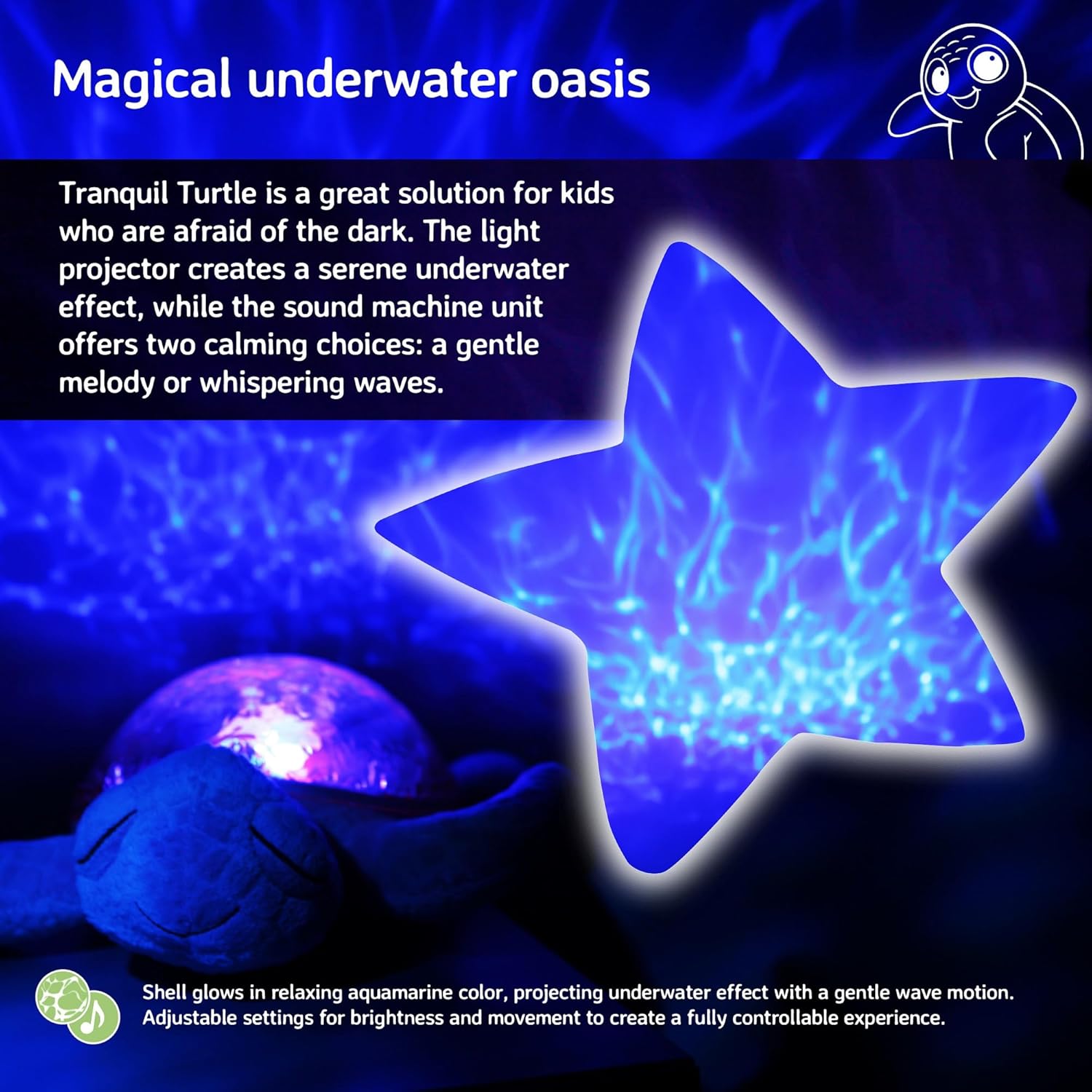
Billede: Den rolige skildpadde skaber en magisk undervandsoase-effekt med en stjerneformet projektion af krusende vand.
4.4 Lydsensor (hvis relevant)
- Nogle modeller har en lydsensor, der kan aktivere enheden, når den registrerer støj, f.eks. en babygråd.
- For at aktivere eller deaktivere denne funktion skal du finde kontakten 'SOUND SENSOR' (ofte med indstillingerne 'HI', 'LO', 'OFF') og vælge din foretrukne tilstand.
5. Vedligeholdelse
5.1 Rengøringsinstruktioner
- For at rengøre den plyssede yderside, tør forsigtigt af med enamp en klud og en mild sæbe. Hele enheden må ikke nedsænkes i vand.
- Tør plastikskallen af med en blød, tør klud. Undgå slibende rengøringsmidler, der kan ridse overfladen.
- Sørg for, at enheden er helt tør, før den opbevares eller tages i brug.
5.2 Opbevaring
- Når enheden ikke er i brug i længere perioder, skal batterierne fjernes for at forhindre lækage og beskadigelse af den.
- Opbevar den rolige skildpadde et køligt, tørt sted væk fra direkte sollys.
6. Fejlfinding
| Problem | Mulig årsag | Løsning |
|---|---|---|
| Enheden tænder ikke. | Døde eller forkert installerede batterier. | Kontroller batteripolariteten. Udskift med nye AA-batterier. |
| Lysene er svage eller flimrende. | Lav batteristrøm. | Udskift batterierne. Sørg for, at lysintensitetsskyderen er indstillet til et højere niveau. |
| Ingen lyd eller forvrænget lyd. | Lydstyrken er for lav, eller batterierne er ved at være lave. | Skru op for lydstyrken. Udskift batterierne. |
| Projektionen er ikke klar. | Rummet er for lyst, eller enheden er for langt fra overfladen. | Sørg for, at rummet er mørkt. Placer skildpadden tættere på projektionsfladen (loft/væg). |
| Enheden slukker for hurtigt. | Automatisk slukningstimer aktiveret. | Enheden er designet til at slukke efter 23 minutter for at spare batterilevetid og fremme dyb søvn. Dette er normal drift. |
7. Specifikationer
| Specifikation | Detalje |
|---|---|
| Produktdimensioner | 11.02 x 9.84 x 4 tommer |
| Varemodelnummer | CB7423-PK |
| Batterier påkrævet | 3 AA batterier (medfølger) |
| Materiale Type | Plastik, plysstof |
| Varens vægt | 1.21 pund |
| Strømkilde | Batteridrevet |
| Auto-sluk-timer | 23 minutter |
8. Garanti og support
For garantioplysninger eller teknisk support henvises til produktemballagen eller den officielle Cloud b webDu kan også kontakte Cloud b's kundeservice direkte for at få hjælp til din Tranquil Turtle.
For yderligere information og produktregistrering, besøg venligst: Cloud b Officiel Butik


