1. Introduktion
This manual provides detailed instructions for the OREI HD-104 HDMI Splitter. This device is designed to distribute one HDMI input signal to four identical HDMI output signals simultaneously, making it suitable for various display setups.
Nøglefunktioner:
- Splits one HDMI input signal into four identical HDMI output signals.
- Supports resolutions up to 4K@30Hz, 1080p, and 720p.
- Compatible with HDCP 1.4 for secure content transmission.
- Supports advanced audio formats including LPCM, Dolby-AC3, DTS 7.1, DSD, Dolby TrueHD, and DTS-HD Master Audio.
- Compact design with easy plug-and-play operation.

Figure 1: OREI HD-104 HDMI Splitter distributing a single source to four displays.
Pakkens indhold
Bekræft at alle varer er til stede i pakken:
- 1 x OREI HD-104 HDMI Splitter (1 input, 4 outputs)
- 1 x 5V AC strømadapter
- 1 x brugermanual
Bemærk: HDMI-kabler medfølger ikke og skal købes separat.
2. Opsætning og installation
Follow these steps to connect and set up your OREI HD-104 HDMI Splitter:
- Sluk for enheder: Ensure all source devices (e.g., Blu-ray player, gaming console) and display devices (e.g., TVs, monitors) are powered off before making connections.
- Tilslut HDMI-indgang: Connect an HDMI cable from your source device to the 'IN' port on the OREI HD-104 splitter.
- Connect HDMI Outputs: Connect HDMI cables from the 'OUT 1', 'OUT 2', 'OUT 3', and 'OUT 4' ports on the splitter to your display devices.
- Tilslut strømadapter: Plug the 5V AC power adapter into the 'DC 5V' port on the splitter, then plug the adapter into a power outlet.
- Tænd enheder: Power on the splitter, then power on your display devices, and finally your source device.

Figure 2: Front and rear panel connections of the OREI HD-104 HDMI Splitter.
EDID Management
The HD-104 features an EDID (Extended Display Identification Data) switch to manage display compatibility. This switch is located on the front panel:
- STD (Standard): Select this mode for standard EDID settings, which may resolve compatibility issues with older or specific display devices.
- TV: Select this mode to copy the EDID from the display connected to Output 1. This ensures the source device outputs a signal compatible with the primary display. If Output 1 is not connected, the splitter will default to a standard EDID.
It is recommended to set the EDID mode before powering on the source device.
3. Betjening
Once connected and powered on, the OREI HD-104 splitter will automatically duplicate the HDMI input signal to all four connected displays. No additional configuration is typically required for basic operation.
LED-indikatorer
The front panel of the splitter includes LED indicators to show the status of the device:
- Power LED: Lyser, når enheden er tændt.
- Input LED: Illuminates when an active HDMI input signal is detected.
- Output 1-4 LEDs: Each LED illuminates when an active HDMI output connection is established with a display.
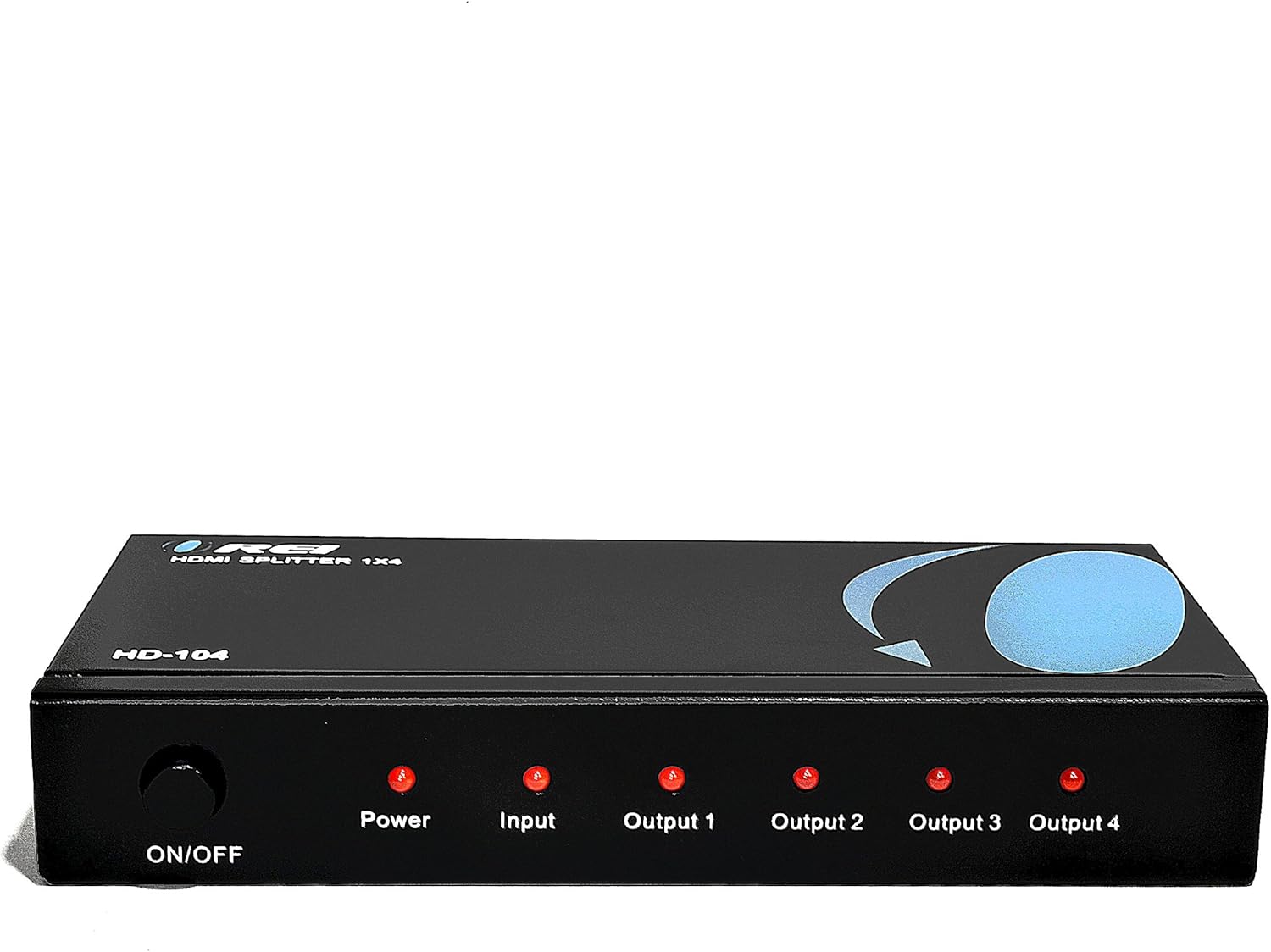
Figure 3: Front panel with LED indicators.
Vigtige overvejelser
- Duplication Only: This device duplicates the input signal. It does not extend your desktop across multiple monitors to create a single, larger display. All connected displays will show the same content.
- No Audio Extraction: The splitter passes through audio signals but does not extract or separate audio from the HDMI stream.

Figure 4: Connection diagram and functional limitations.
4. Specifikationer
| Model | HD-104 |
| Indgangsporte | 1 x HDMI |
| Udgangsporte | 4 x HDMI |
| HDMI version | HDMI 2.0 (bagudkompatibel) |
| HDCP-version | HDCP 1.4 |
| Max opløsning | 4K@30Hz, 1080p, 720p |
| Audio Support | LPCM, Dolby-AC3, DTS 7.1, DSD, Dolby TrueHD, DTS-HD Master Audio |
| Strømforsyning | DC 5V |
| Dimensioner (L x B x H) | 7 x 3 x 1 tommer (17.8 x 7.6 x 2.5 cm) |
| Vægt | 15.4 ounce (436.6 gram) |
| Materiale | Heavy-duty metal enclosure |

Figure 5: Durable metal casing for varmeafledning.

Figure 6: Compact design and included power adapter.
5. Fejlfinding
If you encounter issues with your OREI HD-104 HDMI Splitter, refer to the following troubleshooting tips:
- Intet billede/signal:
- Ensure the splitter is powered on and the Power LED is illuminated.
- Verify all HDMI cables are securely connected to both the splitter and your source/display devices.
- Try using different HDMI cables, as faulty cables can cause signal loss.
- Test the source device and display directly without the splitter to confirm they are working correctly.
- Adjust the EDID switch (STD/TV) on the splitter and restart all devices.
- Ensure your display devices support the resolution output by your source device.
- Poor Picture Quality/Flickering:
- Use high-quality HDMI cables, especially for longer runs or higher resolutions (4K).
- Tjek for interferens fra andre elektroniske enheder.
- Ensure the power adapter is providing stable power to the splitter.
- Lydproblemer:
- Confirm that your source device is outputting audio via HDMI.
- Check audio settings on your source device and display.
- Ensure the EDID setting is appropriate for your audio setup.
- LED Indicators Not Lighting Up:
- If the Power LED is off, check the power adapter and outlet.
- If Input/Output LEDs are off, ensure devices are connected and powered on, and active signals are present.
6. Vedligeholdelse
To ensure the longevity and optimal performance of your OREI HD-104 HDMI Splitter:
- Opbevar enheden et køligt, tørt sted, væk fra direkte sollys, varmekilder og fugt.
- Avoid placing heavy objects on the splitter.
- Rengør enheden med en blød, tør klud. Brug ikke flydende rengøringsmidler eller rengøringsmidler på sprayform.
- Sørg for korrekt ventilation omkring enheden for at forhindre overophedning.
7. Garanti og support
The OREI HD-104 HDMI Splitter comes with a 12-Month Manufacturer's Warranty. OREI also provides Livsvarig teknisk support for sine produkter.
For technical assistance or warranty claims, please contact OREI customer support through their official website or the retailer where the product was purchased. Please have your model number (HD-104) and purchase information ready.


