1. Introduktion
This manual provides detailed instructions for the operation and maintenance of your Supersonic SC-1091 4-Band PLL Portable Radio. Please read this manual thoroughly before using the device to ensure proper function and longevity.
2. Produktet er slutview
The Supersonic SC-1091 is a portable radio featuring AM, FM, and two Shortwave (SW1-2) bands. It includes a digital LCD display, clock, alarm function, built-in speaker, telescopic antenna, and a foldable handle for portability. It can be powered by AC or batteries.
2.1 Kontrol og display på frontpanelet
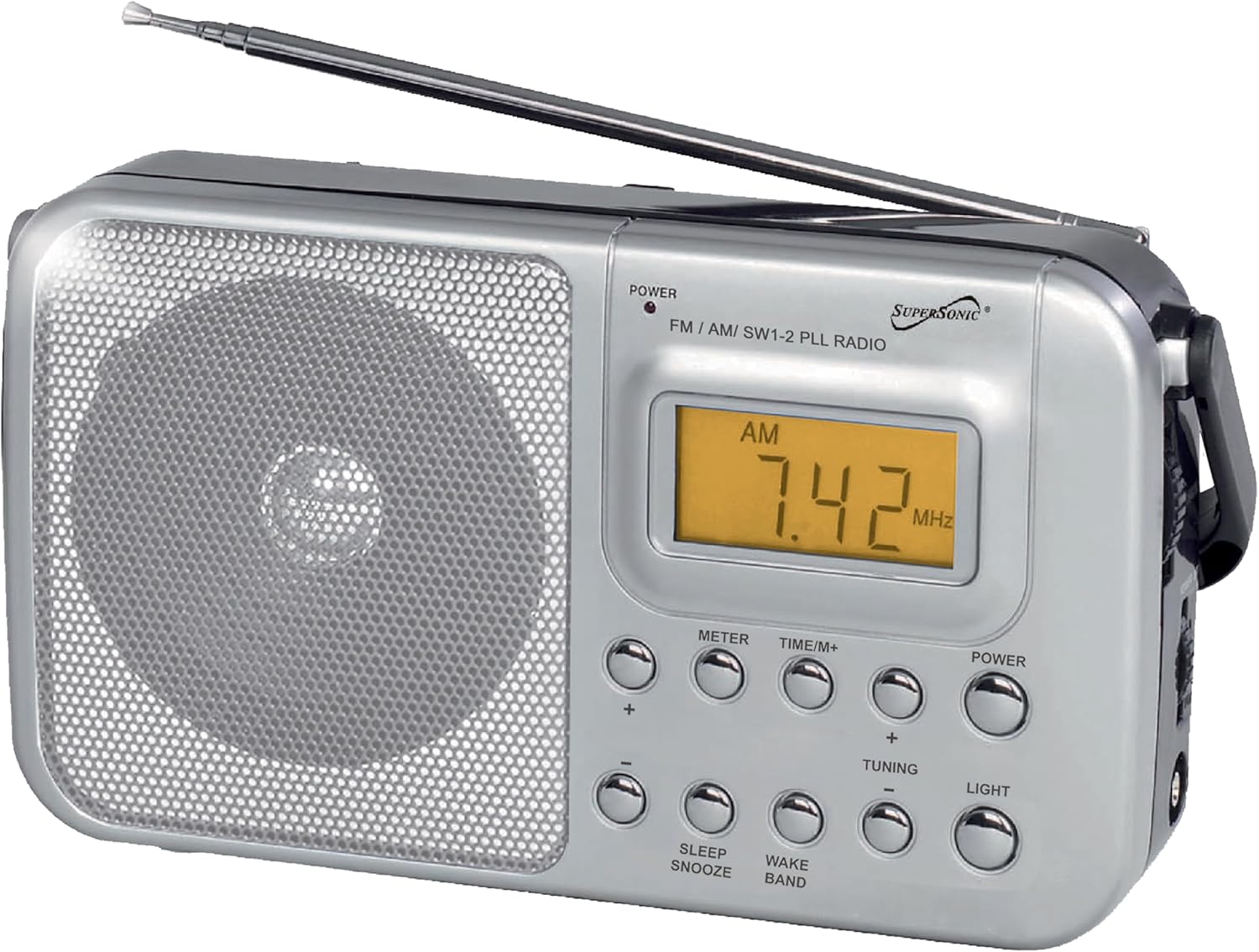
Billede 2.1: Forside view of the Supersonic SC-1091 radio, showing the digital LCD display, speaker grille, and various control buttons.
- POWER -knap: Tænder eller slukker for radioen.
- FM / AM / SW1-2 PLL RADIO Indicator: Lights up to indicate the selected band.
- Digital LCD-skærm: Shows frequency, time, and alarm status.
- METER Button: Cycles through different meter bands (for shortwave).
- TIME/M+ Button: Used for setting the clock and alarm.
- TUNING +/- Buttons: Justerer radiofrekvensen.
- LYDSTYRKE +/- knapper: Justerer lydudgangsniveauet.
- LIGHT -knap: Aktiverer displayets baggrundsbelysning.
- SLEEP/SNOOZE Button: Activates sleep timer or snoozes the alarm.
- WAKE BAND Button: Selects the band for the alarm.
2.2 Side and Rear Features

Billede 2.2: Side view of the radio, highlighting the extendable telescopic antenna and the foldable carrying handle.
- Teleskopantenne: Extends for improved FM and Shortwave reception.
- Sammenfoldeligt håndtag: For praktisk transport.
- AC strømindgang: Connects to the included AC power cord.
- Batterirum: Located on the rear, holds 2 "D" batteries (not included).
3. Opsætning
3.1 Strømforsyning til radioen
Your SC-1091 radio can be powered by either AC electricity or batteries.
3.1.1 Drift med vekselstrøm
- Sørg for, at radioen er slukket.
- Insert the included AC power cord into the AC power input jack on the radio.
- Plug the other end of the AC power cord into a standard wall outlet (110V/60Hz).
- The radio is now ready for operation using AC power.
3.1.2 Batteridrift
For portable use, the radio requires 2 "D" size batteries (not included).
- Find batterirummet på bagsiden af radioen.
- Åbn batterirummets dæksel.
- Insert 2 "D" size batteries, ensuring the correct polarity (+ and -) as indicated inside the compartment.
- Luk batterirummets dæksel forsvarligt.
- Når du bruger batterier, skal du frakoble netledningen.
Note: Remove batteries if the radio will not be used for an extended period to prevent leakage and damage.
4. Betjeningsvejledning
4.1 Tænd/sluk og lydstyrkekontrol
- Tryk på MAGT button to turn the radio on. The LCD display will illuminate.
- Juster lyttevolumen ved hjælp af LYDSTYRKE +/- knapper.
- To turn the radio off, press the MAGT knappen igen.
4.2 Selecting a Radio Band
Tryk gentagne gange på FM / AM / SW1-2 PLL RADIO button to cycle through the available bands: FM, AM, SW1, and SW2. The selected band will be indicated on the LCD display.
4.3 Indstilling på en station
- Select the desired band (AM, FM, SW1, or SW2).
- Extend the telescopic antenna for optimal FM and Shortwave reception. For AM, the internal ferrite bar antenna is used, and rotating the radio may improve reception.
- Tryk på TUNING +/- buttons to scan for stations. Hold the button to scan quickly, or press briefly for fine-tuning.
- The frequency will be displayed on the LCD.

Billede 4.3: Nærbillede view of the digital LCD display, clearly showing the tuned frequency and band indicator.
4.4 Indstilling af uret
- Med radioen slukket, tryk og hold nede TIME/M+ button until the hour digits on the LCD display begin to flash.
- Brug TUNING +/- knapper for at justere timen.
- Tryk på TIME/M+ Tryk på knappen igen for at bekræfte timetallet og gå videre til minutindstillingen. Minuttifrene blinker.
- Brug TUNING +/- knapper for at justere minutterne.
- Tryk på TIME/M+ knappen én gang til for at gemme tidsindstillingen.
4.5 Indstilling af alarmen
- Med radioen slukket, tryk på TIME/M+ button once. The current time will be displayed.
- Tryk og hold på TIME/M+ button again until the alarm hour digits flash.
- Brug TUNING +/- knapperne for at indstille den ønskede alarmtime.
- Tryk på TIME/M+ button to confirm the alarm hour and move to the minute setting.
- Brug TUNING +/- knapperne til at indstille de ønskede alarmminutter.
- Tryk på TIME/M+ knappen for at gemme alarmtidspunktet.
- For at aktivere alarmen skal du trykke på WAKE BAND button. The alarm icon will appear on the display.
- To select the alarm source (radio or buzzer), press the WAKE BAND knappen gentagne gange.
- Når alarmen lyder, skal du trykke på SØV/SLUM button to activate snooze (alarm will sound again after a few minutes) or press the MAGT knappen for at slukke for alarmen.
4.6 Using the Sleep Timer
Når radioen er tændt, skal du trykke på SØV/SLUM button repeatedly to set a sleep timer (e.g., 90, 60, 30, 15 minutes). The radio will automatically turn off after the selected time.
5. Vedligeholdelse
- Hold radioen tør. Tør den straks af, hvis den bliver våd.
- Brug en blød, tør klud til at rengøre radioens yderside. Brug ikke slibende rengøringsmidler eller opløsningsmidler.
- Undgå at udsætte radioen for ekstreme temperaturer, direkte sollys eller høj luftfugtighed.
- Do not attempt to disassemble the radio. Refer all servicing to qualified personnel.
- Remove batteries if the unit is not used for extended periods to prevent corrosion.
6. Fejlfinding
| Problem | Mulig årsag | Løsning |
|---|---|---|
| Radioen tænder ikke. | No power supply; batteries are dead or incorrectly inserted; AC cord not properly connected. | Check AC cord connection. Replace batteries or ensure correct polarity. |
| Dårlig radiomodtagelse. | Antennen ikke strakt ud; svagt signal; interferens. | Fully extend the telescopic antenna. Rotate the radio for AM reception. Move away from electronic devices causing interference. |
| Ingen lyd fra højttaleren. | Volume is too low; radio is muted. | Øg lydstyrken ved hjælp af LYDSTYRKE + knap. |
| Alarmen lyder ikke. | Alarm ikke indstillet eller aktiveret; lydstyrken er for lav. | Ensure alarm time is set and activated (alarm icon visible). Check volume level. |
7. Specifikationer
- Model: SC-1091
- Mærke: Supersonisk
- Radiobånd: AM, FM, SW1, SW2
- Vise: Digital LCD
- Strømkilde: AC 110V/60Hz or 2 x "D" size batteries (not included)
- Højttaler: Indbygget
- Antenne: Telescopic (FM/SW), Internal Ferrite Bar (AM)
- Dimensioner: Cirka 8.2 cm L x 2.8 cm B x 4.8 cm H
- Vægt: Approximately 1 pound (without batteries)
- Særlige funktioner: Clock, Alarm, Sleep Timer, Foldable Handle
8. Hvad er der i æsken
- Supersonic SC-1091 4-Band PLL Portable Radio
- AC strømledning
- Instruktionsmanual (dette dokument)
9. Sikkerhedsoplysninger og advarsler
Forslag 65 Advarsel: Dette produkt indeholder kemikalier, der af staten Californien vides at forårsage kræft og fødselsdefekter eller anden reproduktionsskade. For mere information, besøg www.P65Warnings.ca.gov.
- Udsæt ikke enheden for regn eller fugt for at forhindre brand eller stød.
- Bloker ikke ventilationsåbninger.
- Brug kun tilbehør/tilbehør specificeret af producenten.
- Træk stikket ud af dette apparat under tordenvejr, eller når det ikke skal bruges i længere perioder.
- Bortskaf batterier korrekt i henhold til lokale regler.
10. Garanti og support
For warranty information or technical support, please refer to the warranty card included with your product or visit the official Supersonic webwebstedet. Behold din købskvittering som købsbevis.
Supersonisk officiel Webwebsted: www.supersonicinc.com


