1. Introduktion
The Pentax Optio WG-2 is a rugged digital camera designed for durability and performance in challenging environments. It features a 16-megapixel CMOS sensor, 5x optical zoom, and full HD 1080p video recording. This camera is built to be waterproof down to 40 feet (12 meters), shockproof from drops up to 5 feet (1.5 meters), crushproof up to 220 pounds (100 kgf), coldproof down to 14°F (-10°C), and dustproof.
This manual provides essential information for setting up, operating, maintaining, and troubleshooting your Pentax Optio WG-2 camera.

Figur 1.1: Forside view of the Pentax Optio WG-2 Digital Camera.
2. Opsætning
2.1. Opladning af batteriet
Before initial use, fully charge the camera battery using the provided external charger. Connect the charger to a power outlet and insert the battery. The charging indicator will show the charging status.
2.2. Isætning af batteri og hukommelseskort
- Open the battery/memory card compartment cover located on the side of the camera. Ensure the cover is dry before opening.
- Insert the charged battery with the correct orientation.
- Insert an SD, SDHC, or SDXC memory card into the card slot until it clicks into place.
- Close the compartment cover securely until it locks. Ensure the seal is free of debris to maintain waterproof integrity.
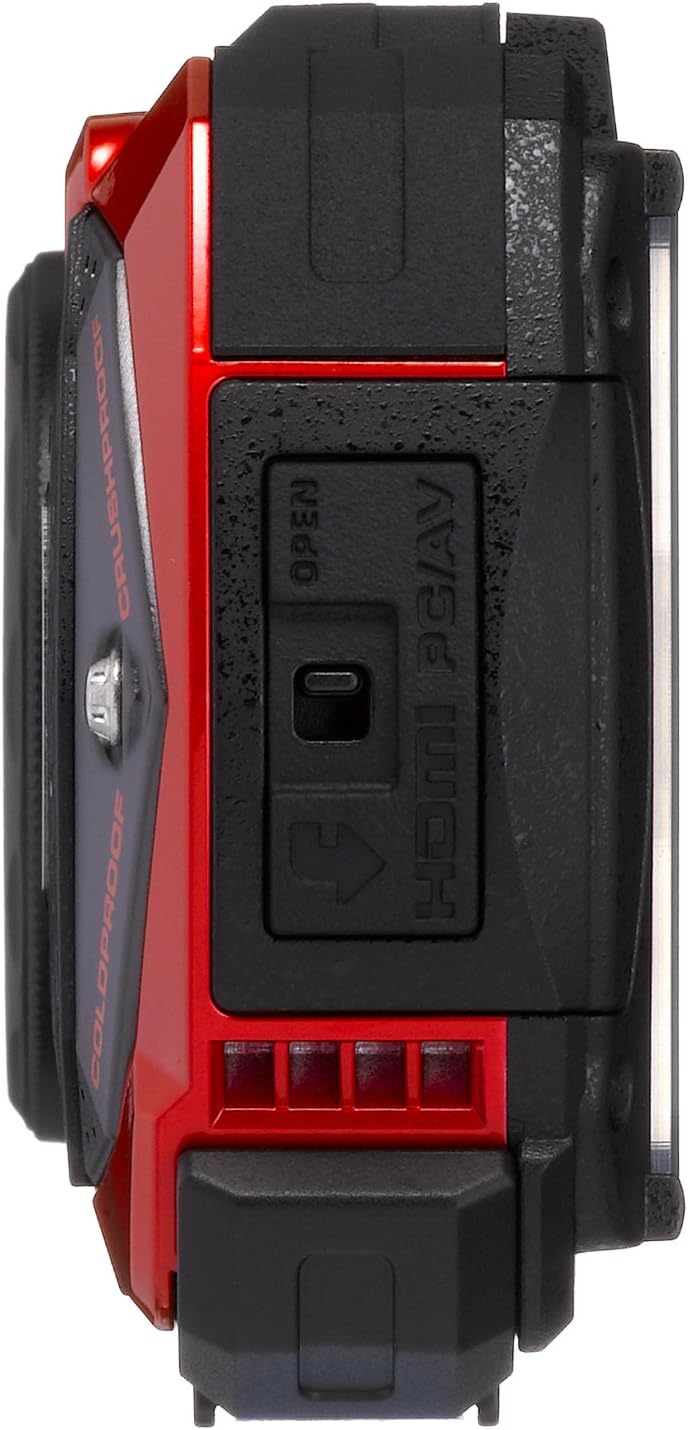
Figur 2.1: Side view with port cover open.
2.3. Indledende indstillinger
Upon first power-on, the camera will prompt you to set the date, time, and language. Follow the on-screen instructions to configure these basic settings.
3. Betjening af kameraet
3.1. Tænd/sluk
Tryk på ON/OFF knappen øverst på kameraet for at tænde eller slukke det.

Figur 3.1: Øverst view with Power and Shutter buttons.
3.2. Tage billeder
- Tænd kameraet.
- Komponer dit billede ved hjælp af den 3.0-tommer LCD-skærm.
- Tryk udløserknappen halvt ned for at fokusere.
- Tryk udløserknappen helt ned for at tage billedet.
3.3. Zoomfunktion
Use the zoom buttons (W for wide, T for telephoto) located on the back of the camera to adjust the 5x optical zoom. The camera also features a 7.2x digital zoom.

Figur 3.2: Tilbage view with LCD and control buttons.
3.4. Optagetilstande
Tryk på MODE button to select various shooting modes, including automatic, program, and specialized modes like Underwater mode. Refer to the on-screen menu for detailed options.
3.5. Videooptagelse
To record video, switch to video mode (if available via the MODE button or a dedicated video button). Press the shutter button to start and stop recording. The camera supports Full HD 1080p video at 30 frames per second.
3.6. Macro Photography with LED Lights
For close-up shots, the camera features a ring of six LED lights around the lens. Activate these lights in macro mode to provide even illumination for subjects as close as 1 cm.
4. Vedligeholdelse
4.1. Rengøring af kameraet
- Kamerahus: Tør af med en blød, damp klud. Brug en mild sæbeopløsning til genstridigt snavs og skyl grundigt.
- Lens and LCD Screen: Brug en blød, fnugfri klud, der er specielt designet til optiske overflader. Undgå skrappe kemikalier.
- Vandtætte forseglinger: Regularly inspect the rubber seals on the battery/card compartment and port covers for dirt, sand, or damage. Clean with a soft brush and ensure they are free of debris before closing.
4.2. After Underwater Use
After using the camera in water, especially saltwater, rinse it thoroughly with fresh water. Allow the camera to air dry completely before opening any compartments. Do not open compartments while the camera is wet to prevent water ingress.

Figure 4.1: Pentax Optio WG-2 after water exposure.
4.3. Opbevaring
Opbevar kameraet et køligt og tørt sted væk fra direkte sollys og ekstreme temperaturer. Fjern batteriet, hvis kameraet ikke skal bruges i en længere periode.
5. Fejlfinding
- Kameraet tænder ikke: Sørg for, at batteriet er fuldt opladet og korrekt isat.
- Billederne er slørede: Check focus settings. Ensure the lens is clean. Use image stabilization if available.
- Water inside the camera: Immediately power off the camera, remove the battery and memory card. Contact customer support. This indicates a failure of the waterproof seals.
- Poor performance in low light: The camera may struggle in very low light conditions. Use the built-in flash or adjust ISO settings if possible.
- Fejl på hukommelseskort: Sørg for, at hukommelseskortet er isat korrekt og ikke er beskadiget. Prøv at formatere kortet (dette vil slette alle data).
- LCD-skærmen viser ikke: If the screen is blank or malfunctioning, try restarting the camera. If the issue persists, contact customer support.
6. Specifikationer
| Feature | Specifikation |
|---|---|
| Modelnavn | Pentax Optio WG-2 |
| Fotosensor opløsning | 16 MP |
| Optisk zoom | 5x |
| Digital Zoom | 7.2x |
| Maksimal brændvidde | 140 millimeter |
| Minimum brændvidde | 28 millimeter |
| Billedstabilisering | Optisk |
| Video opløsning | FHD 1080p |
| Skærmstørrelse | 3 tommer |
| Vandtæt vurdering | Down to 40 feet (12 meters) |
| Stødsikker vurdering | Op til 5 fod (1.5 meter) |
| Crushproof Rating | Up to 220 pounds (100 kgf) |
| Coldproof Rating | Ned til -10 °C |
| Støvtæt | Ja |
| Flash-hukommelsestype | SD, SDHC, SDXC |
| Forbindelsesteknologi | HDMI, USB, EyeFi |
| ISO rækkevidde | 100-6400 |
| Varens vægt | 0.44 pund |
7. Garanti og support
For warranty information, please refer to the warranty card included with your product or visit the official Pentax website. For technical support, service, or additional inquiries, please contact Pentax customer service through their official channels.
Gem dit købsbevis for garantikrav.


