1. Introduktion
The iLuv MobiAir iMM377BLK is a Bluetooth stereo speaker dock designed for smartphones. It allows users to stream music wirelessly via Bluetooth, charge compatible micro-USB smartphones, and engage in hands-free conversations using its built-in speakerphone. This manual provides detailed instructions for the proper setup, operation, and maintenance of your device.
2. Pakkens indhold
Kontroller venligst, at alle nedenstående varer er inkluderet i din pakke:
- iLuv MobiAir iMM377BLK Bluetooth Stereo Speaker Dock
- AC Adapter
- Hurtig startvejledning
3. Produktet er slutview
Familiarize yourself with the components of your MobiAir speaker dock.

Figur 3.1: Front view of the iLuv MobiAir iMM377BLK with a smartphone securely docked.
3.1 Front Panel and Docking Area
- Højttalergitter: Located on the left and right sides, providing stereo audio output.
- myBot Robotic Arms: Adjustable arms that secure your smartphone in place, accommodating various phone sizes.
- Sliding Micro-USB Connector: A flexible connector that slides and rotates to align with your smartphone's micro-USB port for charging.

Figur 3.2: Top-mounted control buttons for power, playback, volume, and Bluetooth functions.
3.2 Betjeningselementer på øverste panel
- Power knap: Tænder eller slukker for enheden.
- Bluetooth-parringsknap: Starter Bluetooth-parringstilstand.
- Knapper til lydstyrke op / ned: Justerer lydstyrken for udgangen.
- Afspil/pause knap: Styrer medieafspilning.
- Knapper til at springe spor over: Springer til det næste eller forrige spor.
- Knap til besvar/afslut opkald: Manages phone calls when connected via Bluetooth.
- Mikrofon: Til håndfri opkald.

Figur 3.3: Rear panel with auxiliary input and DC power port.
3.3 Bagpaneltilslutninger
- DC IN-port: Connects to the provided AC adapter for power.
- AUX IN -stik: Allows connection of external audio devices via a 3.5mm audio cable (not included).
4. Opsætning
4.1 Strømtilslutning
- Connect the supplied AC adapter to the DC IN port on the rear of the MobiAir dock.
- Sæt AC-adapteren i en almindelig stikkontakt.
- Tryk på Power-knappen på toppanelet for at tænde enheden.
4.2 Docking Your Smartphone
The MobiAir features adjustable myBot robotic arms and a sliding micro-USB connector to accommodate various smartphone designs.
- Gently pull apart the myBot robotic arms to create enough space for your smartphone.
- Position your smartphone between the arms.
- Adjust the sliding micro-USB connector to align with your smartphone's charging port. The connector can also rotate to match the port's orientation.
- Carefully push your smartphone onto the micro-USB connector until it is securely seated and charging begins.
- Release the myBot arms to gently secure the smartphone in the dock.

Figur 4.1: Horizontal adjustment of the myBot robotic arms to fit various smartphone widths.
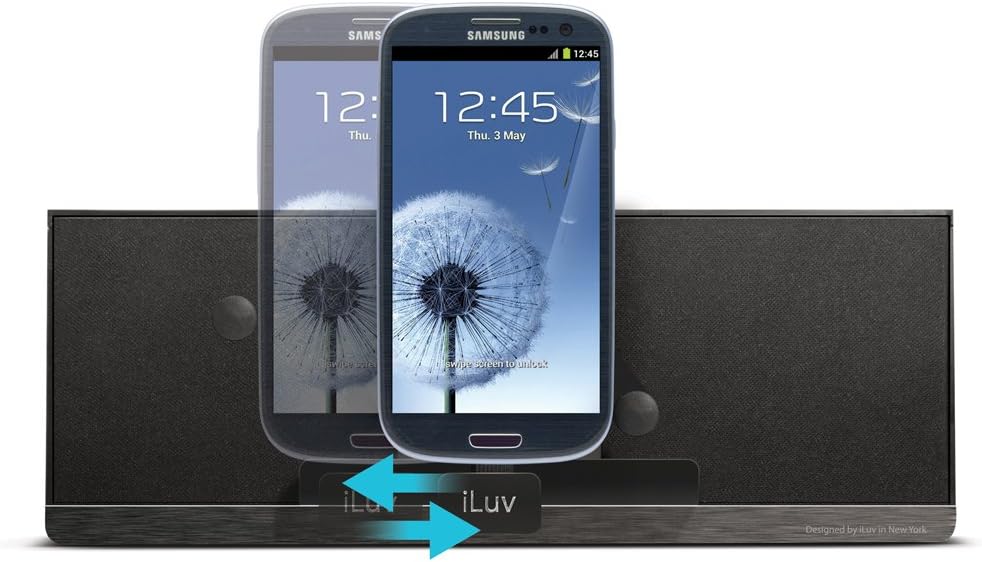
Figur 4.2: Vertical adjustment of the myBot robotic arms for different smartphone heights.
5. Betjeningsvejledning
5.1 Bluetooth Pairing and Audio Streaming
- Ensure the MobiAir dock is powered on.
- Press and hold the Bluetooth Pairing button on the top panel until the Bluetooth indicator light begins to flash, indicating pairing mode.
- Gå til Bluetooth-indstillingerne på din smartphone, og aktiver Bluetooth.
- Søg efter available devices and select "iLuv MobiAir" (or similar name) from the list.
- Once paired, the Bluetooth indicator light will become solid, and you can now stream audio wirelessly from your smartphone to the dock.
- Use the Play/Pause and Track Skip buttons on the dock, or your smartphone, to control playback.
- Adjust volume using the Volume Up/Down buttons on the dock or your smartphone.
5.2 Using the Auxiliary Input (AUX IN)
For devices without Bluetooth capability, or if you prefer a wired connection, use the AUX IN jack.
- Connect one end of a 3.5mm audio cable (not included) to the AUX IN jack on the rear of the MobiAir dock.
- Tilslut den anden ende af lydkablet til hovedtelefonstikket eller lydudgangen på din eksterne lydenhed.
- The dock will automatically switch to AUX IN mode. If not, ensure no Bluetooth device is actively streaming.
- Control playback and track selection directly from your external audio device. Volume can be adjusted on both the device and the dock.
5.3 Hands-Free Speakerphone Function
When your smartphone is connected via Bluetooth, you can use the MobiAir dock as a speakerphone.
- Besvare et opkald: When a call comes in, press the Call Answer/End button on the top panel.
- Afslutning af et opkald: Press the Call Answer/End button again to end the conversation.
- Foretag et opkald: Initiate a call from your smartphone. The audio will automatically route through the MobiAir dock.
6. Vedligeholdelse
- Rensning: Use a soft, dry cloth to clean the surface of the unit. Do not use liquid cleaners or abrasive materials.
- Opbevaring: When not in use for extended periods, unplug the AC adapter and store the unit in a cool, dry place.
- Undgå fugt: Hold enheden væk fra vand og høj luftfugtighed.
- Undgå ekstreme temperaturer: Do not expose the unit to direct sunlight or extreme heat/cold.
7. Fejlfinding
| Problem | Mulig årsag | Løsning |
|---|---|---|
| Ingen strøm | Netadapteren er ikke tilsluttet, eller strømudtaget er ikke aktivt. | Ensure the AC adapter is securely connected to the dock and a working power outlet. Press the Power button. |
| No audio via Bluetooth | Not paired, out of range, or volume too low. |
|
| Smartphone oplader ikke | Micro-USB connector misalignment or incompatible phone. |
|
| Dårlig lydkvalitet | Low quality audio source, interference, or incorrect volume levels. |
|
8. Specifikationer
| Feature | Detalje |
|---|---|
| Modelnummer | iMM377BLK |
| Mærke | iLuv |
| Produktdimensioner | 8.5 x 4.5 x 6.5 tommer (21.6 x 11.4 x 16.5 cm) |
| Varens vægt | 1.2 pund (0.54 kg) |
| Farve | Sort |
| Hardware-interface | USB 2.0 (for charging) |
| Kompatible enheder | Smartphones with Micro-USB charging and Bluetooth (A2DP) audio capability |
| Samlet USB-porte | 1 (Micro-USB for charging) |
| Input bindtage | 5 volt (DC) |
| Forbindelse | Bluetooth (A2DP), 3.5mm AUX IN |
9. Garanti og support
For warranty information and technical support, please refer to the warranty card included with your product or visit the official iLuv webwebsted.
iLuv Customer Support: For assistance with product setup, troubleshooting, or warranty claims, please contact iLuv customer service through their official channels.


