1. Introduktion
This manual provides comprehensive instructions for the safe and effective operation, maintenance, and troubleshooting of your OWON SDS6062 Digital Storage Oscilloscope. Please read this manual thoroughly before using the device to ensure proper functionality and to prevent damage.
The OWON SDS6062 is a 60 MHz Deep Memory Digital Storage Oscilloscope featuring 10 M points of memory and 2 channels. It is equipped with LAN and VGA interfaces for enhanced connectivity and display options. This package includes the oscilloscope, two probes, a power cable, a USB cable, this manual, and a CD with software.
2. Produktet er slutview
2.1 Nøglefunktioner
- 10M record length with 500MS/s sample sats.
- Auto Scale function for simplified operation.
- Smart design body for easy workplace integration.
- SVGA port for enlarged waveform display on external monitors.
- 8-inch high definition TFT display (800 x 600 pixels).
- Pass/Fail function for automated testing.
- LAN and USB connectivity for data transfer and remote control.
2.2 Hvad er der i æsken
Ved udpakning skal du kontrollere, at alle nedenstående varer er til stede og i god stand:
- OWON SDS6062 Digital Storage Oscilloscope
- Strømledning
- USB-stikkabel
- Instruktionsmanual (dette dokument)
- Software CD
- Probe Set (2 probes)
2.3 Produkt Views

Figur 2.1: Forside view of the OWON SDS6062 Digital Storage Oscilloscope, showing the large 8-inch display and control panel with various knobs and buttons for measurement, acquisition, horizontal, vertical, and trigger settings.

Figur 2.2: Bagside view of the OWON SDS6062 Oscilloscope, highlighting the power input socket and the main power switch. The included power cable is also shown connected.

Figur 2.3: Side view of the OWON SDS6062 Oscilloscope, illustrating the USB (Device and Host), VGA, LAN, and Probe Compensation ports. Two oscilloscope probes and a USB cable are also displayed, indicating the included accessories.
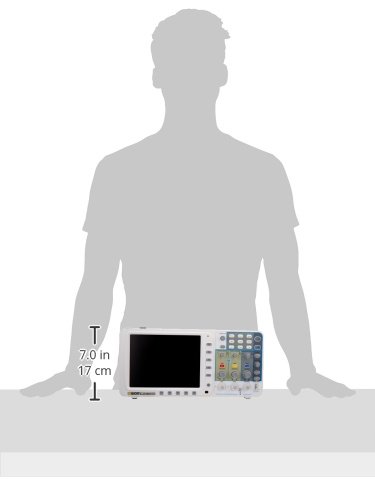
Figure 2.4: A silhouette showing the approximate dimensions of the OWON SDS6062 Oscilloscope, indicating a height of approximately 7.0 inches (17 cm) for scale.
3. Sikkerhedsoplysninger
Overhold altid følgende sikkerhedsforanstaltninger for at forhindre personskade og beskadigelse af instrumentet:
- Strømkilde: Connect the instrument only to a power source that provides the specified voltage and frequency. Ensure the power cord is properly grounded.
- Jording: The oscilloscope chassis is connected to the ground terminal of the power cord. To prevent electric shock, ensure the instrument is properly grounded before making any connections.
- Sonder: Use only probes supplied or recommended by Owon. Ensure probes are rated for the voltage and current being measured. Do not touch the probe tip or exposed components when connected to a live circuit.
- Miljø: Operate the oscilloscope in a well-ventilated area, away from direct sunlight, high temperatures, humidity, and excessive dust. Avoid operating in explosive atmospheres.
- Rensning: Afbryd strømmen før rengøring. Brug en blød, tør klud. Brug ikke slibende rengøringsmidler eller opløsningsmidler.
- Service: Overlad al service til kvalificeret servicepersonale. Forsøg ikke selv at åbne eller reparere instrumentet.
4. Opsætning
4.1 Udpakning og inspektion
Carefully remove the oscilloscope and all accessories from the packaging. Inspect for any signs of damage during transit. If any damage is found, contact your dealer immediately.
4.2 Strømtilslutning
- Ensure the oscilloscope's power switch (located on the rear panel, refer to Figure 2.2) is in the OFF position.
- Connect the provided power cord to the AC power input socket on the rear panel of the oscilloscope.
- Sæt den anden ende af netledningen i en jordet stikkontakt.
4.3 Probetilslutning og kompensation
- Connect the BNC connector of a probe to one of the input channels (CH1 or CH2) on the front panel.
- Attach the probe ground clip to the ground terminal on the oscilloscope's front panel (typically near the probe compensation output).
- Connect the probe tip to the probe compensation output terminal (PROBE COMP) on the front panel (refer to Figure 2.3).
- Power on the oscilloscope.
- Adjust the probe compensation screw on the probe until a flat-top square wave is displayed on the screen. This ensures accurate measurements.
4.4 Connecting to External Devices (LAN/VGA/USB)
The SDS6062 offers multiple connectivity options:
- LAN-port: Connect an Ethernet cable from the oscilloscope's LAN port to your network router or PC for remote control and data transfer. Refer to the software CD for PC application installation and network configuration.
- VGA port: Connect a VGA cable from the oscilloscope's VGA port to an external monitor or projector to display the waveform on a larger screen.
- USB-porte:
- USB Device Port: Use the provided USB cable to connect the oscilloscope to a PC for data transfer and remote control. Install the necessary drivers and software from the included CD.
- USB-værtsport: Connect a USB flash drive to save waveform data or screenshots directly from the oscilloscope.
5. Betjeningsvejledning
5.1 Tænd/sluk
To power on the oscilloscope, press the power switch on the rear panel to the ON position. To power off, press the switch to the OFF position.
5.2 Forstå skærmen
The 8-inch TFT display provides a clear view of waveforms and measurement parameters. The screen is divided into a grid for easy amplitude and time measurement. Key information such as channel status, trigger settings, and measurement values are displayed around the waveform area.
5.3 Basic Waveform Acquisition
- Tilslut sonde: Ensure your probe is correctly connected to a channel (CH1 or CH2) and compensated.
- Tilslut til kredsløb: Connect the probe tip to the test point in your circuit and the ground clip to the circuit's ground.
- Auto Scale: Tryk på Auto button on the front panel. The oscilloscope will automatically adjust the vertical and horizontal settings to display a stable waveform. This is useful for quickly viewing an unknown signal.
- Manuelle justeringer:
- Vertical Position (VOLTS/DIV): Use the vertical position knob for the selected channel to move the waveform up or down. Use the VOLTS/DIV knob to adjust the vertical scale (voltage pr. division).
- Horizontal Position (SEC/DIV): Use the horizontal position knob to move the waveform left or right. Use the SEC/DIV knob to adjust the horizontal scale (time per division).
5.4 Udløsning
Triggering stabilizes repetitive waveforms and captures single-shot events. The trigger controls are located on the right side of the front panel.
- Triggerniveau: Juster TRIG-NIVEAU knap til at indstille lydstyrkentage level at which the trigger occurs.
- Trigger -tilstand: Select trigger modes (e.g., Edge, Pulse, Video) using the dedicated buttons or menu options. Edge triggering is the most common for general-purpose use.
- Triggerkilde: Select the channel (CH1, CH2, EXT, AC Line) that will serve as the trigger source.
5.5 Målinger
The SDS6062 offers various automatic measurement functions:
- Tryk på Måle button to access the automatic measurement menu.
- Select desired parameters such as Vpp (peak-to-peak voltage), Vmax, Vmin, Frequency, Period, Rise Time, Fall Time, etc.
- The selected measurements will be displayed on the screen, typically at the bottom or side.
5.6 Pass/Fail Function
The Pass/Fail function allows for automated testing against predefined waveform masks. If a waveform falls outside the specified mask, it is flagged as a "Fail".
- Access the Pass/Fail settings through the menu system.
- Define the upper and lower limits of the waveform mask.
- Enable the function to begin continuous testing.
5.7 Saving and Recalling Data
Waveforms, setups, and screenshots can be saved to internal memory or a USB flash drive.
- Tryk på Spare button to access saving options.
- Choose to save waveform data, oscilloscope setup, or a screen image.
- Select the destination (internal memory or USB drive).
- To recall, press the Minde om button and select the desired file.
6. Vedligeholdelse
6.1 Generel pleje og rengøring
To maintain the performance and longevity of your oscilloscope:
- Keep the instrument clean and free from dust. Use a soft, dry cloth for cleaning the exterior. For stubborn dirt, a cloth lightly dampened with water and mild detergent may be used, ensuring no liquid enters the device.
- Do not use abrasive cleaners, solvents, or strong chemicals, as these can damage the plastic components and screen.
- Regularly inspect probes and cables for damage. Replace any damaged accessories immediately.
6.2 Opbevaring
When not in use for extended periods, store the oscilloscope in a cool, dry environment, away from direct sunlight and extreme temperatures. Use the original packaging or a suitable carrying case to protect it from physical shock and dust.
7. Fejlfinding
This section addresses common issues you might encounter with your OWON SDS6062 oscilloscope. If the problem persists after following these steps, contact customer support.
| Problem | Mulig årsag | Løsning |
|---|---|---|
| Intet display efter tænding. | Power cord not connected; power switch off; power outlet fault. | Ensure power cord is securely connected. Verify power switch is ON. Test power outlet with another device. |
| Ingen bølgeform vises | Probe not connected; signal too small/large; incorrect vertical/horizontal settings; trigger issues. | Verify probe connection to channel and circuit. Press Auto. Adjust VOLTS/DIV and SEC/DIV. Check trigger level and mode. |
| Unstable or rolling waveform. | Incorrect trigger settings; signal noise. | Adjust trigger level. Change trigger mode (e.g., to Edge). Select appropriate trigger source. Ensure stable signal input. |
| VGA/LAN/USB connectivity issues. | Cable not connected; driver issues; software incompatibility; port malfunction. | Ensure cables are securely connected. Install/reinstall drivers from the included CD. Verify software compatibility with your operating system. Test with different cables/ports if possible. |
| Upræcise målinger. | Probe not compensated; incorrect probe attenuation setting; signal distortion. | Perform probe compensation (Section 4.3). Ensure probe attenuation setting on oscilloscope matches the probe (e.g., 1X, 10X). Check signal integrity. |
8. Specifikationer
| Parameter | Værdi |
|---|---|
| Båndbredde | 60 MHz |
| Kanaler | 2 |
| Sample Sats | 500 MS/s (Real-time) |
| Rekordlængde | 10 millioner point |
| Vise | 8-inch Color TFT LCD (800 x 600 pixels) |
| Forbindelse | LAN, VGA, USB (Host & Device) |
| Funktioner | Auto Scale, Pass/Fail, Multiple Measurement Types |
| Dimensioner (L x B x H) | 14 x 3 x 7 tommer (ca.) |
| Vægt | 5.5 pund (ca.) |
| Fabrikant | OWON |
9. Garanti og support
For information regarding warranty coverage, technical support, or service, please refer to the documentation included with your product or visit the official OWON webwebsted. Behold din købskvittering som købsbevis i tilfælde af garantikrav.
Fabrikant: OWON


