1. Introduktion
This instruction manual provides comprehensive guidance for the Sanyo VPC-E2100BK 14MP Digital Camera. It covers essential information regarding the camera's setup, operation, maintenance, and troubleshooting. Please read this manual thoroughly to ensure proper use and to maximize the camera's capabilities.
2. Produktet er slutview
The Sanyo VPC-E2100BK is a 14-megapixel digital camera featuring a powerful 21x optical zoom lens, a 3-inch LCD display, and CCD Sensor Shift image stabilization. It is capable of recording 720p HD video and includes intelligent scene modes for various shooting conditions.
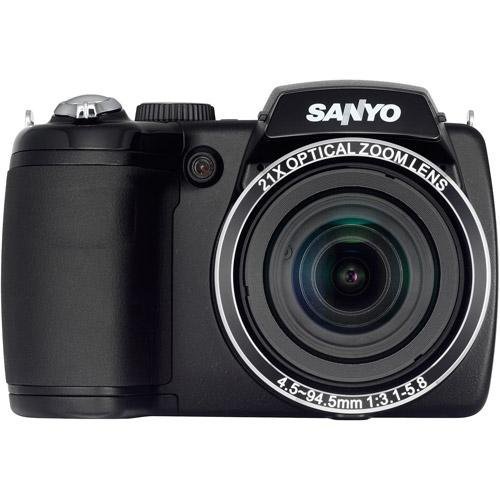
Figur 2.1: Forside view of the Sanyo VPC-E2100BK Digital Camera. This image displays the camera from the front, highlighting the large optical zoom lens, the built-in flash, and the ergonomic grip on the left side. The SANYO brand name is prominently displayed above the lens.
3. Opsætning
3.1. Batteriinstallation
- Find batteridækslet i bunden af kameraet.
- Skub dækslets lås for at åbne rummet.
- Isæt to AA-batterier, og sørg for at polerne (+/-) vender korrekt som angivet i batterirummet.
- Luk batteridækslet ordentligt, indtil det klikker på plads.
3.2. Indsættelse af hukommelseskort
- Open the memory card slot cover, typically located on the side or bottom of the camera.
- Insert a compatible SD/SDHC memory card into the slot with the metal contacts facing the correct direction, usually towards the front of the camera. Push until it clicks into place.
- Luk dækslet til hukommelseskortstikket ordentligt.
3.3. Første opstart
- Press the Power button, usually located on the top panel of the camera.
- The LCD screen will illuminate, and the lens will extend.
- Follow any on-screen prompts for initial setup, such as setting the date and time.
4. Betjening af kameraet
4.1. Optagelse af stillbilleder
- Tænd kameraet.
- Komponer dit billede ved hjælp af LCD-skærmen.
- Press the shutter button halfway down to allow the camera to focus. A green frame or beep indicates focus lock.
- Tryk udløserknappen helt ned for at tage billedet.
4.2. Videooptagelse
- Ensure the camera is in video recording mode (if applicable, often indicated by a dedicated button or mode dial setting).
- Tryk på den dedikerede videooptageknap for at starte optagelsen.
- Press the video record button again to stop recording.
4.3. Zoomfunktion
Use the zoom lever, typically located around the shutter button, to adjust the optical zoom. Push the lever towards 'W' for wide-angle and 'T' for telephoto to zoom in or out.
4.4. Billedstabilisering
The camera features CCD Sensor Shift image stabilization to reduce blur caused by camera shake, especially in low light or when using the telephoto zoom. This function operates automatically.
4.5. Scenetilstande
The Sanyo VPC-E2100BK includes various scene modes, such as Intelligent Scene Mode, to optimize settings for different shooting environments. Access these modes via the camera's menu or mode dial to select the most appropriate setting for your subject (e.g., Portrait, Landscape, Night Scene).
4.6. Afspilning
- Press the Playback button (often marked with a triangle icon).
- Use the directional pad or control buttons to navigate through your captured photos and videos.
- Tryk på afspilningsknappen igen eller udløserknappen for at vende tilbage til optagetilstand.
5. Vedligeholdelse
5.1. Rensning
- Linse: Brug en blød, fnugfri klud eller en linsebørste til forsigtigt at fjerne støv. Brug en specialiseret linserengøringsopløsning på en klud, ikke direkte på linsen, til at fjerne snavs.
- LCD skærm: Wipe with a soft, dry cloth. Avoid harsh chemicals.
- Kamerahus: Use a dry, soft cloth to wipe the camera body. Do not use solvents or abrasive cleaners.
5.2. Batteripleje
- Fjern batterierne, hvis kameraet ikke skal bruges i en længere periode.
- Use high-quality AA alkaline or rechargeable NiMH batteries.
- Opbevar batterier på et køligt, tørt sted.
5.3. Opbevaring
Store the camera in a dry, dust-free environment, away from extreme temperatures and direct sunlight. Consider using a camera bag for protection during transport.
6. Fejlfinding
- Kameraet tænder ikke: Kontroller batteriinstallationen, og sørg for, at batterierne har tilstrækkelig opladning.
- Billederne er slørede: Ensure the lens is clean. Check if image stabilization is active. Ensure the camera has focused correctly before fully pressing the shutter button.
- Fejl på hukommelseskort: Reinsert the memory card. Ensure the card is not full or corrupted. Try formatting the card (this will erase all data).
- Blitzen går ikke af: Check flash settings in the menu. Ensure the flash is not set to 'Off' or 'Red-eye Reduction' in bright conditions where it may not be needed.
7. Specifikationer
| Feature | Specifikation |
|---|---|
| Modelnavn | VPC-E2100BK |
| Fotosensor opløsning | 14 MP |
| Optisk zoom | 21x |
| Video opløsning | 720p |
| Billedstabilisering | CCD Sensor-shift, Digital, Optical |
| Skærmstørrelse | 3 tommer |
| Display Type | LCD |
| Understøttet File Format | JPEG, RAW |
| Strømkilde | 2 AA batterier |
| Autofokus teknologi | Kontrastregistrering |
| Kontinuerlig optagelse | 30 FPS |
| Udvidet ISO Maximum | 3200 |
8. Garanti og support
For warranty information and technical support, please refer to the documentation provided at the time of purchase or visit the official Sanyo support webwebsted. Gem din købsbevis til garantikrav.


