1. Vigtige sikkerhedsoplysninger
Please read this entire manual before assembling or operating the Zipro Holo 2 Exercise Bike. Keep this manual for future reference. Failure to follow these instructions can result in serious injury or damage to the equipment.
- Maksimal brugervægt: This exercise bike is designed for users weighing up to 130 kg (approximately 286 lbs). Do not exceed this weight limit.
- Sundhedsmæssige overvejelser: Consult your physician before starting any new exercise program, especially if you have pre-existing health conditions. Stop exercising immediately if you feel faint, dizzy, or experience pain.
- Korrekt placering: Place the exercise bike on a stable, level surface. Ensure adequate clearance (at least 0.6 meters or 2 feet) around the equipment for safe operation and movement.
- Børn og kæledyr: Hold børn og kæledyr væk fra udstyret under brug. Dette udstyr er ikke legetøj.
- Inspektion: Before each use, inspect the bike for loose parts, wear, or damage. Do not use the equipment if it is damaged.
- Tøj: Brug passende sportstøj og fodtøj. Undgå løstsiddende tøj, der kan sætte sig fast i bevægelige dele.
- Justeringer: Ensure all adjustment knobs and levers are securely tightened before use.
2. Produktet er slutview
The Zipro Holo 2 is a robust indoor exercise bike designed for effective home training. It features a sturdy steel frame, adjustable components, and a mechanical resistance system to simulate real cycling conditions.

Image 2.1: The Zipro Holo 2 Exercise Bike, showcasindets overordnede design og komponenter.
Nøglefunktioner:
- Multifunction LCD Computer: Displays essential training data including time, distance, calories burned, and heart rate.
- Robust Steel Frame: Ensures stability and durability during intense workouts.
- Adjustable Saddle and Handlebars: Allows for vertical and horizontal adjustments to achieve an ergonomic and comfortable riding position for various user heights.
- Heavy Steel Flywheel with Chain Drive: Provides a smooth and realistic cycling motion.
- Non-slip Pedals with Adjustable Straps: Securely holds footwear, ensuring stability even during dynamic riding.
- Fixed Wheel Drive: Engages muscles continuously for maximum training effectiveness.
3. Samling og opsætning
Before assembly, ensure all parts are present and undamaged. Refer to the included hardware pack and assembly diagram for detailed steps. It is recommended to have two people for assembly.
3.1. Udpakning og komponentidentifikation
Carefully remove all components from the packaging. Lay them out on a clean, flat surface. Verify all parts against the parts list provided in the separate assembly guide.
3.2. Stabilizer Installation
Attach the front and rear stabilizers to the main frame using the provided bolts and washers. Ensure they are securely tightened to provide a stable base for the bike.

Image 3.1: Close-up of the bike's base, showing the transport wheels and adjustable feet for leveling.
3.3. Saddle and Handlebar Adjustment
The saddle and handlebars can be adjusted vertically and horizontally to fit your body. Loosen the adjustment knobs, position the saddle/handlebars to your desired height and distance, and then securely tighten the knobs.

Image 3.2: Detail of the adjustable saddle post, allowing for vertical and horizontal positioning.

Image 3.3: Diagram illustrating the dimensions of the Zipro Holo 2 Exercise Bike (125 cm L x 64 cm W x 126 cm H).
4. Betjeningsvejledning
4.1. Kom godt i gang
- Ensure the bike is on a stable surface and all adjustments are secure.
- Step onto the bike, placing your feet firmly in the pedal cages. Adjust the straps for a snug fit.
- Begin pedaling at a comfortable pace.

Image 4.1: Close-up of the non-slip pedals with adjustable straps, designed to secure your feet during exercise.
4.2. Justering af modstand
The Zipro Holo 2 features a mechanical resistance system. To adjust the resistance level:
- Locate the resistance knob, typically positioned on the frame below the handlebars.
- Turn the knob clockwise to increase resistance, making pedaling harder.
- Turn the knob counter-clockwise to decrease resistance, making pedaling easier.
- For emergency stops, press down firmly on the resistance knob.
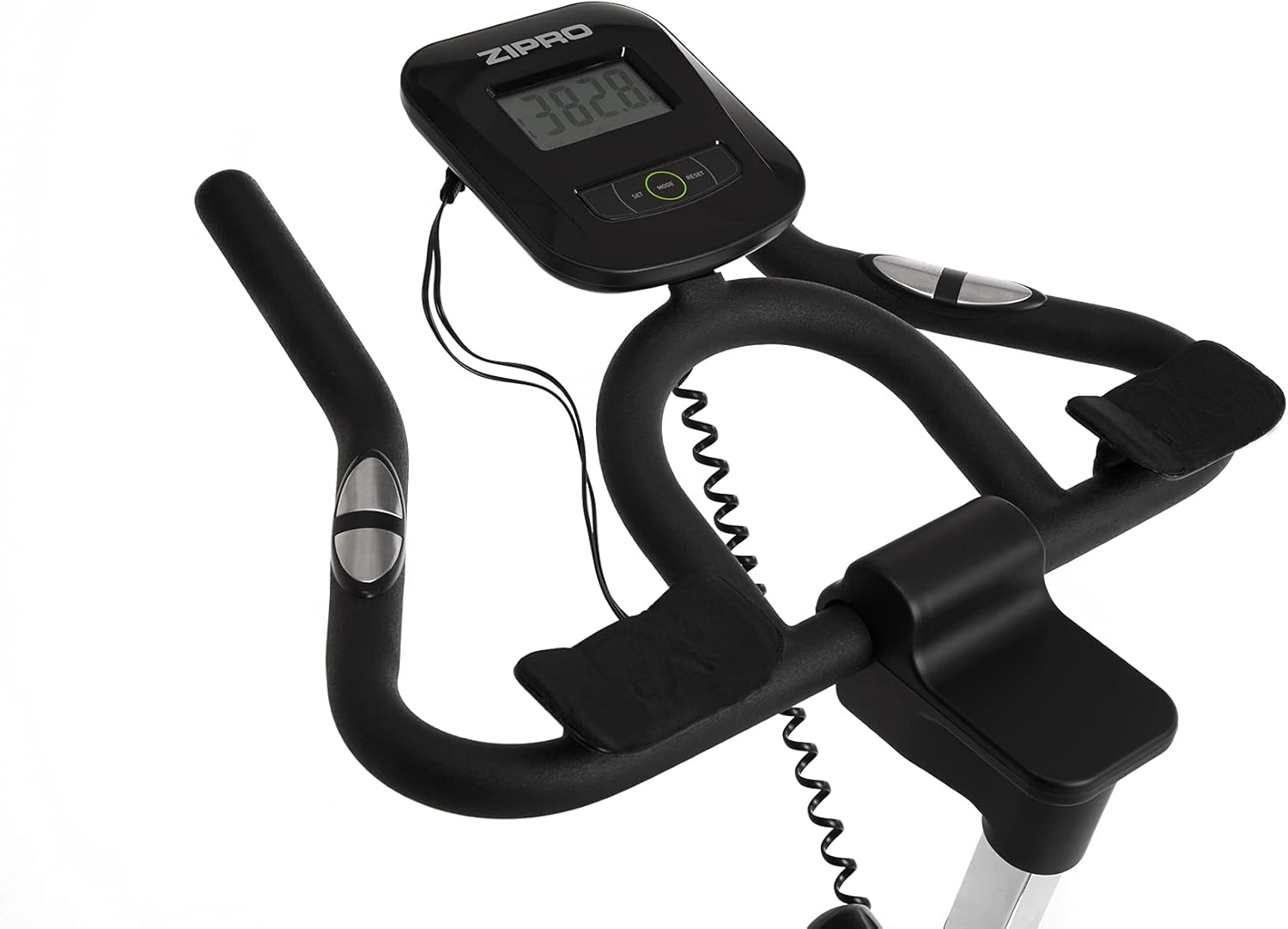
Image 4.2: Detail of the resistance adjustment knob, allowing for precise control over workout intensity.
4.3. Using the Multifunction Computer
The integrated LCD computer displays your workout data. Connect the pulse sensors (if applicable) for heart rate monitoring.
- Skærmtilstande: The computer cycles through various metrics such as Time, Distance, Calories, Speed, and Pulse.
- Start/Stop: The computer automatically starts when you begin pedaling and pauses when you stop.
- Nulstil: Press and hold the 'MODE' or 'RESET' button (refer to the computer's specific buttons) to clear all data.
- Pulsmåling: Grip the pulse sensors on the handlebars to display your heart rate. Ensure both hands are firmly on the sensors for an accurate reading.

Image 4.3: Close-up of the multifunction LCD computer and handlebars with integrated pulse sensors.
4.4. Water Bottle Holder
A convenient water bottle holder is integrated into the frame to keep you hydrated during your workout.

Image 4.4: Detail of the water bottle holder mounted on the bike frame.
5. Vedligeholdelse
Regular maintenance ensures the longevity and safe operation of your Zipro Holo 2 Exercise Bike.
- Rensning: Tør cyklen af med annonceamp en klud efter hver brug for at fjerne sved og støv. Undgå slibende rengøringsmidler eller opløsningsmidler.
- Smøring: Periodically check the chain drive for proper lubrication. Apply a suitable lubricant if necessary, following the manufacturer's recommendations for bicycle chains.
- Bolt and Nut Check: Regularly inspect all bolts, nuts, and connections to ensure they are tight. Tighten any loose fasteners.
- Slitage: Check for signs of wear on moving parts, such as pedals, straps, and the saddle. Replace worn components as needed.
- Opbevaring: Opbevar cyklen et tørt, køligt sted væk fra direkte sollys og ekstreme temperaturer.
6. Fejlfinding
If you encounter issues with your Zipro Holo 2 Exercise Bike, refer to the following common troubleshooting steps:
| Problem | Mulig årsag | Løsning |
|---|---|---|
| Computer display is blank or erratic. | Low or dead batteries; loose connection. | Replace batteries (AA or AAA, typically). Check all cable connections to the computer. |
| Resistance feels inconsistent or too loose/tight. | Resistance mechanism issue; knob not properly adjusted. | Ensure the resistance knob is fully functional and not stripped. Inspect the mechanical resistance pads for wear. |
| Unusual noises (squeaking, grinding). | Loose parts; lack of lubrication; worn components. | Check all bolts and nuts for tightness. Lubricate the chain drive if dry. Inspect pedals and flywheel for any obstructions or wear. |
| Saddle or handlebars slip during use. | Adjustment knobs not tightened sufficiently. | Ensure all adjustment knobs for the saddle and handlebars are tightened firmly. |
7. Specifikationer
| Feature | Specifikation |
|---|---|
| Model | Holo 2 |
| Mærke | ZIPRO |
| Modelnummer | 5944594 |
| Dimensioner (L x B x H) | 125 cm x 64 cm x 126 cm |
| Varens vægt | 42.5 kg (42500 gram) |
| Maksimal brugervægt | 130 kg (130000 gram) |
| Drive System | Kæde |
| Modstandsmekanisme | Mekanisk |
| Strømkilde | Battery Powered (for computer) |
| Hovedmateriale | Plastic (components), Steel (frame) |
| Farve | Sort / Grøn |
8. Garanti og support
For specific warranty details, please refer to the documentation included with your purchase or contact the retailer. General return policy for this product is typically 30 days from the date of purchase.
For technical support, spare parts, or further assistance, please contact ZIPRO customer service through their official webwebstedet eller forhandleren, hvor produktet blev købt.


