1. Introduktion
This manual provides comprehensive instructions for the setup, operation, and maintenance of your Bose Personal Music Center III. This device is designed to extend control and access to your Bose Lifestyle home entertainment system from additional locations within your home or outdoors. It allows control over connected components and provides access to music libraries.
2. Produktet er slutview
2.1 Nøglefunktioner
- Radio frequency remote control for devices connected to your Lifestyle system.
- Provides system information outside the main room.
- Expands sound from your Lifestyle system to other rooms or outdoors when used with Bose link-compatible products.
- Includes a "Party" feature to link all connected expansion products to the current source.
- Backlit LCD screen with layered menu display for quick access to system information.
- Operates through most walls, floors, and ceilings.
2.2 Pakkens indhold
- Bose Personal Music Center III fjernbetjening
- To AA batterier
2.3 Kompatibilitet
The Personal Music Center III is compatible with the following Bose Lifestyle systems:
- Lifestyle V35 home theater system
- Lifestyle V25 home theater system
- Lifestyle 235 home theater system
- Lifestyle 135 home theater system
- Other latest 5.1, 2.1, and 1.1-channel Lifestyle systems.
2.4 Fjernbetjeningens layout
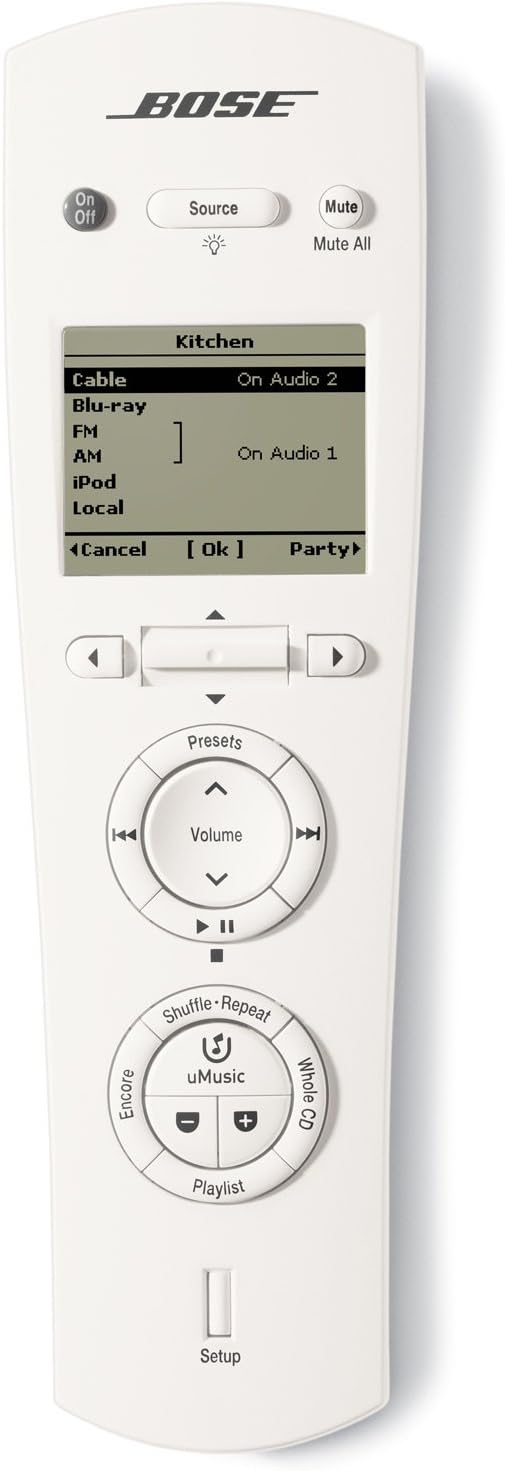
Figur 1: Forside view of the Bose Personal Music Center III remote control. This image displays the remote's screen, power button, source button, mute button, navigation buttons, volume controls, and various function buttons for music playback.

Figure 2: Labeled diagram of the Bose Personal Music Center III remote control. This diagram highlights specific buttons and their functions, including "Show list of FM presets," "Toggle shuffle mode in iPod source," "Play whole CD of current iPod track," "Switch to iPod source," "Toggle repeat mode in iPod source," "Skip to next/prev playlist in iPod source," and "Show list of iPod playlists."
Refer to Figure 2 for a detailed breakdown of button functions:
- On/Off knap: Tænder eller slukker for systemet.
- Kildeknap: Selects the audio/video source.
- Mute/Mute All Button: Slår lyden til eller fra.
- LCD skærm: Displays system information, menus, and track details.
- Navigation Buttons (Left/Right/Up/Down/OK): Bruges til at navigere i menuer og bekræfte valg.
- Lydstyrkekontrol: Justerer lydstyrken.
- Presets: Accesses saved FM presets.
- Afspilningskontroller (Afspil/Pause, Spring over): Styrer medieafspilning.
- Bland/Gentag: Toggles shuffle and repeat modes for iPod sources.
- uMusic: Accesses the uMusic system.
- Whole CD: Plays the entire CD of the current iPod track.
- Encore: Function related to music playback.
- Playliste: Displays iPod playlists.
- Opsætning: Åbner systemopsætningsmenuen.
3. Opsætning
3.1 Batteriinstallation
- Locate the battery compartment cover on the back of the Personal Music Center III.
- Skub dækslet af.
- Isæt to AA-batterier, og sørg for at polerne vender korrekt (+ og -).
- Sæt batterirummets dæksel på igen.
3.2 Pairing with Your Lifestyle System
To ensure proper functionality, the Personal Music Center III must be paired or synchronized with your Bose Lifestyle home entertainment system. The exact pairing procedure may vary slightly depending on your specific Lifestyle system model. Refer to your Lifestyle system's main instruction manual for detailed pairing instructions.
General Pairing Steps (Consult your Lifestyle system manual for specifics):
- Ensure your Lifestyle system is powered on.
- Access the system's setup or remote control pairing menu.
- Follow the on-screen prompts to initiate the pairing process for a new remote control.
- The Personal Music Center III should automatically detect and pair with the system. If not, you may need to press a specific button combination on the remote as instructed by your Lifestyle system.
- Confirm successful pairing on the Lifestyle system's display or the Personal Music Center III's screen.
4. Betjeningsvejledning
4.1 Tænd/sluk
Tryk på Til/Fra button located at the top left of the remote to power your Lifestyle system on or off.
4.2 Valg af en kilde
Tryk på Kilde button to cycle through available audio/video sources connected to your Lifestyle system (e.g., Cable, Blu-ray, FM, AM, iPod, Local). The selected source will be displayed on the remote's LCD screen.
4.3 Justering af lydstyrke
Brug Lydstyrke op og Lydstyrke ned buttons in the central control ring to adjust the audio level. Press the Stum knappen for midlertidigt at slå lyden fra.
4.4 Navigating Menus and iPod Playlists
The backlit LCD screen displays layered menus for easy navigation. Use the Venstre / højre / op / ned navigation buttons to move through options and the OK knappen for at bekræfte valg.
When an iPod source is selected, you can access playlists, view track titles, artists, and genres directly on the remote's screen. Use the Afspilningsliste button to display your iPod playlists and the navigation buttons to browse.
4.5 Using the "Party" Feature
The "Party" feature allows you to link all connected Bose link-compatible expansion products to play the same audio source as your main Lifestyle system. To activate, navigate to the "Party" option on the remote's screen and select it.
4.6 Controlling Connected Components
The Personal Music Center III can control various components connected to your Lifestyle system media console, such as Blu-ray players and DVRs. Once the relevant source is selected, the remote's navigation and playback buttons will typically control the functions of that component.
5. Vedligeholdelse
5.1 Rengøring
Wipe the remote control with a soft, dry cloth. Do not use liquid cleaners or solvents, as they may damage the finish or internal components.
5.2 Udskiftning af batteri
When the remote's screen dims or responsiveness decreases, it is time to replace the AA batteries. Follow the battery installation steps in Section 3.1.
6. Fejlfinding
| Problem | Mulig årsag | Løsning |
|---|---|---|
| Fjernbetjeningen svarer ikke. | Døde eller forkert installerede batterier. | Udskift batterierne, og sørg for korrekt polaritet. |
| Remote not controlling the Lifestyle system. | Remote is not paired with the Lifestyle system. | Refer to Section 3.2 for pairing instructions, or consult your Lifestyle system's manual. |
| Intermitterende kontrol- eller signaltab. | Interference from other wireless devices; distance from the Lifestyle system. | Ensure no strong interference sources are nearby. Try moving closer to the Lifestyle system's console. |
| iPod playlists or track information not displaying. | iPod not properly connected or source not selected. | Ensure the iPod is correctly connected to the Lifestyle system. Select the iPod source on the remote. |
7. Specifikationer
| Feature | Detalje |
|---|---|
| Modelnummer | PMCIIIREMOTECONTROL |
| Produktdimensioner | 9.8 x 14.25 x 9.76 tommer |
| Varens vægt | 1.5 pund |
| Fabrikant | Bose |
| Strømkilde | 2 x AA batterier |
| Forbindelse | Radiofrekvens (RF) |
| Speciel funktion | Universal control for compatible Bose Lifestyle systems |
| Farve | Hvid |
8. Garanti og support
For warranty information and technical support, please refer to the documentation included with your Bose Lifestyle home entertainment system or visit the official Bose support website. You can also contact Bose customer service directly for assistance with your Personal Music Center III.
Bose-support Webwebsted: www.bose.com/support


