Indledning
This manual provides essential information for the proper installation, operation, and maintenance of the Comelit 4888CU Simplebus 2 Color Mixer. The 4888CU is a mixer unit designed for integration within a Simplebus 2 system, housed in an 8 DIN module box. It plays a crucial role in managing and distributing audio, video, and data signals within the system.
Please read this manual thoroughly before use to ensure safe, efficient, and correct operation of the device and its integration into your Comelit Simplebus 2 system.
Sikkerhedsoplysninger
- Kvalificeret personale: Installation, wiring, and maintenance procedures must only be performed by qualified technical personnel in accordance with local electrical codes and regulations.
- Strømafbrydelse: Always disconnect the main power supply to the entire system before performing any installation, wiring, or maintenance work on the 4888CU or any connected components.
- Miljøforhold: Do not expose the device to moisture, rain, direct sunlight, or extreme temperatures. Ensure the installation location provides adequate ventilation to prevent overheating.
- Originale dele: Use only original Comelit spare parts and accessories to ensure compatibility and maintain product warranty.
- Bortskaffelse: At the end of its life cycle, dispose of the product according to local regulations for electronic waste. Do not dispose of it with general household waste.
Produkt overview
The Comelit 4888CU is a dedicated mixer unit for Simplebus 2 color video door entry systems. It is designed to be mounted on a standard DIN rail within an electrical distribution board or enclosure. Its function is to combine and distribute the various signals (audio, video, data) that constitute the Simplebus 2 communication protocol, ensuring seamless operation across the system.
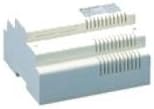
Figur 1: Front view of the Comelit 4888CU Simplebus 2 Color Mixer. This image displays the compact, white plastic housing with integrated ventilation slots, designed for secure DIN rail mounting within an electrical panel.
The unit is passive in terms of user interaction, meaning there are no buttons or indicators for direct user control. Its operation is entirely managed by the Simplebus 2 system's central control logic.
Opsætning og installation
Vigtig: Ensure all power to the system is disconnected before proceeding with installation.
- Montering: Securely mount the 4888CU mixer onto a standard 8 DIN rail within an appropriate electrical enclosure. Ensure the enclosure provides adequate space for wiring and allows for proper air circulation around the unit.
- Ledningsforbindelser: Refer to the specific wiring diagram provided with your Comelit Simplebus 2 system documentation. Connect the Simplebus 2 main line, power supply, and any other relevant system components (e.g., risers, distributors) to the designated terminals on the 4888CU. Pay close attention to polarity and ensure all connections are firm and secure to prevent intermittent operation.
- Power Supply Integration: Connect the appropriate Comelit power supply unit (e.g., model 1207, 1209, or equivalent) to the Simplebus 2 system as per the overall system installation guidelines. Do not apply power until all wiring connections have been thoroughly checked and verified for correctness.
- Systemkonfiguration: After completing all physical wiring, proceed with the system configuration and addressing of connected devices as detailed in the main Simplebus 2 system manual. The 4888CU typically does not require individual programming but relies on the correct configuration of the overall system.
Driftsprincipper
The Comelit 4888CU operates automatically as an integral part of the Simplebus 2 system. Once correctly installed and powered, it continuously processes and mixes the audio, video, and data signals transmitted across the Simplebus 2 line. Its primary function is to ensure that signals from various system components (e.g., outdoor entrance panels, indoor monitors, other mixers) are correctly combined and routed to their intended destinations.
There are no user-adjustable controls, indicators, or operational modes on the 4888CU itself. Its proper functioning is reflected in the overall performance and stability of the video door entry system, such as clear audio communication, stable video feeds, and correct call routing between indoor and outdoor units.
Any issues with system performance should first lead to a review of the entire Simplebus 2 system configuration and wiring, as the 4888CU's operation is dependent on the integrity of the broader system.
Opretholdelse
- Rensning: The exterior of the unit can be cleaned periodically with a soft, dry, lint-free cloth. Do not use abrasive cleaners, solvents, or excessive moisture, as these can damage the casing eller interne komponenter.
- Inspektion: Periodically, and especially during routine system checks, inspect the wiring connections to the 4888CU to ensure they remain tight and free from corrosion. Check for any visible signs of damage to the unit or its cables.
- Ventilation: Ensure that the ventilation slots on the unit are not obstructed by dust, debris, or other objects. Adequate airflow is crucial for preventing overheating and ensuring long-term reliability.
- Intern vedligeholdelse: The Comelit 4888CU contains no user-serviceable parts. Do not attempt to open the casing or perform any internal repairs. All internal maintenance or repairs must be carried out by qualified Comelit service personnel.
Fejlfinding
If you experience issues with your Simplebus 2 system, consider the following troubleshooting steps. Note that many system issues are related to overall system configuration or wiring rather than a specific component fault.
| Problem | Mulig årsag | Løsning |
|---|---|---|
| No video or audio from indoor monitors. | Incorrect wiring to the 4888CU; power supply issue; faulty component elsewhere in the Simplebus 2 system. | Verify all wiring connections to the 4888CU and other system components according to the system diagram. Check the power supply unit for proper operation (voltage output, indicators). Consult the main Simplebus 2 system manual for comprehensive diagnostics. |
| Intermittent video or audio signals. | Loose or poor wiring connections; signal interference; system overload or impedance mismatch. | Ensure all terminal connections on the 4888CU and other devices are tight and secure. Check for potential sources of electrical interference near system cabling. Review the system design for proper load balancing and cable lengths. |
| The 4888CU unit feels excessively hot to the touch. | Poor ventilation in the enclosure; internal system fault causing excessive current draw. | Ensure that the ventilation slots on the unit are clear and that the electrical enclosure has adequate airflow. If overheating persists, immediately disconnect power to the system and contact qualified technical support. |
| System not responding after power cycle. | Incorrect system configuration; power supply failure; critical component failure. | Verify that the power supply is functioning correctly. Re-check all system wiring and configuration settings as per the Simplebus 2 manual. If the problem persists, professional assistance may be required. |
For issues not listed here, or if the suggested troubleshooting steps do not resolve the problem, please contact Comelit technical support or your authorized Comelit installer.
Specifikationer
- Model: Comelit 4888CU
- Produkttype: Simplebus 2 Color Mixer
- Bolig: 8 DIN module box
- Kompatibilitet: Specifically designed for Comelit Simplebus 2 video door entry systems.
- Montering: DIN rail mountable.
- Fabrikant: Comelit Group SpA
- Dato først tilgængelig: 5. august 2011
- Note: Detailed electrical specifications (e.g., operating voltage, current consumption, operating temperature range) are typically provided in the comprehensive Simplebus 2 system installation manual or on the product's technical data sheet.
Garanti og support
Comelit products are covered by a standard manufacturer's warranty against defects in materials and workmanship. For specific warranty terms, conditions, and duration, please refer to the warranty documentation included with your purchase or visit the official Comelit webDet er vigtigt at gemme dit købsbevis i tilfælde af garantikrav.
For technical assistance, product support, or to report a fault, please contact your local authorized Comelit distributor or visit the Comelit official support page. You may find useful resources, frequently asked questions (FAQs), and contact information at www.comelitgroup.com/en-us/support. When contacting support, please have your product model (4888CU) and a detailed description of the issue ready.


