1. Introduktion
Thank you for choosing the Philips AJB3552/12 DAB+ FM Clock Radio. This manual provides essential information for setting up, operating, and maintaining your device. Please read it carefully to ensure optimal performance and safe use of your clock radio.
Key features of your Philips AJB3552/12 include:
- DAB+ (Digital Audio Broadcasting) for clear, noise-free radio reception.
- FM tuner for traditional radio stations.
- Dynamic Bass Boost for enhanced low-frequency sound.
- Integrated alarm with multiple wake-up options.
- Light sensor for automatic display brightness adjustment.
- Backlit LCD display for easy readability.
2. Sikkerhedsoplysninger
Overhold følgende sikkerhedsforanstaltninger for at forhindre elektrisk stød, brand eller beskadigelse af enheden:
- Udsæt ikke enheden for regn eller fugt.
- Placer ikke genstande fyldt med væske, såsom vaser, på enheden.
- Sørg for tilstrækkelig ventilation. Bloker ikke ventilationsåbningerne.
- Beskyt netledningen mod at blive trådt på eller klemt.
- Brug kun tilbehør/tilbehør specificeret af producenten.
- Tag stikket ud af enheden under tordenvejr, eller når den ikke skal bruges i længere perioder.
- Overlad al service til kvalificeret servicepersonale.
3. Pakkens indhold
Bekræft, at din pakke indeholder følgende varer:
- Philips AJB3552/12 Clock Radio
- Brugervejledning (dette dokument)
- Hurtig startvejledning
- Strømforsyningsenhed
- Garantibevis
4. Produktet er slutview
Familiarize yourself with the components of your Philips AJB3552/12 Clock Radio.
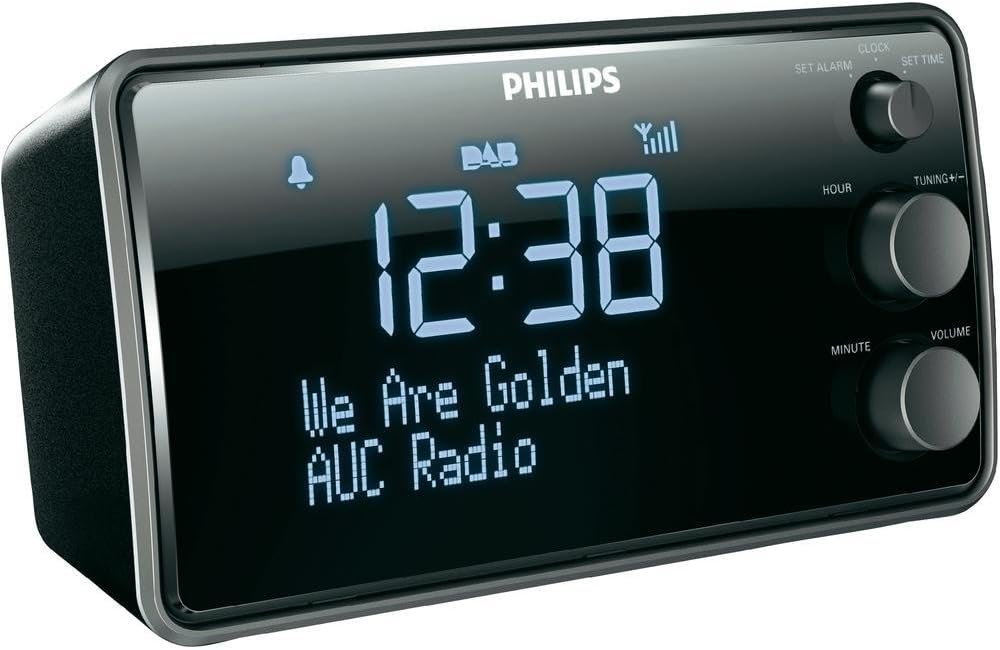
Billede 1: Front view of the Philips AJB3552/12 Clock Radio, showing the digital display, Philips logo, and control knobs for setting time, tuning, and volume.
Frontpanel
- Vise: Shows time, radio station information, and alarm status.
- SET ALARM knob: Bruges til at indstille alarmtidspunktet.
- SET TIME knob: Bruges til at indstille den aktuelle tid.
- HOUR button: Justerer timen.
- MINUTE button: Justerer minuttet.
- TUNING +/- knob: For tuning radio frequencies or navigating menus.
- VOLUME knap: Justerer lydudgangsniveauet.
Bagpanel
- Strømindgang: Tilsluttes den medfølgende strømadapter.
- FM/DAB-antenne: Til modtagelse af radiosignaler.
5. Opsætning
5.1 Tilslutning af strøm
- Uncoil the FM/DAB antenna fully for optimal reception.
- Connect the power adapter to the DC IN socket on the rear of the clock radio.
- Sæt strømadapteren i en stikkontakt.
5.2 Initial Power On and Time Synchronization
Upon first connection, the clock radio will automatically attempt to synchronize the time via DAB+ signal. This process may take a few minutes.

Billede 2: The Philips AJB3552/12 Clock Radio positioned on a wooden bedside table next to a bed, illustrating a typical usage scenario.
5.3 Manual Time Setting (if automatic synchronization fails)
- Tryk og hold på FASTSAT TIDSPUNKT knob until the hour digits flash.
- Drej på TIME knappen for at justere timetallet. Tryk på TIME for at bekræfte.
- Drej på MINUT button to adjust the minute. Press MINUT for at bekræfte.
- Tiden er nu sat.
6. Betjeningsvejledning
6.1 Tænd/sluk
- To turn on the clock radio, press the MAGT button (usually integrated with the VOLUME knob).
- To turn off the clock radio, press the MAGT button again. The display will show the current time.
6.2 Radiodrift
6.2.1 DAB+ radio
- Tryk på MODE button (if available, or cycle through modes using the power button) to select DAB+ mode.
- The radio will automatically scan for available DAB+ stations. This may take a few moments.
- Once scanning is complete, rotate the TUNING +/- knob to browse through the available stations.
- Tryk på TUNING +/- knappen for at vælge en station.
- To store a preset, press and hold a preset number button (if available) until the display confirms.
6.2.2 FM radio
- Tryk på MODE knappen for at vælge FM-tilstand.
- Drej på TUNING +/- knappen til manuelt at indstille til en frekvens.
- For automatisk at scanne efter den næste tilgængelige station skal du trykke på og holde TUNING +/- knop.
- To store a preset, press and hold a preset number button (if available) until the display confirms.
6.2.3 Dynamisk basforstærkning
The Dynamic Bass Boost feature enhances low-frequency sounds for a richer audio experience. To activate or deactivate, press the DBB button (if available, or check menu options).
6.3 Alarmindstillinger
The Philips AJB3552/12 allows you to set an alarm to wake up to your preferred radio station or a buzzer.
- Tryk og hold på SÆT ALARM knob until the alarm time digits flash.
- Drej på TIME button to set the alarm hour. Press TIME for at bekræfte.
- Drej på MINUT button to set the alarm minute. Press MINUT for at bekræfte.
- Select the alarm source: Rotate the TUNING +/- knob to choose between Radio or Summer. Press the knob to confirm.
- Select the alarm frequency: Rotate the TUNING +/- knob to choose between Daglig, Hverdage (Mon-Fri), or Weekender (Sat-Sun). Press the knob to confirm.
- For at aktivere/deaktivere alarmen skal du trykke på ALARM TIL / FRA button (often located on top or integrated with the SET ALARM knob). An alarm icon will appear on the display when active.
6.3.1 Snooze -funktion
Når alarmen lyder, skal du trykke på SLUM button (usually a large button on top) to temporarily silence the alarm. The alarm will sound again after a few minutes (default snooze time is typically 9 minutes).
6.3.2 Sleep Timer
Sleep-timeren giver dig mulighed for at falde i søvn til radioen, som automatisk slukker efter et bestemt tidsrum. Tryk på SOVE button repeatedly to cycle through available sleep times (e.g., 120, 90, 60, 30, 15 minutes, or OFF).
6.4 Skærmindstillinger
The clock radio features a light sensor that automatically adjusts the display brightness based on ambient light conditions. If manual adjustment is desired, consult the full user manual for specific steps, as this may vary.
7. Vedligeholdelse
7.1 Rengøring
To clean the unit, use a soft, dry cloth. Do not use abrasive cleaners, alcohol, or benzene, as these can damage the surface. Ensure the device is unplugged before cleaning.
7.2 Batterioplysninger
The device requires 1 Lithium-ion battery for backup purposes (e.g., to retain time settings during a power outage). This battery is typically pre-installed and not user-replaceable. If the time is consistently lost after power interruptions, professional servicing may be required.
8. Fejlfinding
If you encounter issues with your clock radio, refer to the following common problems and solutions:
| Problem | Mulig årsag | Løsning |
|---|---|---|
| Ingen strøm | Netledningen er ikke korrekt tilsluttet. | Sørg for, at netledningen er korrekt tilsluttet enheden og stikkontakten. |
| Dårlig radiomodtagelse (DAB+/FM) | Antenna not fully extended or positioned incorrectly. Interference from other electronic devices. | Fully extend and adjust the antenna. Move the unit away from other electronic devices. Try repositioning the unit. |
| Alarmen lyder ikke | Alarm ikke aktiveret. Alarmlydstyrken er for lav. | Ensure the alarm is set and activated (alarm icon visible). Increase the alarm volume. |
| Skærmen er for lys/dæmpet | Automatic light sensor adjustment. | The light sensor adjusts brightness automatically. If manual override is desired, refer to the full user manual. |
9. Specifikationer
Detailed technical specifications for the Philips AJB3552/12 Clock Radio:

Billede 3: Top-down view of the Philips AJB3552/12 Clock Radio, indicating its dimensions: 9.2 cm depth and 6.3 cm height.
| Feature | Specifikation |
|---|---|
| Mærke | Philips |
| Modelnummer | AJB3552/12 |
| Fabrikant | TP Vision |
| Produktdimensioner | 17.2 x 6.3 x 9.2 cm (B x H x D) |
| Vægt | 658 g |
| Farve | Sort |
| Display Type | Digital |
| Særlige funktioner | Integrated clock, Built-in speakers, Volume control, DAB+, Dynamic Bass Boost, Light sensor |
| Strømkilde | Battery (backup) / AC Power |
| Værelsestype | Soveværelse |
| Formfaktor | Rektangulært prisme |
| Brugsmiljø | Indendørs |
| Batterier påkrævet | 1 Lithium ion battery (for backup) |
10. Garanti og support
For warranty information and customer support, please refer to the warranty certificate included in your package or visit the official Philips support webwebsted. Gem din købsbevis til garantikrav.


