1. Introduktion
This manual provides detailed instructions for the installation, operation, and maintenance of your Voyager AOM713 7" Rear View Wide Format LCD Monitor. Designed to enhance vehicle safety, this monitor eliminates blind spots when paired with up to three Voyager observation cameras, assisting drivers with backing up, changing lanes, and navigating traffic. Please read this manual thoroughly before use to ensure proper functionality and longevity of your device.
The AOM713 monitor features a heavy-duty color LCD panel, compatible with both 12 and 24 Volt power systems, and supports NTSC and PAL video signals. Its auto Day/Night brightness mode and multiple camera inputs make it a versatile solution for various vehicle applications.
2. Produktfunktioner
The Voyager AOM713 monitor is equipped with a range of features designed for optimal performance and user convenience:
- 7-inch Rear View Overvåge: Provides a clear, wide-format display for enhanced visibility.
- 3 Camera Inputs: Allows connection of up to three observation cameras for comprehensive coverage.
- NTSC and PAL Video Signal Compatible: Supports various video standards for broad compatibility.
- 12 Volt and 24 Volt Power System: Versatile power input for different vehicle types.
- Manual (Pushbutton) or Automatic (Trigger) Source Selection: Easily switch between camera views.
- Turn-Signal (Pulsed DC) Compatible Trigger Inputs (AV2, AV3): Enables automatic camera activation with turn signals.
- Auto Power On (Standby): Convenient power management.
- Auto Day/Night Brightness Mode: Automatically adjusts screen brightness for optimal viewbetingelser.
- On Screen Display (OSD): For AV source, picture adjustment, and volume level control.
- Ikke-flygtig hukommelse: Retains picture and volume adjustment settings after power off.
- Integrated Audio Speaker: For audio feedback from connected cameras (if applicable).
- Energy Efficient White LED Backlight: Provides bright and clear display with low power consumption.
- Removable Sun-Visor Included: Reducerer blænding for bedre synlighed under lyse forhold.
- Flere monteringsmuligheder: For flexible installation in various vehicle environments.
3. Opsætning og installation
Proper installation is crucial for the optimal performance of your Voyager AOM713 monitor. It is recommended to have this unit installed by a qualified technician.
3.1 Udpakning og inspektion
Carefully remove all components from the packaging. Inspect the monitor and accessories for any signs of damage. If any damage is found, do not proceed with installation and contact your dealer immediately.
3.2 Montering af skærmen
Vælg et monteringssted, der giver en klar view for the driver without obstructing the windshield or airbags. Ensure the location is stable and can support the monitor's weight. Use the provided mounting hardware to secure the monitor firmly.
3.3 Ledningsforbindelser
The AOM713 monitor requires a 12V or 24V DC power source. Connect the power wires according to the wiring diagram provided with your product. Ensure proper polarity (positive to positive, negative to negative) to prevent damage. Connect your observation cameras to the AV1, AV2, and AV3 inputs. The AV2 and AV3 inputs support trigger wires for automatic switching (e.g., with turn signals or reverse gear).

Image: Voyager AOM713 monitor with key features labeled, including 3 Camera Inputs, 7" Color LCD Monitor with built-in speaker, Back-lit Control Buttons, and 12 Volt Triggers.
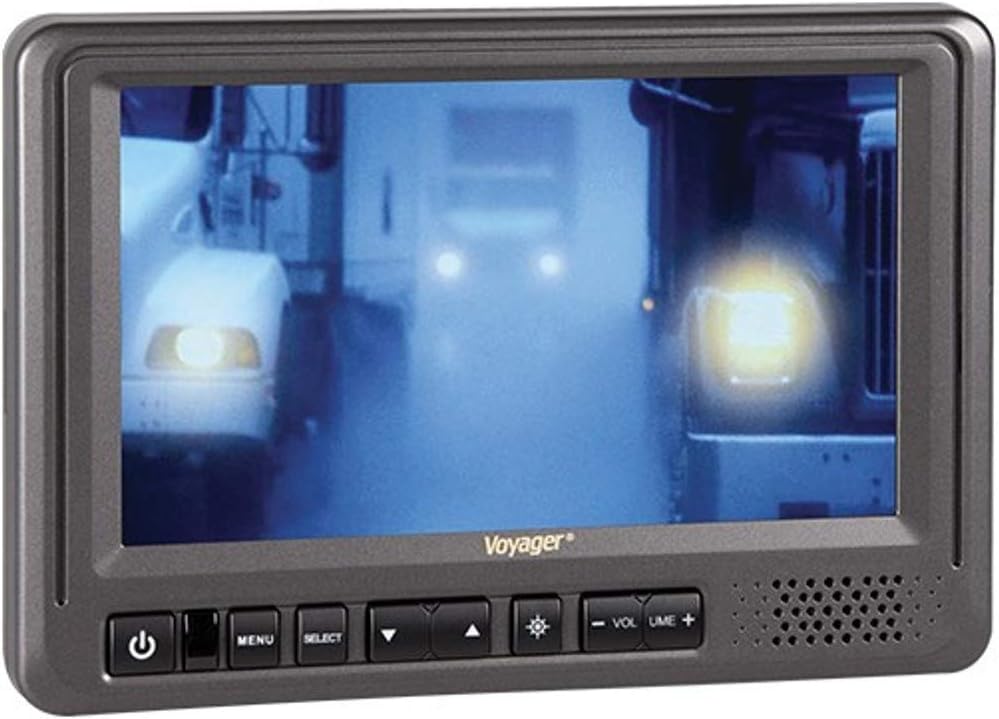
Billede: Forside view of the Voyager AOM713 monitor, showing the screen displaying a camera feed and the control buttons below the screen.
4. Betjeningsvejledning
Once installed and powered, the AOM713 monitor is ready for operation.
4.1 Tænd/sluk
- Tryk på Power-knap (symbol: cirkel med lodret linje) on the front panel to turn the monitor on or off.
- The monitor also supports auto power on from standby mode.
4.2 Kildevalg
- Tryk på SELECT -knap to cycle through the connected camera inputs (AV1, AV2, AV3).
- Alternatively, the monitor will automatically switch to a triggered input (AV2 or AV3) when the corresponding trigger wire receives a 12V signal (e.g., when reverse gear is engaged or a turn signal is activated).
4.3 Justering af indstillinger (OSD)
- Tryk på MENU knap to access the On Screen Display (OSD).
- Brug Pil op-knap (symbol: triangle pointing up) og Pil ned knap (symbol: triangle pointing down) to navigate through menu options such as brightness, contrast, color, and volume.
- Brug SELECT -knap for at bekræfte valg eller åbne undermenuer.
- Skærmen har en Auto Day/Night brightness mode, which automatically adjusts the screen's illumination based on ambient light conditions.
- Juster lydstyrken ved hjælp af Volumen + og Volumen - knapper.
4.4 Sun-Visor Usage
Attach the removable sun-visor to the monitor to reduce glare and improve screen visibility in bright sunlight conditions.
5. Vedligeholdelse
To ensure the longevity and optimal performance of your Voyager AOM713 monitor, follow these maintenance guidelines:
- Rensning: Brug en blød, tør klud til at rengøre skærmen ogasing. For stubborn smudges, lightly dampen the cloth with water or a mild, non-abrasive screen cleaner. Do not use harsh chemicals, solvents, or abrasive cleaners, as they can damage the screen or finish.
- Undgå væsker: Do not spray liquids directly onto the monitor. Ensure no liquids enter the unit's openings.
- Temperatur: Avoid exposing the monitor to extreme temperatures, direct sunlight for prolonged periods, or high humidity.
- Forbindelser: Kontrollér regelmæssigt alle kabelforbindelser for at sikre, at de er fastgjorte og fri for korrosion eller beskadigelse.
6. Fejlfinding
If you encounter issues with your Voyager AOM713 monitor, refer to the following troubleshooting steps:
| Problem | Mulig årsag | Løsning |
|---|---|---|
| Skærmen tænder ikke. | Ingen strømforsyning; forkert ledningsføring; sprunget sikring. | Check power connections (12V/24V). Verify fuse in the power line. Ensure vehicle ignition is on if wired to accessory power. |
| Intet billede vises. | Camera not connected; incorrect input selected; faulty camera or cable. | Ensure camera is properly connected to an AV input. Press SELECT to cycle through inputs. Check camera and cable for damage. |
| Billedet er forvrænget eller flimrer. | Loose video connection; signal interference; incompatible video signal. | Secure all video cable connections. Ensure cables are routed away from strong electrical interference sources. Verify camera output is NTSC/PAL compatible. |
| Automatic switching (trigger) not working. | Trigger wire not connected; insufficient trigger voltage; incorrect trigger setting. | Check trigger wire connection to the correct AV input (AV2/AV3). Ensure the trigger source provides a stable 12V signal. |
| Ingen lyd. | Camera does not have audio; volume too low; faulty speaker. | Confirm connected camera provides audio output. Increase volume using the Volume + button. |
Hvis problemet fortsætter efter at have forsøgt disse løsninger, bedes du kontakte kundesupport for yderligere assistance.
7. Specifikationer
Detailed technical specifications for the Voyager AOM713 monitor:
| Feature | Specifikation |
|---|---|
| Diagonal skærmstørrelse | 7 tommer |
| Aspektforhold | 16:9 |
| Opløsning | 480 x 324 |
| Lysstyrke | 500 nit |
| Kontrastforhold | 300:1 |
| Viewi vinkler | 100/120 |
| Power System | 12 VDC / 24 VDC Compatible |
| Kameraindgange | 3 |
| Screen Capabilities | Enkelt |
| Udløsere | Three 12V |
| Indbyggede højtalere | Ja |
| Video Output Signal Format | NTSC/PAL |
| Removable Sunvisor Included | Ja |
| Produktmål (B x H x D) | 7-3/4"W x 5-1/4"H x 1-1/4"D (approx. 9.3 x 6.5 x 4.8 inches packaged) |
| Varens vægt | 2.05 pund (pakket) |
8. Garanti og support
For warranty information, please refer to the warranty card included with your product or visit the official Voyager (ASA Electronics) webwebsted. Gem din købsbevis til garantikrav.
If you require technical assistance, have questions about installation, or need to troubleshoot an issue not covered in this manual, please contact Voyager customer support. Contact details can typically be found on the manufacturer's webwebstedet eller på produktemballagen.
Fabrikant: ASA Elektronik


