Indledning
This manual provides essential instructions for the safe and efficient operation of your I-TEC T2404 Universal Wireless Bluetooth Portable Sound System (Model BTO-SPEAKRST). Please read this manual thoroughly before using the device and retain it for future reference.
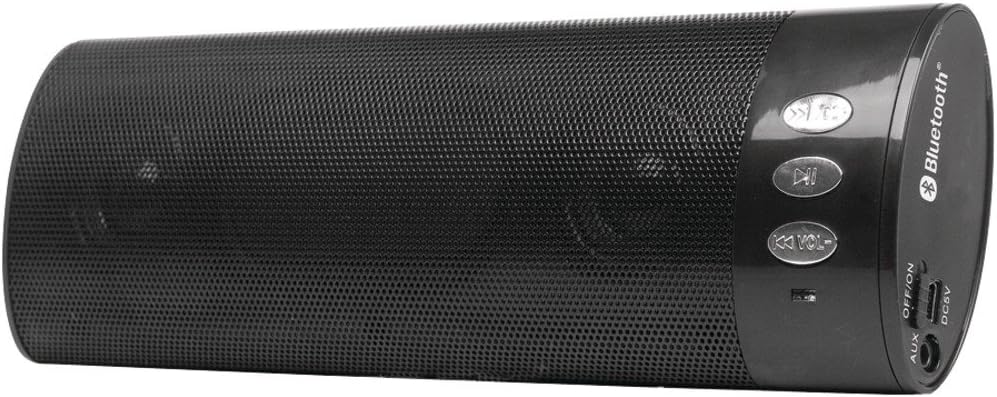
Figur 1: I-TEC T2404 Universal Wireless Bluetooth Portable Sound System. This image shows the cylindrical black speaker with a perforated metal grille, control buttons on one end, and input/output ports on the other end.
Opsætning
1. Udpakning
Carefully remove the sound system from its packaging. Verify that all components are present. If any items are missing or damaged, contact your retailer.
2. Strømforsyning til enheden
The I-TEC T2404 is powered via a DC 5V input. Connect a standard USB power adapter (not included) to the DC5V port on the speaker using a compatible USB cable. Ensure the power source provides 5V DC.
3. Tænd/sluk
Locate the "OFF/ON" switch on the side panel of the speaker. Slide the switch to the "ON" position to power on the device. Slide it to the "OFF" position to power off.
Figur 2: Close-up of the control panel and ports. This image highlights the buttons for track control and volume, the Bluetooth logo, and the AUX, OFF/ON switch, and DC5V ports on the side of the speaker.
Betjeningsvejledning
1. Bluetooth-parring
- Ensure the speaker is powered on. It will automatically enter Bluetooth pairing mode, indicated by a flashing LED light (location not specified in product data, assume standard behavior).
- Activate Bluetooth on your mobile device (smartphone, tablet, computer).
- Søg efter available Bluetooth devices. The speaker will appear as "I-TEC T2404" or a similar name.
- Select the speaker from the list to pair. A confirmation tone or steady LED light will indicate successful pairing.
- Når den er parret, kan du afspille lyd fra din enhed via højttaleren.
2. Betjening af AUX-indgang
To use the AUX input:
- Tilslut den ene ende af et 3.5 mm lydkabel (medfølger ikke) til AUX-porten på højttaleren.
- Tilslut den anden ende af 3.5 mm lydkablet til hovedtelefonstikket eller lydudgangen på din eksterne lydenhed.
- The speaker should automatically switch to AUX mode. If not, ensure no Bluetooth device is actively connected or try cycling the power.
3. Kontrolknapper
The speaker features several control buttons:
- Afspil/pause knap: Tryk for at afspille eller sætte lydafspilningen på pause.
- Previous Track / Volume Down (K<< VOL-): Press briefly to skip to the previous track. Press and hold to decrease the volume.
- Next Track / Volume Up (>>K VOL+): Tryk kort for at springe til næste nummer. Tryk og hold nede for at øge lydstyrken.
Opretholdelse
1. Rensning
Wipe the exterior of the speaker with a soft, dry cloth. Do not use abrasive cleaners, waxes, or solvents as they may damage the finish. Avoid getting moisture into any openings.
2. Opbevaring
When not in use for extended periods, store the speaker in a cool, dry place, away from direct sunlight and extreme temperatures. Disconnect it from the power source.
Fejlfinding
| Problem | Mulig årsag | Løsning |
|---|---|---|
| Ingen strøm | Speaker is off; power cable not connected; power source issue. | Ensure the "OFF/ON" switch is in the "ON" position. Verify the DC5V power cable is securely connected to a working power source. |
| Kan ikke parres via Bluetooth | Speaker not in pairing mode; Bluetooth disabled on device; device too far; interference. | Ensure the speaker is on and in pairing mode (flashing LED). Enable Bluetooth on your device. Move the device closer to the speaker. Turn off other Bluetooth devices to reduce interference. |
| Ingen lyd | Volume too low; incorrect input mode; audio source issue. | Increase the volume on both the speaker and your connected device. Ensure the correct input mode (Bluetooth or AUX) is active. Check if the audio source is playing correctly. |
| Lydforvrængning | Volume too high; weak Bluetooth signal; damaged audio cable. | Reduce the volume. Move the Bluetooth device closer to the speaker. If using AUX, try a different audio cable. |
Specifikationer
- Mærke: i-tec
- Model: BTO-SPEAKRST (T2404 Series)
- Forbindelse teknologi: Bluetooth, Trådløs
- Højttalerforbindelse: Bluetooth
- Særlige funktioner: Transportabel
- Wattage: 4 watt
- Monteringstype: Bordplade
- Strømindgang: DC 5V (via USB)
- Varens vægt: 268 g
- Pakkedimensioner: 23.62 x 9.4 x 4.57 cm
- Første tilgængelige dato: 29. august 2022
Garanti og support
For warranty information or technical support, please refer to the documentation provided with your purchase or visit the official i-tec webwebsted. Gem din købsbevis til garantikrav.


