
Indledning
Thank you for choosing the Zippo 45016 Digital Quartz Watch. This manual provides detailed instructions to help you understand and operate your new watch effectively. Please read this manual thoroughly before use and keep it for future reference.
Sikkerhedsoplysninger
- Forsøg ikke selv at åbne urkassen eller udskifte batteriet, da dette kan ugyldiggøre garantien og beskadige uret.
- Undgå at udsætte uret for ekstreme temperaturer, direkte sollys i længere perioder eller stærke magnetfelter.
- Clean the watch with a soft, dry cloth. Do not use chemical cleaners.
- While the watch is designed for daily wear, avoid direct impact or dropping it.
Opsætning
Første opstart og tidsindstilling
Your Zippo 45016 watch comes with a pre-installed battery. Upon first use, you may need to set the current time and date.
- Locate the mode button (usually on the bottom left) and the adjustment buttons (usually on the right side).
- Press the mode button repeatedly until the time setting mode is displayed. Digits for hours or minutes will typically flash.
- Use the adjustment buttons (e.g., 'Start/Stop' or 'Reset') to increase or decrease the flashing value.
- Tryk på tilstandsknappen igen for at gå til den næste indstilling (minutter, år, måned, dag).
- Once all settings are correct, press the mode button one last time to exit the setting mode.
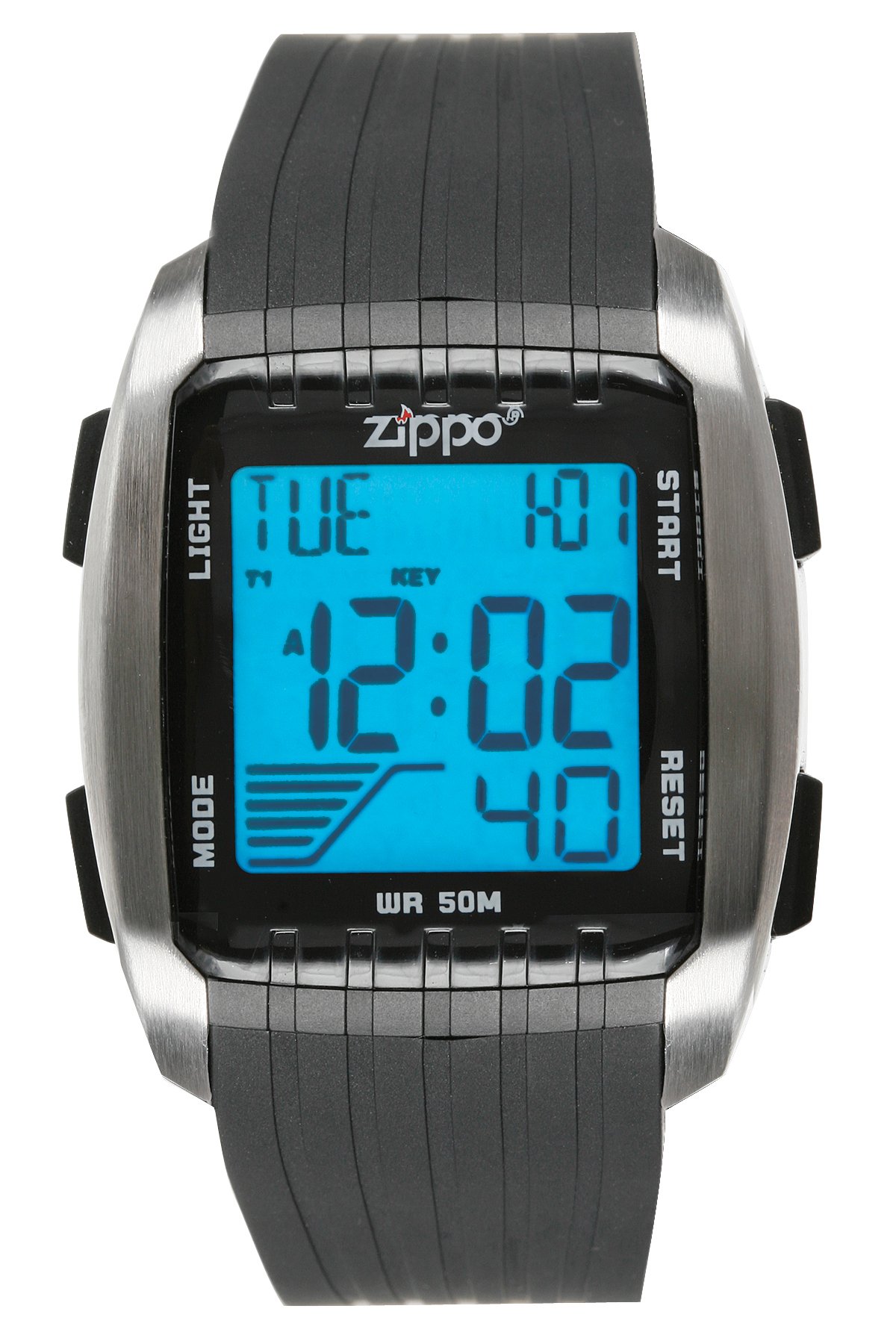
Image: Zippo 45016 Digital Quartz Watch. This image shows the watch face and strap, illustrating its general appearance and button placement for setup and operation.
Betjeningsvejledning
Grundlæggende tidsvisning
In the default mode, the watch displays the current time (hours, minutes, seconds) and often the day of the week and date.
Lys funktion
To illuminate the display in low-light conditions:
- Press the 'Light' button (typically located on the top left or top right of the watch).
- The backlight will activate for a few seconds.
Lap Timer (Stopwatch) Function
The lap timer allows you to measure elapsed time.
- Press the 'Mode' button until the stopwatch display appears (usually indicated by 'STW' or a stopwatch icon).
- Press the 'Start/Stop' button (often on the top right) to begin timing.
- To record a lap time without stopping the main timer, press the 'Lap' or 'Reset' button. The lap time will display briefly.
- Press 'Start/Stop' again to pause the timer.
- Press 'Reset' (often on the bottom right) while the timer is paused to clear the stopwatch to zero.
Opretholdelse
Rengøring af dit ur
Sådan bevarer du dit urs udseende:
- Tør urkassen og remmen af med en blød, let fugtig kludamp klæde.
- For stubborn dirt, use a mild soap solution, then wipe clean with a damp klud og tør grundigt.
- Undgå at bruge slibende rengøringsmidler eller opløsningsmidler, da disse kan beskadige urets finish.
Udskiftning af batteri
The Zippo 45016 uses a product-specific battery. When the display becomes dim or the watch stops functioning, the battery may need replacement. It is recommended to have the battery replaced by a qualified watch technician to ensure proper sealing and functionality.
Fejlfinding
| Problem | Mulig årsag | Løsning |
|---|---|---|
| Watch display is blank | Lavt eller dødt batteri | Udskift batteriet (professionel service anbefales). |
| Forkert tid vist | Time not set correctly or reset after battery change | Refer to the 'Time Setting' section to adjust the time. |
| Knapperne reagerer ikke | Dirt or debris under buttons, or internal malfunction | Rengør omkring knapperne. Kontakt kundesupport, hvis problemet fortsætter. |
Specifikationer
- Modelnummer: 45016
- Mærke: Zippo
- Bevægelse: Digital kvarts
- Batteri: 1 product-specific battery (included)
- Produktdimensioner: 25.4 x 4.9 x 0.64 cm
- Vægt: 54.43 g
- ASIN: B004WMEY9K
Garanti og support
For warranty information, please refer to the warranty card included with your purchase or visit the official Zippo website. If you require technical assistance or have questions not covered in this manual, please contact Zippo customer support through their official channels.