1. Introduktion
This manual provides essential information for the proper installation, operation, and maintenance of your Behringer Truth B1031A Active 2-Way Reference Studio Monitor. Please read this manual thoroughly to ensure optimal performance and longevity of your device. The B1031A is designed for professional audio applications, offering ultra-linear frequency response and precise sound reproduction.
2. Vigtige sikkerhedsinstruktioner
- Strømkilde: Connect the unit only to a power supply of the voltage specified in the manual or on the unit.
- Jording: Sørg for, at enheden er korrekt jordforbundet for at forhindre elektrisk stød.
- Ventilation: Bloker ikke ventilationsåbninger. Installer i overensstemmelse med producentens anvisninger.
- Vand og fugt: Do not use this apparatus near water or expose it to rain or moisture.
- Varme: Må ikke installeres i nærheden af varmekilder såsom radiatorer, varmeapparater, komfurer eller andre apparater (inklusive ampløftere), der producerer varme.
- Rensning: Rengør kun med en tør klud.
- Service: Overlad al service til kvalificeret servicepersonale. Service er påkrævet, når apparatet er blevet beskadiget på nogen måde, såsom strømforsyningsledning eller stik er beskadiget, væske er blevet spildt, eller genstande er faldet ind i apparatet, apparatet har været udsat for regn eller fugt, ikke fungerer normalt , eller er blevet droppet.
3. Pakkens indhold
Upon unpacking your Behringer Truth B1031A, please verify that all components are present and in good condition:
- Behringer Truth B1031A Active Studio Monitor (1 unit)
- Strømkabel
- Brugervejledning (dette dokument)
Hvis nogen dele mangler eller er beskadiget, bedes du straks kontakte din forhandler.
4. Produktet er slutview
The Behringer Truth B1031A is an active 2-way reference studio monitor featuring an 8-inch Kevlar woofer and a 1-inch silk dome tweeter. It incorporates precision Class A/B amplifiers with active protection circuits, delivering 100 W for low frequencies and 50 W for high frequencies. Its design aims for ultra-linear frequency response and wide dispersion characteristics.
4.1. Frontpanel

The front panel features the primary acoustic components: the 8-inch Kevlar woofer for low-frequency reproduction and the 1-inch silk dome tweeter for high frequencies. Indicator LEDs provide visual feedback on the monitor's power status and signal clipping.
4.2. Bagpanel
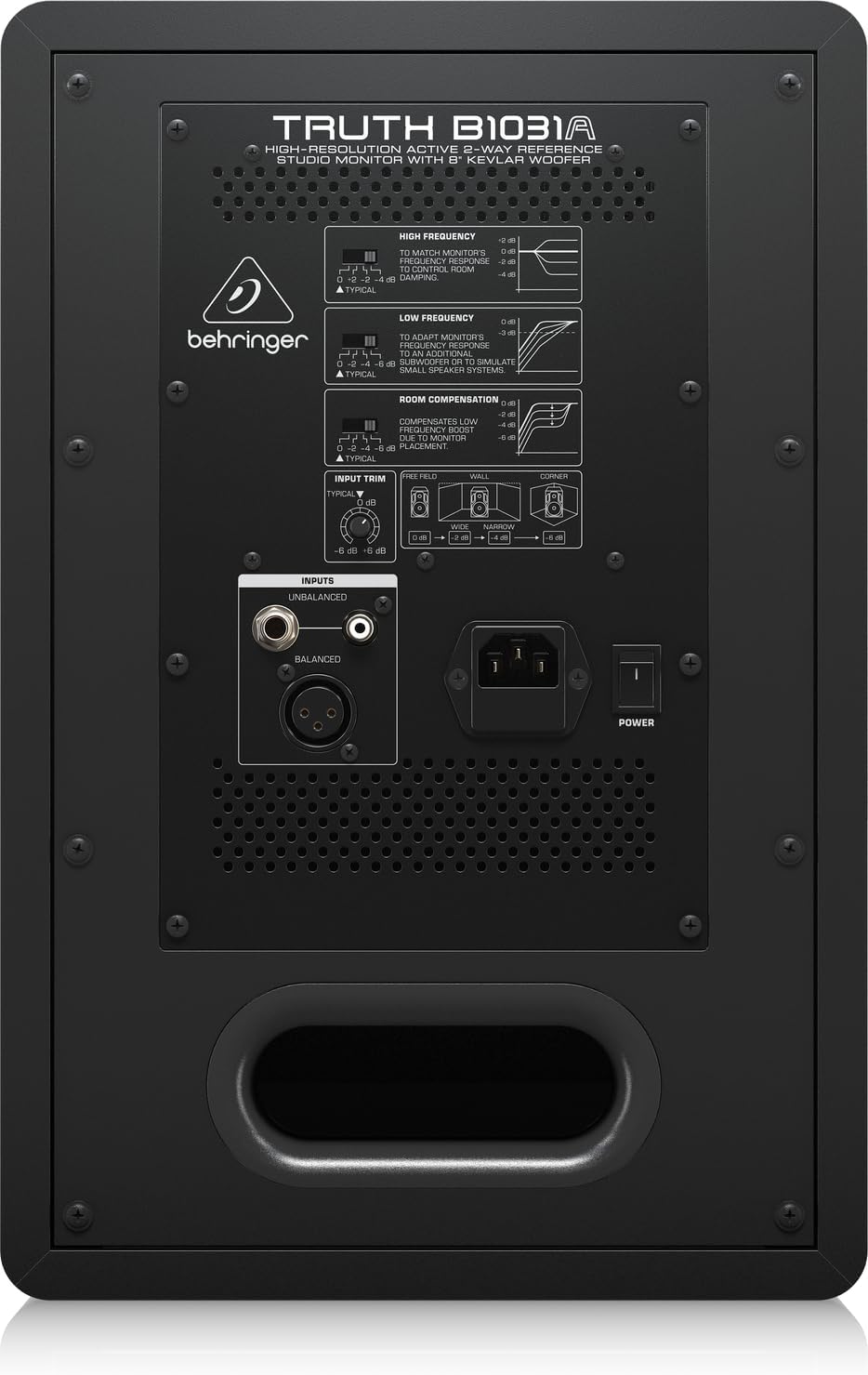
The rear panel houses all input connections and acoustic adjustment controls. These include:
- Balanceret XLR-indgang: For professional audio connections.
- Balanceret 6,35 mm TRS-indgang: For professional audio connections.
- Unbalanced RCA Input: For consumer audio devices.
- Input trim: Justerer inputfølsomheden.
- High Frequency Adjustment: Allows tailoring of the high-frequency response.
- Low Frequency Adjustment: Allows tailoring of the low-frequency response.
- Room Compensation Switches: Adjusts the monitor's response to compensate for room acoustics (e.g., placement near walls or corners).
- Power Switch and IEC Power Inlet: For connecting the power cable and turning the unit on/off.
5. Opsætning
5.1. Placering
Proper placement of your studio monitors is crucial for accurate sound reproduction. Consider the following guidelines:
- Stereotrekant: Position the monitors and your listening position to form an equilateral triangle. The distance between the two monitors should be equal to the distance from each monitor to your head.
- Ear Level: The tweeters should ideally be at ear level when you are in your primary listening position.
- Afstand fra vægge: Avoid placing monitors directly against walls or in corners, as this can exaggerate bass frequencies. If unavoidable, use the Værelseskompensation switches on the rear panel to adjust.
- Symmetri: Ensure the left and right monitors are placed symmetrically within the room to maintain a balanced stereo image.
5.2. Forbindelser
Before making any connections, ensure the monitor is powered off and unplugged from the mains.
- Lydindgang: Connect your audio source (e.g., audio interface, mixer) to the B1031A using either an XLR, 1/4" TRS, or RCA cable. For optimal signal integrity, balanced XLR or TRS connections are recommended.
- Strømtilslutning: Insert the supplied power cable into the IEC power inlet on the rear panel of the monitor, then plug the other end into a suitable AC power outlet.
6. Betjening
6.1. Tænd/sluk
- Ensure all audio connections are secure and the input trim is set to a low level.
- Flip the power switch on the rear panel to the 'ON' position. The power indicator LED on the front panel will illuminate.
- To power off, flip the power switch to the 'OFF' position. It is recommended to power off your audio source first, then the monitors.
6.2. Justering af kontroller
- Input trim: Use this knob to match the output level of your audio source. Start with a low setting and gradually increase until you achieve a comfortable listening level without distortion.
- High Frequency Adjustment: This switch allows you to boost or cut high frequencies to suit your listening environment or preference.
- Low Frequency Adjustment: This switch allows you to boost or cut low frequencies. This is particularly useful for compensating for room acoustics or if you are using a separate subwoofer.
- Værelseskompensation: These switches are designed to optimize the monitor's performance based on its placement in your room. Refer to the diagram on the rear panel for recommended settings when placing the monitor near walls or in corners.
7. Vedligeholdelse
To ensure the longevity and optimal performance of your Behringer Truth B1031A monitor, follow these maintenance guidelines:
- Rensning: Use a soft, dry cloth to clean the exterior of the monitor. Avoid using abrasive cleaners, solvents, or waxes, as these can damage the finish.
- Støv: Regularly dust the speaker cones and vents to prevent accumulation, which can affect sound quality and cooling.
- Miljø: Operate the monitor in a stable environment, away from extreme temperatures, humidity, and direct sunlight.
- Transport: When moving the monitor, ensure it is powered off and disconnected. Use appropriate packaging to protect it from physical damage.
8. Fejlfinding
If you encounter issues with your B1031A monitor, consult the following table for common problems and solutions:
| Problem | Mulig årsag | Løsning |
|---|---|---|
| Ingen lyd | No power; incorrect input connection; input trim too low; audio source issue. | Check power cable and switch; verify audio cable connections; increase input trim; check audio source output. |
| Forvrænget lyd | Input signal too high; damaged cable; faulty audio source. | Reduce input trim or output level from source; try a different audio cable; test with another audio source. |
| Brummende eller summende lyd | Ground loop; interference from other electronics; unbalanced cable used for long runs. | Ensure proper grounding; move monitor away from other electronic devices; use balanced cables (XLR/TRS). |
| Uneven stereo image | Improper monitor placement; differing acoustic settings between monitors. | Adjust monitor placement for symmetry; ensure High/Low Frequency and Room Compensation settings are identical on both monitors. |
If the problem persists after attempting these solutions, please contact Behringer customer support or a qualified service technician.
9. Specifikationer
Technical specifications for the Behringer Truth B1031A Active Studio Monitor:
| Feature | Specifikation |
|---|---|
| Modelnavn | SANDHED B1031A |
| Højttaler type | Active 2-Way Reference Studio Monitor |
| Bashøjttaler diameter | 8 Inches (Kevlar cone) |
| Tweeter-type | 1 cm silkekuppel |
| Amplivligere Type | Klasse A/B |
| LF Amplivligere Output | 100 watt |
| HF Amplivligere Output | 50 watt |
| Samlet output Wattage | 150 watt |
| Forbindelsesteknologi | XLR, 1/4" TRS, RCA |
| Strømkilde | Elektrisk ledning (110 volt) |
| Produktmål (D x B x H) | 13.3 cm x 10.28 cm x 15.47 cm |
| Varens vægt | 24.91 pund |
| Farve | Sort |
| Materiale | Metal |
10. Garanti og support
Behringer products are designed and manufactured to high-quality standards. For detailed warranty information, including terms and conditions, please refer to the warranty card included with your product or visit the official Behringer website. For technical support, service, or spare parts, please contact your local Behringer dealer or authorized service center. You can also find support resources and contact information on the Behringer Store.


