1. Introduktion
Tak for købetasing the Supersonic SC31 5.1 Channel DVD Player with Karaoke. This manual provides essential information for the safe and efficient operation of your device. Please read it thoroughly before use and retain it for future reference.
Sikkerhedsoplysninger
- Udsæt ikke enheden for regn eller fugt for at forhindre brand eller elektrisk stød.
- Åbn ikke kabinettet. Overlad kun service til kvalificeret personale.
- Sørg for korrekt ventilation omkring enheden.
- Disconnect the power cord from the wall outlet if the unit is not to be used for a long period.
- Undgå at placere enheden på ustabile overflader.
2. Pakkens indhold
Bekræft, at alle nedenstående varer er inkluderet i din pakke:
- Supersonic SC31 5.1 Channel DVD Player
- Fjernbetjening
- AV-kabler
- Karaoke Microphone (1 included)
- Brugervejledning (dette dokument)
3. Produktet er slutview
The Supersonic SC31 is a versatile 5.1 channel DVD player featuring karaoke functionality and multiple media inputs. Familiarize yourself with the front panel controls and connections.
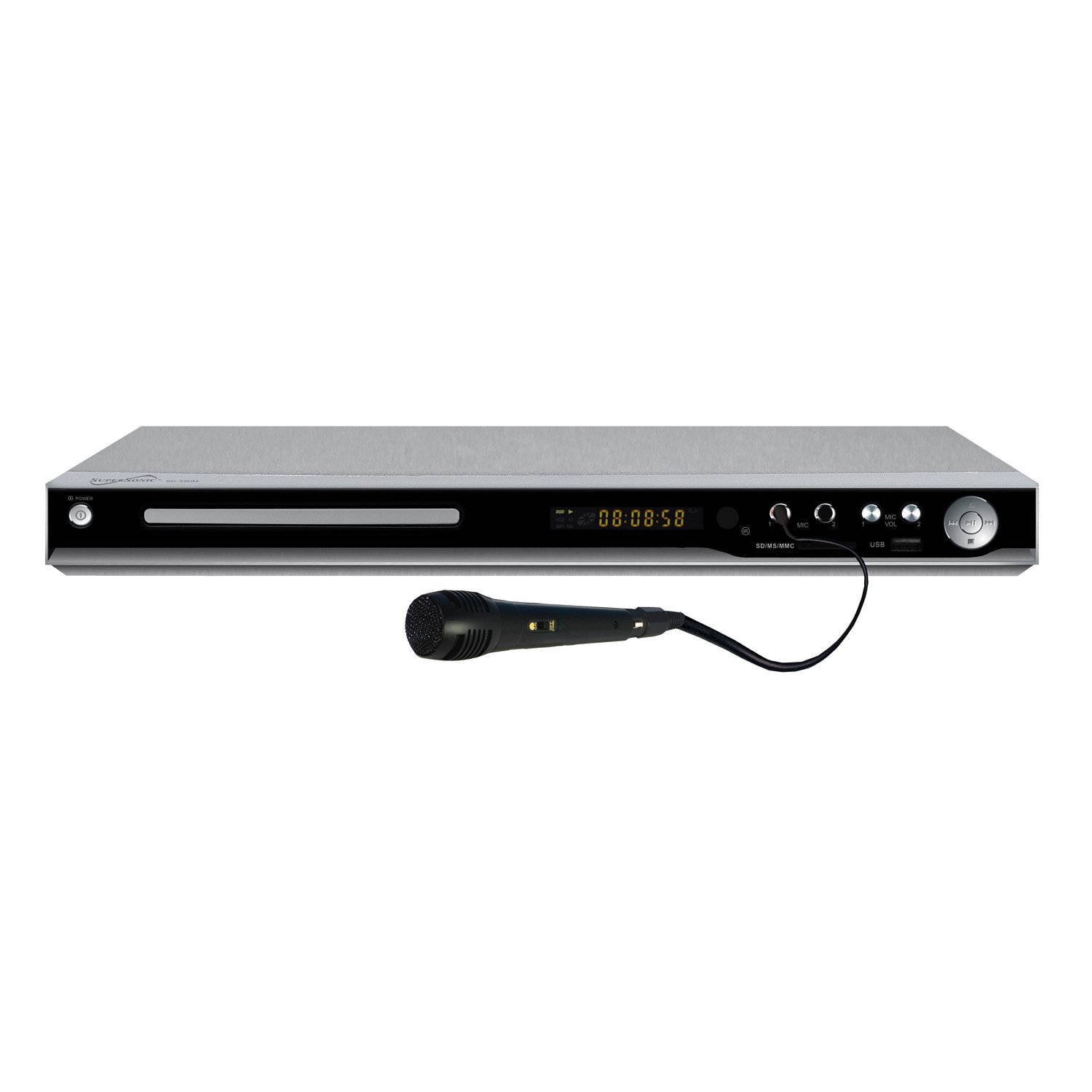
Figure 1: Front Panel of Supersonic SC31 DVD Player with Microphone. This image displays the front of the Supersonic SC31 DVD player, showing the power button, disc tray, digital display, SD/MS/MMC card slot, two microphone inputs (MIC 1 and MIC 2), microphone volume controls, USB port, and playback control buttons. A black wired microphone is plugged into the MIC 1 input.
Frontpanelets funktioner:
- POWER -knap: Tænder eller slukker for enheden.
- Diskbakke: For inserting DVDs or CDs.
- Skærm: Shows playback information, track number, time, etc.
- SD/MS/MMC Card Slot: For playing media from memory cards.
- MIC 1 / MIC 2 Inputs: 3.5 mm stik til tilslutning af mikrofoner.
- MIC VOL 1 / MIC VOL 2: Rotary knobs to adjust microphone volume.
- USB-port: Til tilslutning af USB-lagerenheder.
- Afspilningskontroller: Play/Pause, Stop, Skip Forward/Backward buttons.
Bagpanelets funktioner:
(Note: A detailed image of the rear panel is not available.) The rear panel typically includes:
- Audio Output (5.1 Channel): RCA jacks for connecting to a 5.1 surround sound system.
- Stereo lydudgang: Left and Right RCA jacks for standard stereo connection.
- Video output: RCA (Composite Video) output for connecting to a TV.
- S-Video Output: For improved video quality connection.
- Komponentvideoudgang (YPbPr): For high-quality video connection.
- Coaxial/Optical Digital Audio Output: For digital audio connection to compatible receivers.
- AC strømindgang: Til tilslutning af strømkablet.
4. Opsætning
4.1 Tilslutning til et fjernsyn
Use the supplied AV cables to connect the DVD player to your television.
- Connect the yellow video cable from the DVD player's "VIDEO OUT" port to the yellow "VIDEO IN" port on your TV.
- Connect the red and white audio cables from the DVD player's "AUDIO OUT (L/R)" ports to the corresponding red and white "AUDIO IN (L/R)" ports on your TV.
- Alternatively, for better video quality, use an S-Video or Component Video (YPbPr) connection if your TV supports it.
4.2 Connecting to an Audio System (5.1 Channel)
For a full surround sound experience, connect the DVD player to a 5.1 channel audio receiver.
- Connect the 5.1 channel audio output jacks (Front Left, Front Right, Center, Subwoofer, Surround Left, Surround Right) from the DVD player to the corresponding 5.1 channel input jacks on your audio receiver.
- Ensure all connections are secure and correctly matched (color-coded).
- Alternatively, use the Coaxial or Optical Digital Audio Output for a digital connection to a compatible receiver.
4.3 Strømtilslutning
- Plug the AC power cord into the AC power input on the rear of the DVD player.
- Sæt den anden ende af netledningen i en almindelig stikkontakt.
4.4 Microphone Connection for Karaoke
- Connect the supplied microphone to either the "MIC 1" or "MIC 2" input jack on the front panel of the DVD player.
- If using a second microphone (sold separately), connect it to the remaining microphone input.
5. Betjeningsvejledning
5.1 Basic DVD/CD Playback
- Tryk på MAGT knappen for at tænde DVD-afspilleren.
- Tryk på ÅBN/LUK button (usually on the remote or front panel) to open the disc tray.
- Placer forsigtigt en dvd- eller cd-disk i bakken med etiketsiden opad.
- Tryk på ÅBN/LUK knappen igen for at lukke bakken.
- The player will automatically begin playback or display the disc menu.
- Use the remote control's navigation buttons (UP, DOWN, LEFT, RIGHT, ENTER) to select menu options.
- Brug AFSPIL/PAUSE, STOP, SPRINGE knapperne på fjernbetjeningen eller frontpanelet til at styre afspilningen.
5.2 USB/SD/MMC/MS Input Playback
The player supports media playback from USB drives and various memory cards (SD, MS, MMC).
- Insert your USB drive into the USB port or your memory card into the SD/MS/MMC slot on the front panel.
- The player should automatically detect the device and display a media browser. If not, use the KILDE or USB/KORT button on the remote to switch input.
- Naviger gennem din files (MP3, JPEG, etc.) using the remote control and press ENTER to play or view.
5.3 Karaoke-funktion
Enjoy karaoke with compatible discs or media files.
- Ensure microphones are connected to the front panel MIC inputs.
- Play a karaoke-compatible DVD or CD.
- Juster mikrofonens lydstyrke ved hjælp af MIC VOL 1 og MIC VOL 2 knobs on the front panel.
- Some karaoke discs may have options to turn vocal tracks on/off or adjust key/echo via the disc menu or remote control functions (refer to disc instructions).
5.4 Brug af fjernbetjening
The remote control provides full functionality for the DVD player. Insert two AAA batteries (not included) into the remote control, observing correct polarity.
- MAGT: Til/Fra.
- ÅBEN LUK: Opens/closes disc tray.
- OPSÆTNING: Accesses system settings menu.
- MENU/TITLE: Accesses disc menu or title menu.
- NAVIGATIONAL BUTTONS (UP/DOWN/LEFT/RIGHT/ENTER): Til menu navigation.
- PLAY/PAUSE, STOP, FAST FORWARD/REWIND, SKIP: Playback controls.
- LYDSTYRKE +/-: Adjusts main audio volume.
- STUM: Slår lyden fra.
- LYD: Vælger lydspor/sprog.
- UNDERTEKST: Selects subtitle language.
- VINKEL: Changes camera angle on compatible DVDs.
- ZOOM: Zoomer ind på billedet.
- GENTAGE: Repeats current track/chapter/disc.
6. Vedligeholdelse
6.1 Rengøring af enheden
- Tør enhedens yderside af med en blød, tør klud.
- Brug ikke slibende rengøringsmidler, voks eller opløsningsmidler.
- Sørg for, at enheden er taget ud af stikkontakten før rengøring.
6.2 Rengøring af diske
- Hold diskene i kanterne for at undgå fingeraftryk.
- Wipe discs with a soft, lint-free cloth from the center outwards.
- Do not use harsh chemicals or abrasive materials on discs.
7. Fejlfinding
If you encounter problems with your DVD player, refer to the following common issues and solutions:
| Problem | Mulig årsag | Løsning |
|---|---|---|
| Ingen strøm | Netledningen er ikke tilsluttet; stikkontakten er defekt. | Kontrollér netledningens tilslutning; prøv en anden stikkontakt. |
| Intet billede | Video cables incorrectly connected; incorrect TV input selected. | Ensure video cables are securely connected; select the correct AV input on your TV. |
| Ingen lyd | Audio cables incorrectly connected; TV/receiver volume too low or muted. | Check audio cable connections; increase volume on TV/receiver; check mute status. |
| Disken afspilles ikke | Disken er isat forkert; disken er snavset eller ridset; diskformatet understøttes ikke. | Reinsert disc correctly; clean disc; ensure disc format (DVD/CD/SVCD/VCD/MP3/JPEG/CD-R/CD-RW) is supported. |
| Mikrofon virker ikke | Microphone not connected; MIC VOL knob too low. | Ensure microphone is securely plugged into MIC 1 or MIC 2; increase the corresponding MIC VOL knob. |
| Fjernbetjening virker ikke | Batterierne er døde eller isat forkert; blokering mellem fjernbetjening og afspiller. | Replace batteries; ensure correct polarity; remove any obstructions; point remote directly at the player's sensor. |
8. Specifikationer
Technical specifications for the Supersonic SC31 DVD Player:
- Model: SC31
- Mærke: Supersonisk
- Medietype: CD, DVD
- Kompatible formater: DVD/CD/SVCD/VCD/MP3/JPEG/CD-R/CD-RW
- Lydudgangstilstand: 5.1 kanals surround sound
- Forbindelse teknologi: USB
- Input Video Compatibility: NTSC
- Antal kanaler: 5.1
- Indgange: USB, SD/MS/MMC, 2x Microphone Jack
- Udgange: 5.1 Channel Audio, Stereo Audio (L/R), Composite Video, S-Video, Component Video (YPbPr), Coaxial/Optical Digital Audio
- Produktdimensioner: Cirka 10 x 8.7 x 1.5 tommer
- Varens vægt: Cirka 1.5 pund
- UPC: 639131000339, 710069209817
9. Garanti og support
For warranty information or technical support, please refer to the warranty card included with your product or contact Supersonic customer service directly. Contact details are typically available on the manufacturer's official webwebsted.
Please note: Warranty terms and conditions may vary and are subject to change without prior notice.


