1. Produktet er slutview
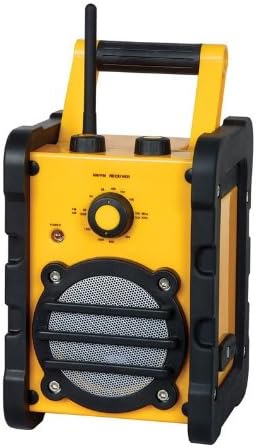
The Marquant MHDR-1 is a durable and portable radio designed for reliable audio reception. Its robust construction and simple controls make it suitable for various environments, from workshops to outdoor activities. This manual provides essential information for setting up, operating, and maintaining your MHDR-1 radio.
Nøglefunktioner:
- Farve: Sort og gul
- Bærbart design
- Roterende lydstyrkekontrol
- 3.5 mm Audio Jack Output (for speaker/headphones)
- Operates on 1.5V (supports 4 batteries)
- Kompakt Mål: 250 x 170 x 180 mm
2. Opsætning
2.1 Batteriinstallation
- Locate the battery compartment cover on the back or bottom of the radio.
- Åbn dækslet ved at skubbe eller oplåse det.
- Insert four (4) 1.5V 'C' type batteries, ensuring the correct polarity (+/-) as indicated inside the compartment.
- Luk batterirummets dæksel forsvarligt.
Note: Always use fresh batteries and replace all four batteries at the same time for optimal performance. Remove batteries if the radio will not be used for an extended period.
2.2 Justering af antenne
For best reception, extend the telescopic antenna fully. You may need to rotate or adjust the angle of the antenna to improve signal clarity, especially for FM stations.
3. Betjeningsvejledning
3.1 Tænd og sluk
Rotate the volume control knob clockwise until you hear a click and the power indicator light illuminates. To turn off the radio, rotate the volume control knob counter-clockwise until it clicks off.
3.2 Tuning the Radio
Use the large rotary tuning dial on the front panel to select your desired radio station. The dial is marked with frequency ranges for both AM and FM bands. Slowly turn the dial until you find a clear signal.
3.3 Lydstyrkekontrol
Adjust the listening volume by rotating the volume control knob. Turn clockwise to increase volume and counter-clockwise to decrease volume.
3.4 Using the Headphone/Speaker Jack
The radio is equipped with a 3.5 mm audio output jack. You can connect headphones for private listening or an external speaker for enhanced audio output. Plugging in a device to this jack will typically mute the radio's internal speaker.
4. Vedligeholdelse
4.1 Rengøring
Tør radioens yderside af med en blød kludamp cloth. Do not use abrasive cleaners or solvents, as these may damage the finish. Ensure no liquid enters the radio's internal components.
4.2 Udskiftning af batteri
When the sound becomes distorted or the power indicator light dims, it is time to replace the batteries. Follow the battery installation steps in Section 2.1.
4.3 Opbevaring
Opbevar radioen et køligt og tørt sted væk fra direkte sollys og ekstreme temperaturer. Fjern batterierne, hvis den opbevares i en længere periode, for at forhindre lækage.
5. Fejlfinding
| Problem | Mulig årsag | Løsning |
|---|---|---|
| Ingen strøm / Radioen tænder ikke | Batterierne er døde eller forkert installeret. | Kontroller batteripolariteten. Udskift med nye batterier. |
| Dårlig modtagelse / Statisk støj | Antennen er ikke trukket ud eller placeret korrekt. Svagt signal i området. | Fully extend and adjust the antenna. Try moving the radio to a different location. |
| Ingen lyd fra højttaleren | Volume is too low. Headphones are plugged in. | Increase volume. Disconnect headphones from the 3.5mm jack. |
If you experience issues not covered here, or if the problem persists, please refer to the support information in Section 7.
6. Specifikationer
| Modelnummer | MHDR-1 |
| Mærke | Mærkning |
| Farve | Sort, Gul |
| Dimensioner (B x D x H) | 250 x 170 x 180 mm (or 17 x 25 x 18 cm) |
| Strømkilde | 4 x 1.5V 'C' Batteries |
| Voltage | 1.5 volt |
| Lydudgang | 3.5 mm Headphone/Speaker Jack |
| Lydstyrkekontrol | Rotary |
7. Garanti og support
Marquant products are manufactured to high quality standards. For information regarding warranty coverage, please refer to the warranty card included with your purchase or visit the official Marquant webwebsted.
For technical support, troubleshooting assistance beyond this manual, or spare parts, please contact Marquant customer service through their official channels. Keep your purchase receipt and model number (MHDR-1) ready when contacting support.


