1. Introduktion
This manual provides essential information for the safe and efficient operation of your APC Smart-UPS RM SMT3000RM2U Uninterruptible Power Supply (UPS) system. Please read this manual thoroughly before installation and use.
The APC Smart-UPS RM SMT3000RM2U is designed to provide reliable power protection for your critical electronic equipment, ensuring continuous operation during power outages, sags, surges, and other power disturbances. It features a 2700W/3000VA capacity, 2U rack-mount design, and a 120V LCD interface for easy monitoring and control.
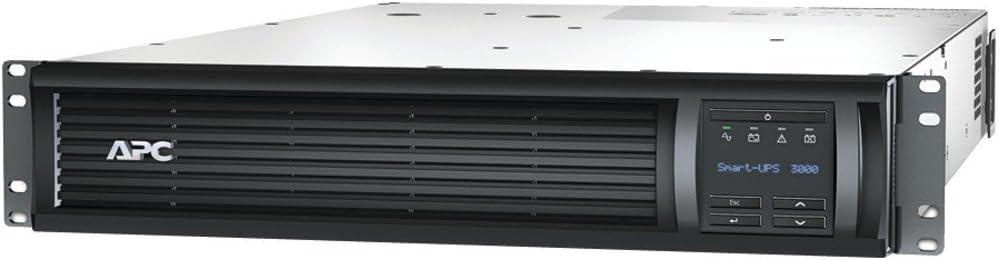
Figur 1: Forside view of the APC Smart-UPS RM SMT3000RM2U UPS system, showing the LCD display and ventilation grilles.
2. Sikkerhedsoplysninger
WARNING: Risk of Electric Shock. Do not open the UPS unit. There are no user-serviceable parts inside. Refer servicing to qualified service personnel.
Overhold følgende sikkerhedsforanstaltninger under installation og drift:
- Denne UPS er kun beregnet til indendørs brug.
- Brug ikke denne UPS i direkte sollys, i kontakt med væsker, eller hvor der er meget støv eller fugt.
- Ensure proper grounding. The UPS must be connected to a grounded AC power outlet.
- The UPS contains internal batteries that can present a risk of electric shock even when disconnected from the AC power source.
- Frakobl altid UPS'en fra strømkilden, før du udfører vedligeholdelse eller service.
- The input connection for this UPS is a NEMA L5-30P. Ensure your electrical installation can accommodate this plug type.
3. Pakkens indhold
Verify that all components are present upon unpacking. If any items are missing or damaged, contact your dealer or APC customer service.
- APC Smart-UPS RM SMT3000RM2U UPS Unit
- Hardware til rackmontering
- Dokumentations-cd
- USB-kommunikationskabel
- Seriel kommunikationskabel
- Network Management Card (if included with specific model variant)
4. Opsætning
4.1 Fysisk installation
The SMT3000RM2U is a 2U rack-mount unit. It is heavy (97.4 pounds), so ensure adequate support and use proper lifting techniques or assistance during installation.
- Rack montering: Secure the UPS in a standard 19-inch equipment rack using the provided rack-mounting hardware. Ensure the rack can support the weight of the UPS.
- Ventilation: Allow adequate space around the unit for proper ventilation. Do not block the ventilation openings.
4.2 Elektrisk tilslutning
The UPS requires a dedicated 120V, 30A circuit with a NEMA L5-30P receptacle. Consult a qualified electrician if your facility does not have the appropriate outlet.
- Connect the UPS input power cord to the dedicated 120V, 30A NEMA L5-30R wall outlet.
- Connect your equipment to the UPS output receptacles. The UPS has 6x NEMA 5-15R and 2x NEMA 5-20R outlets. Do not overload the UPS.
4.3 Første opstart
- After connecting the input power and equipment, press the power button on the front panel to turn on the UPS.
- The LCD display will illuminate and show startup information.
- Allow the batteries to charge for at least 24 hours before connecting critical loads or performing a self-test to ensure maximum runtime.
5. Betjening af UPS'en
5.1 Frontpanel LCD-skærm
The LCD display provides real-time information about the UPS status, load, battery charge, and various settings. Use the navigation buttons (Esc, Up, Down, Enter) to browse menus and adjust settings.
- Statusskærm: Displays current operating mode (Online, On Battery), input/output voltage, belastningsprocenttage, and battery charge level.
- Konfigurationsmenu: Tillader justering af indstillinger såsom udgangsvolumentage, sensitivity, alarm options, and self-test initiation.
- Logfiler: View event logs and historical data.
5.2 Strømstyringssoftware
For advanced monitoring and management, install the APC PowerChute™ software on a connected computer. This software enables graceful shutdown of connected equipment during extended power outages, remote monitoring, and detailed power analysis.
- Connect the UPS to your computer using the provided USB or serial cable.
- Install the PowerChute software from the documentation CD or download the latest version from the APC webwebsted.
6. Vedligeholdelse
The APC Smart-UPS RM SMT3000RM2U is designed for minimal maintenance. However, regular checks ensure optimal performance and longevity.
- Udskiftning af batteri: The internal batteries are sealed lead-acid and are user-replaceable. The typical battery life is 3-5 years, depending on environmental conditions and usage. Replace batteries when the UPS indicates a battery fault or when runtime significantly decreases. Refer to the battery replacement instructions provided with the replacement battery kit.
- Miljøforhold: Keep the UPS in a clean, cool, and dry environment. Avoid extreme temperatures and high humidity, which can shorten battery life.
- Selv test: Perform a self-test periodically (e.g., monthly) via the LCD display or PowerChute software to verify battery and UPS functionality.
- Rensning: Keep the ventilation openings clear of dust and debris. Use a dry cloth to clean the exterior of the unit. Do not use liquid cleaners.
7. Fejlfinding
Dette afsnit indeholder løsninger på almindelige problemer. Kontakt APC's tekniske support ved mere komplekse problemer.
| Problem | Mulig årsag | Løsning |
|---|---|---|
| UPS'en tænder ikke. | Ingen strømforsyning; Batteriet er ikke tilsluttet eller afladet. | Check input power connection and wall outlet. Ensure batteries are properly connected and allow to charge. |
| UPS'en bipper kontinuerligt. | UPS is on battery power; Overload condition. | Restore utility power. Reduce connected load. |
| "Site Wiring Fault" indicator is lit. | Wiring problem in the building's electrical system. | Kontakt en kvalificeret elektriker for at få inspiceret bygningens ledningsføring. |
| Kort batterilevetid. | Batteries are old or not fully charged; Overload. | Allow batteries to charge for 24 hours. Replace batteries if they are old. Reduce connected load. |
8. Specifikationer
| Feature | Detalje |
|---|---|
| Model | SMT3000RM2U |
| Udgangseffektkapacitet | 2700 Watt / 3000 VA |
| Nominel Output Voltage | 120 V |
| Bølgeform type | Sinusbølge |
| Udgangsforbindelser | 6x NEMA 5-15R; 2x NEMA 5-20R |
| Nominel input Voltage | 120 V |
| Indgangsfrekvens | 50/60 Hz +/- 3Hz (auto sensing) |
| Indgangsforbindelser | NEMA L5-30P |
| Batteritype | Vedligeholdelsesfrit forseglet blybatteri |
| Typisk genopladningstid | 3 timer |
| Interface -porte | USB, Smart Slot |
| Produktmål (H x B x D) | 3.39 x 18.9 x 26.89 tommer (8.6 x 48 x 68.3 cm) |
| Varens vægt | 97.4 pund (44.18 kg) |
| Audible Noise at 1 meter | 55 dBA |
| Regulatoriske godkendelser | CSA, FCC Part 15 Class A, UL 1778 |
9. Garanti og support
For garantioplysninger og teknisk support henvises til den dokumentation, der følger med dit produkt, eller besøg den officielle APC website. You can also contact APC customer service directly for assistance with product registration, troubleshooting, and service requests.
Online ressourcer:
- Official APC Webwebsted: www.apc.com
- Brugermanual (PDF): Download PDF
- Installationsmanual (PDF): Download PDF


