1. Introduktion
Tak for købetasing the Digiquest Invisible DVB-T2 HEVC H.265 Digital Terrestrial Receiver. This device is designed to provide high-definition digital terrestrial television reception, including HEVC H.265 encoded channels. Its compact and adjustable design allows for discreet installation behind your television. This manual provides detailed instructions for setup, operation, and troubleshooting to ensure optimal performance.

Image 1.1: Digiquest Invisible DVB-T2 HEVC H.265 Digital Terrestrial Receiver.
2. Pakkens indhold
Please check the package carefully to ensure all items are present and in good condition. If any items are missing or damaged, please contact your retailer.

Image 2.1: Contents of the Digiquest Invisible DVB-T2 HEVC H.265 Receiver package.
- Digiquest Invisible DVB-T2 HEVC H.265 Receiver Unit
- Fjernbetjening
- External Power Supply (AC 100-240V - DC 12V)
- Remote Control Extender (IR sensor with adhesive)
- Removable Support with Hole and Adhesive
- Brugervejledning / Quick Guide
3. Produktet er slutview
3.1. Modtagerenhed
The Digiquest Invisible receiver is designed for compact and flexible installation. It features a 180° adjustable SCART connector, allowing it to be positioned optimally behind your TV.

Billede 3.1: Side view of the receiver unit with the adjustable SCART connector.
3.2. Porte og forbindelser
Familiarize yourself with the various ports on your receiver:

Image 3.2: Detailed diagram showing all ports and their functions.
- USB 2.0 Port (Lateral): Til tilslutning af USB-lagerenheder for at afspille multimedieindhold.
- RF IN: Terrestrial antenna input for connecting your DVB-T/T2 antenna.
- LAN: Ethernet port for network connection, primarily for FTP updates.
- HDMI: High-Definition Multimedia Interface for connecting to a modern TV.
- IR: Input for the external IR sensor (remote control extender).
- Strømindgang: For connecting the 12V DC power adapter.
- SCART-stik: 180° adjustable connector for older TVs.
3.3. Fjernbetjening
The remote control allows you to operate all functions of the receiver. Insert two AAA batteries (not included) into the battery compartment.

Image 3.3: Layout of the remote control buttons.
- Power knap: Tænder eller slukker for modtageren.
- Mute-knap: Slår lyden fra eller til.
- TXT: Tekst-tv-funktion.
- SUBT: Valg af undertekster.
- INFO: Viser kanaloplysninger.
- FAVV: Accesses favorite channel list.
- Farveknapper (rød, grøn, gul, blå): For specific functions as indicated on-screen.
- LANG: Audio language selection.
- MENU: Åbner hovedmenuen.
- Navigationsknapper (op/ned/venstre/højre) og OK: Til menunavigation og valg.
- AFSLUT: Forlader den aktuelle menu eller funktion.
- Lydstyrke op/ned: Justerer lydstyrken.
- Kanal op/ned: Skifter kanaler.
- Numerisk tastatur (0-9): Til direkte kanalindgang.
- EPG: Elektronisk programguide.
4. Opsætning og installation
Follow these steps to connect and set up your Digiquest Invisible receiver.
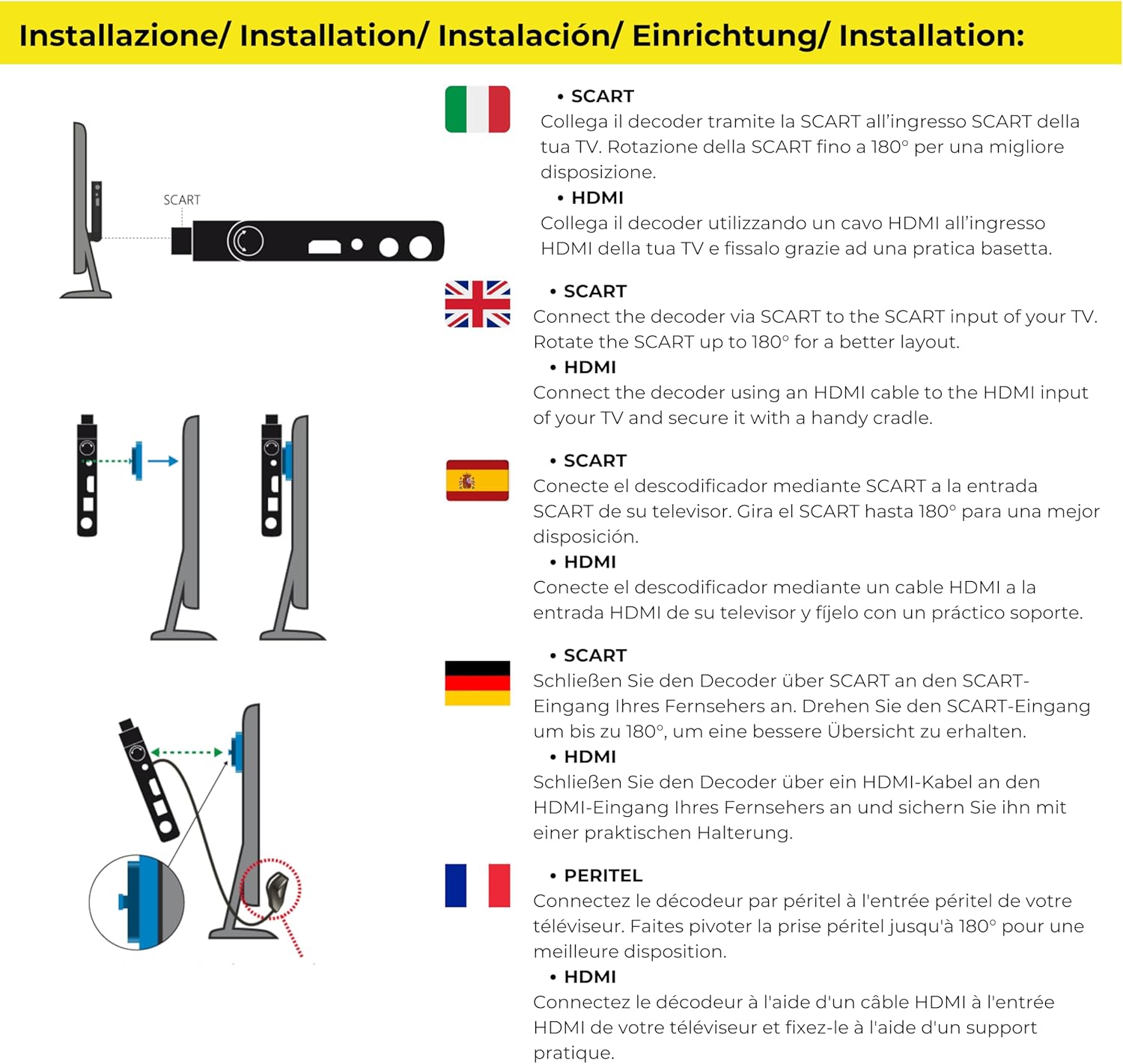
Image 4.1: Connection options for the receiver via SCART or HDMI.
4.1. Tilslutning til dit TV
The receiver offers flexible connection options:
- Using SCART: Connect the receiver directly to your TV's SCART input. The 180° articulated SCART connector allows you to position the receiver discreetly behind the TV.
- Brug af HDMI: For TVs with an HDMI port, connect the receiver using an HDMI cable (not included). You can use the provided removable support to secure the receiver if needed.

Billede 4.2: Eks.ample of the receiver connected discreetly behind a TV using the SCART connector.
4.2. Antenna and Power Connection
- Tilslut dit jordbaserede antennekabel til RF IN port på modtageren.
- If using the remote control extender, plug its cable into the IR port. Position the IR sensor in a location where it can receive signals from your remote control.
- Connect the external power supply to the Strømindgang port on the receiver, then plug the power adapter into a wall outlet.
4.3. Initial Setup and Channel Scan
- Turn on your TV and select the correct input source (SCART or HDMI) where the receiver is connected.
- Power on the Digiquest receiver using the remote control.
- The first-time installation wizard should appear. Follow the on-screen prompts to select your language, country, and initiate an automatic channel scan.
- Allow the receiver to complete the channel scan. This may take several minutes.
- Once the scan is complete, you should be able to view available digital terrestrial channels.
5. Grundlæggende betjening
5.1. Kanalvalg
- Brug Kanal op/ned buttons on the remote to browse channels sequentially.
- Indtast kanalnummeret direkte ved hjælp af Numerisk tastatur.
- Tryk på OK button to display the channel list, then use the navigation buttons to select a channel.
5.2. Lydstyrkekontrol
Juster lydstyrken ved hjælp af Lydstyrke op/ned buttons on the remote control. For optimal control, set your TV's volume to a high fixed level and use the receiver's remote for daily volume adjustments.
5.3. CEC Function (Consumer Electronics Control)
If your TV supports CEC and it is enabled, you may be able to control basic functions of the receiver (like power on/off) using your TV's remote control. Refer to your TV's manual for CEC setup.

Image 5.1: CEC Functionality.
5.4. Subtitles and Audio Language
- Tryk på SUBT button to enable or disable subtitles, or to select from available subtitle tracks.
- Tryk på LANG button to select from available audio languages (if broadcast).
6. Medieafspillerfunktioner
The Digiquest Invisible receiver includes a media player function, allowing you to view photos, listen to music, and watch videos from a USB storage device.

Image 6.1: Media Player functionality for various file typer.
- Insert a USB storage device (e.g., USB flash drive) into the USB 2.0 port on the side of the receiver.
- Access the Media Player menu from the main menu.
- Navigate through your USB device's folders to select the desired video, audio, or image file.
- Trykke OK to play or view den valgte file.
7. Fejlfinding
If you encounter problems with your receiver, please refer to the following common issues and solutions before contacting support.
| Problem | Mulig årsag | Løsning |
|---|---|---|
| Intet billede eller lyd | Incorrect TV input selected; Loose cable connections; Receiver not powered on. | Ensure TV is on correct input (SCART/HDMI). Check all cable connections (antenna, power, video). Power on the receiver. |
| Ingen kanaler fundet | Antenna not connected or faulty; Poor signal strength; No channel scan performed. | Check antenna connection. Adjust antenna position. Perform a new channel scan from the menu. |
| Fjernbetjening virker ikke | Batteries depleted or incorrectly inserted; IR sensor blocked or not connected. | Replace batteries. Ensure batteries are inserted with correct polarity. Check IR sensor connection and ensure it has a clear line of sight to the remote. |
| Channels reorder after power off | Specific software behavior or setting. | Check receiver settings for channel sorting options. Ensure any custom channel lists are saved. If the issue persists, check for firmware updates. |
| Menu language not available | Limited language options in firmware. | The receiver may have a limited set of menu languages. Check for available firmware updates that might include additional languages. |
8. Specifikationer
Key technical specifications for the Digiquest Invisible DVB-T2 HEVC H.265 Digital Terrestrial Receiver:
- Mærke: DIGIQUEST
- Model: Invisible DVB-T2 HEVC H.265
- Farve: Sort
- Forbindelse: HDMI, SCART (180° adjustable), USB 2.0 (x2), LAN (Ethernet), RF IN, IR
- Kompatible enheder: Television
- Videokodning: HEVC Main 10
- Lydudgangstilstand: Omgive
- Strømforsyning: 12V DC (External AC 100-240V adapter included)
- Vægt: 200 gram
- Kontrolmetode: Fjernbetjening
- Funktioner: Full HD, Mediaplayer, CEC Function, FTP Update via LAN

Image 8.1: LAN port for FTP updates.

Image 8.2: 12V power supply.
9. Garanti og support
9.1. Producentens garanti
Dette produkt leveres med en 2 års producentgarantiGem venligst din købsbevis i tilfælde af garantikrav. Garantien dækker materiale- og fabrikationsfejl ved normal brug.
9.2. Kundesupport
For technical assistance, troubleshooting beyond this manual, or warranty inquiries, please contact your retailer or visit the official Digiquest webwebsted for supportoplysninger.
10. Sikkerhedsoplysninger
Læs og følg disse sikkerhedsretningslinjer for at sikre sikker betjening og forhindre skader på enheden:
- Udsæt ikke modtageren for regn, fugt eller ekstreme temperaturer.
- Sørg for korrekt ventilation omkring enheden for at forhindre overophedning.
- Brug kun den medfølgende strømadapter. Brug af uautoriserede adaptere kan beskadige enheden og ugyldiggøre garantien.
- Do not attempt to open or repair the receiver yourself. Refer all servicing to qualified personnel.
- Hold enheden væk fra stærke magnetiske felter.
- Bortskaf elektronisk affald ansvarligt i henhold til lokale regler.


