Indledning
The Cellularline Roller Clip Bluetooth Headset is designed for convenient, hands-free communication. Featuring a retractable cable and a wireless Bluetooth clip, this headset offers flexibility and ease of use. It supports simultaneous connection to two mobile phones, automatically activating when a call is received or made on either device. Its automatic cable winder ensures a tidy experience, making it ideal for users who prefer to wear the headset only during calls.
Produkt overview
Familiarize yourself with the components and features of your Cellularline Roller Clip Bluetooth Headset.

Figur 1: Front view of the Cellularline Roller Clip Bluetooth Headset, showing the main unit with the retractable earbud.
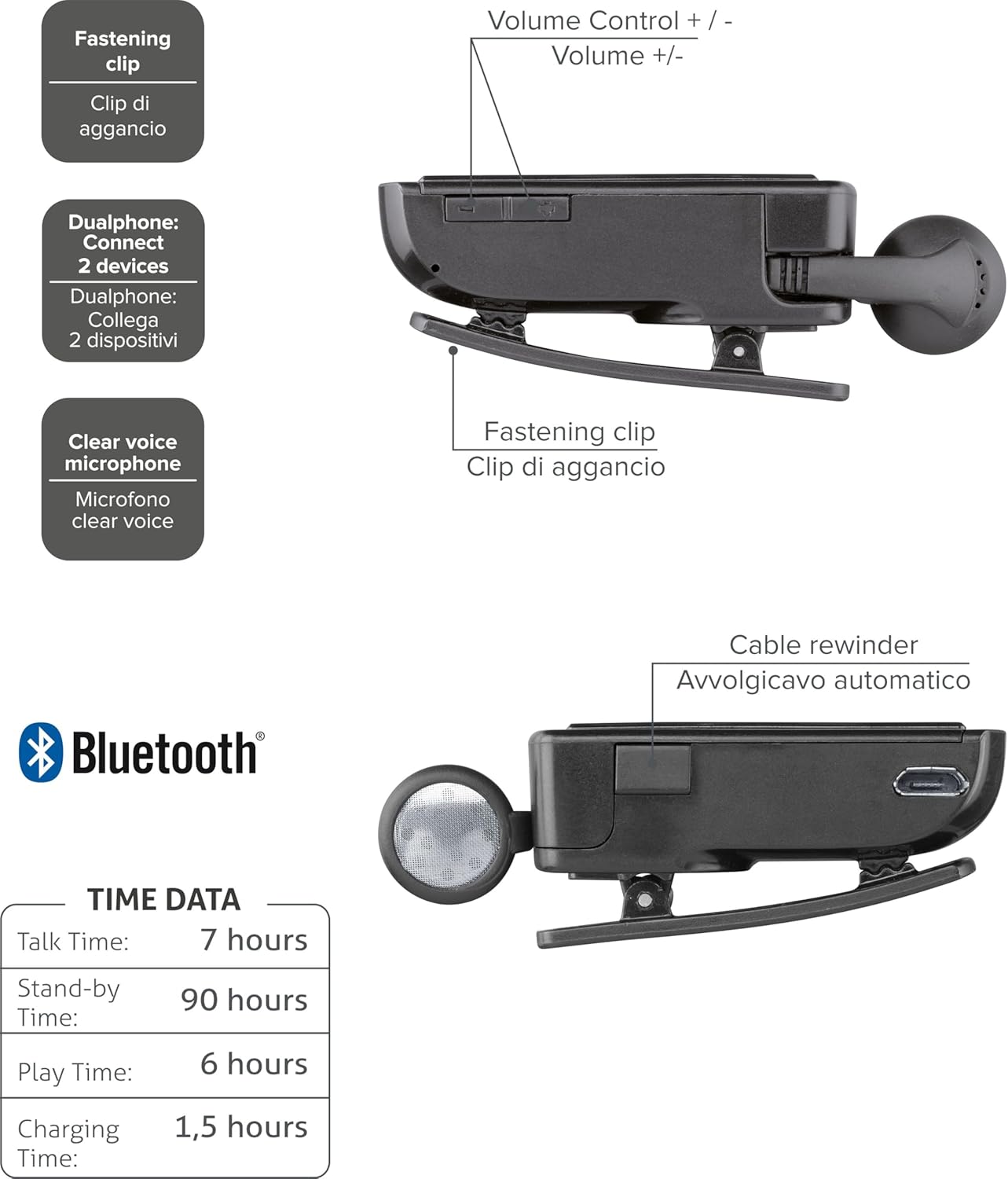
Figur 2: Diagram illustrating key features including the fastening clip, volume controls, dualphone connectivity, clear voice microphone, and cable rewinder.
- Retractable Earbud: The earbud cable automatically retracts into the main unit for compact storage.
- Bluetooth Clip: The main unit features a clip for attaching to clothing.
- Lydstyrkekontrol: Buttons located on the side for adjusting audio volume.
- Flerpunktsforbindelse: Connects to two mobile phones simultaneously.
- Clear Voice Microphone: Ensures clear audio transmission during calls.
- Mikro-USB-port: Til opladning af enheden.
Opsætning
1. Opladning af headsettet
Before first use, fully charge the headset. Use the provided Micro-USB cable to connect the headset to a USB power source (e.g., computer USB port or wall adapter).
- Opladningsindikatorlampen lyser under opladning.
- En fuld opladning tager typisk cirka 1.5 timer.
- Indikatorlampen skifter eller slukker, når opladningen er færdig.

Figur 3: Side view of the headset showing the Micro-USB charging port.
2. Parring med en mobilenhed
To use the headset, it must be paired with your Bluetooth-enabled mobile phone or device.
- Sørg for, at headsettet er slukket.
- Press and hold the Multi-function button (usually the main power button) until the indicator light flashes blue and red alternately, indicating pairing mode.
- Aktiver Bluetooth på din mobilenhed, og søg efter nye enheder.
- Select "Cellularline Roller Clip" or a similar name from the list of available devices.
- Hvis du bliver bedt om en adgangskode, skal du indtaste "0000" (fire nuller).
- Once paired, the indicator light will typically flash blue slowly, and you may hear a confirmation tone.
3. Connecting to Two Devices (Multi-point)
The headset can be connected to two mobile phones simultaneously.
- Pair the headset with the first mobile device as described above.
- Deaktiver Bluetooth på den første enhed.
- Put the headset back into pairing mode and pair it with the second mobile device.
- Once paired with the second device, re-enable Bluetooth on the first device.
- The headset should now be connected to both devices. It will automatically switch to the active call on either phone.
Betjeningsvejledning
Tænd/sluk
- Tænd: Press and hold the Multi-function button for approximately 3 seconds until the blue indicator light flashes.
- Sluk: Press and hold the Multi-function button for approximately 3 seconds until the red indicator light flashes and then turns off.
Foretage og modtage opkald
- Besvar opkald: Tryk én gang på multifunktionsknappen, når du modtager et opkald.
- Afslut opkald: Tryk én gang på multifunktionsknappen under et opkald.
- Afvis opkald: Tryk på multifunktionsknappen, og hold den nede i cirka 2 sekunder, når du modtager et opkald.
- Genopkald sidste nummer: Double-press the Multi-function button when the headset is idle.
- Stemmeopkald (hvis understøttet af telefonen): Press and hold the Multi-function button for approximately 1 second when the headset is idle.
Lydstyrkekontrol
Adjust the call or media volume using the dedicated volume buttons on the side of the headset.

Figur 4: Side view of the headset showing the volume control buttons.
- Lydstyrke op: Tryk på '+'-knappen.
- Skrue ned for lyden: Tryk på '-' knappen.
Udtrækkeligt kabel
To extend the earbud, gently pull it out. To retract, press the cable winder button (if present) or gently pull the cable slightly further and release to activate the retraction mechanism.
Opretholdelse
- Rensning: Tør headsettet af med en blød, tør klud. Brug ikke slibende rengøringsmidler eller opløsningsmidler.
- Opbevaring: Opbevar headsettet et køligt, tørt sted væk fra direkte sollys og ekstreme temperaturer.
- Batteripleje: For at forlænge batteriets levetid bør du undgå at aflade batteriet helt ofte. Oplad headsettet regelmæssigt, selvom det ikke er i brug i længere perioder.
- Kabelpleje: Avoid forcefully pulling the retractable cable. Allow the automatic winder to retract the cable smoothly.
Fejlfinding
| Problem | Mulig årsag | Løsning |
|---|---|---|
| Headsettet tænder ikke. | Lavt batteri. | Oplad headsettet helt. |
| Kan ikke parre headsettet. | Headsettet er ikke i parringstilstand; Bluetooth deaktiveret på enheden; enheden er for langt væk. | Ensure headset is in pairing mode (flashing red/blue). Enable Bluetooth on your device. Move headset closer to the device. |
| Ingen lyd eller dårlig lydkvalitet. | Lydstyrken er for lav; headsettet er ikke tilsluttet; interferens. | Increase volume on both headset and phone. Reconnect the headset. Move away from other electronic devices. |
| Udtrækkeligt kabel fungerer ikke problemfrit. | Mekanismeblokering eller beskadigelse. | Ensure no debris is obstructing the cable. Avoid forceful pulling. If damaged, contact support. |
| Cannot connect to two devices. | Incorrect pairing sequence. | Follow the multi-point pairing instructions carefully (pair first, disable Bluetooth, pair second, re-enable first). |
Specifikationer
| Feature | Detalje |
|---|---|
| Modelnummer | BTCLIPARDP |
| Mærke | Mobillinje |
| Farve | Black/Grey (Schwarz) |
| Øreplacering | In Ear |
| Formfaktor | In Ear |
| Impedans | 32 Ohm |
| Produktdimensioner | 9 x 2.4 x 11 cm; 50 g |
| Batteritype | 1 lithium-ion batteri |
| Taletid | Op til 7 timer |
| Standby tid | Op til 90 timer |
| Spilletid | Op til 6 timer |
| Opladningstid | Cirka 1.5 timer |
Garanti og support
For garantioplysninger og teknisk support henvises til den officielle Cellularline webwebstedet eller kontakt deres kundeservice direkte. Gem din købsbevis til garantikrav.
For yderligere hjælp kan du besøge product page on Amazon.ae.


