1. Produktet er slutview
The Cooler Master HAF X (High Air Flow) is a full tower computer case designed for high-performance systems, offering extensive cooling capabilities and spacious interior for advanced components. This chassis, model RC-942-KKN1, features a rugged black coated interior and a windowed side panel for system visibility.
Nøglefunktioner omfatter:
- Integrated SATA Dock for easy hard drive installation.
- Front I/O-panel med USB 3.0-porte.
- Dedicated air duct for cooling graphic cards.
- Support for multiple large fans, including a 230mm red LED front fan and up to three 200mm fans.
- Nine expansion slots to accommodate triple VGA cards.
- Adjustable VGA card holder for heavier graphics processing units.
- Power supply partition for improved cable management.
- Spacious interior compatible with larger component parts and XL-ATX motherboards.
- Advanced cable management system with rubber grommets.

Figur 1.1: Forfra vinklet view of the Cooler Master HAF X Full Tower Computer Case, showcasing its robust design and windowed side panel.
2. Opsætning og installation
This section guides you through the installation of various components into your HAF X chassis.
2.1 Installation af bundkort
The HAF X supports Micro ATX, ATX, E-ATX, and XL-ATX motherboards. Ensure proper standoffs are installed before mounting your motherboard. The spacious interior allows for easy access during installation.
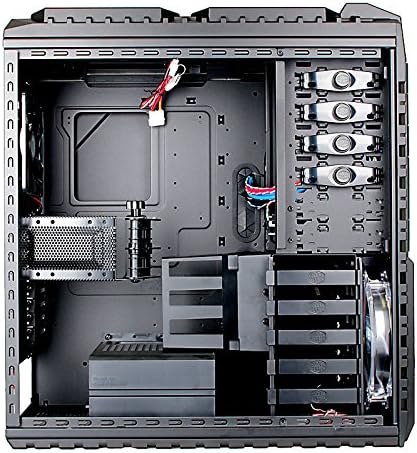
Figure 2.1: Internal layout of the HAF X chassis, showing motherboard tray, drive bays, and cable management cutouts.
2.2 Drive Installation (SATA Dock & Internal Bays)
The case features a convenient SATA Dock for quick installation of 3.5" or 2.5" SATA drives without opening the side panel. For internal drives, utilize the tool-free 3.5" drive bays.
- SATA Dock: Locate the SATA dock on the top front of the case. Simply slide your SATA hard drive into the dock until it clicks into place.
- Internal 3.5" Drives: Open the side panel. For tool-free installation, align the drive with the bay and slide it in until secured by the retention clips.
- 5.25" Drives: The case has six 5.25" external bays. Remove the front bezel cover, slide the optical drive or other 5.25" device into the bay, and secure it using the tool-free mechanisms.
2.3 Power Supply Installation and Cable Management
The HAF X supports standard ATX PS2 power supplies, mounted at the bottom. A dedicated power supply partition helps conceal cables for a cleaner build and improved airflow.
- Mount your power supply in the designated bottom compartment.
- Route all power cables through the rubber grommets behind the motherboard tray.
- Utilize the power supply cable partition to neatly organize excess cables, enhancing the aesthetic and airflow within the case.
2.4 Installation af grafikkort
The case offers nine expansion slots, supporting configurations up to triple VGA cards. An adjustable VGA card holder is included to provide additional support for heavier graphics cards, preventing sag.
An integrated air duct is positioned to direct airflow directly to the latest graphic cards, optimizing cooling performance.
2.5 Opsætning af kølesystem
The HAF X is designed for superior airflow. It comes with a 230mm red LED front fan and supports additional fans:
- Front: 1x 230 x 30 mm red LED fan (with on/off switch).
- Side: 1x 200 x 30mm fan.
- Top: Up to 2x 200 x 30mm fans (one optional) or a 360mm radiator for liquid cooling.
- Bag: 1x 140 x 25mm fan.
- VGA Fan Duct: Optional 1x 120 x 25 mm or 120 x 38 mm fan.
- VGA Holder: Optional 1x 80 x 15 mm fan.
Ensure all fans are properly connected to your motherboard or fan controller for optimal performance.
3. Betjeningsvejledning
3.1 Forreste I/O-panel
The front I/O panel provides convenient access to various ports:
- USB 3.0-porte: Two SuperSpeed USB 3.0 ports for high-speed data transfer.
- USB 2.0-porte: To USB 2.0-porte.
- eSATA Port: One eSATA port for external SATA devices.
- Lydstik: One Mic-in and one Audio-out port.
- IEEE 1394a Port: One FireWire port.

Figur 3.1: Foran og bagpå views of the HAF X, highlighting the front I/O panel and rear exhaust fan.
3.2 Power and Reset Buttons
The power and reset buttons are located on the top panel. A safety cover is provided for the power button to prevent accidental shutdowns.
- To power on/off, slide the safety cover open and press the power button.
- To reset the system, press the reset button.
4. Vedligeholdelse
Regular maintenance ensures optimal performance and longevity of your computer case and components.
4.1 Støvfiltre
The HAF X includes dust filters on the top and side intakes to prevent dust accumulation inside the case. Periodically remove and clean these filters to maintain optimal airflow and cooling efficiency.
- Fjern forsigtigt støvfiltrene.
- Clean them using compressed air or by washing with water (ensure they are completely dry before reinstallation).
- Reinstall the filters securely.
4.2 Generel rengøring
Tør ydersiden af kabinettet af med en blød, tør klud.amp cloth. Avoid using harsh chemicals or abrasive materials that could damage the finish. For internal cleaning, use compressed air to remove dust from fans and components.
5. Fejlfinding
Hvis du støder på problemer under eller efter installationen, kan du overveje følgende almindelige fejlfindingstrin:
- Ingen strøm:
- Ensure the power supply is securely connected to the wall outlet and the case.
- Verify all internal power cables (24-pin ATX, CPU, GPU) are correctly seated.
- Kontroller tænd/sluk-knappens forbindelse til bundkortet.
- Ventilatorer der ikke drejer:
- Kontroller, at blæserkablerne er korrekt tilsluttet til bundkortet eller blæsercontrolleren.
- Check fan speed settings in BIOS/UEFI or fan control software.
- USB-porte virker ikke:
- Ensure the front panel USB headers are correctly connected to the motherboard.
- Verify motherboard drivers are installed.
- SATA Dock Not Detecting Drive:
- Ensure the drive is fully seated in the dock.
- Check the SATA data and power connections from the dock to the motherboard/power supply.
For further assistance, please refer to the Cooler Master support webwebsted eller kontakt kundeservice.
6. Specifikationer
| Feature | Specifikation |
|---|---|
| Modelnummer | RC-942-KKN1 |
| Sagstype | Fuldtårn |
| Farve | Sort |
| Materiale | Steel, Mesh |
| Bundkort kompatibilitet | Micro ATX / ATX / E-ATX / XL-ATX |
| Drevbåse (eksterne) | 6x 5.25" (2 converted SATA HDD drive bay available) |
| Drevbåse (interne) | 5x 3.5" |
| Udvidelsesslots | 9 |
| Front I / O-porte | 2x USB 3.0, 2x USB 2.0, 1x eSATA, 1x IEEE 1394a, 1x Mic-in, 1x Audio |
| Cooling System (Front) | 1x 230 x 30 mm red LED fan (on/off) |
| Cooling System (Side) | 1x 200 x 30mm fan |
| Cooling System (Top) | 2x 200 x 30mm fans (one optional) or 360mm radiator |
| Kølesystem (bag) | 1x 140 x 25mm fan |
| Understøttelse af strømforsyning | Bottom / Standard ATX PS2 (optional) |
| Dimensioner (BxDxH) | 9.1 x 23.2 x 21.7 tommer (230 x 590 x 550 mm) |
| Varens vægt | 31.5 lbs (14.35 kg) |

Figure 6.1: Dimensional drawing of the Cooler Master HAF X case.
7. Product Feature Video Guide
Watch this official video from Cooler Master for a visual demonstration of the HAF X case features and capabilities.
Video 7.1: Official Cooler Master HAF X product feature overview. This video demonstrates key aspects such as the SATA dock, front USB 3.0 ports, power button safety cover, top fan/radiator support, tool-free drive installation, power supply cable management, expansion slots, water cooling outlets, dust filters, air duct for GPUs, adjustable VGA card holder, and XL-ATX motherboard compatibility.
8. Garanti og support
For warranty information, technical support, or any product-related inquiries, please visit the official Cooler Master webwebsted eller kontakt deres kundeserviceafdeling.
Cooler Master Officiel Webwebsted: www.coolermaster.com
Please have your product model number (RC-942-KKN1) and purchase details ready when contacting support.


