Indledning
This manual provides comprehensive instructions for the setup, operation, maintenance, and troubleshooting of your Logitech M510 Wireless Mouse. Designed for comfort and efficiency, the M510 offers precise control and convenient features for your computing needs.
The Logitech M510 is a comfortable wireless computer mouse featuring a USB Unifying Receiver, back/forward buttons, and side-to-side scrolling. It operates on 2 AA batteries and is compatible with Personal Computers and Macbooks running operating systems like Windows 10.
Pakkens indhold
- Logitech M510 trådløs mus
- Logitech Uniting-modtager
- 2 AA-batterier (forinstalleret eller inkluderet)
Opsætning
1. Batteriinstallation
The Logitech M510 mouse requires two AA batteries for operation. These are typically included with your purchase. If not already installed, follow these steps:
- Find batteridækslet på undersiden af musen.
- Skub eller løft dækslet for at åbne rummet.
- Isæt to AA-batterier, og sørg for, at de positive (+) og negative (-) poler er justeret korrekt med indikatorerne i batterirummet.
- Luk batterirummets dæksel forsvarligt.
2. Tilslutning af Unifying-modtageren
The Logitech M510 uses a Logitech Unifying Receiver for wireless connectivity. This small USB receiver allows you to connect multiple compatible Logitech devices to your computer using a single USB port.
- Locate the Logitech Unifying Receiver. It is often stored inside the battery compartment of the mouse for safekeeping during transport.
- Plug the Unifying Receiver into an available USB port on your computer (desktop, laptop, or Macbook).
- Your computer should automatically detect the receiver and install the necessary drivers. This may take a few moments.
- Once the drivers are installed, the mouse should be ready for use. If not, ensure the mouse's power switch (if present) is in the 'ON' position.

Billede: Top-down view of the Logitech M510 Wireless Mouse alongside its compact USB Unifying Receiver.
Betjening af musen
The Logitech M510 Wireless Mouse is designed for intuitive use with several programmable buttons and comfortable ergonomics.
Grundlæggende funktioner
- Venstreklik-knap: Primær knap til valg af elementer, åbning files, og interaktion med software.
- Højreklik-knap: Sekundær knap til adgang til kontekstmenuer og yderligere muligheder.
- Scrollhjul: Rul op eller ned gennem dokumenter og web sider. Scrollhjulet fungerer også som en midterste klikknap.
- Side-to-Side Scrolling: Tilt the scroll wheel left or right to scroll horizontally in applications that support this feature.
Advanced Features (Programmable Buttons)
The M510 features two thumb buttons (back/forward) on the left side, which can be customized using Logitech Options software (available for download from the Logitech website). By default, these buttons perform browser navigation functions.
- Tilbage knap: Navigerer tilbage i web browsere eller file opdagelsesrejsende.
- Frem-knap: Navigerer fremad i web browsere eller file opdagelsesrejsende.
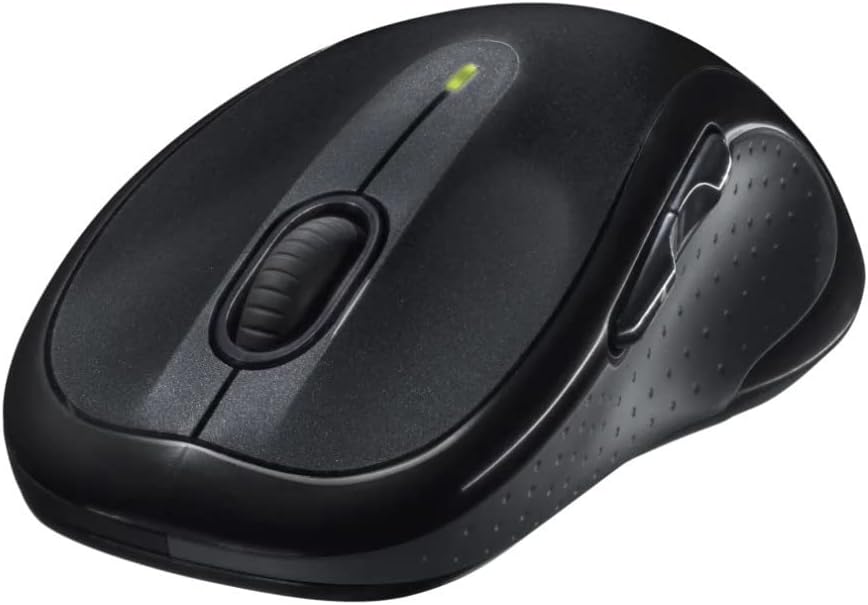
Billede: Vinklet view of the Logitech M510 Wireless Mouse, highlighting its ergonomic shape and side buttons.
Opretholdelse
Rengøring af din mus
To ensure optimal performance and hygiene, regularly clean your Logitech M510 mouse:
- Disconnect the mouse from your computer by removing the Unifying Receiver.
- Brug let en blød, fnugfri klud dampened with water or a mild cleaning solution (e.g., isopropyl alcohol) to wipe down the surface of the mouse.
- Brug en vatpind eller en blød børste til sprækker og omkring knapper.
- Avoid getting liquid into the internal components or the optical sensor.
- Allow the mouse to dry completely before re-connecting.
Udskiftning af batteri
The Logitech M510 has an average battery life of 18 months. When the battery indicator light (if present) flashes or mouse performance degrades, it's time to replace the batteries.
- Sluk musen ved hjælp af tænd/sluk-knappen på undersiden.
- Åbn batterirummets dæksel.
- Fjern de gamle AA-batterier.
- Isæt to nye AA-batterier, og overhold den korrekte polaritet (+/-).
- Luk batterirummets dæksel.
- Tænd musen igen.
Fejlfinding
| Problem | Mulig årsag | Løsning |
|---|---|---|
| Musen reagerer ikke | Low or dead batteries; Unifying Receiver not connected; Mouse power off; Driver issue. | Replace batteries; Ensure Unifying Receiver is securely plugged into a USB port; Turn mouse power switch to 'ON'; Reinstall Logitech Options software or check device manager for driver issues. |
| Forsinket eller uregelmæssig markørbevægelse | Interference; Dirty optical sensor; Mouse used on unsuitable surface; Low battery. | Move mouse closer to receiver; Clear obstructions; Clean optical sensor; Use a mouse pad or suitable surface; Replace batteries. |
| Sideknapper virker ikke | Software not installed or configured; Application does not support custom buttons. | Download and install Logitech Options software from the official Logitech website to customize button functions. Ensure the application you are using supports these functions. |
| Unifying Receiver not recognized | Faulty USB port; Driver issue. | Try a different USB port; Restart your computer; Download and install the Logitech Unifying Software to re-pair the mouse with the receiver. |
Specifikationer
| Feature | Detalje |
|---|---|
| Mærke | Logitech |
| Modelnummer | 910-001822 |
| Serie | M510 |
| Forbindelsesteknologi | Radio Frequency, USB (via Unifying Receiver) |
| Bevægelsesdetekteringsteknologi | Laser |
| Farve | Mørkegrå |
| Varens vægt | 4.6 ounce (ca. 130 gram) |
| Produktmål (LxBxH) | 4.38 x 2.5 x 1.75 tommer (ca. 11.13 x 6.35 x 4.45 cm) |
| Strømkilde | Batteridrevet |
| Batterier påkrævet | 2 AA batterier (medfølger) |
| Gennemsnitlig batterilevetid | 18 måneder |
| Hardware platform | Personal Computer, Macbook |
| Operativsystemkompatibilitet | Windows 10 (and likely earlier versions, macOS) |
| Særlige funktioner | Battery Life Indicator, Power Saving Mode, Programmable Buttons, Wireless |
| Dato først tilgængelig | 7. juni 2010 |

Billede: Top-down view of the Logitech M510 Wireless Mouse showing its approximate dimensions (4.4" length, 2.5" width).
Garanti og support
Garantioplysninger
Logitech products typically come with a limited hardware warranty. For specific warranty terms and conditions applicable to your Logitech M510 Wireless Mouse, please refer to the warranty card included with your product or visit the official Logitech webwebsted.
Kundesupport
For further assistance, technical support, or to download the latest software (such as Logitech Options or Unifying Software), please visit the official Logitech support webwebsted:
Du kan også finde nyttige ressourcer, ofte stillede spørgsmål og fællesskabsfora på deres webwebsted.


