Indledning
This manual provides essential information for the safe and efficient use of your Samsung UN46C6300 46-Inch 1080p 120 Hz LED HDTV. Please read these instructions thoroughly before operating your television and retain them for future reference. Your Samsung LED HDTV combines advanced picture quality with versatile connectivity options, designed for an optimal viewoplevelse.
Sikkerhedsoplysninger
Always follow basic safety precautions when using this product to reduce the risk of fire, electric shock, and injury to persons. Keep the television away from moisture and heat sources. Do not block ventilation openings. Use only specified attachments/accessories. Refer all servicing to qualified service personnel.
- Udsæt ikke dette apparat for regn eller fugt.
- Anbring ikke genstande fyldt med væske, såsom vaser, på apparatet.
- Må ikke installeres i nærheden af varmekilder såsom radiatorer, varmeapparater, komfurer eller andre apparater (inklusive ampløftere), der producerer varme.
- Beskyt netledningen mod at blive trådt på eller klemt.
- Brug kun tilbehør/tilbehør specificeret af producenten.
Hvad er der i æsken
Ved udpakning skal du sørge for, at alle komponenter er til stede og ubeskadigede:
- Samsung UN46C6300 LED HDTV
- TV Stand
- Strømledning
- Fjernbetjening
- Brugervejledning (dette dokument)
Opsætning
1. Montering af stativ
Carefully place the TV screen-down on a soft, flat surface to prevent damage. Attach the stand to the television using the provided screws, ensuring it is securely fastened. Refer to the diagram below for proper stand attachment.

Figur 1: Side view of the Samsung UN46C6300 LED HDTV, illustrating its thin profile and the location of side-mounted ports.
2. Tilslutning af eksterne enheder
Connect your external devices such as cable/satellite boxes, Blu-ray players, or gaming consoles to the appropriate ports on the back or side of the TV. The UN46C6300 features 4 HDMI (ver 1.3) ports for high-definition connectivity. Ensure all cables are securely connected.
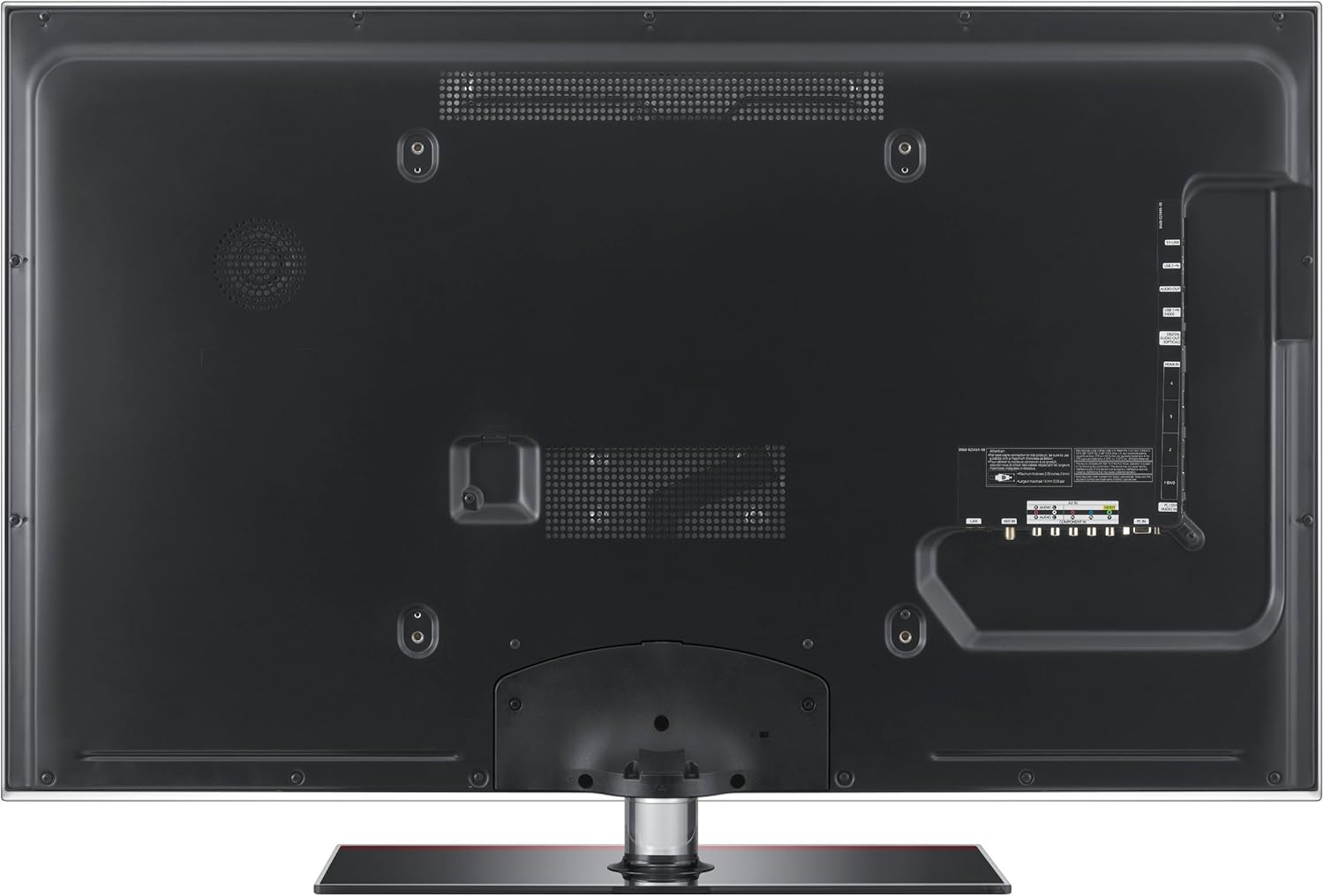
Figur 2: Bagside view of the Samsung UN46C6300 LED HDTV, highlighting the arrangement of various input and output ports for external device connections.
- HDMI: For high-definition video and audio from devices like Blu-ray players, game consoles, and set-top boxes.
- USB: For connecting USB storage devices to use the ConnectShare Movie feature.
- Component/Composite: Til ældre enheder.
- Antenne/kabelindgang: Til tilslutning af en antenne eller et kabel-tv-signal.
3. Strømtilslutning
Plug the power cord into the TV's power input, then plug the other end into a wall outlet. The TV is designed to be ENERGY STAR compliant, promoting energy efficiency.
Betjeningsvejledning
Tænd/sluk
Tryk på MAGT -knappen på fjernbetjeningen eller på tv'et for at tænde eller slukke for tv'et.
Valg af inputkilde
Tryk på KILDE button on the remote control to cycle through available input sources (HDMI1, HDMI2, USB, Component, etc.).
Nøglefunktioner
- Auto Motion Plus: Reduces blur in fast-moving scenes, providing smoother action. This feature can be adjusted or turned off via the picture settings menu.
- Bred farveforstærker Plus: Delivers a broader spectrum of colors for a more vibrant and lifelike picture.
- Mega Dynamic Contrast Ratio: Enhances the contrast between the brightest whites and darkest blacks, making images pop.
- ConnectShare-film: Allows you to play movies, photos, and music directly from a USB storage device by simply plugging it into the TV's USB port.
- HDMI-CEC: Enables control of multiple HDMI-connected devices with a single remote control.
Opretholdelse
For at bevare dit TV's ydeevne og udseende:
- Rengøring af skærm: Tør forsigtigt skærmen af med en blød, fnugfri klud. Tør forsigtigt genstridige mærker afampRengør kluden med vand eller en specialiseret skærmrens. Spray ikke rengøringsmiddel direkte på skærmen.
- Skabsrengøring: Tør kabinettet af med en blød, tør klud. Undgå at bruge slibende rengøringsmidler eller opløsningsmidler.
- Ventilation: Sørg for, at ventilationsåbningerne på bagsiden af tv'et ikke er blokerede for at forhindre overophedning.
Fejlfinding
Hvis du støder på problemer med dit tv, kan du bruge følgende almindelige løsninger:
| Problem | Mulig løsning |
|---|---|
| Ingen strøm | Kontroller, om netledningen er korrekt tilsluttet både tv'et og stikkontakten. Test stikkontakten med en anden enhed. |
| Intet billede / Forvrænget billede | Ensure the correct input source is selected. Check all cable connections (HDMI, component) for looseness or damage. Try a different source device. Adjust picture settings. |
| Ingen lyd | Kontroller lydstyrken, og sørg for, at tv'et ikke er slået fra. Kontroller lydkabelforbindelserne. Hvis du bruger ekstern lyd, skal du sørge for, at den er korrekt konfigureret. |
| Fjernbetjeningen virker ikke | Udskift batterierne i fjernbetjeningen. Sørg for, at der ikke er nogen forhindringer mellem fjernbetjeningen og tv'ets IR-sensor. |
Specifikationer
| Feature | Detalje |
|---|---|
| Modelnummer | UN46C6300 |
| Skærmstørrelse | 46 tommer |
| Displayteknologi | LED |
| Opløsning | 1080p (Full HD) |
| Opdateringshastighed | 120 Hz |
| Aspektforhold | 16:9 |
| Forbindelsesteknologi | HDMI (4 ports), USB |
| Speciel funktion | Flat Panel, ConnectShare Movie, Auto Motion Plus, Wide Color Enhancer Plus, Mega Dynamic Contrast Ratio, HDMI-CEC |
| Produktmål (BxHxD) | 43 x 28.5 x 10.8 cm (med stativ) |
| Varens vægt | 44.1 pund |
| Fabrikant | Samsung elektronik |
Garanti og support
For garantioplysninger og teknisk support henvises til garantikortet, der følger med dit produkt, eller besøg den officielle Samsung-supportside. webwebsted. Du kan finde detaljerede supportressourcer, ofte stillede spørgsmål og kontaktoplysninger til kundeservice.
Samsung support Webwebsted: www.samsung.com/us/support/